
Core源码(四)IEnumerable
首先我们去core的源码中去找IEnumerable发现并没有,如下
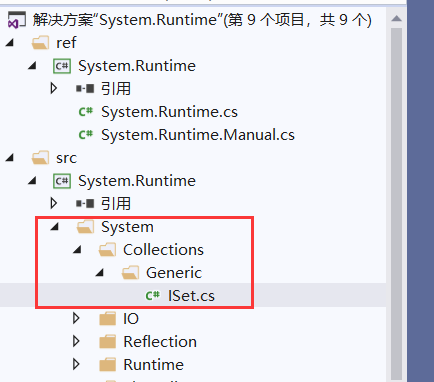
Core中应该是直接使用.net中对IEnumerable的定义
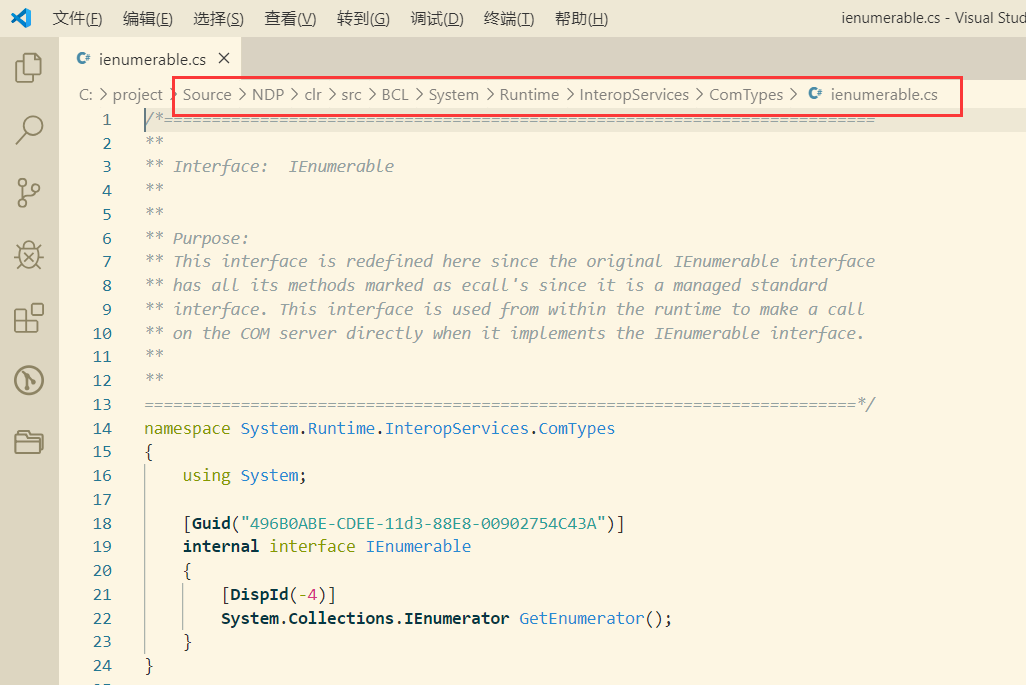
自己实现迭代器
迭代器是通过IEnumerable和IEnumerator接口来实现的,今天我们也来尝试实现自己的迭代器。
首先来看看这两个接口:
internal interface IEnumerable

{

    [DispId(-)]

    System.Collections.IEnumerator GetEnumerator();

}

public interface IEnumerator

{

    object Current { get; }

    bool MoveNext();

    void Reset();

}
并没有想象的那么复杂。其中IEnumerable只有一个返回IEnumerator的GetEnumerator方法。而IEnumerator中有两个方法加一个属性。
接下来,我们继承IEnumerable接口并实现:
public class MyIEnumerable : IEnumerable

{

    private string[] strList;

    public MyIEnumerable(string[] strList)

    {

        this.strList=strList;

    }

    public IEnumerator GetEnumerator()

    {

        return new MyIEnumerator(strList);

    }

}

public class MyIEnumerator:IEnumerator

{

    private string[] strList;

    private int position;

    public MyIEnumerator(string[] strList)

    {

        this.strList=strList;

        position=-;

    }

    public object Current

    {

        get{ return strList[position];}

    }

    public bool MoveNext()

    {

        position++;

        if (position<strList.Length)

        {

            return true;

        }

        return false;

    }

    public void Reset()

    {

        position=-;

    }

}
下面使用原始的方式调用:
static void Main(string[] args)

{

    string[] strList=new string[]{"",""};

    MyIEnumerable my =new MyIEnumerable(strList);

    var enumerator=my.GetEnumerator();

    while (enumerator.MoveNext())

    {

        Console.WriteLine(enumerator.Current);

        //enumerator.Current="";  这会报错

    }

    Console.WriteLine("-------------------------------");

    foreach (var item in my)

    {

        Console.WriteLine(item);

    }

}
这两种取值方式基本等效,因为实际clr编译后生成的代码是相同的。
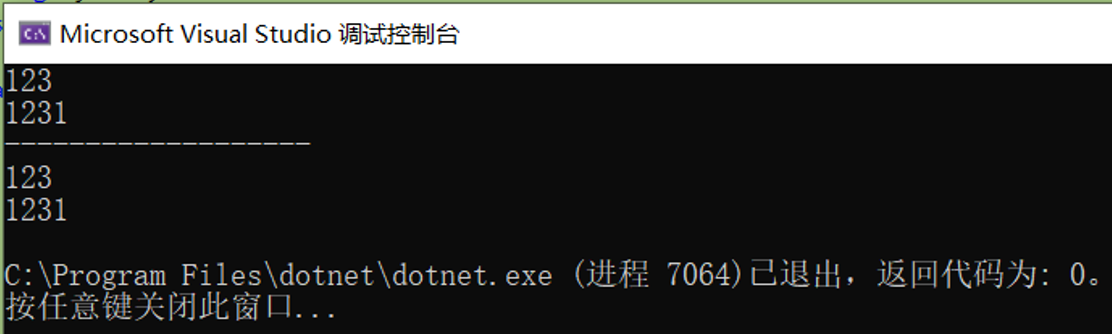
由此可见,两者有这么个关系:
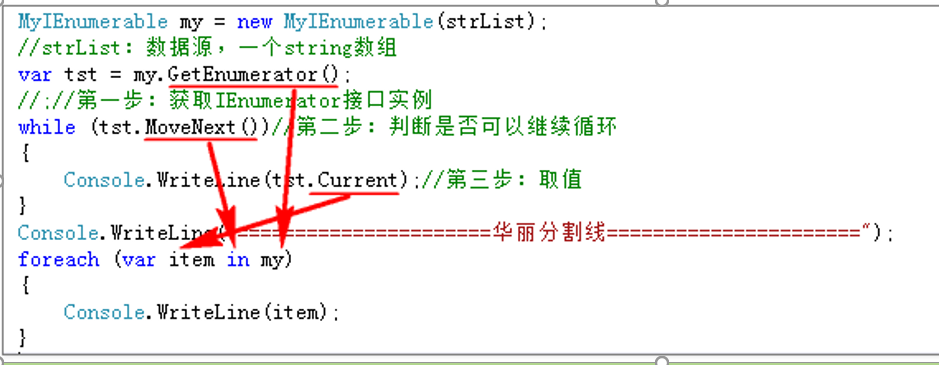
我们可以回答一个问题了“为什么在foreach中不能修改item的值?”:
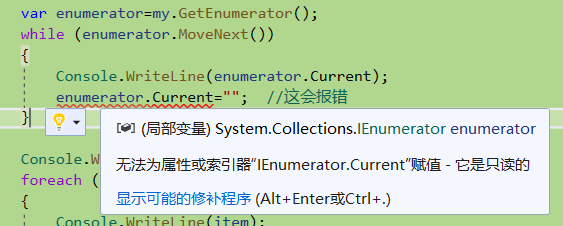
我们还记得IEnumerator的定义吗,接口的定义就只有get没有set。所以我们在foreach中不能修改item的值。
yield的使用
你肯定发现了我们自己去实现IEnumerator接口还是有些许麻烦,并且上面的代码肯定是不够健壮。对的,.net给我们提供了更好的方式。
public IEnumerator GetEnumerator()

{

    //return new MyIEnumerator(strList);

    for (int i = ; i < strList.Length; i++)

    {

        yield return strList[i];

    }

}
你会发现我们连MyIEnumerator都没要了,也可以正常运行。太神奇了。yield到底为我们做了什么呢?
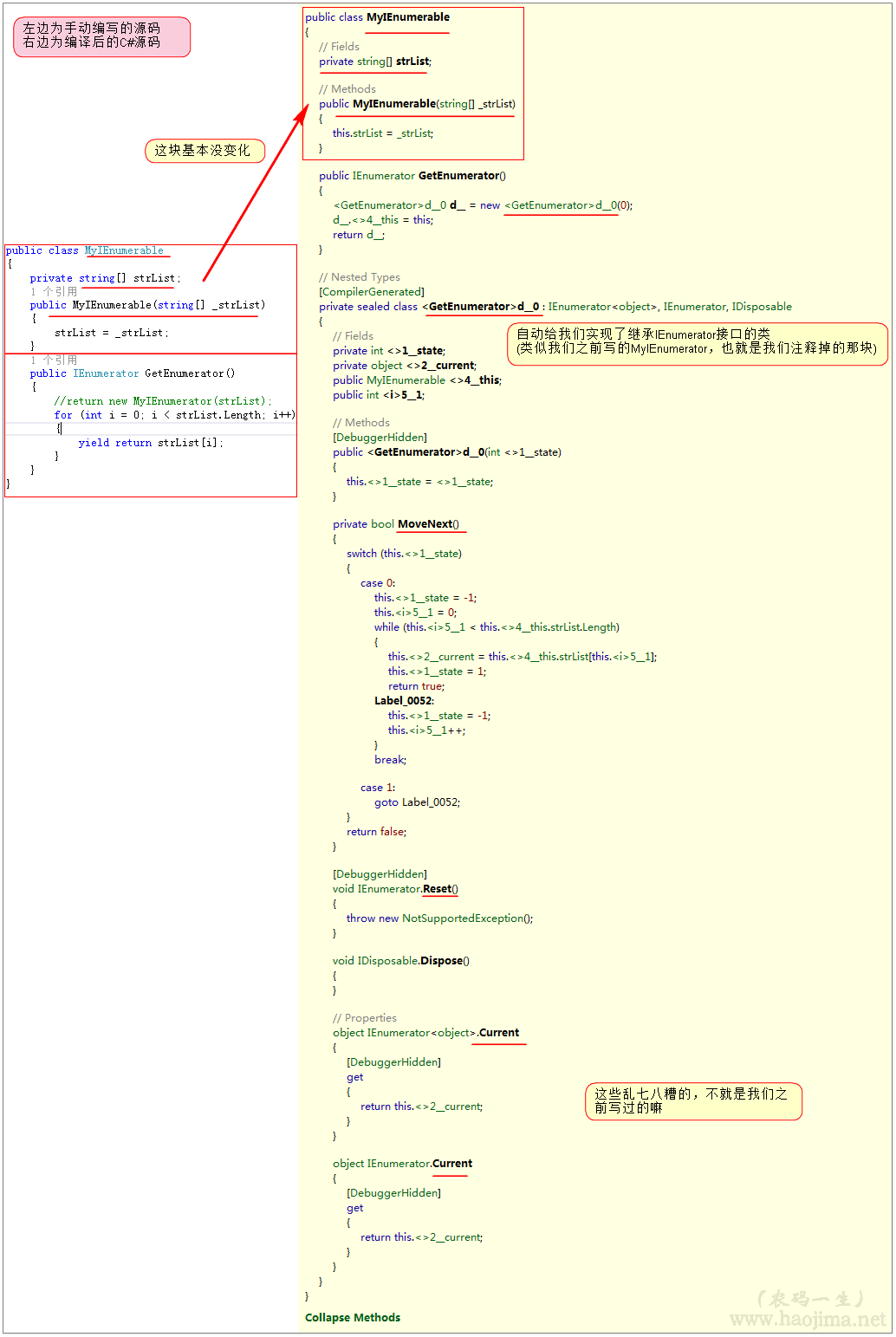
好家伙,我们之前写的那一大坨。你一个yield关键字就搞定了。最妙的是这块代码:

这就是所谓的状态机吧!
我们调用GetEnumerator的时候,看似里面for循环了一次,其实这个时候没有做任何操作。只有调用MoveNext的时候才会对应调用for循环。
为什么Linq to Object中要返回IEnumerable?
因为IEnumerable是延迟加载的,每次访问的时候才取值。也就是我们在Lambda里面写的where、select并没有循环遍历(只是在组装条件),只有在ToList或foreache的时候才真正去集合取值了。这样大大提高了性能。
自己实现MyWhere:
public class MyIEnumerable : IEnumerable

{

    private string[] strList;

    public MyIEnumerable(string[] strList)

    {

        this.strList=strList;

    }

    public IEnumerator GetEnumerator()

    {

        //return new MyIEnumerator(strList);

        for (int i = ; i < strList.Length; i++)

        {

            yield return strList[i];

        }

    }

    public IEnumerable<string> MyWhere(Func<string,bool> func)

    {

        foreach (string item in this)

        {

            if (func(item))

            {

                yield return item;

            }

        }

    }

}
FirstOrDefault的实现
内部调用了TryGetFirst。

private static TSource TryGetFirst<TSource>(this IEnumerable<TSource> source, out bool found)

{

    if (source == null)

    {

        throw Error.ArgumentNull(nameof(source));

    }

    if (source is IPartition<TSource> partition)

    {

        return partition.TryGetFirst(out found);

    }

    if (source is IList<TSource> list)

    {

        if (list.Count > )

        {

            found = true;

            return list[];

        }

    }

    else

    {

        using (IEnumerator<TSource> e = source.GetEnumerator())

        {

            //同样调用了MoveNext方法

            if (e.MoveNext())

            {

                found = true;

                //Current属性在我们的自定义实现里面也有出现

                return e.Current;

            }

        }

    }

    found = false;

    return default(TSource);

}
不传入筛选的实现
private static TSource TryGetFirst<TSource>(this IEnumerable<TSource> source, Func<TSource, bool> predicate, out bool found)

{

    if (source == null)

    {

        throw Error.ArgumentNull(nameof(source));

    }

    if (predicate == null)

    {

        throw Error.ArgumentNull(nameof(predicate));

    }

    if (source is OrderedEnumerable<TSource> ordered)

    {

        return ordered.TryGetFirst(predicate, out found);

    }

    foreach (TSource element in source)

    {

        //循环,直接返回第一个符合条件的对象

        if (predicate(element))

        {

            found = true;

            return element;

        }

    }

    found = false;

    return default(TSource);

}
传入筛选的实现
源码地址
https://gitee.com/qixinbo/MyKestrelServer/tree/master/DataStruct/EnumerableStudy
本文参考《农码一生》
https://www.cnblogs.com/zhaopei/p/5769782.html
Core源码(四)IEnumerable的更多相关文章
- 一个由正则表达式引发的血案 vs2017使用rdlc实现批量打印 vs2017使用rdlc [asp.net core 源码分析] 01 - Session SignalR sql for xml path用法 MemCahe C# 操作Excel图形——绘制、读取、隐藏、删除图形 IOC,DIP,DI,IoC容器
1. 血案由来 近期我在为Lazada卖家中心做一个自助注册的项目,其中的shop name校验规则较为复杂,要求:1. 英文字母大小写2. 数字3. 越南文4. 一些特殊字符,如“&”,“- ...
- 一起来看CORE源码(一) ConcurrentDictionary
先贴源码地址 https://github.com/dotnet/corefx/blob/master/src/System.Collections.Concurrent/src/System/Col ...
- ASP.NET Core[源码分析篇] - WebHost
_configureServicesDelegates的承接 在[ASP.NET Core[源码分析篇] - Startup]这篇文章中,我们得知了目前为止(UseStartup),所有的动作都是在_ ...
- ASP.NET Core[源码分析篇] - Authentication认证
原文:ASP.NET Core[源码分析篇] - Authentication认证 追本溯源,从使用开始 首先看一下我们通常是如何使用微软自带的认证,一般在Startup里面配置我们所需的依赖认证服务 ...
- DOTNET CORE源码分析之IOC容器结果获取内容补充
补充一下ServiceProvider的内容 可能上一篇文章DOTNET CORE源码分析之IServiceProvider.ServiceProvider.IServiceProviderEngin ...
- ASP.NET Core源码学习(一)Hosting
ASP.NET Core源码的学习,我们从Hosting开始, Hosting的GitHub地址为:https://github.com/aspnet/Hosting.git 朋友们可以从以上链接克隆 ...
- asp.net core源码地址
https://github.com/dotnet/corefx 这个是.net core的 开源项目地址 https://github.com/aspnet 这个下面是asp.net core 框架 ...
- ASP .NET CORE 源码地址
ASP .NET CORE 源码地址:https://github.com/dotnet/ 下拉可以查找相应的源码信息, 例如:查找 ASP .NET CORE Microsoft.Extension ...
- .net core 源码解析-web app是如何启动并接收处理请求
最近.net core 1.1也发布了,蹒跚学步的小孩又长高了一些,园子里大家也都非常积极的在学习,闲来无事,扒拔源码,涨涨见识. 先来见识一下web站点是如何启动的,如何接受请求,.net core ...
随机推荐
- 无需重新安装软件,将软件从C盘移至其他盘(mklink)
事先说明,这篇博文算是视频的文字转载版,来源为该视频的五分钟后内容→https://www.bilibili.com/video/av78397784/ 如何拯救标红的C盘[高玩] 有时候安装软件会手 ...
- java之对象创建时各成员变量的初始值
除了byte short int long float double char bollean这基础类型外,其余的都是引用类型 成员变量类型 初始值 byte 0 short 0 int 0 long ...
- Latex学习与使用
Table of Contents Latex学习与使用 简介 文档结构 排版 表格 图片 公式 索引 简介 Latex(发音lay-tek)是一个用来产生专业文档的系统,但它并不是一个单词处理器.它 ...
- 损失函数--KL散度与交叉熵
损失函数 在逻辑回归建立过程中,我们需要一个关于模型参数的可导函数,并且它能够以某种方式衡量模型的效果.这种函数称为损失函数(loss function). 损失函数越小,则模型的预测效果越优.所以我 ...
- Java描述设计模式(04):抽象工厂模式
本文源码:GitHub·点这里 || GitEE·点这里 一.抽象工厂模式 1.生活场景 汽车生产根据用户选择的汽车类型,指定不同的工厂进行生产,选择红旗轿车,就要使用中国工厂,选择奥迪轿车,就要使用 ...
- 硬盘容量统计神器WinDirStat
最近遇到C盘快要爆满的问题,我的笔记本是128G SSD + 1t HDD,给C盘分配的空间是80G固态,由于平时疏远管理,造成了C盘臃肿,迁移一些软件,但还是没有太好的解决,这是上知乎发现有大神推荐 ...
- 一起学Android之AsyncTask
概述 在Android开发中,为了方便我们在后台线程中执行操作,然后将结果发送给主线程,从而在主线程中进行UI更新等操作,Anddroid开发框架提供了一个助手类AsyncTask,它对Thread和 ...
- ASP.NET Core Web 应用程序系列(二)- 在ASP.NET Core中使用Autofac替换自带DI进行批量依赖注入(MVC当中应用)
在上一章中主要和大家分享在MVC当中如何使用ASP.NET Core内置的DI进行批量依赖注入,本章将继续和大家分享在ASP.NET Core中如何使用Autofac替换自带DI进行批量依赖注入. P ...
- 你看不懂的spring原理是因为不知道这几个概念
背景 问题从一杯咖啡开始. 今天我去楼下咖啡机买了一杯「粉黛拿铁」.制作过程中显示: 我取了做好的粉黛拿铁,喝了一口,果然就是一杯热巧克力.咦咦咦,说好的拿铁呢?虽然我对「零点吧」的咖啡评价很高,觉得 ...
- Linxu:在Linux下访问Windows的共享目录
在 Windows xp 上设置一个共享目录 共享目录:d:\myfiles 在 Linux 下安装 samba-client 客户端 yum install samba-client 安装 cifs ...