
OpenDaylight开发hello-world项目之功能实现
OpenDaylight开发hello-world项目之开发环境搭建
OpenDaylight开发hello-world项目之开发工具安装
OpenDaylight开发hello-world项目之代码框架搭建
OpenDaylight开发hello-world项目之功能实现
来到最后的功能实现的步骤,功能实现其实很简单,添加一个yang文件,编译,添加接口实现代码,编译,ok,搞定收工。
yang文件编写
yang文件简单理解为是定义接口和传入参数的文件,在hello world项目中定了一个接口叫hello-world,需要传入的参数是:input标签中的name变量,类型为string,输出的信息为outpu标签中定义的greeting变量,类型也是string。

module example {

    yang-version 1;

    namespace "urn:opendaylight:params:xml:ns:yang:example";

    prefix "example";

    revision "2015-01-05" {

        description "Initial revision of example model";

    }

    rpc hello-world {

        input {

            leaf name {

                type string;

            }

        }

        output {

            leaf greeting {

                type string;

            }

        }

    }

}
定义好yang文件之后编译,odl的框架会自动生成很多代码,包括rpc中函数的定义,文件的引用等。
mvn clean install -DskipTests -Dmaven.javadoc.skip=true -Dcheckstyle.skip=true
[INFO]

[INFO] --- maven-site-plugin:3.6:attach-descriptor (generate-site) @ example-aggregator ---

[INFO] Attaching 'src/site/site.xml' site descriptor with classifier 'site'.

[INFO] ------------------------------------------------------------------------

[INFO] Reactor Summary:

[INFO]

[INFO] ODL :: org.opendaylight.example :: example-api ..... SUCCESS [ 30.916 s]

[INFO] ODL :: org.opendaylight.example :: example-impl .... SUCCESS [ 4.513 s]

[INFO] ODL :: org.opendaylight.example :: example-cli ..... SUCCESS [ 4.574 s]

[INFO] ODL :: org.opendaylight.example :: example-features SUCCESS [ 20.799 s]

[INFO] ODL :: org.opendaylight.example :: example-karaf ... SUCCESS [01:16 min]

[INFO] ODL :: org.opendaylight.example :: example-artifacts SUCCESS [ 5.072 s]

[INFO] ODL :: org.opendaylight.example :: example-it ...... SUCCESS [ 7.690 s]

[INFO] example ............................................ SUCCESS [ 14.771 s]

[INFO] ------------------------------------------------------------------------

[INFO] BUILD SUCCESS

[INFO] ------------------------------------------------------------------------

[INFO] Total time: 02:53 min

[INFO] Finished at: 2019-09-12T17:02:48+08:00

[INFO] Final Memory: 209M/483M

[INFO] ------------------------------------------------------------------------
hello world 函数
编译顺利完成之后,首先将该RPC注册到系统当中去。编写impl-blueprint.xml文件,注册ExampleProvider。

<?xml version="1.0" encoding="UTF-8"?>

<!-- vi: set et smarttab sw=4 tabstop=4: -->

<!--

Copyright © 2017 worker and others. All rights reserved.

This program and the accompanying materials are made available under the

terms of the Eclipse Public License v1.0 which accompanies this distribution,

and is available at http://www.eclipse.org/legal/epl-v10.html

-->

<blueprint xmlns="http://www.osgi.org/xmlns/blueprint/v1.0.0"

  xmlns:odl="http://opendaylight.org/xmlns/blueprint/v1.0.0"

  odl:use-default-for-reference-types="true">

  <bean id="provider"

    class="org.opendaylight.example.impl.ExampleProvider">

  </bean>

  <odl:rpc-implementation ref="provider"/>

</blueprint>
注册好函数之后,最后实现RPC的处理函数。获取input输入的内容,然后返回 ‘hello’ + input的内容。

package org.opendaylight.example.impl;

import org.opendaylight.yang.gen.v1.urn.opendaylight.params.xml.ns.yang.example.rev150105.ExampleService;

import org.opendaylight.yang.gen.v1.urn.opendaylight.params.xml.ns.yang.example.rev150105.HelloWorldInput;

import org.opendaylight.yang.gen.v1.urn.opendaylight.params.xml.ns.yang.example.rev150105.HelloWorldOutput;

import org.opendaylight.yang.gen.v1.urn.opendaylight.params.xml.ns.yang.example.rev150105.HelloWorldOutputBuilder;

import org.opendaylight.yangtools.yang.common.RpcResult;

import org.opendaylight.yangtools.yang.common.RpcResultBuilder;

import java.util.concurrent.Future;

public class ExampleProvider implements ExampleService {

    @Override

    public Future<RpcResult<HelloWorldOutput>> helloWorld(HelloWorldInput input) {

        HelloWorldOutputBuilder helloBuilder = new HelloWorldOutputBuilder();

        helloBuilder.setGreeting("Hello " + input.getName());

        return RpcResultBuilder.success(helloBuilder.build()).buildFuture();

    }

}
编译文件
mvn clean install -DskipTests -Dmaven.javadoc.skip=true -Dcheckstyle.skip=true
[INFO] --- maven-site-plugin:3.6:attach-descriptor (generate-site) @ example-aggregator ---

[INFO] Attaching 'src/site/site.xml' site descriptor with classifier 'site'.

[INFO] ------------------------------------------------------------------------

[INFO] Reactor Summary:

[INFO]

[INFO] ODL :: org.opendaylight.example :: example-api ..... SUCCESS [ 35.665 s]

[INFO] ODL :: org.opendaylight.example :: example-impl .... SUCCESS [  5.435 s]

[INFO] ODL :: org.opendaylight.example :: example-cli ..... SUCCESS [  4.453 s]

[INFO] ODL :: org.opendaylight.example :: example-features  SUCCESS [ 26.418 s]

[INFO] ODL :: org.opendaylight.example :: example-karaf ... SUCCESS [: min]

[INFO] ODL :: org.opendaylight.example :: example-artifacts SUCCESS [  5.602 s]

[INFO] ODL :: org.opendaylight.example :: example-it ...... SUCCESS [ 18.424 s]

[INFO] example ............................................ SUCCESS [ 22.318 s]

[INFO] ------------------------------------------------------------------------

[INFO] BUILD SUCCESS

[INFO] ------------------------------------------------------------------------

[INFO] Total time: : min

[INFO] Finished at: --04T17::+:

[INFO] Final Memory: 207M/483M

[INFO] ------------------------------------------------------------------------
启动ODL
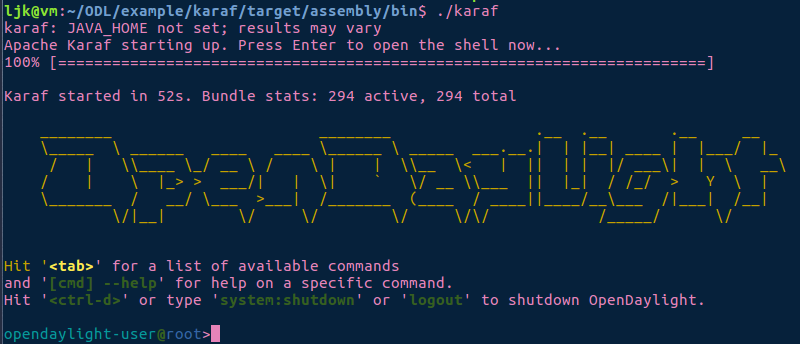
编译通过之后,在karaf文件夹下启动ODL,hello-world模块生效。

查看ODL的api文档
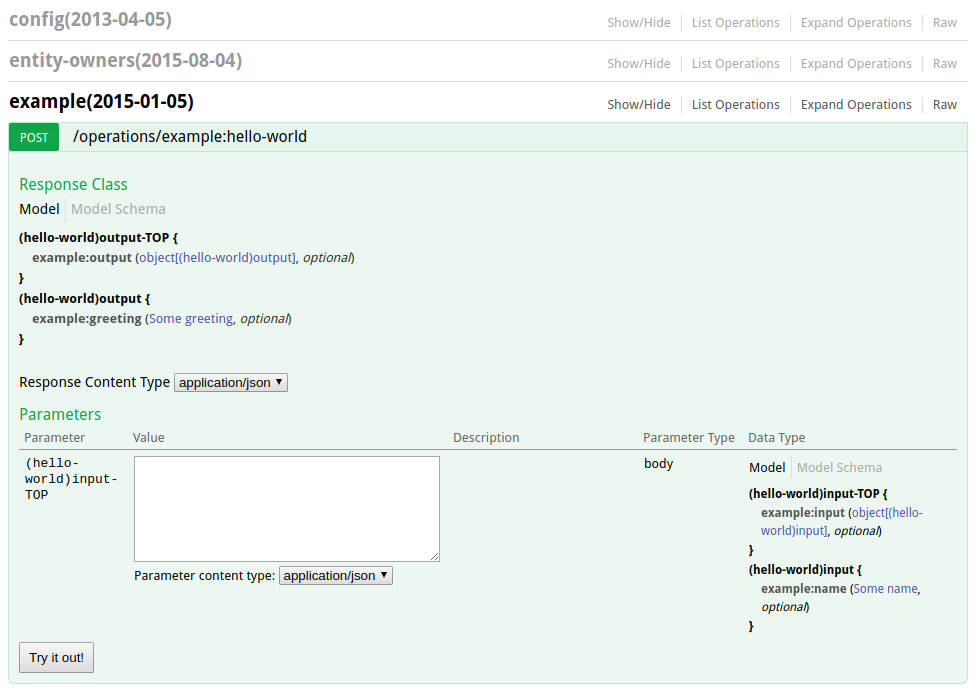
当启动ODL之后,可以查看该ODL所有的api文档,在浏览器中输入 地址:http://localhost:8181/apidoc/explorer/index.html,从中能够找新鲜出炉的example模块。
测试接口
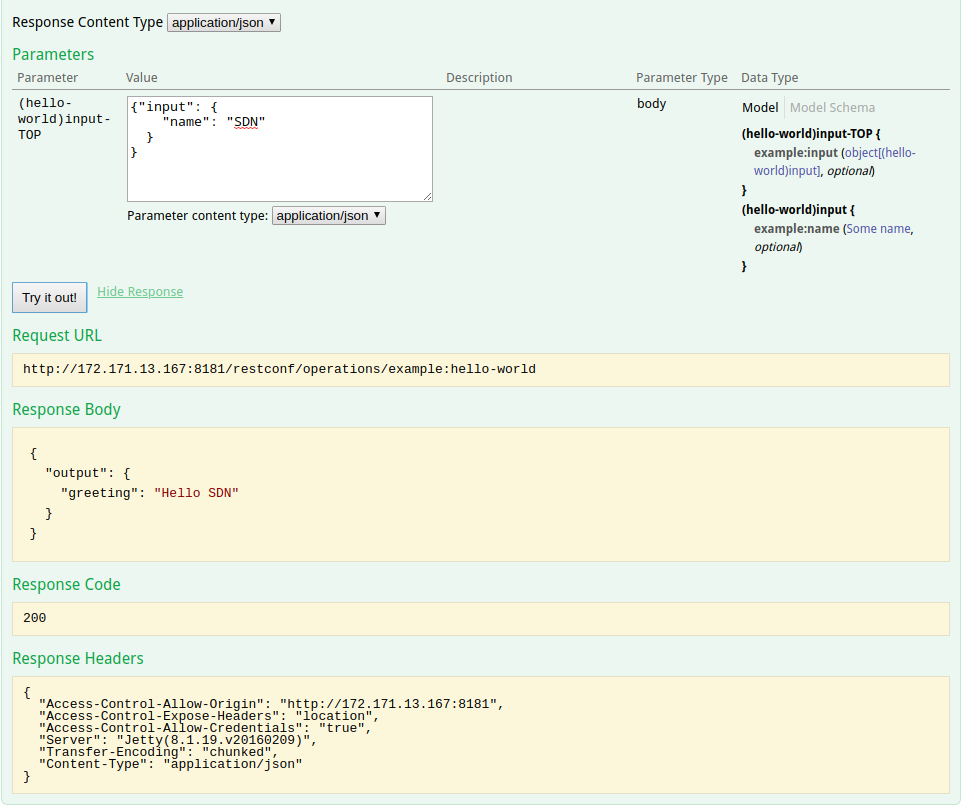
在这个api文档中,可以直接测试接口的可用性,按照输入的格式将内容输入,然后try it out!
使用Postman测试接口
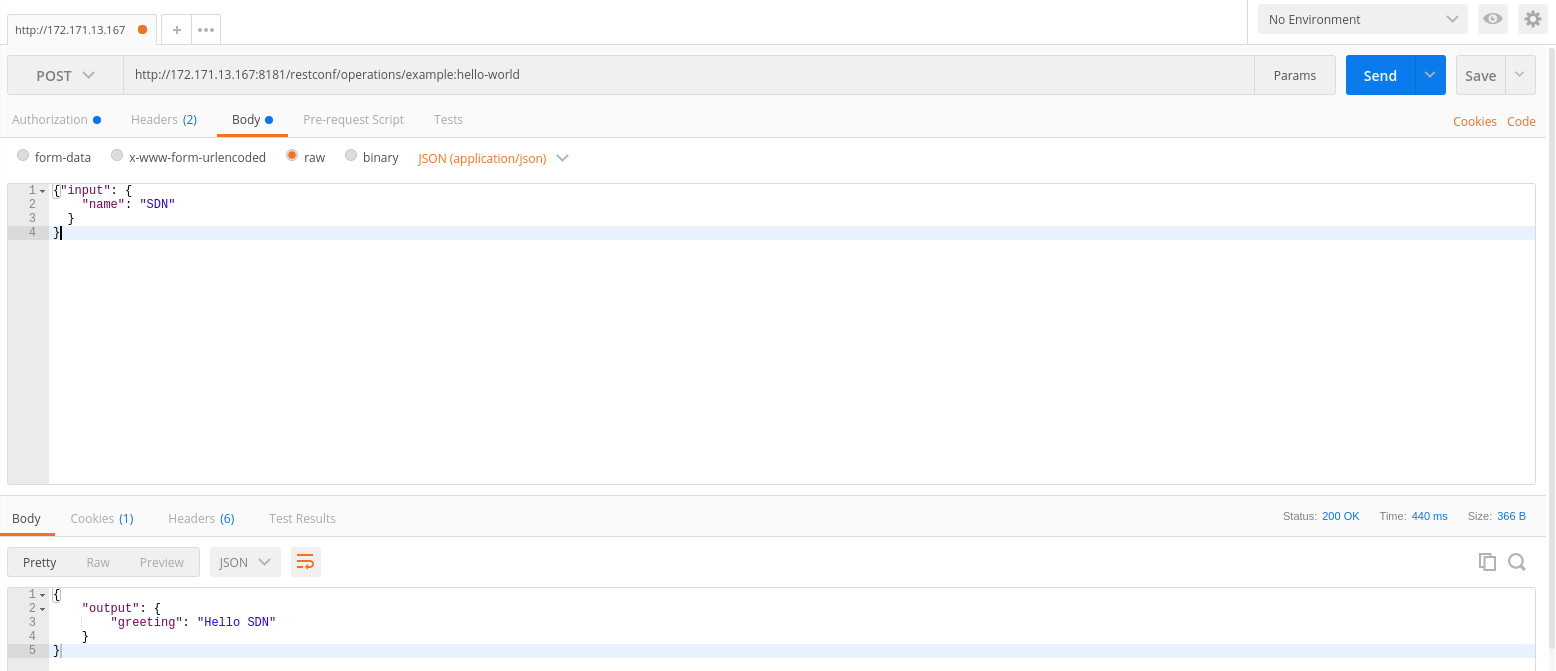
postman是最常见的测试工具,输入restful api的地址,请求方法,body体,认证方式,然后send。
ODL hello-world模块的学习重点不是功能实现,而是ODL开发模块的过程和套路,其中很多深入的内容并没有介绍全面,主要的注意力还是放在流程上,如何安装环境,构建框架代码,编译,实现功能代码等。
OpenDaylight开发hello-world项目之功能实现的更多相关文章
- OpenDaylight开发hello-world项目之代码框架搭建
OpenDaylight开发hello-world项目之开发环境搭建 OpenDaylight开发hello-world项目之开发工具安装 OpenDaylight开发hello-world项目之代码 ...
- OpenDaylight开发hello-world项目之开发环境搭建
OpenDaylight开发hello-world项目之开发环境搭建 OpenDaylight开发hello-world项目之开发工具安装 OpenDaylight开发hello-world项目之代码 ...
- OpenDaylight开发hello-world项目之开发工具安装
OpenDaylight开发hello-world项目之开发环境搭建 OpenDaylight开发hello-world项目之开发工具安装 OpenDaylight开发hello-world项目之代码 ...
- 基于.NetCore开发博客项目 StarBlog - (13) 加入友情链接功能
系列文章 基于.NetCore开发博客项目 StarBlog - (1) 为什么需要自己写一个博客? 基于.NetCore开发博客项目 StarBlog - (2) 环境准备和创建项目 基于.NetC ...
- 基于.NetCore开发博客项目 StarBlog - (14) 实现主题切换功能
系列文章 基于.NetCore开发博客项目 StarBlog - (1) 为什么需要自己写一个博客? 基于.NetCore开发博客项目 StarBlog - (2) 环境准备和创建项目 基于.NetC ...
- 基于.NetCore开发博客项目 StarBlog - (16) 一些新功能 (监控/统计/配置/初始化)
系列文章 基于.NetCore开发博客项目 StarBlog - (1) 为什么需要自己写一个博客? 基于.NetCore开发博客项目 StarBlog - (2) 环境准备和创建项目 基于.NetC ...
- MVC5 网站开发之三 数据存储层功能实现
数据存储层在项目Ninesky.DataLibrary中实现,整个项目只有一个类Repository. 目录 奔跑吧,代码小哥! MVC5网站开发之一 总体概述 MVC5 网站开发之二 创建项目 ...
- ASP.NET MVC5 网站开发实践(一) - 项目框架
前几天算是开题了,关于怎么做自己想了很多,但毕竟没做过项目既不知道这些想法有无必要,也不知道能不能实现,不过邓爷爷说过"摸着石头过河"吧.这段时间看了一些博主的文章收获很大,特别是 ...
- [ASP.NET MVC] 使用CLK.AspNet.Identity提供依权限显示选单项目的功能
[ASP.NET MVC] 使用CLK.AspNet.Identity提供依权限显示选单项目的功能 CLK.AspNet.Identity CLK.AspNet.Identity是一个基于ASP.NE ...
随机推荐
- DomDom: 1 Vulnhub Walkthrough
主机层面扫描: ╰─ nmap -p1-65535 -A -sV 10.10.202.140 You name 存在XSS 漏洞 右键源码有隐藏form表单 修改其type属性为:text 尝试了SQ ...
- windows重装系统后grub引导菜单修复方法(亲自实验过)
问题: 电脑安装的是windows7+ubuntu 15.10双系统.windows重装后,grub引导界面消失. 解决方法有两大步: 1.进入ubuntu; 2.在ubuntu中修复grub. 一. ...
- redis 开源客户端下载
redis 开源客户端下载地址: https://github.com/qishibo/AnotherRedisDesktopManager/releases
- leetcode题解:两数之和
给定一个整数数组 nums 和一个目标值 target,请你在该数组中找出和为目标值的那 两个 整数,并返回他们的数组下标. 你可以假设每种输入只会对应一个答案.但是,你不能重复利用这个数组中同样的元 ...
- Java之Calendar类
Calendar类概述 java.util.Calendar 是日历类,在Date后出现,替换掉了许多Date的方法.该类将所有可能用到的时间信息封装为静态成员变量,方便获取.日历类就是方便获取各个时 ...
- ansible执行带有环境变量的脚本不生效
1背景 jenkins发布时,使用ansible执行远程主机上的启动tomcat脚本发现不生效,启动tomcat的脚本中有环境变量. ansible主机为:172.16.35.8 tomcat服务器为 ...
- PalletOne调色板跨链的BTC实现
之前已经讲到了PalletOne调色板跨链以太坊ETH和ERC20的技术原理,接下来我们来讲解PalletOne跨链比特币BTC的技术原理. 一.BTC充币 假如用户A持有一定数量的比特币BTC,他希 ...
- Python 从入门到进阶之路(三)
在之前的文章我们介绍了一下 Python 中 if while for 的使用,本章我们来看一下 Python 中的变量类型. 在 Python 定义变量时的规则是 变量名 = 变量 ,Python ...
- .net core web api 添加对session跨域实现
1.配置Startup /ConfigureServices添加: services.AddSession(options => { options.Cookie.Name = ".A ...
- ASP.NET MVC IOC依赖注入之Autofac系列(一)- MVC当中应用
话不多说,直入主题看我们的解决方案结构: 分别对上面的工程进行简单的说明: 1.TianYa.DotNetShare.Model:为demo的实体层 2.TianYa.DotNetShare.Repo ...