
4、Work-Queue
Work Queues
using the Java Client

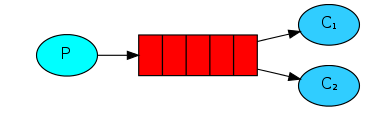
In the first tutorial we wrote programs to send and receive messages from a named queue. In this one we'll create a Work Queue that will be used to distribute time-consuming tasks among multiple workers.
The main idea behind Work Queues (aka: Task Queues) is to avoid doing a resource-intensive task immediately and having to wait for it to complete. Instead we schedule the task to be done later.We encapsulate a task as a message and send it to a queue.A worker process running in the background will pop the tasks and eventually execute the job.When you run many workers the tasks will be shared between them.
This concept is especially useful in web applications where it's impossible to handle a complex task during a short HTTP request window.
Preparation
In the previous part of this tutorial we sent a message containing "Hello World!". Now we'll be sending strings that stand for complex tasks.We don't have a real-world task, like images to be resized or pdf files to be rendered, so let's fake it by just pretending we're busy - by using the Thread.sleep() function.We'll take the number of dots in the string as its complexity; every dot will account for one second of "work". For example, a fake task described by Hello... will take three seconds.
We will slightly modify the Send.java code from our previous example, to allow arbitrary messages to be sent from the command line.This program will schedule tasks to our work queue, so let's name it NewTask.java:
  public class NewTask {

  private static final String TASK_QUEUE_NAME = "task_queue";

  public static void main(String[] argv) throws Exception {

      ConnectionFactory factory = new ConnectionFactory();

      factory.setHost("localhost");

      Connection connection = factory.newConnection();

      Channel channel = connection.createChannel();

      channel.queueDeclare(TASK_QUEUE_NAME, true, false, false, null);

      String message="message";

      //String message = getMessage(argv);

      for (int i=0;i<5;i++) {

          message+=".";

          channel.basicPublish("", TASK_QUEUE_NAME,

                  MessageProperties.PERSISTENT_TEXT_PLAIN,

                  message.getBytes("UTF-8"));

          System.out.println(" [x] Sent '" + message + "'");

      }

      channel.close();

      connection.close();

  }
Our old Recv.java program also requires some changes: it needs to fake a second of work for every dot in the message body. It will handle delivered messages and perform the task, so let's call it Worker.java:
  public class Worker {

  private static final String TASK_QUEUE_NAME = "task_queue";

  public static void main(String[] argv) throws Exception {

      ConnectionFactory factory = new ConnectionFactory();

      factory.setHost("localhost");

      final Connection connection = factory.newConnection();

      final Channel channel = connection.createChannel();

      channel.queueDeclare(TASK_QUEUE_NAME, true, false, false, null);

      System.out.println(" [*] Waiting for messages. To exit press CTRL+C");

      channel.basicQos(1);

      final Consumer consumer = new DefaultConsumer(channel) {

          @Override

          public void handleDelivery(String consumerTag, Envelope envelope, AMQP.BasicProperties properties, byte[] body) throws IOException {

              String message = new String(body, "UTF-8");

              System.out.println(" [x] Received '" + message + "'");

              try {

                  doWork(message);

              } finally {

                  System.out.println(" [x] Done");

                  //channel.basicAck(envelope.getDeliveryTag(), false);

              }

          }

      };

      boolean autoAck = true; // acknowledgment is covered below

      channel.basicConsume(TASK_QUEUE_NAME, autoAck, consumer);

  }

  private static void doWork(String task) {

      for (char ch : task.toCharArray()) {

          if (ch == '.') {

              try {

                  Thread.sleep(10000);

              } catch (InterruptedException _ignored) {

                  Thread.currentThread().interrupt();

              }

          }

      }

  }
}
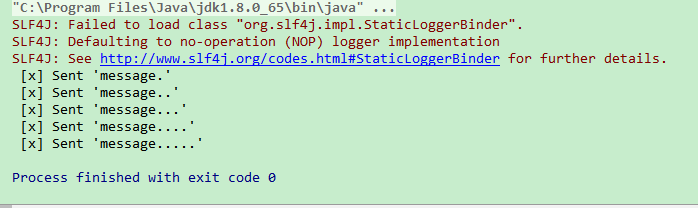
result:


Round-robin dispatching循环分发
- One of the advantages of using a Task Queue is the ability to easily parallelise work.If we are building up a backlog of work,we can just add more workers and that way,scale easily.
- First,run two worker instances at the same time.
- Sencond,publish new tasks.
- 结果如上图。
- By default,RabbitMQ will send each message to the next consumer,in sequence.On average every consumer will get the same number of messages.This way of distributing message is called round-robin.
Message acknowledgment
- Doing a task can take a few seconds.You may wonder what happens if one of the consumers starts a long task and dies with it only partly done.With our current code,once RabbitMQ delivers a message to the costomer it immediately marks it for detetion.In this case ,if you kill a worker we will lose the message it was just processing.We'll also lose all the messsages that were dispatched to this particular worker but were not yet handled.
- But we don't want to lose any tasks.If a worker dies,we'd like the task to be delivered to another workere.
- In order to make sure a message is never lost.RabbitMQ supports message acknowledgments.An ack is sent back by the consumer to tell RabbitMQ that a particular message has been received,processed and that RabbitMQ and that RabbitMQ is free to delete it.
- If a consumer dies(its channel is closed,connection is closed,or TCP connection is lost) without sending an ack.RabbitMQ will understand that a message wasn't processed fully and re-queue it.If there are other consumers online at the same time ,it will then quickly redeliver it to another consumer.That way you can be sure that no message is lost,even if workers occasionally die.
- There aren't any message timeouts;RabbitMQ will redeliver the message when the consumer dies.It's fine even if processing a message takes a very,very long time .
- Manual message acknowledgments are turned on by default .In previous examples we explicitly turned them off via the autoAck-true flag.It's time to set this flag to false and send a proper acknowledgment form the worker,once we're done with a task.
  public static void main(String[] argv) throws Exception {

      ConnectionFactory factory = new ConnectionFactory();

      factory.setHost("localhost");

      final Connection connection = factory.newConnection();

      final Channel channel = connection.createChannel();

      channel.queueDeclare(TASK_QUEUE_NAME, true, false, false, null);

      System.out.println(" [*] Waiting for messages. To exit press CTRL+C");

      channel.basicQos(1);

      final Consumer consumer = new DefaultConsumer(channel) {

          @Override

          public void handleDelivery(String consumerTag, Envelope envelope, AMQP.BasicProperties properties, byte[] body) throws IOException {

              String message = new String(body, "UTF-8");

              System.out.println(" [x] Received '" + message + "'");

              try {

                  doWork(message);

              } finally {

                  System.out.println(" [x] Done");

                  channel.basicAck(envelope.getDeliveryTag(), false);

              }

          }

      };

      //boolean autoAck = true; // acknowledgment is covered below

      channel.basicConsume(TASK_QUEUE_NAME, false, consumer);

  }
- Using this code we can be sure that even if you kill a worker while it processing a message,nothing will be lost.Soon after the worker dies all unacknowledged message will be redelivered.
- Acknowledgment must be sent on same channel the delivery it is for was received on.Attempts to acknowledgment using a different channel will result in a channel-level protocol exception..
- Forgotten acknowledgments
- It's a common mistake to miss the basicAck .It's an easy error,but the consequences are serious.Messages will be redelivered when your client quits,but RabbitMQ will eat more and more memory as it won't be able to release any unacked messages.
Message durability
- We have learned how to make sure that even if the consumer dies,the task isn't lost.But our tasks will still be lost if RabbitMQ server stops.
- When RabbitMQ quits or crashs it will forget the queues and messages unless you tell it not to.Two things are required to make sure that messages aren't lost:we need to mark both the queue and messages as durable.
- First,we need to make sure that RabbitMQ will nerver lose our queue .In order to do so,we need to declare it as durable:
  boolean durable = true;

  channel.queueDeclare("hello", durable, false, false, null);
- Although this command is correct by itself ,it won't work in our present setup.That's because we've already defined a queue called 'hello' which is not durable.RabbitMQ doesn't allow you to redefine an existing queue with different parameters and will return an error to any programs that tries to do that.But there is a quick workaround -Let's declare a queue with different name,for example task_queue.
- This queueDeclare change needs to be applied to both the producer and consumer code .
- As this point we're sure that the task_queue queue won't be lost even if RabbitMQ restarts.Now we need to mark our messages as persistent-by setting MessageProperties to the value PERSISTENT_TEXT_PLAIN.
  import com.rabbitmq.client.MessageProperties;

  channel.basicPublish("", "task_queue",

      MessageProperties.PERSISTENT_TEXT_PLAIN,

      message.getBytes());
- Note on message persistence
- Marking messages as persistent doesn't fully guarantee that a message won't be lost.Although it tells RabbitMQ to save the message to disk,there is still a short time window when RabbitMQ has accepted a message and hasn't saved it yet .Also,RabbitMQ doesn't do fsync(2) for every message it may be just saved to cache and not really written to the disk.The persistence guarantee aren't strong,but it's more than enough for our simple task queue.
Fair dispatch
- You might have noticed that the dispatching still doesn't work exactly as we want.For example in a situation with two workers,when all odd messages are heavy and even message are light,one worker will be constantly busy and the other one will do hardly any work.Well,RabbitMQ doesn't konw anything that and will still dispatch messages evently.
- This happens because RabbitMQ just dispatches a message when the message enters the queue.It doesn't look at the number of unacknowledged messages for a consumer.It just blindly dispatches every n-th message to the n-th consumer.
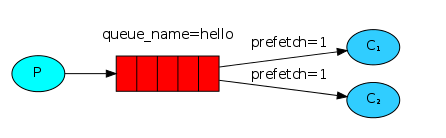
- In order to defeat that we can use the basicQos method with the prefetchCount=1 setting.This tells RabbitMQ not to give more than one message to a worker at a time.Or in other words,don't dispatch a new message to a worker until it has processed an acknowledged the previous one.Instead ,it will dispatch it to the next worker that is not still busy.
  int prefetchCount = 1;

  channel.basicQos(prefetchCount);
总结
- Task Queue
- 循环分发 Round-robin dispatch
- 消息确认
- 消息持久化
- 队列持久化channel.queueDeclare(...,true,...)声明队列时指定
- 消息持久化channel.basicPublish(...,MessageProperties.PERSISTENT_TEXT_PLAIN,...)发送消息时通过MessageProperties指定
- 平均分发 fair dispatch (可能导致一个worker busy 另一个free)
- channel.basicQos(1)//等得到ack时在分发下一条消息
4、Work-Queue的更多相关文章
- Python进阶(3)_进程与线程中的lock(线程中互斥锁、递归锁、信号量、Event对象、队列queue)
1.同步锁 (Lock) 当全局资源(counter)被抢占的情况,问题产生的原因就是没有控制多个线程对同一资源的访问,对数据造成破坏,使得线程运行的结果不可预期.这种现象称为“线程不安全”.在开发过 ...
- STL学习笔记6 -- 栈stack 、队列queue 和优先级priority_queue 三者比较
栈stack .队列queue 和优先级priority_queue 三者比较 默认下stack 和queue 基于deque 容器实现,priority_queue 则基于vector 容器实现 ...
- Python之路(第四十五篇)线程Event事件、 条件Condition、定时器Timer、线程queue
一.事件Event Event(事件):事件处理的机制:全局定义了一个内置标志Flag,如果Flag值为 False,那么当程序执行 event.wait方法时就会阻塞,如果Flag值为True,那么 ...
- 并发编程(五)——GIL全局解释器锁、死锁现象与递归锁、信号量、Event事件、线程queue
GIL.死锁现象与递归锁.信号量.Event事件.线程queue 一.GIL全局解释器锁 1.什么是全局解释器锁 GIL本质就是一把互斥锁,相当于执行权限,每个进程内都会存在一把GIL,同一进程内的多 ...
- Python并发编程06 /阻塞、异步调用/同步调用、异步回调函数、线程queue、事件event、协程
Python并发编程06 /阻塞.异步调用/同步调用.异步回调函数.线程queue.事件event.协程 目录 Python并发编程06 /阻塞.异步调用/同步调用.异步回调函数.线程queue.事件 ...
- [操作系统知识储备,进程相关概念,开启进程的两种方式、 进程Queue介绍]
[操作系统知识储备,进程相关概念,开启进程的两种方式.进程Queue介绍] 操作系统知识回顾 为什么要有操作系统. 程序员无法把所有的硬件操作细节都了解到,管理这些硬件并且加以优化使用是非常繁琐的工作 ...
- Message、Handler、Message Queue、Looper 之间的关系
单线程模型中Message.Handler.Message Queue.Looper之间的关系 1.Message Message即为消息,可以理解为线程间交流的信息.处理数据后台线程需要更新UI,你 ...
- [数据结构]——链表(list)、队列(queue)和栈(stack)
在前面几篇博文中曾经提到链表(list).队列(queue)和(stack),为了更加系统化,这里统一介绍着三种数据结构及相应实现. 1)链表 首先回想一下基本的数据类型,当需要存储多个相同类型的数据 ...
- Python成长笔记 - 基础篇 (十一)----RabbitMQ、Redis 、线程queue
本节内容: 1.RabbitMQ 消息队列 2.Redis 3.Mysql PY 中的线程queue(threading Queue):用于多个线程之间进行数据交换,不能在进程间进行通信 进程qu ...
- 单线程模型中Message、Handler、Message Queue、Looper之间的关系
1. Android进程 在了解Android线程之前得先了解一下Android的进程.当一个程序第一次启动的时候,Android会启动一个LINUX进程和一个主线程.默认的情况下,所有该程序的组件都 ...
随机推荐
- Java学习笔记(1)--- 简介
简介: 注:和之前的C不一样,本人没有学过java,所以内容上可能会相对详细一些. 主要特性: 1.这跟c++一样是面对对象语言: Java语言提供类.接口和继承等面向对象的特性,为了简单起见,只支持 ...
- 初学JavaScript正则表达式(十一)
JavaScript的对象属性 整理自慕课网教学 点此进入
- 6. Go语言—字符串操作
一.字符串支持的转义字符 \r 回车符(返回行首) \n 换行符(直接跳到下一行的同列位置) \t 制表符 \' 单引号 \" 双引号 \\ 反斜杠 \uXXXX Unicode字符码值转义 ...
- 《Zabbix》
https://github.com/itnihao/zabbix-rpm https://github.com/itnihao/zabbix-book 一.zabbix支持的主要监控方式: zabb ...
- MySQL学习笔记2——DML
DML(数据操作语言,它是对表记录的操作(增,删,改)!) 1.插入数据 *INSERT INTO 表名(列名1,列名2,...) VALUES(列值1,列值2,...); >在表名后给出要插入 ...
- Java HashMap用法
为了做题用Java语法替代C++map的常用语法,记录一下,剖析原理以后再补上. 1.import java.util.HashMap;//导入; 2.HashMap<K, V> map= ...
- 第04组 Alpha冲刺(1/4)
队名:斗地组 组长博客:地址 作业博客:Alpha冲刺(1/4) 各组员情况 林涛(组长) 过去两天完成了哪些任务: 1.安排好各个组员的任务 2.收集各个组员的进度 3.写页面 4.写博客 展示Gi ...
- android shape图形优化Button效果
android shape可以让我们通过定义xml文件的方式创建图形,当然只能实现一些比较简单的图形(圆形,矩形,椭圆,线段),但是已经相当不错了,通过shape创建的图形作为控件的背景已经基本可以满 ...
- ubutnu 挂载磁盘
1. 查看已挂载的磁盘 df -h 2. 查看可挂载的磁盘 fdisk -l 3. 创建挂载点 mkdir /media/HDD 注意: /media/HDD 必须为空文件夹 4. 挂载 sudo m ...
- Java连载37-面向对象的封装性
一.IDE上继续新建工程 1.在src目录下新建软件包:package机制后面再讲,目前先用着 2.给package命名一个名称:com.bjpowernode.java_learning 3.软件包 ...