
android 官方DrawerLayout的介绍和使用
南尘:爱编程,爱安卓,每天进步一点点。
drawerLayout是Support Library包中实现了侧滑菜单效果的控件,可以说drawerLayout是因为第三方控件如MenuDrawer等的出现之后,google借鉴而出现的产物。drawerLayout分为侧边菜单和主内容区两部分,侧边菜单可以根据手势展开与隐藏(drawerLayout自身特性),主内容区的内容可以随着菜单的点击而变化(这需要使用者自己实现)。
项目已同步至github:https://github.com/nanchen2251/DrawerLayoutDemo
drawerLayout的使用很方便,使用drawerLayout的要点如下:
1.drawerLayout其实是一个布局控件,跟LinearLayout等控件是一种东西,但是drawerLayout带有滑动的功能。只要按照drawerLayout的规定布局方式写完布局,就能有侧滑的效果。
有两点要注意:
1)主内容区的布局代码要放在侧滑菜单布局的前面,这可以帮助DrawerLayout判断谁是侧滑菜单,谁是主内容区;
2)侧滑菜单的部分的布局(这里是ListView)可以设置layout_gravity属性,他表示侧滑菜单是在左边还是右边。
先上一个运行图:
2.drawerLayout左侧菜单(或者右侧)的展开与隐藏可以被DrawerLayout.DrawerListener的实现监听到,这样你就可以在菜单展开与隐藏发生的时刻做一些希望做的事情。
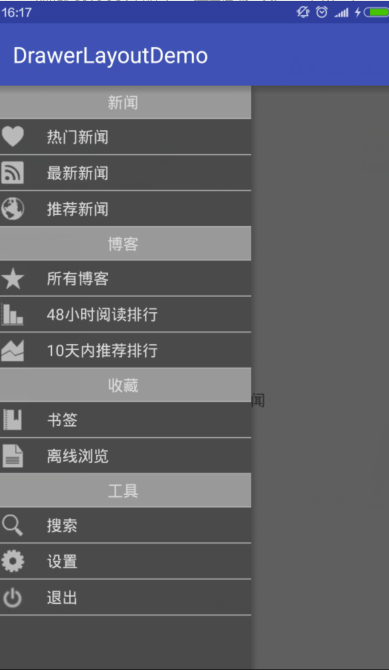
3.何为侧边菜单。
侧边菜单其实只是一个普通的View,一般里面装的是ListView,看起来就像菜单,他完全可以是一个button,textView等等。虽然称为菜单,但跟Activity的菜单形式是两码事,Activity的菜单只需要在资源文件中定义好,就能按照固定的形式显示出来。而drawerLayout的侧边菜单显示成什么样完全是取决于你自己,同样点击事件也完全由你自己去写。
4.如何点击某个按钮的时候能够展开或者隐藏侧边菜单。
可以用DrawerLayout.closeDrawer和DrawerLayout.openDrawer来隐藏与展开
5. drawerLayout与Fragment是什么关系?
我们看到很多使用drawerLayout的代码中都同时使用了Fragment,这会造成误解,以为使用drawerLayout必须用到Fragment,其实这是错误的,使用Fragment是因为在侧滑菜单被点击的时候,主内容区如果内容比较复杂,用Fragment去填充会更容易,如果你的主内容区只是一个简单的字符串,只想在不同菜单点击的时候更新一下字符串的内容,我觉得没必要用Fragment。不过Fragment真的是很有用的东西,大多数情况下我们还是优先考虑Fragment和DrawerLayout搭配使用的。
6.说到Fragment,就想到了当我们在使用FrameLayout装载的时候,总会不断地来回切换Fragment,一直都是用replace()方法来替换Fragment:然后总感觉切换的时候有些卡顿,这样就会导致Fragment无限重绘。
每次切换的时候,Fragment都会重新实例化,重新加载一边数据,这样非常消耗性能和用户的数据流量。就想,如何让多个Fragment彼此切换时不重新实例化?翻看了Android官方Doc,和一些组件的源代码,发现,replace()这个方法只是在上一个Fragment不再需要时采用的简便方法。正确的切换方式是add(),切换时hide(),add()另一个Fragment;再次切换时,只需hide()当前,show()另一个。
这样就能做到多个Fragment切换不重新实例化。
下面是一些代码:包含了fragment事务处理刷新界面的问题。
package com.example.nanchen.drawerlayoutdemo;

import android.os.Bundle;

import android.support.v4.app.Fragment;

import android.support.v4.app.FragmentTransaction;

import android.support.v4.widget.DrawerLayout;

import android.support.v7.app.AppCompatActivity;

import android.view.View;

import android.widget.AdapterView;

import android.widget.FrameLayout;

import android.widget.ListView;

import com.example.nanchen.drawerlayoutdemo.adapter.MenuListAdapter;

import com.example.nanchen.drawerlayoutdemo.fragment.HotNewsFragment;

import com.example.nanchen.drawerlayoutdemo.fragment.LateNewsFragment;

import java.util.ArrayList;

import java.util.List;

public class MainActivity extends AppCompatActivity {

    private ListView lv;

    private FrameLayout fl;

    private List<String> list;

    private Fragment fragment_hot_news,fragment_late_news;

    private MenuListAdapter adapter;

    private DrawerLayout dl;

    private FragmentTransaction ft;

    @Override

    protected void onCreate(Bundle savedInstanceState) {

        super.onCreate(savedInstanceState);

        setContentView(R.layout.activity_main);

        fl = (FrameLayout) findViewById(R.id.main_content_frame);

        lv = (ListView) findViewById(R.id.main_left_drawer_lv);

        dl = (DrawerLayout) findViewById(R.id.main_dl);

        initList();

        adapter = new MenuListAdapter(this,list);

        lv.setAdapter(adapter);

        //创建Fragment管理事务

        ft = getSupportFragmentManager().beginTransaction();

        if (fragment_hot_news == null){

            fragment_hot_news = new HotNewsFragment();

            ft.add(R.id.main_content_frame,fragment_hot_news);

            ft.commit();

        }

        lv.setOnItemClickListener(new AdapterView.OnItemClickListener() {

            @Override

            public void onItemClick(AdapterView<?> parent, View view, int position, long id) {

                dl.closeDrawer(lv);

                FragmentTransaction tran  = getSupportFragmentManager().beginTransaction();

                hideFragment(tran);//隐藏已经add的fragment

                switch (position){

                    case 1:

                        if (fragment_hot_news == null){

                            fragment_hot_news = new HotNewsFragment();

                            tran.add(R.id.main_content_frame,fragment_hot_news);

                        }else{

                            tran.show(fragment_hot_news);

                        }

                        break;

                    case 2:

                        if (fragment_late_news == null){

                            fragment_late_news = new LateNewsFragment();

                            tran.add(R.id.main_content_frame,fragment_late_news);

                        }else{

                            tran.show(fragment_late_news);

                        }

                        break;

                }

                tran.commit();

            }

            /**

             * 隐藏已经初始化的Fragment

             */

            private void hideFragment(FragmentTransaction tran) {

                if (fragment_hot_news != null){

                    tran.hide(fragment_hot_news);

                }

                if (fragment_late_news != null){

                    tran.hide(fragment_late_news);

                }

            }

        });

    }

    private void initList() {

        list = new ArrayList<>();

        list.add("新闻");

        list.add("热门新闻");

        list.add("最新新闻");

        list.add("推荐新闻");

        list.add("博客");

        list.add("所有博客");

        list.add("48小时阅读排行");

        list.add("10天内推荐排行");

        list.add("收藏");

        list.add("书签");

        list.add("离线浏览");

        list.add("工具");

        list.add("搜索");

        list.add("设置");

        list.add("退出");

    }

}
package com.example.nanchen.drawerlayoutdemo.fragment;

import android.os.Bundle;

import android.support.annotation.Nullable;

import android.support.v4.app.Fragment;

import android.view.LayoutInflater;

import android.view.View;

import android.view.ViewGroup;

import com.example.nanchen.drawerlayoutdemo.R;

/**

 * Created by nanchen on 2016/6/24.

 */

public class HotNewsFragment extends Fragment {

    @Nullable

    @Override

    public View onCreateView(LayoutInflater inflater, @Nullable ViewGroup container, @Nullable Bundle savedInstanceState) {

        return inflater.inflate(R.layout.fragment_hot_news,null);

    }

}
 package com.example.nanchen.drawerlayoutdemo.fragment;

 import android.os.Bundle;

 import android.support.annotation.Nullable;

 import android.support.v4.app.Fragment;

 import android.view.LayoutInflater;

 import android.view.View;

 import android.view.ViewGroup;

 import com.example.nanchen.drawerlayoutdemo.R;

 /**

  * Created by nanchen on 2016/6/24.

  */

 public class LateNewsFragment extends Fragment {

     @Nullable

     @Override

     public View onCreateView(LayoutInflater inflater, @Nullable ViewGroup container, @Nullable Bundle savedInstanceState) {

         return inflater.inflate(R.layout.fragment_late_news,null);

     }

 }
下面是一些资源文件xml
<?xml version="1.0" encoding="utf-8"?>

<android.support.v4.widget.DrawerLayout

    xmlns:android="http://schemas.android.com/apk/res/android"

    xmlns:tools="http://schemas.android.com/tools"

    android:layout_width="match_parent"

    android:layout_height="match_parent"

    android:id="@+id/main_dl"

    tools:context="com.example.nanchen.drawerlayoutdemo.MainActivity">

    <FrameLayout

        android:id="@+id/main_content_frame"

        android:layout_width="match_parent"

        android:layout_height="match_parent">

    </FrameLayout>

    <ListView

        android:id="@+id/main_left_drawer_lv"

        android:layout_width="230dp"

        android:layout_height="match_parent"

        android:layout_gravity="left"

        android:divider="#afafaf"

        android:background="#4b4a4a"

        android:dividerHeight="1dp"

        >

    </ListView>

</android.support.v4.widget.DrawerLayout>
<?xml version="1.0" encoding="utf-8"?>

<LinearLayout xmlns:android="http://schemas.android.com/apk/res/android"

              android:layout_width="match_parent"

              android:background="#ddb0b0"

              android:layout_height="match_parent">

    <TextView

        android:layout_width="match_parent"

        android:layout_height="match_parent"

        android:text="这是热门新闻板块"

        android:gravity="center"/>

</LinearLayout>
<?xml version="1.0" encoding="utf-8"?>

<LinearLayout xmlns:android="http://schemas.android.com/apk/res/android"

              android:layout_width="match_parent"

              android:layout_height="match_parent">

    <TextView

        android:layout_width="match_parent"

        android:layout_height="match_parent"

        android:text="这里都是最新的新闻"

        android:gravity="center"/>

</LinearLayout>
<?xml version="1.0" encoding="utf-8"?>

<LinearLayout xmlns:android="http://schemas.android.com/apk/res/android"

              android:layout_width="match_parent"

              android:layout_height="match_parent"

              android:background="#ff9a9999"

    android:padding="5dp">

    <TextView

        android:layout_width="match_parent"

        android:layout_height="wrap_content"

        android:text="aa"

        android:textColor="@color/tv_color_white"

        android:id="@+id/menu_item1_tv"

        android:gravity="center"/>

</LinearLayout>
<?xml version="1.0" encoding="utf-8"?>

<LinearLayout xmlns:android="http://schemas.android.com/apk/res/android"

              android:layout_width="match_parent"

              android:layout_height="match_parent"

              android:orientation="horizontal"

              android:padding="5dp">

    <ImageView

        android:layout_width="wrap_content"

        android:layout_height="wrap_content"

        android:background="@mipmap/ic_launcher"

        android:scaleType="fitXY"

        android:id="@+id/menu_item2_iv"

        android:padding="5dp"/>

    <TextView

        android:layout_width="match_parent"

        android:layout_height="match_parent"

        android:text="aa"

        android:textColor="@color/tv_color_white"

        android:id="@+id/menu_item2_tv"

        android:layout_marginLeft="20dp"

        android:gravity="center_vertical"/>

</LinearLayout>
android 官方DrawerLayout的介绍和使用的更多相关文章
- Android官方架构组件介绍之LifeCycle(一)
Android官方架构组件介绍之LifeCycle 下面是官方提供的Android App开发的架构图: 从上图可以看到一些关键字:ViewModel,LiveData,Room等.其实看了上面视频的 ...
- Android官方架构组件介绍之LifeCycle
Google 2017 I/O开发者大会于近日召开,在开发者大会上谷歌除了发布了Android O等一些新产品之外,也对Android代码的架构做出了一个官方的回应. Google 2017 I/O开 ...
- Android官方架构组件介绍之ViewModel
ViewModel 像Activity,Fragment这类应用组件都有自己的生命周期并且是被Android的Framework所管理的.Framework可能会根据用户的一些操作和设备的状态对Act ...
- Android官方架构组件介绍之LiveData
LiveData LiveData是一个用于持有数据并支持数据可被监听(观察).和传统的观察者模式中的被观察者不一样,LiveData是一个生命周期感知组件,因此观察者可以指定某一个LifeCycle ...
- Android官方架构组件介绍之应用(四)
讲一个项目常见的功能,友盟统计功能 例如一个项目有很多多modlue,每个里面modlue都有Activity,Activity需要友盟统一,Fragment也需要友盟统计.一般做法就是继承一个Bas ...
- Android官方架构组件介绍之ViewModel(三)
ViewModel 像Activity,Fragment这类应用组件都有自己的生命周期并且是被Android的Framework所管理的.Framework可能会根据用户的一些操作和设备的状态对Act ...
- Android官方架构组件介绍之LiveData(二)
LiveData LiveData是一个用于持有数据并支持数据可被监听(观察).和传统的观察者模式中的被观察者不一样,LiveData是一个生命周期感知组件,因此观察者可以指定某一个LifeCycle ...
- 【转】Android Support Library详细介绍
网上对Android Support Library中各个依赖包介绍的中文资料太少了,结合官方文档和有限的参考资料做了一次总结,有描述得不对的地方还请指正. 一.主工程.依赖包.jar包.androi ...
- Android Support Library详细介绍
网上对Android Support Library中各个依赖包介绍的中文资料太少了,结合官方文档和有限的参考资料做了一次总结,有描述得不对的地方还请指正. 一.主工程.依赖包.jar包.androi ...
随机推荐
- 单页Web应用优缺点
一.定义单页 Web 应用 (single-page application 简称为 SPA) 是一种特殊的 Web 应用.它将所有的活动局限于一个Web页面中,仅在该Web页面初始化时加载相应的HT ...
- 用itextsharp打印pdf示例
学习了用itextsharp输出PDF文档,支持用XML定义文档,可定义多个数据源,简单的表达式,用于项目中效果还不错,其中PdfPageEvent类由包大人提供. 示例程序定义了一个简单的xml文件 ...
- 爬虫初探(2)之requests
关于请求网络,requests这个库是爬虫经常用到的一个第三方库. import requests url = 'http://www.baidu.com' #这里用get方法用来请求网页,其他还有p ...
- asp.net 生成图形验证码(字母和数字混合)
验证码技术是网站开发过程中比较重要的技术,可以防止非法人员利用注册机或者登陆工具来攻击我们的网站.下面是效果图: 具体实现方法如下: 1.主要思路是:引用Using System.Drawing命名空 ...
- $Host.Runspace.ThreadOptions = “ReuseThread”有神马用?
$Host.Runspace.ThreadOptions = “ReuseThread” 在很多PowerShell的脚本中你都会看到这个语句被用来开头,那它的作用是什么呢? 答:这个设置可以提高对内 ...
- AJXA!让体验更美好
AJXA = Asynchronous JavaScript and XML(异步的 JavaScript 和 XML). AJAX 不是新的编程语言,而是一种使用现有标准的新方法. AJAX 是与服 ...
- Python黑帽编程 3.2 ARP监控
Python黑帽编程 3.2 ARP监控 在第3.1节<ARP欺骗>中,我们学习了ARP的基本原理,使用Python实现了我们自己的ARP欺骗工具.在上一节的基础上,我们来实现一个ARP监 ...
- Atitit 索引技术--位图索引
Atitit 索引技术--位图索引 索引在数据结构上可以分为三种B树索引.位图索引和散列索引 存储原理 编辑 位图索引对数据表的列的每一个键值分别存储为一个位图,Oracle对于不同的版本,不同的操作 ...
- The currently selected variant "arm-debug" uses split APKs, but none of the 1 split apks are compatible with the current device with density "213" and ABIs "x86".
出现这种错误一般是在电脑上用模拟器运行APK的吧. 可以在build.gradle中这样配置下: android{ ... defaultConfig { applicationId "XX ...
- sql期末复习(二)
1.概念模式是对dba所看到的全局数据逻辑结构和特征的描述 概念模式是对数据整体的逻辑结构的描述 2.数据库网状模型应满足的条件是允许一个以上的结点无父结点,其余结点都只有一个父结点 3.sql语言中 ...