
C#实现登录某web进而获取其token数据
实习在学C#,记录一下学习过程!
首先是需求描述(基于C#的.net core MVC实现):
User:
Resource Owner
Agent:
Brower
auth.brightspace.com:
Authorization Server
politemalltest.brightspace.com:
Resource Server
1. Web Page:
1.1 host must be https://localhost:3434
2. Button:
2.1 onclick <a href="/d2lauth">
2.2 get https://localhost:3434/d2lauth
2.3 response 302 https://auth.brightspace.com/oauth2/auth?response_type=code&client_id=*******&state=ssss&scope=core%3A*%3A*&redirect_uri=https%3A%2F%2Flocalhost%3A3434%2Fredirecturi
3. Api:
3.1 build api for POST https://localhost:3434/redirecturi to received Auth Code
3.2 Use Auth code to get Token from [POST https://auth.brightspace.com/core/connect/token] (use HttpClient)
3.3 Save Token to database
URL:
https://politemalltest.brightspace.com/d2l/login?noredirect=1
Username:***********
Password: ************
首先将本地服务器端口号设置为3434,具体操作为,找到lunchsettings文件,修改url
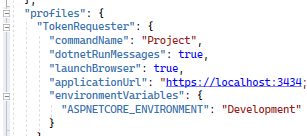
然后我们要向https://localhost:3434/d2lauth发送get请求,然后跳转到 https://auth.brightspace.com/oauth2/auth?response_type=code&client_id=0055e1d6-0d67-47b3-9169- b329a4af7eae&state=ssss&scope=core%3A*%3A*&redirect_uri=https%3A%2F%2Flocalhost%3A3434%2Fredirecturi
然后我们要向 https://localhost:3434/redirecturi发送post请求,来获取鉴权码,也就是authcode,因为我们是基于Oauth2.0协议的。要获取token,首先服务端会验证客户端身份,验证成功后,会返给一个authcode,然后客户端拿着authcode,去换取token,进而在服务端获取相关资源!
接下来就是主要获取token的操作,我们在controller下的文件,编写一个控制器,发送请求,代码如下:
             string authcode = this.HttpContext.Request.Query["code"];

            HttpClient client = new HttpClient();

            Dictionary<string, string> headers = new Dictionary<string, string>();

            headers["grant_type"] = "authorization_code";

            //headers["grant_type"] = "refresh_token";

            headers["client_id"] = "*************";

            headers["client_secret"] = "********************888";

            headers["code"] = authcode;

            //headers["refresh_token"] = "rt.ap-southeast-1.z9I0S2XTQ9EMCRUVaAil8_4C83X7X8yt_6ExSF6VRyk";

            headers["redirect_uri"] = "https://localhost:3434/redirecturi";

            FormUrlEncodedContent content = new FormUrlEncodedContent(headers);

            var url = "https:****************/connect/token";

            var response = await client.PostAsync(url, content);

            string result = response.Content.ReadAsStringAsync().Result;

            Dictionary<string, string> values = JsonConvert.DeserializeObject<Dictionary<string, string>>(result);

            string access_token = values["access_token"];
代码结构很清晰,逻辑就是获取重定向后的authcode,然后我们使用httpclient实例话一个对象,用来发送请求,然后创建一个字典结构,用来存放请求头信息,获取token的必要参数如代码所示,client_id,client_sercet,grant_type,redirect_uri,code,然后我们对这些内容进行编码。之后的操作也很容易理解,response表示发送请求之后的回应,result表示获取到的结果,然后反序列化内容,进而等到token数据中的access_token.

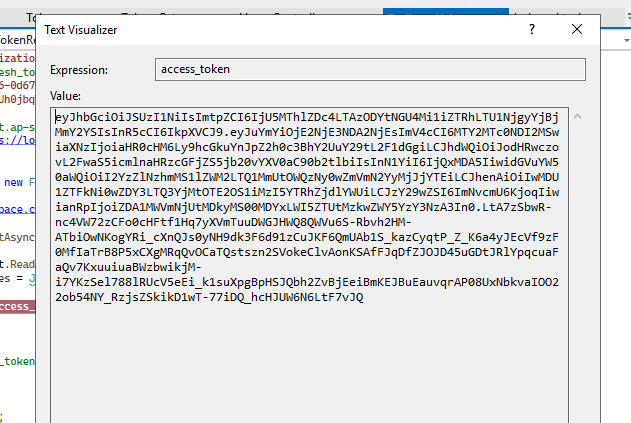
如图,我们就获取了token中的access_token数据了!
上述代码表达了获取token的大致思路,下面看一下结构化代码:
using Microsoft.AspNetCore.Mvc;

using System.Net.Http.Headers;

using System.Text;

namespace TokenRequester.Controllers

{

    public class Token_Get : Controller

    {

        public class AccessTokenSend

        {

            public string client_id { get; set; }

            public string client_secret { get; set; }

            public string code { get; set; }

            public string grant_type { get; set; }

            public string redirect_url { get; set; }

        }

        public IActionResult Index()

        {

            return Redirect("https://auth.brightspace.com/oauth2/auth?response_type=code&client_id=0055e1d6-0d67-47b3-9169-b329a4af7eae&state=ssss&scope=core%3A*%3A*&redirect_uri=https%3A%2F%2Flocalhost%3A3434%2Fredirecturi");

        }

        public async Task<string> GetAccess()

        {

            using (var client = new HttpClient())

            {

                client.BaseAddress = new Uri("https://auth.brightspace.com/core/connect/token");

                var contentType = new MediaTypeWithQualityHeaderValue("application/json");

                client.DefaultRequestHeaders.Accept.Add(contentType);

                AccessTokenSend accessTokenSend = new AccessTokenSend()

                {

                    client_id = "_client_id_",

                    client_secret = "_client_secret",

                    code = "_authorisation_code_from_url",

                    grant_type = "authorization_code",

                    redirect_url = "_redirect_url"

                };

                var json = Newtonsoft.Json.JsonConvert.SerializeObject(accessTokenSend);

                var data = new System.Net.Http.StringContent(json, Encoding.UTF8, "application/x-www-from-urlencoded");

                var result = await client.PostAsync("https://auth.brightspace.com/core/connect/token", data);

                string resultContent = await result.Content.ReadAsStringAsync();

                return resultContent;

            }

        }

    }

}
C#实现登录某web进而获取其token数据的更多相关文章
- SSO单点登录在web上的关键点 cookie跨域
概述 其实WEB单点登录的原理挺简单的,抛开那些复杂的概念,简单来讲讲如何实现一个最基本的单点登录 首先需要有两个程序 例如:http://www.site-a.com 我们简称A http://ww ...
- 2017-2018-2 20155303『网络对抗技术』Final:Web渗透获取WebShell权限
2017-2018-2 『网络对抗技术』Final:Web渗透获取WebShell权限 --------CONTENTS-------- 一.Webshell原理 1.什么是WebShell 2.We ...
- web项目获取资源文件
首页 博客 学院 CSDN学院 下载 论坛 APP CSDN 问答 商城 活动 VIP会员 专题 招聘 ITeye GitChat GitChat 图文课 写博客 消息 1 评论 关注 点赞 回答 系 ...
- 【转】Java Web 项目获取运行时路径 classpath
Java Web 项目获取运行时路径 classpath 假设资源文件放在maven工程的 src/main/resources 资源文件夹下,源码文件放在 src/main/java/下, 那么ja ...
- web qq 获取好友列表hash算法
web qq 获取好友列表hash算法 在使用web qq的接口进行好友列表获取的时候,需要post一个参数:hash 在对其js文件进行分析之后,发现计算hash的函数位于: http://0.we ...
- jQuery Ajax使用FormData上传文件和其他数据,后端web.py获取
参考博文: 通过jQuery Ajax使用FormData对象上传文件 方法一:使用<form>表单初始化FormData对象方式上传文件 前端(JQuery): <form enc ...
- 微信小程序API 登录-wx.login(OBJECT) + 获取微信用户唯一标识openid | 小程序
wx.login(OBJECT) 调用接口获取登录凭证(code)进而换取用户登录态信息,包括用户的唯一标识(openid) 及本次登录的 会话密钥(session_key).用户数据的加解密通讯需要 ...
- Python爬虫实战五之模拟登录淘宝并获取所有订单
经过多次尝试,模拟登录淘宝终于成功了,实在是不容易,淘宝的登录加密和验证太复杂了,煞费苦心,在此写出来和大家一起分享,希望大家支持. 温馨提示 更新时间,2016-02-01,现在淘宝换成了滑块验证了 ...
- HTTP协议下保证登录密码不被获取最健壮方式
原文:http://www.cnblogs.com/intsmaze/p/6009648.html HTTP协议下保证登录密码不被获取最健壮方式 说到在http协议下用户登录如何保证密码安全这个问 ...
随机推荐
- Linux 加密安全和私有CA的搭建方法
常用安全技术 3A: 认证:身份确认 授权:权限分配 审计:监控做了什么 安全通信 加密算法和协议 对称加密: 非对称加密 单向加密:哈希(hash)加密 认证协议 对称加密: 加密和解密使用的是同一 ...
- 常用的函数式接口_Function接口练习_自定义函数模型拼接
package com.yang.Test.FunctionStudy; import java.util.function.Function; /** * 练习:自定义函数模型拼接 * 题目: * ...
- JS常用的3种弹出框
1.提示框 alert // 没有返回值 alert('你好'); 2.确认框 confirm // 返回 false/true let res = confirm('确定删除?'); if(res ...
- Möbius 反演注记
目录 基本理论基础 数论函数 线性筛 Mobius 反演 Dirichlet 卷积 数论分块 / 整除分块 拆函数 时间复杂度分析 基本形式 GCD 形 万能 Prod 的莫比乌斯反演 正常例题 YY ...
- Ubuntu14.04或16.04下普通用户的root权限获得
Ubuntu系统默认不允许使用root登录,因此初始root帐户是不能使用的,需要在普通账户下利用sudo权限修改root密码.然后以root帐户进行相关操作. 具体操作: 1.打开系统,用普通帐户登 ...
- Apache DolphinScheduler & Doris 将于本周六联合进行线上 Meetup
01 - 活动介绍 2020年,大数据成为国家基建的一个重要组成,大数据在越来越多的领域展现威力.随着大数据的应用场景越来越多,大家对数据的响应速度和数据加工工作流的方便程度也提出了更高的要求.在这种 ...
- BZOJ2286/Luogu2495 [Sdoi2011]消耗战 (虚树)
// never forget open "Head.cpp", boy, never ! #include <iostream> #include <cstdi ...
- 如果让我设计一套,TPS百万级API网关!
作者:小傅哥 博客:https://bugstack.cn 沉淀.分享.成长,让自己和他人都能有所收获! 是滴,小傅哥又要准备搞事情了!这次准备下手API网关项目,因为这是所有互联网大厂都有的一个核心 ...
- Taurus.MVC 微服务框架 入门开发教程:项目集成:2、客户端:ASP.NET Core(C#)项目集成:应用中心。
系列目录: 本系列分为项目集成.项目部署.架构演进三个方向,后续会根据情况调整文章目录. 本系列第一篇:Taurus.MVC V3.0.3 微服务开源框架发布:让.NET 架构在大并发的演进过程更简单 ...
- HDU2065 “红色病毒”问题 (指数型母函数经典板题)
题面 医学界发现的新病毒因其蔓延速度和Internet上传播的"红色病毒"不相上下,被称为"红色病毒",经研究发现,该病毒及其变种的DNA的一条单链中,胞嘧啶, ...