
安装DevExpress VCL,使用时报错 某单元文件找不到的解决办法
1.新建一个工程做为测试
2.点击projecct-->options
3.

4.
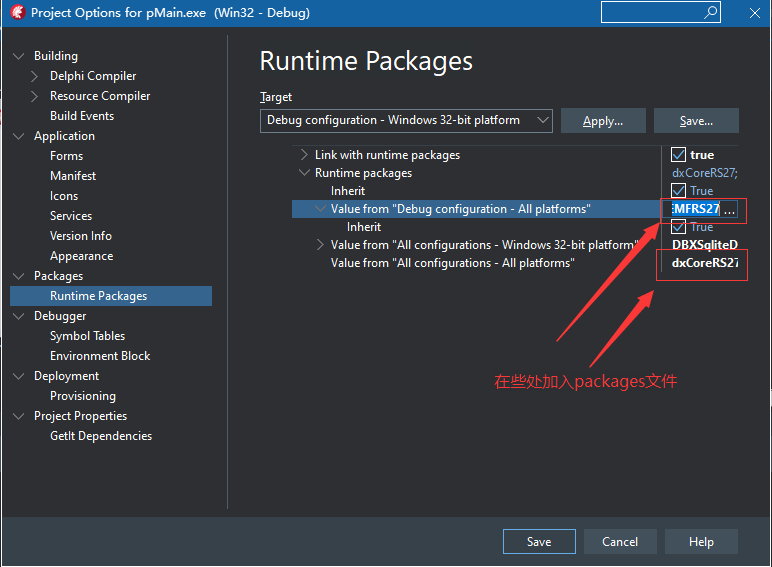
5.在上4图上的红框内加入packages文件
dxCoreRS27;dxGDIPlusRS27;dxComnRS27;cxADOAdaptersRS27;cxFireDACAdaptersRS27;cxIBXAdaptersRS27;cxLibraryRS27;dxADOServerModeRS27;dxCloudServiceLibraryRS27;dxDBXServerModeRS27;dxFireDACServerModeRS27;dxHttpIndyRequestRS27;dxServerModeRS27;cxPageControldxBarPopupMenuRS27;dxWizardControlRS27;dxDockingRS27;dxSpreadSheetCoreConditionalFormattingDialogsRS27;dxSpreadSheetCoreRS27;dxSpreadSheetConditionalFormattingDialogsRS27;dxSpreadSheetReportDesignerRS27;dxSpreadSheetRS27;cxExportRS27;cxSchedulerGridRS27;cxSchedulerRibbonStyleEventEditorRS27;cxSchedulerRS27;cxSchedulerTreeBrowserRS27;cxSchedulerWebServiceStorageRS27;cxTreeListdxBarPopupMenuRS27;cxTreeListRS27;dxBarDBNavRS27;dxBarExtDBItemsRS27;dxBarExtItemsRS27;dxBarRS27;dxRibbonCustomizationFormRS27;dxRibbonRS27;dxTabbedMDIRS27;cxVerticalGridRS27;dxmdsRS27;dxSpellCheckerRS27;dxTileControlRS27;dxNavBarRS27;dxSkinBasicRS27;dxSkinBlackRS27;dxSkinBlueprintRS27;dxSkinBlueRS27;dxSkinCaramelRS27;dxSkinCoffeeRS27;dxSkinDarkRoomRS27;dxSkinDarkSideRS27;dxSkinDevExpressDarkStyleRS27;dxSkinDevExpressStyleRS27;dxSkinFoggyRS27;dxSkinGlassOceansRS27;dxSkinHighContrastRS27;dxSkiniMaginaryRS27;dxSkinLilianRS27;dxSkinLiquidSkyRS27;dxSkinLondonLiquidSkyRS27;dxSkinMcSkinRS27;dxSkinMetropolisDarkRS27;dxSkinMetropolisRS27;dxSkinMoneyTwinsRS27;dxSkinOffice2007BlackRS27;dxSkinOffice2007BlueRS27;dxSkinOffice2007GreenRS27;dxSkinOffice2007PinkRS27;dxSkinOffice2007SilverRS27;dxSkinOffice2010BlackRS27;dxSkinOffice2010BlueRS27;dxSkinOffice2010SilverRS27;dxSkinOffice2013DarkGrayRS27;dxSkinOffice2013LightGrayRS27;dxSkinOffice2013WhiteRS27;dxSkinOffice2016ColorfulRS27;dxSkinOffice2016DarkRS27;dxSkinOffice2019BlackRS27;dxSkinOffice2019ColorfulRS27;dxSkinOffice2019DarkGrayRS27;dxSkinOffice2019WhiteRS27;dxSkinPumpkinRS27;dxSkinsCoreRS27;dxSkinSevenClassicRS27;dxSkinSevenRS27;dxSkinSharpPlusRS27;dxSkinSharpRS27;dxSkinSilverRS27;dxSkinSpringTimeRS27;dxSkinStardustRS27;dxSkinSummer2008RS27;dxSkinTheAsphaltWorldRS27;dxSkinTheBezierRS27;dxSkinValentineRS27;dxSkinVisualStudio2013BlueRS27;dxSkinVisualStudio2013DarkRS27;dxSkinVisualStudio2013LightRS27;dxSkinVS2010RS27;dxSkinWhiteprintRS27;dxSkinXmas2008BlueRS27;dxPSCoreRS27;dxPScxCommonRS27;dxPScxExtCommonRS27;dxPScxGridLnkRS27;dxPScxPCProdRS27;dxPScxPivotGridLnkRS27;dxPScxSchedulerLnkRS27;dxPScxTLLnkRS27;dxPScxVGridLnkRS27;dxPSDBTeeChartRS27;dxPSdxDBOCLnkRS27;dxPSdxDBTVLnkRS27;dxPSdxFCLnkRS27;dxPSdxGaugeControlLnkRS27;dxPSdxLCLnkRS27;dxPSdxMapControlLnkRS27;dxPSdxOCLnkRS27;dxPSdxPDFViewerLnkRS27;dxPSdxSpreadSheetLnkRS27;dxPSLnksRS27;dxPSPrVwAdvRS27;dxPSPrVwRibbonRS27;dxPSRichEditControlLnkRS27;dxPSTeeChartRS27;cxPivotGridChartRS27;cxPivotGridOLAPRS27;cxPivotGridRS27;dxdbtrRS27;dxtrmdRS27;dxDBOrRS27;dxOrgChartAdvancedCustomizeFormRS27;dxOrgCRS27;dxFlowChartAdvancedCustomizeFormRS27;dxFlowChartDesignerRS27;dxFlowChartLayoutsRS27;dxFlowChartRS27;dxMapControlRS27;cxGridEMFRS27;cxGridRS27;dxGanttControlRS27;dxGanttControlSchedulerStorageImporterRS27;dxRichEditControlCoreRS27;dxRichEditControlDocFormatRS27;dxRichEditControlHtmlFormatRS27;dxRichEditControlOpenXMLFormatRS27;dxRichEditControlRS27;dxRichEditCoreRS27;dxRichEditDocumentModelRS27;dxGaugeControlRS27;dxPDFViewerRS27;dxADOEMFRS27;dxEMFDataRS27;dxEMFRS27;dxFireDACEMFRS27
6,点击save保存后,就可以使用devexpress插件,本人已经测试成功,环境:OS:WIN10 64bit,IDE:delphi10.4.1,Dev verison: 21.1.4
7.参考:https://www.280i.com/blog/10278.html.
安装DevExpress VCL,使用时报错 某单元文件找不到的解决办法的更多相关文章
- linux安装jdk1.8之后报错Error: dl failure on line 893的解决办法
问题描述:安装jdk1.8之后,输入java -version查看安装是否成功之后,报错: 报错如下: Error: dl failure on line 893 Error: failed /u ...
- [CentOS]CentOS下编译CPP文件时报错[undefined reference to `__gxx_personality_v0' collect2: ld]的解决办法
在CentOS环境下编译CPP时报出 undefined reference to `__gxx_personality_v0' collect2: ld 以上错误,调查了一下,加上参数[-lstdc ...
- CentOS 6.5安装PostgreSQL9.3.5时报错: jade: Command not found
CentOS 6.5安装PostgreSQL9.3.5时报错: jade: Command not found 1[root@pghost1 postgresql-9.3.5]# ./configur ...
- 新安装的soapui启动时报错及解决方法
今天新安装了soapui准备测试一下接口,结果安装成功后启动时报错:The JVM could not be started. The maximum heap size (-Xmx) might b ...
- 安装FreeIPA以及应用时报错汇总
安装FreeIPA以及应用时报错汇总 作者:尹正杰 版权声明:原创作品,谢绝转载!否则将追究法律责任. 一.ERROR DNS zone yinzhengjie.org.cn already exis ...
- 关于go get安装git golang项目时报错的处理办法
关于go get安装git golang项目时报错的处理办法 使用go get安装github上的项目时一般来说,不可避免会出错.各种错误的处理办法: 必须条件: 1.安装git并配置环境变量.下载地 ...
- mac安装protobuf2.4.1时报错./include/gtest/internal/gtest-port.h:428:10: fatal error: 'tr1/tuple' file not found和google/protobuf/message.cc:175:16: error: implicit instantiation of undefined template
通过网上下载的protobuf2.4.1的压缩文件,然后进行安装,./configure和make时遇到了两个问题. 正常的安装步骤如下: ./configure make make check m ...
- 使用npm安装 Ant Design Vue 时报错—ant-design-vue@latest(sha1-qsf / gCIFcRYxyGmOKgx7TmHf1z4 =)seems to be corrupted.
安装 Ant Design Vue 时报错: npm install ant-design-vue --save ant-design-vue @ latest(sha1-qsf / gCIFcRYx ...
- Scrapy安装报错 Microsoft Visual C++ 14.0 is required 解决办法
Scrapy安装报错 Microsoft Visual C++ 14.0 is required 解决办法原因:Scrapy需要的组 twisted 需要 C++环境编译. 方法一:根据错误提示去对应 ...
- Laravel5.5执行 npm run dev时报错,提示cross-env找不到(not found)的解决办法
Laravel 5.4 Mix & Laravel5.5执行 npm run dev时报错,提示cross-env找不到(not found)的解决办法 首先进入package.json文 ...
随机推荐
- react ts 上传
public MessageObjectPO<UploadPO> OnPostUpload(UploadRO uploadRO) { var response = new MessageO ...
- VScode打开文件夹位置技巧
VScode在打开文件夹,弹出对话框的时候,去文件夹(应用)到达该路径,对话框中的路径自动变为当前文件夹(应用)的路径.去文件夹(应用)到达该路径
- Java数组之多维数组
多维数组 多维数组可以看成是数组的数组,比如二维数组就是一个特殊的一维数组,其每一个元素都是一个一维数组. 二维数组 int a[][] = new int[2][5]; 解析:以上二维数组a可以看成 ...
- Unity多线程使用(线程池)
1.在C#中使用线程池需要以下这个类库using System.Threading 2.开单个线程(unity程序停止前 线程一定要关闭) private Thread tempThread; voi ...
- memoの颜色配置
Visual Studio的配置 没啥说的,直接上网站: https://studiostyl.es/schemes/create 顺便保存一份我的配置 一些有趣的插件:Amigo 主题配色,还是Bl ...
- spring boot权限设计资源
源代码 https://github.com/2237995998/education 博客说明 https://blog.csdn.net/weixin_45138601/article/detai ...
- MVC内置对象
MVC内置函数 ----HTML页 <!DOCTYPE html> <html> <head> <meta charset="utf-8&q ...
- HDOJ--1010题C++
有两点需要注意,第一点就是,题意是指在第T秒时门才打开,并不是越早到门口就能越早出去,而是只要存在指定长的路径即可以出去. 第二点,每次深搜发现答案不符都必须将点重新初始化.#include<i ...
- APP性能测试——热启动耗时测试
热启动耗时: 即当启动应用时,后台已有该应用的进程(我们模拟按下HOME键),打开软件,直到进入到首页activity页面,并计算耗时. 示例代码: import os import time def ...
- openSuse Tumbleweed 安装钉钉
办公软件钉钉提供了 Linux 版本,但是只有deb安装包. https://page.dingtalk.com/wow/z/dingtalk/default/dddownload-index ope ...