
kali添加开机自启[亲测有效]
kali添加开机自启
采用systemd的方法,kali默认是没有rc.local的,需要自己创建。本方法也适用于ubuntu 18.04 64bit
改写rc-local.service 文件
先从lib中拿出模板文件进行更改
sudo cp /lib/systemd/system/rc-local.service /etc/systemd/system/rc-local.service
再vim修改
sudo vim /etc/systemd/system/rc-local.service
主要是添加[install]复制最下面的[install]即可
#  SPDX-License-Identifier: LGPL-2.1+

#

#  This file is part of systemd.

#

#  systemd is free software; you can redistribute it and/or modify it

#  under the terms of the GNU Lesser General Public License as published by

#  the Free Software Foundation; either version 2.1 of the License, or

#  (at your option) any later version.

# This unit gets pulled automatically into multi-user.target by

# systemd-rc-local-generator if /etc/rc.local is executable.

[Unit]

Description=/etc/rc.local Compatibility

Documentation=man:systemd-rc-local-generator(8)

ConditionFileIsExecutable=/etc/rc.local

After=network.target

[Service]

Type=forking

ExecStart=/etc/rc.local start

TimeoutSec=0

RemainAfterExit=yes

GuessMainPID=no

[Install]

WantedBy=multi-user.target
创建/etc/rc.local文件
sudo vim /etc/rc.local
#!/bin/bash

#!/bin/bash

#

# rc.local

#

# This script is executed at the end of each multiuser runlevel.

# Make sure that the script will "exit 0" on success or any other

# value on error.

#

# In order to enable or disable this script just change the execution

# bits.

#

# By default this script does nothing.

/home/ki/桌面/frp_0.36.2_linux_amd64/frpc -c /home/ki/桌面/frp_0.36.2_linux_amd64/frpc.ini &

exit 0
注意,注释到执行代码这片区域中间不要有空行。不然该服务会将空行当命令执行,所以就会报错。命令后面我加上
&是表示在后台执行
设置执行权限
sudo chmod a+x /etc/rc.local
检查脚本是否正确
含义分别是重载服务,启动服务,查看服务状态
sudo systemctl enable rc-local

sudo systemctl start rc-local.service

sudo systemctl status rc-local.service
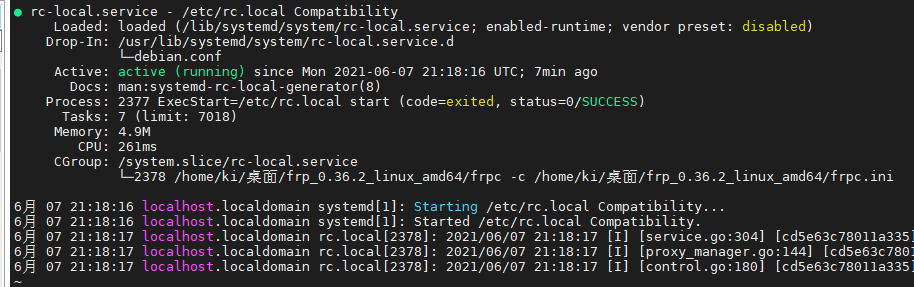
可能出现的问题
- 出现active,但是下面日志出现报错
则你的systemd服务顺利执行了。但是你的/etc/rc.local脚本有问题。自己执行下这个命令看看能不能正确执行该脚本。不能那就检查脚本代码,注意不要出现空行。重新检查文件执行权限
./etc/rc.local
- 没显示active
那么就是你的/etc/systemd/system/rc-local.service 写的不对。重新检查下,特别是[install]部分
kali添加开机自启[亲测有效]的更多相关文章
- Redis单机部署、添加开机自启、配置参数
1.Redis简介 redis是使用C语言编写的开源的,支持网络,基于内存,可持久性的键值对存储数据库,2013年5月之前,Redis是最流行的键值对存储数据库,Redis采用内存数据集,支持多种数据 ...
- Centos 7 redis、tomcat、Spring Boot添加开机自启服务
一.redis添加开机自启 1.添加服务配置文件 [root@test system]# vim /etc/systemd/system/redis-server.service 2.服务配置文件内容 ...
- ubuntu添加开机自启和sysv-rc-conf
此文ubuntu使用sysvinit,而非upstart UBUNTU添加开机自动启动程序方法 1. 开机启动时自动运行程序 Linux加载后, 它将初始化硬件和设备驱动, 然后运行第一个进程i ...
- ubuntu-18.04 设置开机启动脚本-亲测有效
ubuntu-18.04不能像ubuntu14一样通过编辑rc.local来设置开机启动脚本,通过下列简单设置后,可以使rc.local重新发挥作用. 2.将下列内容复制进rc-local.servi ...
- zabbix添加开机自启
原文链接:https://www.cnblogs.com/zydev/p/6888805.html 1. zabbix客户端的系统服务脚本 1.1 拷贝启动脚本 zabbix的源码提供了系统服务脚本, ...
- linux中添加开机自启服务的方法
往文件/etc/rc.d/rc.local中追加内容即可,如: /mongodb/start_mongoDB.sh
- 【centos7】添加开机启动服务/脚本
一.添加开机自启服务 在centos7中添加开机自启服务非常方便,只需要两条命令(以Jenkins为例): systemctl enable jenkins.service #设置jenkins服务为 ...
- centos7如何添加开机启动服务/脚本
一.添加开机自启服务 在centos7中添加开机自启服务非常方便,只需要两条命令(以Jenkins为例): systemctl enable jenkins.service #设置jenkins服务为 ...
- Centos 下添加开机自启动服务和脚本
最近刚玩Centos7的系统,跟Centos6还是很多方面有改变的,这里记录一下怎么在Centos7下添加开机自启动脚本和服务的方法. 1.添加开机自启服务 我这里以docker 服务为例,设置如下两 ...
随机推荐
- Ajax结合THymeleaf使用
<script type="text/javascript"> //通过$("标签"),也可以使用id的点击事件 $("a"). ...
- web自动化之selenium(六)利用坐标点定位
这是通过第三发库实现对元素的定位,因为在无法定位元素的时候,只能通过外部来定位,此时就可以使用pyautogui模块,操作鼠标,模拟人进行操作 # 使用注意事项,不要过于的依赖它 1.使用时需要在通过 ...
- Spark 在 Window 环境下的搭建
1.java/scala的安装 - 安装JDK下载: http://www.oracle.com/technetwork/java/javase/downloads/jdk8-downloads-21 ...
- idea创建web项目以及配置Tomcat
废话不多说,直接上干活: 1.在project中现创建好module,也就是java web项目 2.把路径名写清楚就行了 3.创建在WEB-INF上右击创建classes和lib以存储class编译 ...
- 同一局域网ping ip 失败(可能是你的路由器坑了你)
事件起源:手机需要通过fiddler代理抓包 一顿操作猛如虎,手机输入ip+端口,芭比q了,连接不上.. 解决思路: 一.保证双方处于同一局域网内 二.查看电脑配置,找到 防火墙,关闭防火墙,再试 三 ...
- 比较HQL、Criteria、Native-SQL这三者做查询的区别,以及应该如何进行选择?
HQL功能很强大,适合各种情况,但是动态条件查询构造起来很不方便: Criteria 最适合动态查询,但不太适合统计查询,QBE还不够强大.只适合简单的查询: Native-SQL可以实现特定的数据库 ...
- zookeeper 是如何保证事务的顺序一致性的?
zookeeper 采用了全局递增的事务 Id 来标识,所有的 proposal(提议)都在被 提出的时候加上了 zxid,zxid 实际上是一个 64 位的数字,高 32 位是 epoch(时 期; ...
- C# 如何让new 出来的form显示在最外层?
/// <summary> /// 显示比对不同点的位置 /// </summary> public void showDiffImage() { //在此处弹出不一样图 Bi ...
- 我对arguments.callee的理解
基本理解: 你怎么看待一个函数呢?又如何看待一个函数对象呢?函数和Function之间的关系到底是什么?我觉得理解这些对理解arguments.callee有所帮助. 先说说auguments.cal ...
- int 和 Integer 有什么区别?
Java 是一个近乎纯洁的面向对象编程语言,但是为了编程的方便还是引入了基本 数据类型,但是为了能够将这些基本数据类型当成对象操作,Java 为每一个基本 数据类型都引入了对应的包装类型(wrappe ...