
donet core 应用 部署到CentOS
创建应用
新建一个Asp.net core Web API 应用
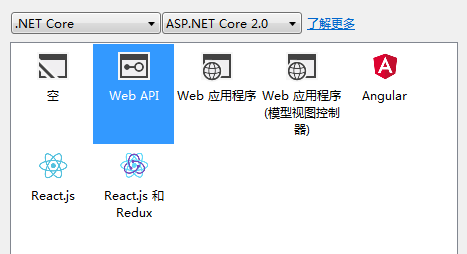
在program里指定监听端口
public static IWebHost BuildWebHost(string[] args) =>
            WebHost.CreateDefaultBuilder(args)
                .UseStartup<Startup>()
                .UseKestrel(options =>
                {
                    options.Listen(IPAddress.Any, );

                })
                .Build();
在应用目录使用dotnet publish 发布文件
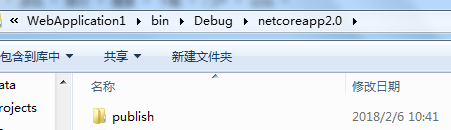
将发布的文件上传至CentOS里面
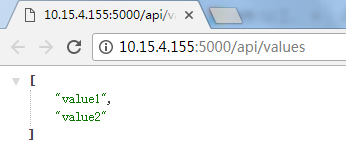
使用命令测试
dotnet WebApplication1.dll

打开浏览器:http://10.15.4.155:5000/api/values
配置反向代理
修改Nginx配置
vi /usr/local/nginx/conf/nginx.conf
添加反向代理
server {
    listen ;
    location / {
        proxy_pass http://localhost:5000;
        proxy_http_version 1.1;
        proxy_set_header Upgrade $http_upgrade;
        proxy_set_header Connection keep-alive;
        proxy_set_header Host $http_host;
        proxy_cache_bypass $http_upgrade;
    }
}
重新启动Nginx
service nginx reload
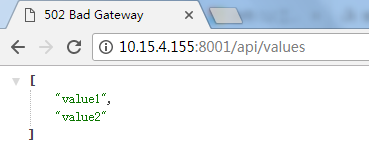
打开浏览器:http://10.15.4.155:8001/api/values
在CentOS中,要想在不退出Web服务的情况下返回shell,可以按Ctrl+Z,此时如果想要关掉Web应用,可以先查找进程,然后杀掉
ps -ef | grep WebApplication1
netstat -anp|grep

kill -

配置SSL
使用OpenSSL生成证书
首先自己创建根证书 root 自己做CA也就是发行者。
openssl genrsa -des3 -out root.key
然后按照提示输入密码
openssl req -new -key root.key -out root.csr
输入刚才设置的密码,然后填写一些信息
然后创建一个10年期根证书 root.crt
openssl x509 -req -days -sha1 -extensions v3_ca -signkey root.key -in root.csr -out root.crt
接下来创建服务器证书
openssl genrsa -des3 -

openssl req -new -key server.key -out server.req

openssl x509 -req -days  -sha1 -extensions v3_req -CA root.crt -CAkey root.key -CAserial root.srl -CAcreateserial -in server.key -out server.crt
导出pfx格式
openssl pkcs12 -export -in server.crt -inkey server.key -out server.pfx
将生成的server.pfx通过放到网站根目录下
修改Startup的ConfigureServices要求全局使用HTTPS
//配置使用HTTPS
            services.Configure<MvcOptions>(options =>
            {
                options.Filters.Add(new RequireHttpsAttribute());
            });
修改Configure
//HTTP重定向到HTTPS
            var options = new RewriteOptions().AddRedirectToHttps();
            app.UseRewriter(options);
修改program代码
public static IWebHost BuildWebHost(string[] args) =>
            WebHost.CreateDefaultBuilder(args)
                .UseStartup<Startup>()
                .UseKestrel(options =>
                {
                    options.Listen(IPAddress.Any, ,listenOptions=> {
                        listenOptions.UseHttps("server.pfx","test");
                    });

                })
                .Build();
重新发布到CentOS中,记得将证书也放到目录中
开启应用

打开浏览器
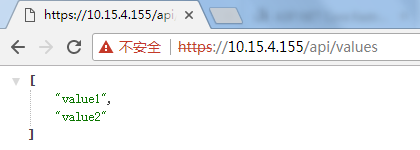
使用HTTP是无法打开的。
使用程序访问
static void Main(string[] args)
        {
            string url = "https://localhost/api/values";
            using (HttpClient client = new HttpClient())
            {
                ServicePointManager.ServerCertificateValidationCallback = delegate { return true; };
                var response = client.GetAsync(url);
                Console.WriteLine(response.Result.Content.ReadAsStringAsync().Result);
            }
            Console.ReadKey();
        }
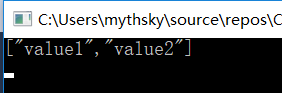
当实际生产部署的时候就不用自签名证书了,一般SSL证书供应商都会提供几种格式的证书
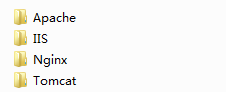
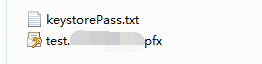
这里选用IIS的就可以,一般在申请证书的时候如果使用了密码,那么生成的IIS证书里面就不带密码,如果申请的时候不使用密码,那么生成的IIS证书目录下会有个随机密码
将网站应用部署成服务
创建配置文件
vi /etc/systemd/system/hellomvc.service
编辑文件
[Unit]
Description=Example .NET Web API App running on CentOS

[Service]
WorkingDirectory=/opt/WebWithSSL/
ExecStart=/usr/bin/dotnet /opt/WebWithSSL/WebApplication1.dll
Restart=always
RestartSec=  # Restart service after  seconds if dotnet service crashes
SyslogIdentifier=dotnet-example
User=root
Environment=ASPNETCORE_ENVIRONMENT=Production
Environment=DOTNET_PRINT_TELEMETRY_MESSAGE=false

[Install]
WantedBy=multi-user.target
启用服务
systemctl enable hellomvc.service
启动服务
systemctl start hellomvc.service
查看服务状态
systemctl status hellomvc.service
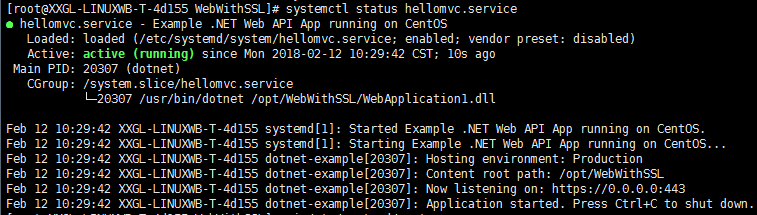
这里的 /usr/bin/dotnet 是dotnet默认安装位置,后面的是网站应用的文件位置。
donet core 应用 部署到CentOS的更多相关文章
- dotNet core 应用部署至 centos(超详解附截图)
文章来源:公众号-智能化IT系统. 需要安装的插件以及支撑架构 1.dotnetSDK dotnet 相关命令是属于 .NET Core command-line (CLI) 的一部分,Microso ...
- 1.6部署到CentOS「深入浅出ASP.NET Core系列」
希望给你3-5分钟的碎片化学习,可能是坐地铁.等公交,积少成多,水滴石穿,谢谢关注. 安装.NET Core 官方安装地址: https://www.microsoft.com/net/learn/d ...
- Asp.Net Core 程序部署到Linux(centos)生产环境(二):docker部署
运行环境 照例,先亮环境:软件的话我这里假设你已经批准好了.net core 运行环境,未配置可以看我的这篇[linux(centos)搭建.net core 运行环境] 腾讯云 centos:7.2 ...
- Asp.Net Core 程序部署到Linux(centos)生产环境(一):普通部署
运行环境 照例,先亮底 centos:7.2 cpu:1核 2G内存 1M带宽 辅助工具:xshell xftp 搭建.net core运行环境 .net core 的运行环境我单独写了一篇,请看我的 ...
- 【ASP.NET Core快速入门】(四)在CentOS上安装.NET Core运行时、部署到CentOS
下载.NET Core SDK 下载地址:https://www.microsoft.com/net/download/windows 第一步:Add the dotnet product feed( ...
- .Net Core 使用 System.Drawing.Common 部署到CentOS上遇到的问题
一开始报这个错误:Unable to load shared library 'libdl' 找到libdl安装位置是/usr/lib64: #locate libdl /usr/lib64/libd ...
- 菜鸟入门【ASP.NET Core】4:在CentOS上安装.NET Core运行时、部署到CentOS
下载.NET Core SDK 下载地址:https://www.microsoft.com/net/download/windows 第一步:Add the dotnet product feed( ...
- .NET Core 部署到CentOS–1.创建项目,简单部署
开发环境:Windows 10,部署环境:阿里云 CentOS 7.3 1. 创建应用 1) 创建项目, 配置应用生成部署包 2) 配置项目 编辑project.json, 追加环境项, 选项可参考这 ...
- .NET Core 部署到CentOS–2.创建守护进程, 通过Nginx公网访问
继上一篇, 我们确定在内网可以通过 "http://localhost:5000",可以访问到站点后,接下来我们要配置"守护进程","Nginx公网8 ...
随机推荐
- html5 ajax多图片可预览上传图片
最近不是特别忙,我就利用html5写了个上传图片(或其他文件)的页面,主要利用是html5的file api,此页面比较简陋,没做样式的优化,包含上传图片预览,多图片上传,上传进度条(利用html5的 ...
- (最长公共子序列 暴力) Common Subsequence (poj 1458)
http://poj.org/problem?id=1458 Description A subsequence of a given sequence is the given sequence w ...
- eclipse选中某个字段没法高亮其他相同字段
eclipse选中某个字段无法高亮其他相同字段解决办法: window >> preference >> java >> Editor >> Mark ...
- hdu 4961 数论?
http://acm.hdu.edu.cn/showproblem.php?pid=4961 给定ai数组; 构造bi, k=max(j | 0<j<i,a j%ai=0), bi=ak; ...
- hdu 1.2.5
#include<cstdio> #include<cstring> int main() { //freopen("input.txt","r& ...
- HSmartWindowControl 之 摄像头实时显示( 使用 WPF )
1.添加Halcon控件,创建WPF项目 在VS2013中创建一个WPF工程,然后添加halcon的控件和工具包,参见: HSmartWindowControl之安装篇 (Visual Studio ...
- ASP.NET Core ef启用数据迁移
创建一个项目 通过Nuget获取EF Core相关的扩展包 appsettings.json 建立数据库连接串 创建数据库上下文EntityDbContext类,用于实体类映射数据库表 使用包管理器控 ...
- WinForm企业级框架实战项目演练
一.课程介绍 我们都知道在软件架构方式分为:C/S和B/S两类.这里阿笨不谈论两种软件架构的优劣之分,因为它们各有千秋,用于不同场合.一位伟大的讲师曾经说过一句话:事物存在即合理!录制这堂课程的目的就 ...
- 【CS】笔试常见题目
网络 IP地址分类 常见网络协议 HTTP状态码 算法 排序问题总结 git git和svn的区别 git常用命令 git暂存区,工作区等 一.网络 1. IP地址分类: IP网络使用32位地址,以点 ...
- Linux常用命令 - ls
目录 Linux常用命令-ls 简介 ls -F ls -a ls -R ls -l 后记 Linux常用命令-ls 简介 ls主要用于显示文件和目录列表.作为最常见的Linux命令,大家应该都不会陌 ...