
[微软]The latest version of Windows is Windows Sandbox
The latest version of Windows is Windows Sandbox
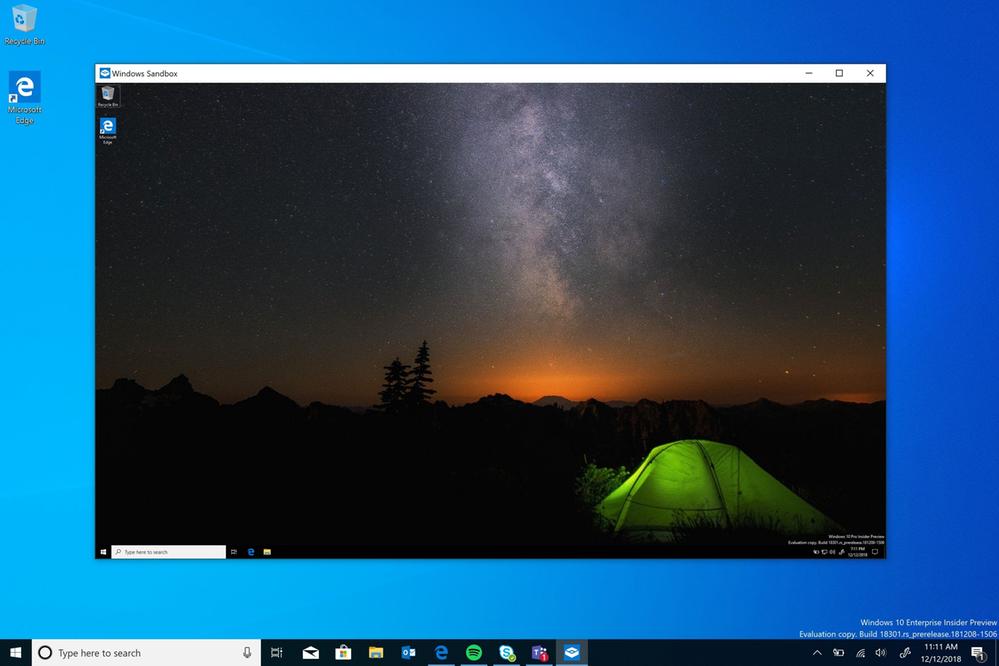
As has been rumoured earlier, Microsoft has now confirmed a new Windows 10 feature called Windows Sandbox. Windows Sandbox is a new lightweight desktop environment tailored for safely running applications in isolation.
Windows Sandbox is an isolated, temporary, desktop environment where you can run untrusted software without the fear of lasting impact to your PC. Any software installed in Windows Sandbox stays only in the sandbox and cannot affect your host. Once Windows Sandbox is closed, all the software with all its files and state are permanently deleted.
Windows Sandbox has the following properties:
- Part of Windows – everything required for this feature ships with Windows 10 Pro and Enterprise. No need to download a VHD!
- Pristine – every time Windows Sandbox runs, it’s as clean as a brand-new installation of Windows
- Disposable – nothing persists on the device; everything is discarded after you close the application
- Secure – uses hardware-based virtualization for kernel isolation, which relies on the Microsoft’s hypervisor to run a separate kernel which isolates Windows Sandbox from the host
- Efficient – uses integrated kernel scheduler, smart memory management, and virtual GPU
Prerequisites for using the feature include:
- Windows 10 Pro or Enterprise build 18301 or later
- AMD64 architecture
- Virtualization capabilities enabled in BIOS
- At least 4GB of RAM (8GB recommended)
- At least 1 GB of free disk space (SSD recommended)
- At least 2 CPU cores (4 cores with hyperthreading recommended)
To use the feature:
- Install Windows 10 Pro or Enterprise, build 18292 or newer
- Enable virtualization:
- If you are using a physical machine, ensure virtualization capabilities are enabled in the BIOS.
- If you are using a virtual machine, enable nested virtualization with this PowerShell cmdlet:
- Set-VMProcessor -VMName <VMName> -ExposeVirtualizationExtensions $true
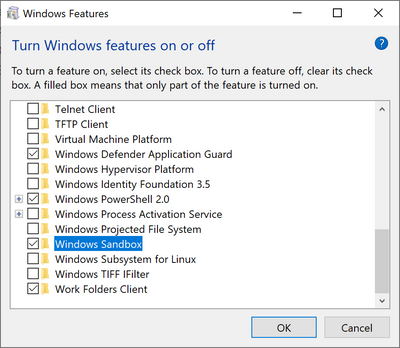
- Open Windows Features, and then select Windows Sandbox. Select OK to install Windows Sandbox. You might be asked to restart the computer.
- Using the Start menu, find Windows Sandbox, run it and allow the elevation
- Copy an executable file from the host
- Paste the executable file in the window of Windows Sandbox (on the Windows desktop)
- Run the executable in the Windows Sandbox; if it is an installer go ahead and install it
- Run the application and use it as you normally do
- When you’re done experimenting, you can simply close the Windows Sandbox application. All sandbox content will be discarded and permanently deleted
- Confirm that the host does not have any of the modifications that you made in Windows Sandbox.
https://mspoweruser.com/the-latest-version-of-windows-is-windows-sandbox/
[微软]The latest version of Windows is Windows Sandbox的更多相关文章
- 和S5933比较起来,开发PLX9054比较不幸,可能是第一次开发PCI的缘故吧。因为,很多PCI的例子都是对S5933,就连微软出版的《Programming the Microsoft Windows Driver Model》都提供了一个完整的S5933的例子。 在这篇有关DDK的开发论文里。
和S5933比较起来,开发PLX9054比较不幸,可能是第一次开发PCI的缘故吧.因为,很多PCI的例子都是对S5933,就连微软出版的<Programming the Microsoft Wi ...
- [转帖]微软宣布即将开始大规模推送Windows 10 V1903重大版本更新
微软宣布即将开始大规模推送Windows 10 V1903重大版本更新 https://www.cnbeta.com/articles/tech/894303.htm 微软要批量更新 1903了 bu ...
- 微软提供了三个核心服务:Windows+Office 365+Azure
微软提供了三个核心服务:Windows+Office 365+Azure 英语新闻来源:http://techcrunch.com/2014/11/10/microsofts-ceo-breaks-d ...
- 微软MVP社区秋日巡讲 —— 北京Windows Phone应用开发训练营
微软MVP社区秋日巡讲 —— 北京Windows Phone应用开发训练营 活动说明和报名地址www.aka.ms\mvpbeijing 欢迎北京的朋友参与在今年10月举办的Windows Phon ...
- Solve: Your project references the latest version of Entity Framework (for MySQL) in Visual Studio 2013
The error message while trying to create a ADO.net Entity Data Model ( Entity Framework 6 ) for MySq ...
- Memory Limits for Windows and Windows Server Releases
来源:https://msdn.microsoft.com/en-us/library/windows/desktop/aa366778(v=vs.85).aspx Limits on memory ...
- Notice to users of DB Query Analyzer in Windows 7, Windows 8 and Windows 10
UnlikeWinXP, VISTA, Windows2000, Windows Nt and Win98,Windows 7 / Windows 8 / Windows 10 select ...
- How to detect, enable and disable SMBv1, SMBv2, and SMBv3 in Windows and Windows Server
转自:https://support.microsoft.com/en-us/help/2696547/detect-enable-disable-smbv1-smbv2-smbv3-in-windo ...
- [转载]Memory Limits for Windows and Windows Server Releases
Memory Limits for Windows and Windows Server Releases This topic describes the memory limits for sup ...
随机推荐
- 密码破解技术——P201421410029
学 号 201421410029 中国人民公安大学 Chinese people’ public security university 网络对抗技术 实验报告 实验三 密码破解技术 ...
- oracle 删除重复数据
1.找出重复数据 select count(1),uuid from ts.test group by uuid having count(1)>1 order by 1 desc ;---找 ...
- JS图片Switchable切换大集合
JS图片切换大集合 利用周末2天把JS图片切换常见效果封装了下,比如:轮播,显示隐藏,淡入淡出等.废话不多说,直接看效果吧!JSFiddler链接如下: 想看JS轮播切换效果请点击我! 当然由于上传图 ...
- STM32 中 BIT_BAND(位段/位带)和别名区使用入门(转载)
一. 什么是位段和别名区 是这样的,记得MCS51吗? MCS51就是有位操作,以一位(BIT)为数据对象的操作,MCS51可以简单的将P1口的第2位独立操作: P1.2=0;P1.2=1 :这样就把 ...
- 在mvc视图中实现rdlc报表展示(补充)
上篇: 在mvc视图中实现rdlc报表展示 在上一遍中,由于不知道如何在aspx.cs后台中实例化abp的IxxxAppService.cs的接口,我采取的方式是在视图页中把查询出的数据存储到aspx ...
- C# 含转义符的字符串处理
如果一个字符串中含有特殊字符,比如"号,如何将一个含有引号"的字符串赋值给一个变量. string a = @"sfsfsf"""; str ...
- linux中原子操作实现方式
原子操作提供了指令原子执行,中间没有中断.就像原子被认为是不可分割颗粒一样,原子操作(atomic operation)是不可分割的操作. 如下面简单的例子: Thread 1 ...
- [Jsoi2016]最佳团体 BZOJ4753 01分数规划+树形背包/dfs序
分析: 化简一下我们可以发现,suma*ans=sumb,那么我们考虑二分ans,之后做树形背包上做剪枝. 时间复杂度证明,By GXZlegend O(nklogans) 附上代码: #includ ...
- 2017-2018 Exp7 网络欺诈技术防范 20155214
目录 Exp7 网络欺诈技术防范 实验内容 信息收集 知识点 Exp7 网络欺诈技术防范 实验内容 实验环境 主机 Kali 靶机 Windows 10 实验工具 平台 Metaploit 信息收集 ...
- 全方位Bindind分析
Binding,音译为绑定,通道捆她想一条数据的高速绑着“源”与“目标”: “源”乃提供数据的一方:“目标”乃接收数据并作出相应反应的一方: 过程感觉就像是,给一个“激励”,就会作出“反应”那样--- ...