
【Qt】QOpenGLWidget展示蒙版效果
关键代码是派生QOpenGLWidget,覆写paintEvent函数
QPainter p;

    p.begin(this);

    p.drawImage(QPoint(, ), m_Img);

    QLinearGradient grad(, , rect().width(), rect().height());

           {

                   QGradientStops gs;

                   gs << QGradientStop(0.0, QColor(,,,))

                           << QGradientStop(0.5, QColor(,,,))

                           << QGradientStop(1.0, QColor(,,,));

                   grad.setStops(gs);

           }

    //定义顶部蒙版高度

     int m_topHeight = ;

     //定义双侧蒙版宽度

     int m_sideWidth = ;

     //定义底部蒙版高度

     int m_bottomHeight = ;

     //线条长度

     int iLineLen = ;

     //底部文字框的宽高

     int iTxtHeight = ;

     int iTxtWidth = ;

   //填充周围蒙版

   //顶部

   p.fillRect(, , rect().width(), m_topHeight, grad);

   //底部

   p.fillRect(, rect().height() - m_bottomHeight, rect().width(), m_bottomHeight, grad);

   //左侧

   p.fillRect(, m_topHeight, m_sideWidth, rect().height() - m_topHeight - m_bottomHeight, grad);

   //右侧

   p.fillRect(rect().width() - m_sideWidth,  m_topHeight, m_sideWidth, rect().height() - m_topHeight - m_bottomHeight, grad);

   QPen pen;

   pen.setStyle(Qt::DashDotLine);

    pen.setWidth();

    if(m_status == )

    {

        pen.setBrush(Qt::green);

    }

    else if(m_status == )

    {

        pen.setBrush(Qt::yellow);

    }

    else if(m_status == )

    {

        pen.setBrush(Qt::red);

    }

    pen.setCapStyle(Qt::RoundCap);

    pen.setJoinStyle(Qt::RoundJoin);

    p.setPen(pen);

    //绘制中间高亮区域矩形

    //矩形宽高

    int iWith =rect().width()-m_sideWidth*;

    int iHeight = rect().height() -m_topHeight - m_bottomHeight;

    p.drawRect(m_sideWidth, m_topHeight, iWith,iHeight);

    QPen pen2;

    pen2.setWidth();

    if(m_status == )

    {

        pen2.setBrush(Qt::green);

    }

    else if(m_status == )

    {

        pen2.setBrush(Qt::yellow);

    }

    else if(m_status == )

    {

        pen2.setBrush(Qt::red);

    }

    p.setPen(pen2);

    //画四角的线条

    //左上横线

    p.drawLine(m_sideWidth,m_topHeight,m_sideWidth +iLineLen, m_topHeight);

    //左上竖线

    p.drawLine(m_sideWidth,m_topHeight+iLineLen,m_sideWidth,m_topHeight);

    //右上横线

    p.drawLine(rect().width() - m_sideWidth - iLineLen,m_topHeight, rect().width() - m_sideWidth,m_topHeight);

    //右上竖线

    p.drawLine(rect().width() - m_sideWidth,m_topHeight, rect().width() - m_sideWidth, m_topHeight + iLineLen);

    //右下竖线

    p.drawLine(rect().width() - m_sideWidth,rect().height()-m_bottomHeight,rect().width() - m_sideWidth,rect().height()-m_bottomHeight - iLineLen);

    //右下横线

    p.drawLine(rect().width() - m_sideWidth,rect().height()-m_bottomHeight, rect().width() - m_sideWidth - iLineLen,rect().height()-m_bottomHeight);

    //左下横线

    p.drawLine(m_sideWidth,rect().height()-m_bottomHeight,m_sideWidth+iLineLen, rect().height()-m_bottomHeight);

    //左下竖线

    p.drawLine(m_sideWidth,rect().height()-m_bottomHeight, m_sideWidth,rect().height()-m_bottomHeight -iLineLen);

    //绘制底部提示消息

    QString strMsg = "";

    if(m_status == )

    {

        strMsg=QStringLiteral("请通行");

    }

    else if(m_status == )

    {

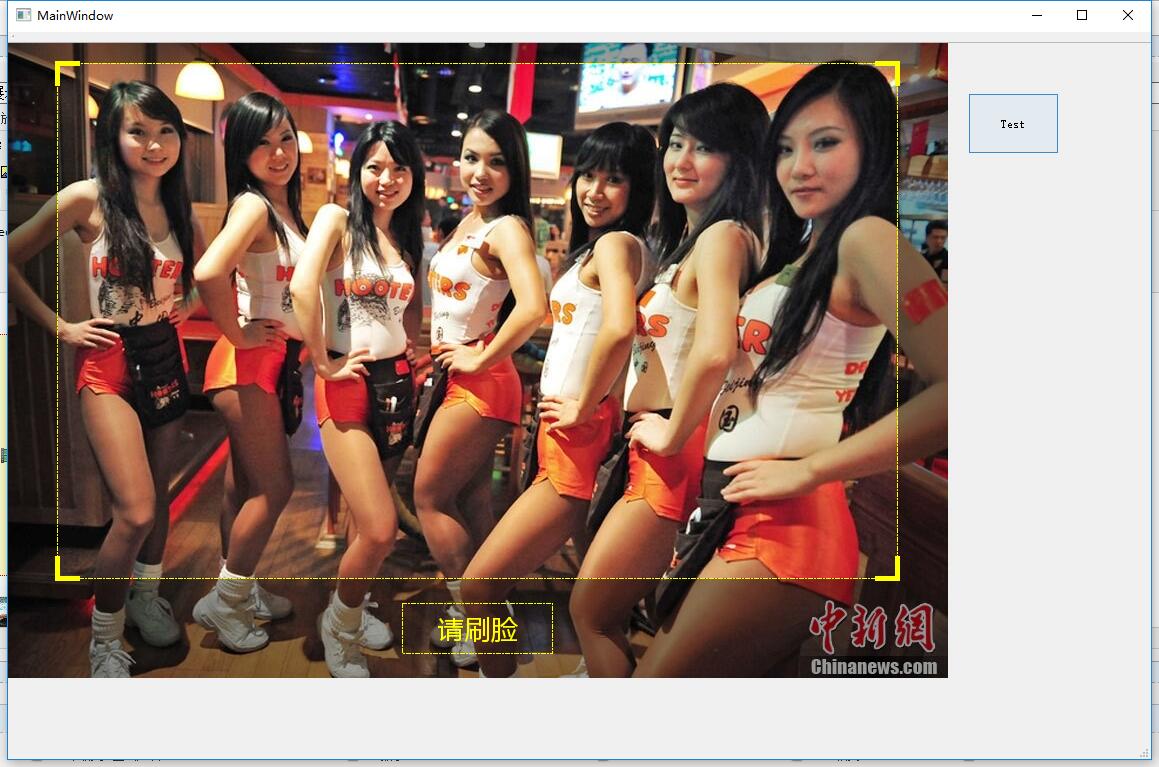
        strMsg=QStringLiteral("请刷脸");

    }

    else if(m_status == )

    {

        strMsg=QStringLiteral("请对准红框");

    }

    p.setPen(pen);

    p.drawRect(rect().width()/ - iTxtWidth/, rect().height()-m_bottomHeight + (m_bottomHeight/-iTxtHeight/), iTxtWidth, iTxtHeight );

    QRect txtRect;

    txtRect.setX(rect().width()/ - iTxtWidth/);

    txtRect.setY(rect().height()-m_bottomHeight + (m_bottomHeight/-iTxtHeight/));

    txtRect.setWidth(iTxtWidth);

    txtRect.setHeight(iTxtHeight);

    p.setPen(pen2);

    QFont font;

    font.setFamily("Microsoft YaHei");

    // 大小

    font.setPointSize();

    // 使用字体

    p.setFont(font);

    p.drawText(txtRect, Qt::AlignCenter , strMsg);

    p.end();
使用QMoive播放Gif的代码
 m_movie =new QMovie("F:/TestProject/QMoveTest/timg.gif");

    m_timer =new QTimer(this);
 ui->lblMove->setVisible(true);

        ui->lblMove->setMovie(m_movie);

        m_movie->start();

        //m_timer->start(3000);

        QTimer::singleShot(, this, SLOT(StopMovie()));
void MainWindow::StopMovie()

{

    m_movie->stop();

    ui->lblMove->setVisible(false);

}
最终效果:
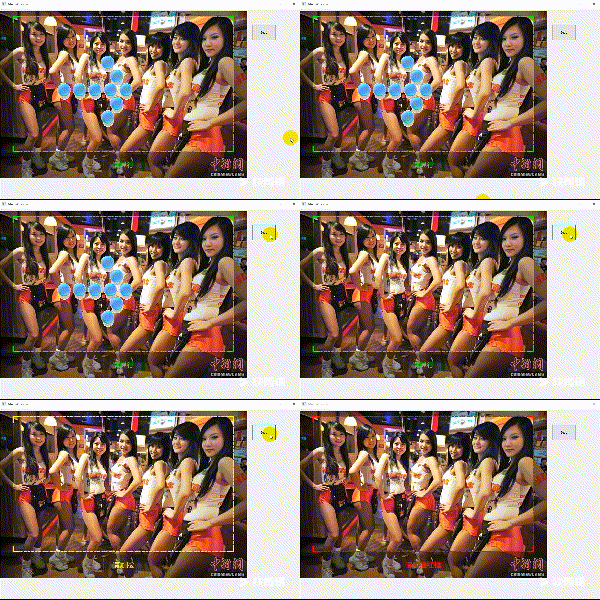
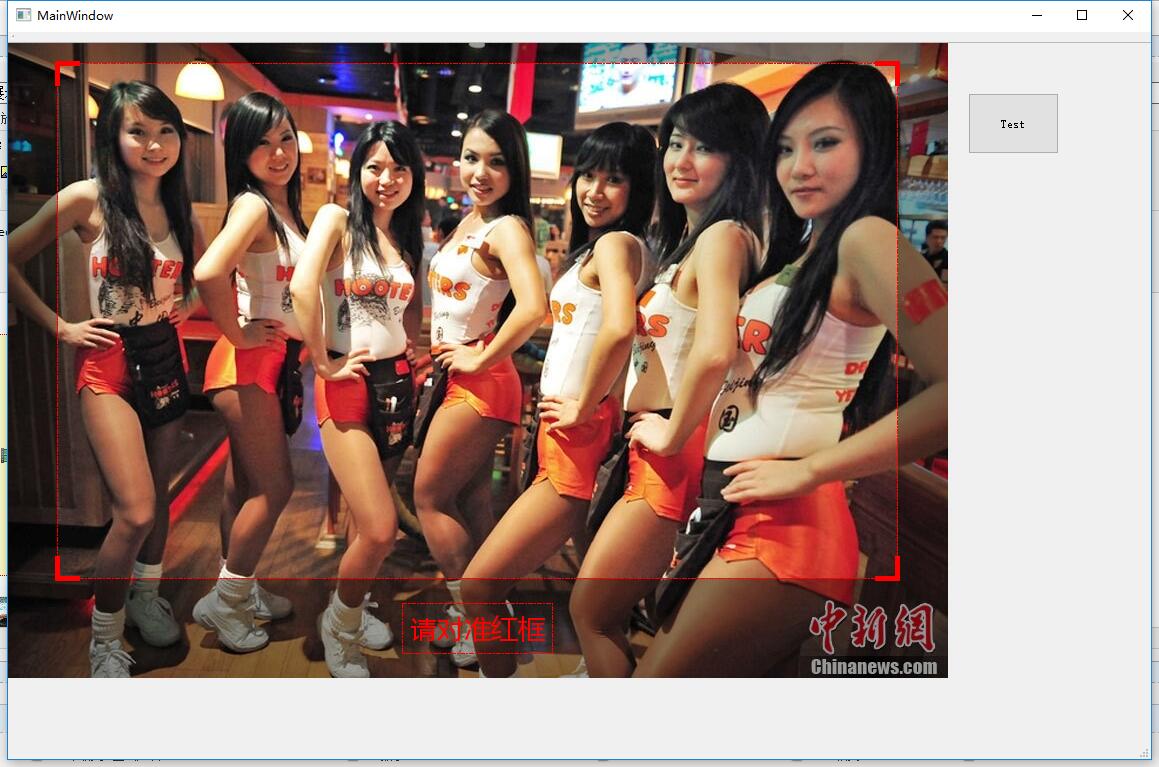 +
+

【Qt】QOpenGLWidget展示蒙版效果的更多相关文章
- css遮罩蒙版效果 分栏效果
mask遮罩蒙版效果 来看一下效果图: 这是两张原图: 遮罩层图像 注意,白色区域为透明状态 要展示的图像 使用mask之后产生的效果图 首先来解释一下遮罩.蒙版.和PS中的蒙版.Flash中 ...
- jQuery图片旋转展示收缩效果
<!DOCTYPE html PUBLIC "-//W3C//DTD XHTML 1.0 Transitional//EN" "http://www.w3.org/ ...
- CorelDRAW 实现蒙版效果的方法
CorelDRAW能够实现很多意想不到的小效果,其中包括了位图图像软件的处理功能,蒙版效果就是其中的一项.作为矢量图形处理软件,从理论上讲它并不具备蒙板技术,然而只是我们平常没有用到而已,利用图框精确 ...
- 浅谈css蒙版效果
我们进网站浏览时经常看到当鼠标悬浮在图片上或者某一个地方时,会出现一层朦胧现象覆盖着悬浮位置,简单的理解为“蒙版效果”.下面简单列举实现过程: HTML: CSS:
- 浅谈图片蒙版效果-webkit-mask
会用PS的童鞋一定知道“蒙版”的概念,它可以在图片上实现一定的遮罩效果,当然这里我们不介绍ps里的蒙版,而是介绍利用CSS3的新属性-webkit-mask来实现网页中的图片遮罩效果. 大家对-web ...
- QT窗口渐现效果,窗口震动效果,鼠标移动窗口
//窗口渐现效果void MainWindow::closeWindowAnimation() //关闭窗口效果 { QPropertyAnimation *animation = new QProp ...
- Qt实现悬浮窗效果
当鼠标移动到头像控件时,显示悬浮窗,当鼠标离开时,悬浮窗隐藏. 1.控件选择 悬浮窗可以从QDialog派生,并将窗口的属性设置为无边框 this->setWindowFlags(this- ...
- Qt实现半透明遮罩效果
本文索引: 需求 原理 实现遮罩控件 遮罩的使用 需求 我们在显示一些模态对话框的时候,往往需要将对话框的背景颜色调暗以达到突出当前对话框的效果,例如: 对话框的父窗口除了标题栏以外的部分都变暗了,在 ...
- 后端数据中含有html标签和css样式,前端如何转译展示样式效果。
后端含有html标签和css样式的数据: domain="<span style='color:red'>www.baidu.com</span>" (vu ...
随机推荐
- [Android] 修图工具Draw9patch使用小结(附ubuntu快捷截图方法)
做项目的时候,素材图遇到点问题,然后老大大概给我讲了讲android下面图片格式.9.png和draw 9-patch的用法,感觉很清楚也很有用,所以记录一下. 原文地址请保留http://www.c ...
- 《图解HTTP》
第一章.了解web及网络基础 1.2 http的诞生 HTTP于1990年问世,那时候HTTP并没有作为正式的标准被建立,被称为HTTP/0.9 HTTP正式作为标准被公布是在1996年5月,版本被命 ...
- "System.OutOfMemoryException" exception when you execute a query in SQL Server Management Studio (转自MSDN)
Symptoms When you use Microsoft SQL Server Management Studio (SSMS) to run an SQL query that returns ...
- python基础学习15----异常处理
异常处理,是编程语言或计算机硬件里的一种机制,用于处理软件或信息系统中出现的异常状况(即超出程序正常执行流程的某些特殊条件). 1.异常的类型 异常的类型多种多样,常见的异常有: AttributeE ...
- Linux yum源详解
软件包安装方式 0.默认从官网下载包(国内,雅虎,网易,阿里云) cat /etc/yum.repos.d/rhel-source.repo [yum文件目录--redhat6版] [ ...
- win10连接外接鼠标怎么禁用触摸板
Win10笔记本如何禁用触摸板呢?Win10笔记本如何设置“插入鼠标自动禁止触摸板功能”呢?虽然笔记本触摸板在一定程度上可以方便我们的 操作,但是在以鼠标和键盘做为重要的输入设备的情况下,笔记本触摸板 ...
- 代理工具--mitmproxy
#代理工具 mitmproxy 指令:mitmproxy -b ip -p port(代理ip设置为:ip,端口设置为:port) 拦截request: 输入字母“i”(代表Intercept fil ...
- 更改win系统的鼠标样式
一.找一个你心仪的鼠标样式(.cur文件),并放到 C:\Windows\Cursors 目录下 二.打开,控制面板 -> 硬件和声音 -> 鼠标 ,如下图: 三.浏览鼠标目录,找到你存放 ...
- NOIP2018考前抱佛脚——搜索复习
目录 搜索 DFS 例1 P1101 单词方阵 题目描述 输入输出格式 输入输出样例 标程 例2 P1605 迷宫 题目背景 输入输出格式 输入输出样例 标程 例3 P1019 单词接龙 题目描述 输 ...
- 使用let声明变量的理解
先看阮大神的[ECMAScript 6 入门]中关于这一部分的描述 var a = []; for (let i = 0; i < 10; i++) { a[i] = function () { ...