
如何区分prometheus中Histogram和Summary类型的metrics?
要理解它们的区别,关键还是告业务应用。
但如何在学习时,如何区分呢?
有以下几个维度:
histogram有bucket,summary在quatile。
summary分位数是客户端计算上报,histogram中位数涉及服务端计算。
具体可以参看如下两个链接:
https://yunlzheng.gitbook.io/prometheus-book/parti-prometheus-ji-chu/promql/prometheus-metrics-types
https://songjiayang.gitbooks.io/prometheus/content/concepts/metric-types.html
Histogram
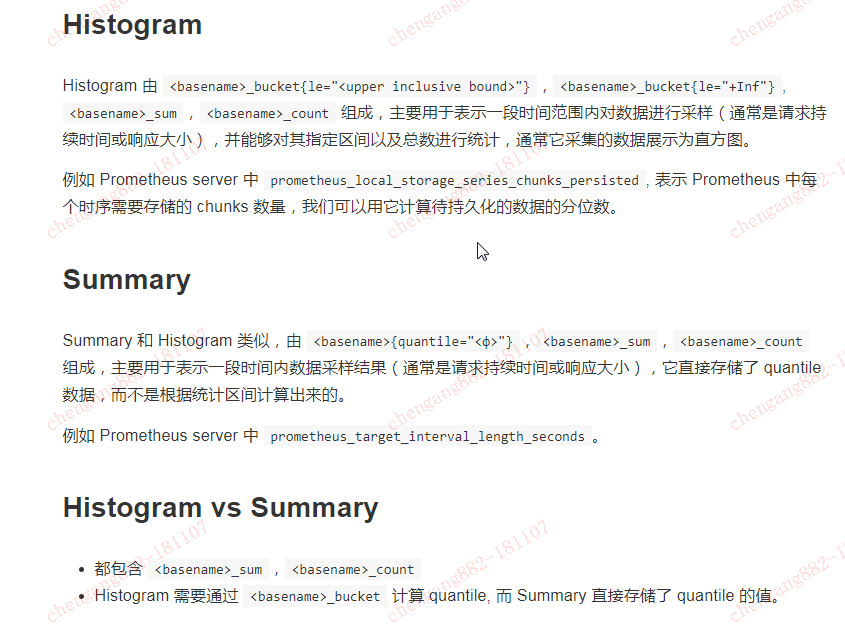
Histogram 由 <basename>_bucket{le="<upper inclusive bound>"},<basename>_bucket{le="+Inf"}, <basename>_sum,<basename>_count 组成,主要用于表示一段时间范围内对数据进行采样(通常是请求持续时间或响应大小),并能够对其指定区间以及总数进行统计,通常它采集的数据展示为直方图。
例如 Prometheus server 中 prometheus_local_storage_series_chunks_persisted, 表示 Prometheus 中每个时序需要存储的 chunks 数量,我们可以用它计算待持久化的数据的分位数。
Summary
Summary 和 Histogram 类似,由 <basename>{quantile="<φ>"},<basename>_sum,<basename>_count 组成,主要用于表示一段时间内数据采样结果(通常是请求持续时间或响应大小),它直接存储了 quantile 数据,而不是根据统计区间计算出来的。
例如 Prometheus server 中 prometheus_target_interval_length_seconds。
Histogram vs Summary
都包含 <basename>_sum,<basename>_count
Histogram 需要通过 <basename>_bucket 计算 quantile, 而 Summary 直接存储了 quantile 的值。
====================================
使用Histogram和Summary分析数据分布情况
除了Counter和Gauge类型的监控指标以外,Prometheus还定义分别定义Histogram和Summary的指标类型。Histogram和Summary主用用于统计和分析样本的分布情况。
在大多数情况下人们都倾向于使用某些量化指标的平均值,例如CPU的平均使用率、页面的平均响应时间。这种方式的问题很明显,以系统API调用的平均响应时间为例:如果大多数API请求都维持在100ms的响应时间范围内,而个别请求的响应时间需要5s,那么就会导致某些WEB页面的响应时间落到中位数的情况,而这种现象被称为长尾问题。
为了区分是平均的慢还是长尾的慢,最简单的方式就是按照请求延迟的范围进行分组。例如,统计延迟在0~10ms之间的请求数有多少而10~20ms之间的请求数又有多少。通过这种方式可以快速分析系统慢的原因。Histogram和Summary都是为了能够解决这样问题的存在,通过Histogram和Summary类型的监控指标,我们可以快速了解监控样本的分布情况。
例如,指标prometheus_tsdb_wal_fsync_duration_seconds的指标类型为Summary。 它记录了Prometheus Server中wal_fsync处理的处理时间,通过访问Prometheus Server的/metrics地址,可以获取到以下监控样本数据:
# HELP prometheus_tsdb_wal_fsync_duration_seconds Duration of WAL fsync.
# TYPE prometheus_tsdb_wal_fsync_duration_seconds summary
prometheus_tsdb_wal_fsync_duration_seconds{quantile="0.5"} 0.012352463
prometheus_tsdb_wal_fsync_duration_seconds{quantile="0.9"} 0.014458005
prometheus_tsdb_wal_fsync_duration_seconds{quantile="0.99"} 0.017316173
prometheus_tsdb_wal_fsync_duration_seconds_sum 2.888716127000002
prometheus_tsdb_wal_fsync_duration_seconds_count 216
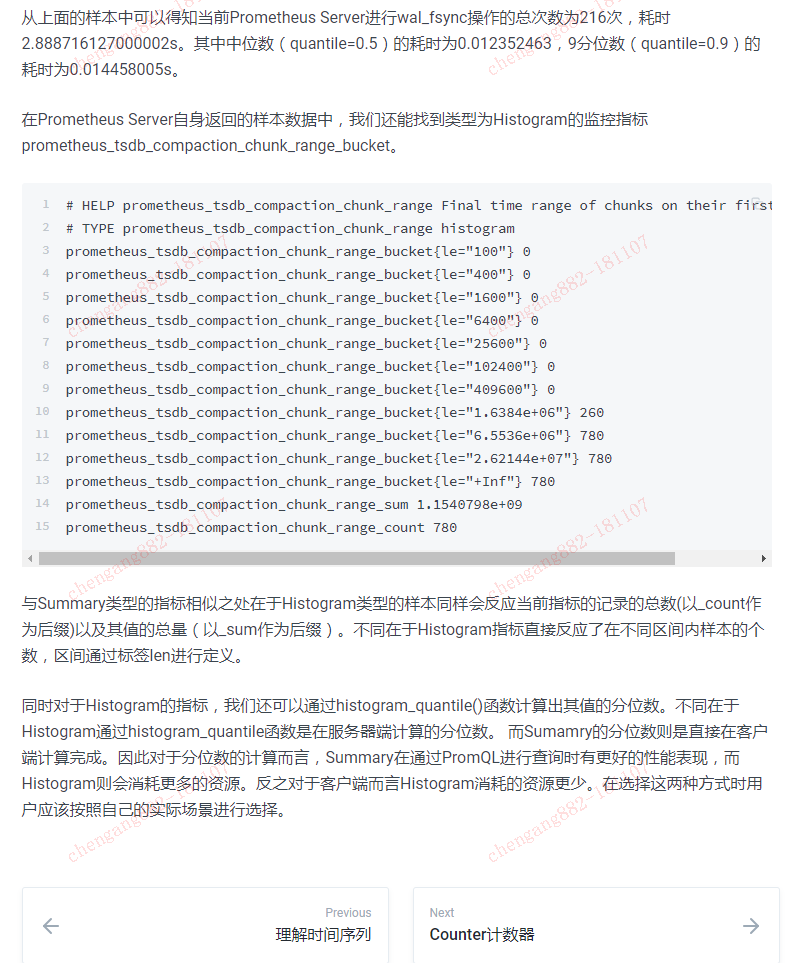
从上面的样本中可以得知当前Prometheus Server进行wal_fsync操作的总次数为216次,耗时2.888716127000002s。其中中位数(quantile=0.5)的耗时为0.012352463,9分位数(quantile=0.9)的耗时为0.014458005s。
在Prometheus Server自身返回的样本数据中,我们还能找到类型为Histogram的监控指标prometheus_tsdb_compaction_chunk_range_bucket。
# HELP prometheus_tsdb_compaction_chunk_range Final time range of chunks on their first compaction
# TYPE prometheus_tsdb_compaction_chunk_range histogram
prometheus_tsdb_compaction_chunk_range_bucket{le="100"} 0
prometheus_tsdb_compaction_chunk_range_bucket{le="400"} 0
prometheus_tsdb_compaction_chunk_range_bucket{le="1600"} 0
prometheus_tsdb_compaction_chunk_range_bucket{le="6400"} 0
prometheus_tsdb_compaction_chunk_range_bucket{le="25600"} 0
prometheus_tsdb_compaction_chunk_range_bucket{le="102400"} 0
prometheus_tsdb_compaction_chunk_range_bucket{le="409600"} 0
prometheus_tsdb_compaction_chunk_range_bucket{le="1.6384e+06"} 260
prometheus_tsdb_compaction_chunk_range_bucket{le="6.5536e+06"} 780
prometheus_tsdb_compaction_chunk_range_bucket{le="2.62144e+07"} 780
prometheus_tsdb_compaction_chunk_range_bucket{le="+Inf"} 780
prometheus_tsdb_compaction_chunk_range_sum 1.1540798e+09
prometheus_tsdb_compaction_chunk_range_count 780
与Summary类型的指标相似之处在于Histogram类型的样本同样会反应当前指标的记录的总数(以_count作为后缀)以及其值的总量(以_sum作为后缀)。不同在于Histogram指标直接反应了在不同区间内样本的个数,区间通过标签len进行定义。
同时对于Histogram的指标,我们还可以通过histogram_quantile()函数计算出其值的分位数。不同在于Histogram通过histogram_quantile函数是在服务器端计算的分位数。 而Sumamry的分位数则是直接在客户端计算完成。因此对于分位数的计算而言,Summary在通过PromQL进行查询时有更好的性能表现,而Histogram则会消耗更多的资源。反之对于客户端而言Histogram消耗的资源更少。在选择这两种方式时用户应该按照自己的实际场景进行选择。
如何区分prometheus中Histogram和Summary类型的metrics?的更多相关文章
- Controller 中Action 返回值类型 及其 页面跳转的用法
•Controller 中Action 返回值类型 View – 返回 ViewResult,相当于返回一个View 页面. -------------------------------- ...
- [C++]C++中的运行时类型检测
Date:2014-1-3 Summary: 使用C++中的运行时类型检测.(文章重点在于记录本人的使用情况,并非深层讨论RTTI) Contents:写习惯C#的我,在C++依然存在哪些.NET的惯 ...
- JavaScript Array 对象方法 以及 如何区分javascript中的toString()、toLocaleString()、valueOf()方法
1.concat() 2.join() 3.pop() 4.push() 5.reverse() 6.shift() 7.unshift() 8.slice() 9.sort() 10.splice( ...
- C#中的常量、类型推断和作用域
一.常量 常量是其值在使用过程中不会发生变化的变量.在声明和初始化变量时,在变量前面家关键字const,就可以把该变量指定为一个常量: const int a=100;//a的值将不可以改变 常量的特 ...
- C# 中的基本数值类型
在之前的文章中(地址:https://www.vinanysoft.com/c-sharp-basics/introducing/),以 HelloWorld 程序为基础,介绍 C# 语言.它的结构. ...
- cassandra表中主键的类型
cassandra表中主键的类型及区分? 一.类型及区分 二.参考文章 一.类型及区分 Cassandra的4种Key Primary Key 主键 Composite Key,Compound Ke ...
- SQL数据库中字段类型 与C#中的对应字段类型
数据库中的字段类型和对应的C#中的对应字段类型 数据库 C#程序int int32text stringbigint int64binary System.Byte[] ...
- 【AspNetCore】【WebApi】扩展Webapi中的RouteConstraint中,让DateTime类型,支持时间格式化(DateTimeFormat)
扩展Webapi中的RouteConstraint中,让DateTime类型,支持时间格式化(DateTimeFormat) 一.背景 大家在使用WebApi时,会用到DateTime为参数,类似于这 ...
- java中基本类型和包装类型实践经验
至今,小菜用java快两年了,有些事,也该有个总结. 基本类型和包装类型的概念在本文不作赘述. 如果这两种类型直接使用,倒没什么值得讨论的,无非就是自动装箱拆箱,java可以让你感觉不到他们的存在,但 ...
随机推荐
- MT【174】凹凸无妨
已知函数$f(x)=|x^3+3x^2-ax-b|$,对任意$a,b\in R$存在$x\in[-3,0]$使得$f(x)\le m$成立,求$m$的范围.求 $\displaystyle\min_{ ...
- Linux下修改tomcat内存
由于服务器上放的tomcat太多,造成内存溢出. 常见的内存溢出有以下两种: java.lang.OutOfMemoryError: PermGen space java.lang.OutOfMemo ...
- 六、spring boot 1.5.4 配置多数据源
spring boot 已经支持多数据源配置了,无需网上好多那些编写什么类的,特别麻烦,看看如下解决方案,官方的,放心! 1.首先定义数据源配置 #=====================multi ...
- mysql新版本问题
异常错误:Loading class `com.mysql.jdbc.Driver'. This is deprecated. The new driver class is `com.mysql.c ...
- Docker 镜像加速器
Docker 镜像加速器 我们使用Docker的第一步,应该是获取一个官方的镜像,例如mysql.wordpress,基于这些基础镜像我们可以开发自己个性化的应用.我们可以使用Docker命令行工 ...
- java基础知识学习--------之枚举类型(1)
枚举类型的概念: /** * 目的:枚举类型 * @author chenyanlong * 日期:2017/10/22 * 网址:http://blog.csdn.net/sup_heaven/ar ...
- Python模块调用方式详解
Python模块调用方式详解 作者:尹正杰 版权声明:原创作品,谢绝转载!否则将追究法律责任. 模块,用一砣代码实现了某个功能的代码集合. 类似于函数式编程和面向过程编程,函数式编程则完成一个功能,其 ...
- 用vue前后端分离项目开发记录
一:软件安装 1.1 检测node 是否安装 1.2 安装淘宝镜像 cnpm 1.3 安装vue-cli 1.4 检查是否安装vue-cli脚手架成功 1.5安装webpack 模块管理工具 二:创建 ...
- Java URL
1.在网络编程的时候,一定不要忘记 <uses-permission android:name="android.permission.INTERNET"></u ...
- css原生变量var()
了解css/css3原生变量var 阮一峰css变量教程 深入学习css自定义属性(css变量)