
自己动手写Vue插件Toast
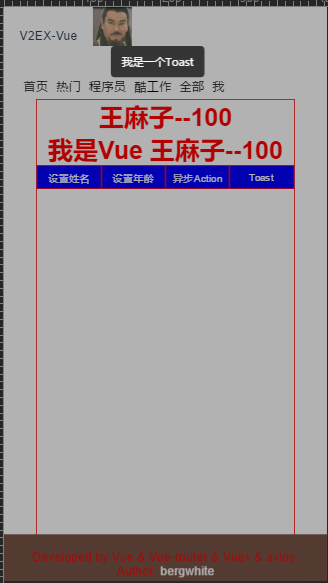
		<style>

			.vue-toast {

				width: 100%;

				height: 100%;

				position: fixed;

				top: 0px;

				left: 0px;

				background: rgba(0, 0, 0, 0.3);

			}

			.vue-tip {

				position: fixed;

				left: 50%;

				width: 100px;

				line-height: 40px;

				padding: 0 10px;

				margin-left: -60px;

				text-align: center;

				z-index: 9999;

				font-size: 14px;

				color: #fff;

				border-radius: 5px;

				background-color: rgba(0, 0, 0, .7);

			}

			.vue-tip.tip-center {

				top: 50%;

			}

			.vue-tip.tip-bottom {

				bottom: 50px;

			}

			.vue-tip.tip-top {

				top: 50px;

			}

			.fadeIn {

				animation-name: fadeIn;

				-webkit-animation-name: fadeIn;

				animation-duration: .5s;

				-webkit-animation-duration: .5s;

				animation-timing-function: ease-in-out;

				-webkit-animation-timing-function: ease-in-out;

				visibility: visible !important;

			}

			@keyframes fadeIn {

				0% {

					transform: scale(0);

					opacity: 0.0;

				}

				60% {

					transform: scale(1.1);

				}

				80% {

					transform: scale(0.9);

					opacity: 1;

				}

				100% {

					transform: scale(1);

					opacity: 1;

				}

			}

			@-webkit-keyframes fadeIn {

				0% {

					-webkit-transform: scale(0);

					opacity: 0.0;

				}

				60% {

					-webkit-transform: scale(1.1);

				}

				80% {

					-webkit-transform: scale(0.9);

					opacity: 1;

				}

				100% {

					-webkit-transform: scale(1);

					opacity: 1;

				}

			}

		</style>
var Toast = {};

//避免重复install,设立flag

Toast.installed = false;

Toast.install = function(Vue, options) {

	if(Toast.installed) return;

	let opt = {

		// 默认显示位置

		defaultType: "center",

		// 默认持续时间

		duration: "3000"

	}

	// 使用options的配置

	for(let i in options) {

		opt[i] = options[i]

	}

	Vue.prototype.$toast = (toast, type) => {

		// 如果有传type,位置则设为该type

		var chooseType = type ? type : opt.defaultType;

		// 如果页面有toast则不继续执行

		if(document.querySelector('.vue-toast')) return;

		// 1、创建构造器,定义好提示信息的模板

		let toastTip = Vue.extend({

			template: `

						           <div class="vue-toast">

						              <div class="vue-tip tip-${chooseType} fadeIn">${toast}</div>

						           </div>

						          `

		});

		// 2、创建实例,挂载到文档以后的地方

		console.log(new toastTip().$mount())

		let tpl = new toastTip().$mount().$el;

		// 3、把创建的实例添加到body中

		document.body.appendChild(tpl);

		// 4.三秒后移除

		setTimeout(() => {

			document.body.removeChild(tpl);

		}, opt.duration);

		//阻止遮罩滑动

		document.querySelector("div.vue-toast").addEventListener("touchmove", function(e) {

			e.stopPropagation();

			e.preventDefault();

		});

		Toast.installed = true;

	};

	// 显示不同的位置

	['bottom', 'top', 'center'].forEach(type => {

		Vue.prototype.$toast[type] = (tips) => {

			return Vue.prototype.$toast(tips, type)

		}

	})

};

// 自动安装  ,有了ES6就不要写AMD,CMD了

if(typeof window !== 'undefined' && window.Vue) {

	window.Vue.use(Toast)

};

export default Toast;
<template>

  <div id="me">

  	<h1>{{getMy&&getMy.name}}--{{getMy&&getMy.age}}</h1>

	  <h1>我是Vue {{this.$store.state.my.name}}--{{this.$store.state.my.age}}</h1>

	  <div class="btn">

	  	<button @click='setName'>设置姓名</button>

	    <button @click='setAge'>设置年龄</button>

	    <button @click='setAction'>异步Action</button>

	    <button @click='alertToast'>Toast</button>

	  </div>

  </div>

</template>

<script>

	import Vue from 'vue'

	import { mapGetters,mapMutations,mapActions  } from 'vuex'

	import Toast from '../js/Toast'

	Vue.use(Toast,{    //支持全局配置

		defaultType: "top",

		duration: "10000"

	})

	export default {

		name: 'Me',

		methods: {

			 ...mapMutations([

	      'setMe' // 映射 this.setMe() 为 this.$store.commit('setMe')

	    ]),

	     ...mapActions([

	      'getTopic' // 映射 this.getTopic() 为 this.$store.dispatch('getTopic')

	    ]),

			setName(){

				this.setMe({

					type:'name',

					num:'王麻子'

				})

			},

			setAge(){

				this.$store.commit('setMe',{

					type:'age',

					num:'100'

				})

			},

			setAction(){

				this.getTopic();

			},

			alertToast(){

				console.log(this);

				console.log(this.$toast("我是一个Toast"));

				//console.log(this.$toast.bottom("我是一个Toast"));

			}

		},

		computed: {

	    ...mapGetters([

	       'getApiVal','getApiValComm','getMy'

    ])

  }

	}

</script>

<style scoped>

	#me {

 	width: 80%;

 	height: 1000px;

 	margin: 0 auto;

 	border: 1px solid red;

 	background: white;

 }

 h1 {

 	color: red;

 	text-align: center;

 }

 .btn{

 	display: flex;

 	justify-content: space-around;

 	align-items: center;

 }

 button{

 	border: 1px solid red;

 	width: 100px;

 	height: 30px;

 	background: blue;

 	color: white;

 	cursor: pointer;

 }

</style>
自己动手写Vue插件Toast的更多相关文章
- 自己动手写Android插件化框架
自己动手写Android插件化框架 转 http://www.imooc.com/article/details/id/252238 最近在工作中接触到了Android插件内的开发,发现自己这种技 ...
- 自己动手编写vue插件
一.为什么要自己动手写插件呢,原因有二: 其一:是因为最近产品了提了一个在web端接收,消息通知的需求,产品要求在若干个页面内如果有消息,就要弹出消息弹窗展示给用户,略加思索之后,第一反应就是写个消息 ...
- 手把手教你写vue插件并发布(二)
前记:上一篇 https://www.cnblogs.com/adouwt/p/9211003.html, 说到了一个完整的vue插件开发.发布的流程,总结下来就讲了这么一个事,如何注入vue, 如果 ...
- 手把手教你写vue插件并发布(一)
vue的插件开发 这篇文章较长,需要一定的阅读时间.这里有一份改善版本的插件笔记,在一个项目下完成开发.测试.发布的全过程.https://www.cnblogs.com/adouwt/p/96555 ...
- 自己动手写Android插件化框架,让老板对你刮目相看
欢迎大家前往腾讯云+社区,获取更多腾讯海量技术实践干货哦~ 本文由达文西发表于云+社区专栏 最近在工作中接触到了Android插件内的开发,发现自己这种技术还缺乏最基本的了解,以至于在一些基本问题上浪 ...
- 自己动手写jQuery插件---Tip(提示框)
对jQuery相信很多同学和我一样平时都是拿来主义,没办法,要怪只能怪jQuery太火了,各种插件基本能满足平时的要求.但是这毕竟不是长久之道,古人云:“授之以鱼,不如授之以渔”. 为了方便之前没有接 ...
- 自己动手写fullPage插件
仿造fullPage.js https://alvarotrigo.com/fullPage/#firstPage 自己参照网上教程写了一个,加了注释.主要是练习造轮子的能力,需求是不断变化的只拿来用 ...
- 发布vue插件到npm上
总体分为2个步骤 一,先写好插件 二,发布到npm上面 一,写vue插件 vue有一个开放的方法install,在vue插件需要写在这个方法里面,在vue官网,里面说的很清楚,这个方法里面可以是全局方 ...
- 自己写jquery插件之模版插件高级篇(一)
需求场景 最近项目改版中,发现很多地方有这样一个操作(见下图gif动画演示),很多地方都有用到.这里不讨论它的用户体验怎么样. 仅仅是从复用的角度,如果每个页面都去写text和select元素,两个b ...
随机推荐
- QTP图片验证/图片比较/二进制流对比法
图片验证主要是文件对比,其中我们可以利用二进制的方法读取图片信息,然后进行对比,达到对比的效果,本例子利用fso对象的文件流的方法实现,代码如下: Public Function CompareFil ...
- mysql innobackupex 备份及恢复
----------------------------------全量备份恢复-------------------------------------1.生成一个完整的备份 innobackupe ...
- usb的一些网址
一些关于usb的帖子.网址: usb gadget device g_ether.ko 做成usbnetwork http://bbs.csdn.net/topics/370120345 Linux ...
- [整理] mysql操作
0.启动mysql(在windows中MySql以服务形式存在,在使用前应确保此服务已经启动) net start mysql 0.5获取版本信息 select version(); 1.root 登 ...
- ***Bootstrap FileInput插件的使用经验汇总
插件下载地址: https://github.com/kartik-v/bootstrap-fileinput/ 官方DEMO查看: http://plugins.krajee.com/file-ba ...
- KDevelop调试NS2
1.将NS2项目导入到KDevelop 具体操作步骤:打开Kdevelop,首先,选择"Project"->"Open/Import Project".然 ...
- IntelliJ IDEA快捷键:Shift+Esc
Shift+Esc moves the focus to the editor and also hides the current (or last active) tool window. 将焦点 ...
- element-ui的rules中正则表达式
<template> <el-form :model="unuseForm" label-position="top" :rules=&quo ...
- Codeforces 601C Kleofáš and the n-thlon 概率dp
Kleofáš and the n-thlon 我们可以用dp算出比当前这个人得分少的概率, 然后人数乘概率就好啦. dp[ i ][ j ]表示进行了 i 轮 得分为 j 的概率, 因为每个人都是独 ...
- zookeeper集群自动启动脚本
定义脚本boot.sh启动zookeeper集群(hadoop1,hadoop2,hadoop3) #!/bin/bash echo "start zkServer..." do ...