
使用Bootstrap 基于MVC输出移动化table 列表
基于Bootrap的列表组及栅格布局来实现
模型定义
public class StreetEvent

    {

        public int Id { get; set; }

        public string StreetName { get; set; }

        public int LACnt { get; set; }

        public int JACnt { get; set; }

        public int SLCnt { get; set; }

        public int PQCnt { get; set; }

    }
测试Controller方法
public ActionResult TableView2([Form]Para para)

        {

            List<StreetEvent> list = new List<StreetEvent>();

            for (int i = ; i < ; i++)

            {

                list.Add(new StreetEvent

                {

                    Id = i,

                    StreetName = "街道" + i.ToString(),

                    LACnt =  + i * ,

                    SLCnt =  + i * ,

                    JACnt =  + i * ,

                    PQCnt =  + i *

                });

            }

            return View(list);

        }
输出视图
@model IEnumerable<MvcWeb01.Models.StreetEvent>

@{

    ViewBag.Title = "TableView2";

}

<div class="container">

    <div class="row">

        <div class="col-xs-12 text-center"><h3>案件统计报表</h3></div>

    </div>

</div>

@foreach (MvcWeb01.Models.StreetEvent item in Model)

{

    <div class="list-group">

        <a href="#" class="list-group-item">

            <div class="container">

                <div class="row">

                    <div class="col-xs-6 text-left">街道</div>

                    <div class="col-xs-6 text-right">@item.StreetName</div>

                </div>

            </div>

        </a>

        <a href="#" class="list-group-item">

            <div class="container">

                <div class="row">

                    <div class="col-xs-6 text-left">立案数</div>

                    <div class="col-xs-6 text-right">@item.LACnt</div>

                </div>

            </div>

        </a>

        <a href="#" class="list-group-item">

            <div class="container">

                <div class="row">

                    <div class="col-xs-6 text-left">结案数</div>

                    <div class="col-xs-6 text-right">@item.JACnt</div>

                </div>

            </div>

        </a>

        <a href="#" class="list-group-item">

            <div class="container">

                <div class="row">

                    <div class="col-xs-6 text-left">受理数</div>

                    <div class="col-xs-6 text-right">@item.SLCnt</div>

                </div>

            </div>

        </a>

        <a href="#" class="list-group-item">

            <div class="container">

                <div class="row">

                    <div class="col-xs-6 text-left">派遣数</div>

                    <div class="col-xs-6 text-right">@item.PQCnt</div>

                </div>

            </div>

        </a>

    </div>

}
输出效果:
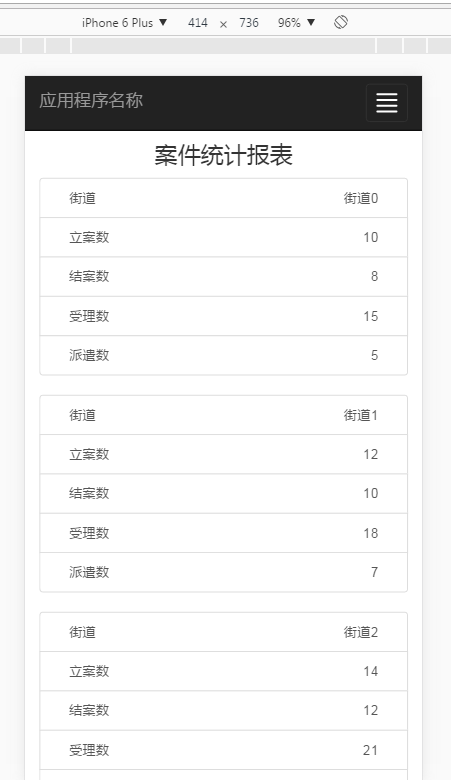
响应式Table:https://dbushell.com/demos/tables/rt_05-01-12.html
<!DOCTYPE html>

<html>

<head>

    <meta charset="UTF-8">

    <meta name="viewport" content="width=device-width, initial-scale=1">

    <title>Responsive Tables</title>

    <style>

    .cf:after { visibility: hidden; display: block; font-size: 0; content: " "; clear: both; height: 0; }

    * html .cf { zoom: 1; }

    *:first-child+html .cf { zoom: 1; }

    body, h1, h2, h3 { margin: 0; font-size: 100%; font-weight: normal; }

    code { padding: 0 .5em; background: #fff2b2; }

    body { padding: 1.25em; font-family: 'Helvetica Neue', Arial, sans-serif; background: #eee; }

    h1 { font-size: 2em; }

    h2 { font-size: 1.5em; }

    h1, h2 { margin: .5em 0; font-weight: bold; }

    .rt { width: 100%; font-size: 0.75em;/*12*/ line-height: 1.25em;/*15*/ border-collapse: collapse; border-spacing: 0; }

    .rt th,

    .rt td { margin: 0; padding: 0.4166em;/*10*/ vertical-align: top; border: 1px solid #babcbf; background: #fff; }

    .rt th { text-align: left; background: #fff2b2; }

    @media only screen and (max-width: 40em) { /*640*/

        #rt1 { display: block; position: relative; width: 100%; }

        #rt1 thead { display: block; float: left; }

        #rt1 tbody { display: block; width: auto; position: relative; overflow-x: auto; white-space: nowrap; }

        #rt1 thead tr { display: block; }

        #rt1 th { display: block; }

        #rt1 tbody tr { display: inline-block; vertical-align: top; }

        #rt1 td { display: block; min-height: 1.25em; }

        #rt2 { display: block; position: relative; width: 100%; }

        #rt2 thead { display: block; float: left; }

        #rt2 tbody { display: -webkit-box; overflow-x: auto; }

        #rt2 th,

        #rt2 tr,

        #rt2 td { display: block; }

        /* sort out borders */

        .rt th { border-bottom: 0; }

        .rt td { border-left: 0; border-right: 0; border-bottom: 0; }

        .rt tbody tr { border-right: 1px solid #babcbf; }

        .rt th:last-child,

        .rt td:last-child { border-bottom: 1px solid #babcbf; }

    }

    </style>

 </head>

<body>

    <h1>Responsive Tables (2)</h1>

    <p><strong>Introduction:</strong> <a href="http://dbushell.com/2012/01/05/responsive-tables-2">Responsive Tables</a> — 5th January, 2012.</p>

    <p>The following tables change orientation on small screens. A horizontal scroll or swipe is used to view more data. The table head is always visible.</p>

    <table id="rt1" class="rt cf">

        <thead class="cf">

            <tr>

                <th>Selector</th>

                <th>IE7</th>

                <th>IE8</th>

                <th>IE9</th>

                <th>FF 3.6</th>

                <th>FF 4</th>

                <th>Safari 5</th>

                <th>Chrome 5</th>

                <th>Opera 10</th>

            </tr>

        </thead>

        <tbody>

            <tr>

                <td>* selector</td>

                <td>yes</td>

                <td>yes</td>

                <td>yes</td>

                <td>yes</td>

                <td>yes</td>

                <td>yes</td>

                <td>yes</td>

                <td>yes</td>

            </tr><tr>

                <td>:before :after</td>

                <td>no</td>

                <td>yes</td>

                <td>yes</td>

                <td>yes</td>

                <td>yes</td>

                <td>yes</td>

                <td>yes</td>

                <td>yes</td>

            </tr><tr>

                <td>:nth-of-type()</td>

                <td>no</td>

                <td>no</td>

                <td>no</td>

                <td>yes</td>

                <td>yes</td>

                <td>yes</td>

                <td>yes</td>

                <td>incorrect</td>

            </tr><tr>

                <td>background-clip</td>

                <td>no</td>

                <td>no</td>

                <td>yes</td>

                <td>no</td>

                <td>yes</td>

                <td>-webkit-</td>

                <td>-webkit-</td>

                <td>buggy</td>

            </tr><tr>

                <td>background-repeat</td>

                <td>incomplete</td>

                <td>incomplete</td>

                <td>yes</td>

                <td>incomplete</td>

                <td>incomplete</td>

                <td>incorrect</td>

                <td>incorrect</td>

                <td>yes</td>

            </tr><tr>

                <td>::selection</td>

                <td>no</td>

                <td>no</td>

                <td>yes</td>

                <td>-moz-</td>

                <td>-moz-</td>

                <td>yes</td>

                <td>yes</td>

                <td>yes</td>

            </tr>

        </tbody>

    </table>

    <p>The trick is to use <code>display: inline-block;</code> on the table rows and <code>white-space: nowrap;</code> on the table body.</p>

    <br>

    <h2>CSS3 Flexible Box model</h2>

    <p>This table replicates the same layout using <code>display: -webkit-box;</code></p>

    <table id="rt2" class="rt cf">

        <thead class="cf">

            <tr>

                <th>Selector</th>

                <th>IE7</th>

                <th>IE8</th>

                <th>IE9</th>

                <th>FF 3.6</th>

                <th>FF 4</th>

                <th>Safari 5</th>

                <th>Chrome 5</th>

                <th>Opera 10</th>

            </tr>

        </thead>

        <tbody>

            <tr>

                <td>* selector</td>

                <td>yes</td>

                <td>yes</td>

                <td>yes</td>

                <td>yes</td>

                <td>yes</td>

                <td>yes</td>

                <td>yes</td>

                <td>yes</td>

            </tr><tr>

                <td>:before :after</td>

                <td>no</td>

                <td>yes</td>

                <td>yes</td>

                <td>yes</td>

                <td>yes</td>

                <td>yes</td>

                <td>yes</td>

                <td>yes</td>

            </tr><tr>

                <td>:nth-of-type()</td>

                <td>no</td>

                <td>no</td>

                <td>no</td>

                <td>yes</td>

                <td>yes</td>

                <td>yes</td>

                <td>yes</td>

                <td>incorrect</td>

            </tr><tr>

                <td>background-clip</td>

                <td>no</td>

                <td>no</td>

                <td>yes</td>

                <td>no</td>

                <td>yes</td>

                <td>-webkit-</td>

                <td>-webkit-</td>

                <td>buggy</td>

            </tr><tr>

                <td>background-repeat</td>

                <td>incomplete</td>

                <td>incomplete</td>

                <td>yes</td>

                <td>incomplete</td>

                <td>incomplete</td>

                <td>incorrect</td>

                <td>incorrect</td>

                <td>yes</td>

            </tr><tr>

                <td>::selection</td>

                <td>no</td>

                <td>no</td>

                <td>yes</td>

                <td>-moz-</td>

                <td>-moz-</td>

                <td>yes</td>

                <td>yes</td>

                <td>yes</td>

            </tr>

        </tbody>

    </table>

    <br>

    <p>This concept needs further work to achieve cross-browser support but I think it has potential!</p>

<script type="text/javascript">

var _gaq = _gaq || [];

_gaq.push(['_setAccount', 'UA-9497100-1']);

_gaq.push(['_setDomainName', 'dbushell.com']);

_gaq.push(['_trackPageview']);

(function() {

    var ga = document.createElement('script'); ga.type = 'text/javascript'; ga.async = true;

    ga.src = ('https:' == document.location.protocol ? 'https://ssl' : 'http://www') + '.google-analytics.com/ga.js';

    var s = document.getElementsByTagName('script')[0]; s.parentNode.insertBefore(ga, s);

})();

</script>

</body>

</html>
使用Bootstrap 基于MVC输出移动化table 列表的更多相关文章
- 【JAVA】基于MVC架构Java技术荟萃案例演练
基于JAVA-MVC技术的顾客管理项目案例总结 作者 白宁超 2016年6月9日22:47:08 阅读前瞻:本文源于对javaweb相关技术和资料汇总,涉及大量javaweb基础技术诸如:Servle ...
- 基于Metronic的Bootstrap开发框架经验总结(2)--列表分页处理和插件JSTree的使用
在上篇<基于Metronic的Bootstrap开发框架经验总结(1)-框架总览及菜单模块的处理>介绍了Bootstrap开发框架的一些基础性概括,包括总体界面效果,以及布局.菜单等内容, ...
- Spring MVC -- MVC设计模式(演示4个基于MVC框架的案例)
对于简单的Java Web项目,我们的项目仅仅包含几个jsp页面,由于项目比较小,我们通常可以通过链接方式进行jsp页面间的跳转. 但是如果是一个中型或者大型的项目,上面那种方式就会带来许多维护困难, ...
- iOS基于MVC的项目重构总结
关于MVC的争论 关于MVC的争论已经有很多,对此我的观点是:对于iOS开发中的绝大部分场景来说,MVC本身是没有问题的,你认为的MVC的问题,一定是你自己理解的问题(资深架构师请自动忽略本文). 行 ...
- ASP.NET MVC 4 插件化架构简单实现-思路篇
用过和做过插件的都会了解插件的好处,园子里也有很多和讨论,但大都只些简单的加载程序集什么的,这里主要讨论的就是使用 ASP.NET MVC 4 来实现每个插件都可以完全从主站点剥离出来,即使只是一个插 ...
- 转:iOS基于MVC的项目重构总结
转:http://www.cocoachina.com/ios/20160519/16346.html 关于MVC的争论 关于MVC的争论已经有很多,对此我的观点是:对于iOS开发中的绝大部分场景来说 ...
- MVC 4 插件化架构简单实现
转ASP.NET MVC 4 插件化架构简单实现-思路篇 用过和做过插件的都会了解插件的好处,园子里也有很多和讨论,但大都只些简单的加载程序集什么的,这里主要讨论的就是使用 ASP.NET MVC ...
- MVC页面静态化
MVC 页面静态化 最近工作需要,实现页面静态化,以前在ASP时代,都是FSO自己手动生成的. 新时代,MVC了,当然也要新技术,网上一搜,找到一种解决方案,是基于MVC3的,实现原理是通过mvc ...
- [置顶]
MVC输出缓存(OutputCache参数详解)
1.学习之前你应该知道这些 几乎每个项目都会用到缓存,这是必然的.以前在学校时做的网站基本上的一个标准就是1.搞定增删改查2.页面做的不要太差3.能运行(ps真的有这种情况,答辩验收的时候几个人在讲台 ...
随机推荐
- ClusterControl 强大免费数据管理工具
几张参考图 galera 集群管理 多种数据库管理 组件架构 参考资料 https://severalnines.com/docs/intro.html
- secureCRT 设置证书免密登陆
1 第一步 2 第二步 3 第三步 4 第4 步 ,然后选择你的 私钥文件
- Jmeter之函数助手
本文转载自:心的开始 Emily0120 JMeter函数是一些能够转化在测试树中取样器或者其他配置元件的域的特殊值.一个函数的调用就像这样:${_functionName(var1,var2,va ...
- Hadoop HDFS元数据目录分析
元数据目录分析 在第一次部署好Hadoop集群的时候,我们需要在NameNode(NN)节点上格式化磁盘: $HADOOP_HOME/bin/hdfs namenode -format 格式化完成之后 ...
- 基于mysql对mybatis中的foreach进行深入研究
鉴于上一篇博文一次修改mysql字段类型引发的技术探究提到的,要对foreach里面的collection相关的内容做一些介绍,今天就围绕foreach,做一些数据插入和查询相关的研究. 首先介绍一下 ...
- PICT测试工具的安装及使用
PICT工具就是在微软公司出品一款成对组合的命令行生成工具,现在已经对外提供,可以在互联网上下载到 .PICT 可以有效地按照两两测试的原理,进行测试用例设计.在使用PICT时,需要输入与测试用例相关 ...
- SDI工程时钟路径分析
SDI工程时钟路径分析 //------------- Receive Ports - RX Fabric Output Control Ports ------------- output rxou ...
- 转---CentOS安装Oracle数据库详细介绍及常见问题汇总
一.安装前准备 1.软件硬件要求 操作系统:CentOS 6.4(32bit)Oracle数据库版本:Oracle 10g(10201_database_linux32.zip)最小内存:1G(检查命 ...
- MyBatis中的@Mapper注解及配套注解使用详解(上)
前言: 从mybatis3.4.0开始加入了@Mapper注解,目的就是为了不再写mapper映射文件(那个xml写的是真的蛋疼...).很恶心的一个事实是源码中并没有对于这个注解的详细解释 现在我们 ...
- PHP 汉字数字互转(100以内)| 汉字转数字 | 数字转汉字
<?php function numDatabase(){ $numarr =array(1,2,3,4,5,6,7,8,9,10,11,12,13,14,15,16,17,18,19,20,2 ...