
一个php创建webservice,并通过c#调用的真实实例
最近需要用php创建webservice供C#和JAVA来调用,通过3天的搜索和尝试,终于成功在C#下调用,JAVA的调用还没开始,为防止忘记,在这里记录下来全过程。
本文参考了许多文章,文中也采用了其中的示例。
本文目录如下
一、php创建webservice
二、生成.wsdl文件
三、c#调用php的webservice

一、php创建webservice
1、php环境
我用的是windows的apache,php.ini文件中 extension=php_soap.dll 去掉注释即可,前提是已经安装了 php_soap.dll。
环境测试,在cmd窗口中输入如下命令来检测soap是否正常
c:\>php --ini ;用来查看ini文件中的soap模块是否正常,它和phpinfo()看到的未必一致
c:\>php -i |findstr "soap" ;用来看soap模块是否正常
c:\>php -r "new SoapClient('http://localhost/wsdl/person.wsdl');" ;用来直接运行soap
2、php服务端文件(TestWebService.php)
<?php

class TestWebService

{

    public function HelloWorld()

    {

        return array("HelloWorldResult"=>"welcome to dongzi world");

    }

    public function GetArray($args)

        {

          /*

           注意,Web Service的方法在声明时至多一个参数,

            可是在调用该方法时就必须传value1,value2两个参数。

            (这一点十分令人费解,我的理解是,在调用该方法时,系统把所有参数都放到一个对象里传过来的)

          */

        $value1 = $args->value1;

        $value2 = $args->value2;//这两句是获取真正的参数

        $arry = array($value1,$value2);

        //返回值也很特别,不是直接返回$arry,而是把它放到一个对象里再返回。

        return array("GetArrayResult"=>$arry);

    }

}

//创建WebSevice实例

$server = new SoapServer("TestWebService.wsdl");

//指定类名

$server->setClass("TestWebService");

$server->handle();

?>
二、生成.wsdl文件
本来我想简单一点,用SoapDiscovery.class.php来生成,可是总是出现各种奇葩问题;迫不得已安装了Zend Studio12.5,可是还是出现另外的奇葩问题;最终我找到一个可行的方案,是用vs2010来生成,C#调用没有问题。
1、打开vs2010,新建项目-ASP.NET空Web应用程序;
2、解决方案资源管理器-项目(右键)-添加-新建项-web服务,名称修改为TestWebService.asmx,代码如下:
using System;

using System.Collections.Generic;

using System.Linq;

using System.Web;

using System.Web.Services;

namespace WebApplication1

{

    /// <summary>

    /// TestWebService 的摘要说明

    /// </summary>

    [WebService(Namespace = "http://tempuri.org/")]

    [WebServiceBinding(ConformsTo = WsiProfiles.BasicProfile1_1)]

    [System.ComponentModel.ToolboxItem(false)]

    // 若要允许使用 ASP.NET AJAX 从脚本中调用此 Web 服务,请取消对下行的注释。

    // [System.Web.Script.Services.ScriptService]

    public class TestWebService : System.Web.Services.WebService

    {

        [WebMethod]

        public string HelloWorld()

        {

            return "";

        }

        [WebMethod]

        public string[] GetArray(string a,string b)

        {

            return null;

        }

    }

}
HelloWorld()和GetArray()是我们希望暴露的方法,我写成空方法了。
3、F5运行,在弹出的IE浏览器中复制运行的url地址
http://localhost:63463/TestWebService.asmx
打开一个新的IE浏览器窗口,粘贴并修改为,然后回车,此时窗口会展示wsdl文件的xml格式内容:
http://localhost:63463/TestWebService.asmx?wsdl
4、点击IE浏览器的文件-另存为菜单,保存为TestWebService.wsdl文件,放到和TestWebService.php同目录下。
代码如下:
<?xml version="1.0" encoding="utf-8"?>

<wsdl:definitions xmlns:soap="http://schemas.xmlsoap.org/wsdl/soap/" xmlns:tm="http://microsoft.com/wsdl/mime/textMatching/" xmlns:soapenc="http://schemas.xmlsoap.org/soap/encoding/" xmlns:mime="http://schemas.xmlsoap.org/wsdl/mime/" xmlns:tns="http://tempuri.org/" xmlns:s="http://www.w3.org/2001/XMLSchema" xmlns:soap12="http://schemas.xmlsoap.org/wsdl/soap12/" xmlns:http="http://schemas.xmlsoap.org/wsdl/http/" targetNamespace="http://tempuri.org/" xmlns:wsdl="http://schemas.xmlsoap.org/wsdl/">

  <wsdl:types>

    <s:schema elementFormDefault="qualified" targetNamespace="http://tempuri.org/">

      <s:element name="HelloWorld">

        <s:complexType />

      </s:element>

      <s:element name="HelloWorldResponse">

        <s:complexType>

          <s:sequence>

            <s:element minOccurs="0" maxOccurs="1" name="HelloWorldResult" type="s:string" />

          </s:sequence>

        </s:complexType>

      </s:element>

      <s:element name="GetArray">

        <s:complexType>

          <s:sequence>

            <s:element minOccurs="0" maxOccurs="1" name="a" type="s:string" />

            <s:element minOccurs="0" maxOccurs="1" name="b" type="s:string" />

          </s:sequence>

        </s:complexType>

      </s:element>

      <s:element name="GetArrayResponse">

        <s:complexType>

          <s:sequence>

            <s:element minOccurs="0" maxOccurs="1" name="GetArrayResult" type="tns:ArrayOfString" />

          </s:sequence>

        </s:complexType>

      </s:element>

      <s:complexType name="ArrayOfString">

        <s:sequence>

          <s:element minOccurs="0" maxOccurs="unbounded" name="string" nillable="true" type="s:string" />

        </s:sequence>

      </s:complexType>

    </s:schema>

  </wsdl:types>

  <wsdl:message name="HelloWorldSoapIn">

    <wsdl:part name="parameters" element="tns:HelloWorld" />

  </wsdl:message>

  <wsdl:message name="HelloWorldSoapOut">

    <wsdl:part name="parameters" element="tns:HelloWorldResponse" />

  </wsdl:message>

  <wsdl:message name="GetArraySoapIn">

    <wsdl:part name="parameters" element="tns:GetArray" />

  </wsdl:message>

  <wsdl:message name="GetArraySoapOut">

    <wsdl:part name="parameters" element="tns:GetArrayResponse" />

  </wsdl:message>

  <wsdl:portType name="TestWebServiceSoap">

    <wsdl:operation name="HelloWorld">

      <wsdl:input message="tns:HelloWorldSoapIn" />

      <wsdl:output message="tns:HelloWorldSoapOut" />

    </wsdl:operation>

    <wsdl:operation name="GetArray">

      <wsdl:input message="tns:GetArraySoapIn" />

      <wsdl:output message="tns:GetArraySoapOut" />

    </wsdl:operation>

  </wsdl:portType>

  <wsdl:binding name="TestWebServiceSoap" type="tns:TestWebServiceSoap">

    <soap:binding transport="http://schemas.xmlsoap.org/soap/http" />

    <wsdl:operation name="HelloWorld">

      <soap:operation soapAction="http://tempuri.org/HelloWorld" style="document" />

      <wsdl:input>

        <soap:body use="literal" />

      </wsdl:input>

      <wsdl:output>

        <soap:body use="literal" />

      </wsdl:output>

    </wsdl:operation>

    <wsdl:operation name="GetArray">

      <soap:operation soapAction="http://tempuri.org/GetArray" style="document" />

      <wsdl:input>

        <soap:body use="literal" />

      </wsdl:input>

      <wsdl:output>

        <soap:body use="literal" />

      </wsdl:output>

    </wsdl:operation>

  </wsdl:binding>

  <wsdl:binding name="TestWebServiceSoap12" type="tns:TestWebServiceSoap">

    <soap12:binding transport="http://schemas.xmlsoap.org/soap/http" />

    <wsdl:operation name="HelloWorld">

      <soap12:operation soapAction="http://tempuri.org/HelloWorld" style="document" />

      <wsdl:input>

        <soap12:body use="literal" />

      </wsdl:input>

      <wsdl:output>

        <soap12:body use="literal" />

      </wsdl:output>

    </wsdl:operation>

    <wsdl:operation name="GetArray">

      <soap12:operation soapAction="http://tempuri.org/GetArray" style="document" />

      <wsdl:input>

        <soap12:body use="literal" />

      </wsdl:input>

      <wsdl:output>

        <soap12:body use="literal" />

      </wsdl:output>

    </wsdl:operation>

  </wsdl:binding>

  <wsdl:service name="TestWebService">

    <wsdl:port name="TestWebServiceSoap" binding="tns:TestWebServiceSoap">

      <soap:address location="http://localhost:63463/TestWebService.asmx" />

    </wsdl:port>

  </wsdl:service>

</wsdl:definitions>
把 http://localhost:63463/TestWebService.asmx 修改为你最终要访问的网址,我的是:
http://192.168.1.5/wsdl/006/TestWebService.php
三、c#调用php的webservice
1、新建网站-ASP.NET网站;
2、解决方案资源管理器-项目(右键)-添加Web引用,在URL中输入:
http://192.168.1.5/wsdl/006/TestWebService.php?wsdl
会显示出如下窗口:
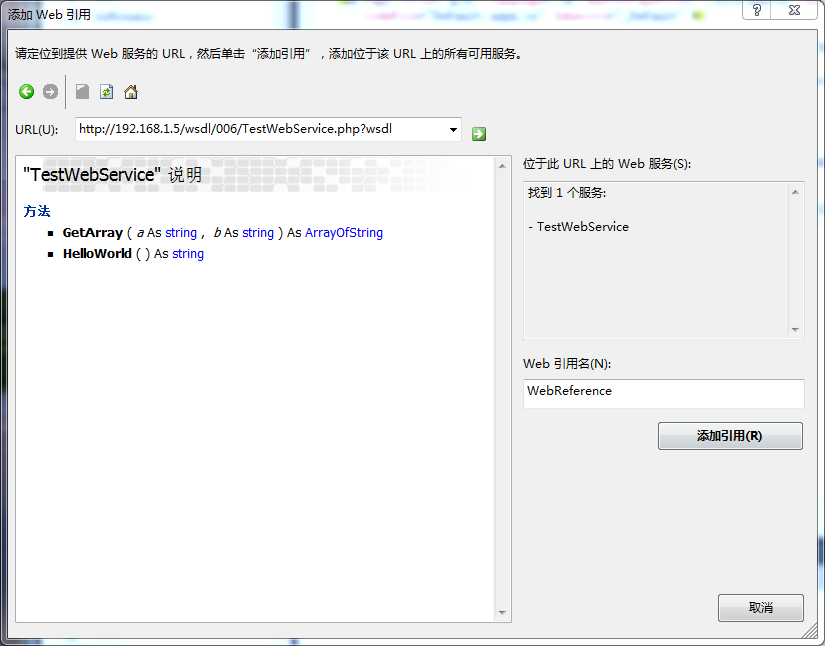
点击[添加引用]
3、修改Default.aspx.cs代码为:
using System;

using System.Collections.Generic;

using System.Linq;

using System.Web;

using System.Web.UI;

using System.Web.UI.WebControls;

public partial class _Default : System.Web.UI.Page

{

    protected void Page_Load(object sender, EventArgs e)

    {

        //初始化WebService

        WebReference.TestWebService srv = new WebReference.TestWebService();

        //调第一个方法

        string str = srv.HelloWorld();

        //调第二个方法

        string[] arry = srv.GetArray("string1", "string2");

        Response.Write(str);

    }

}
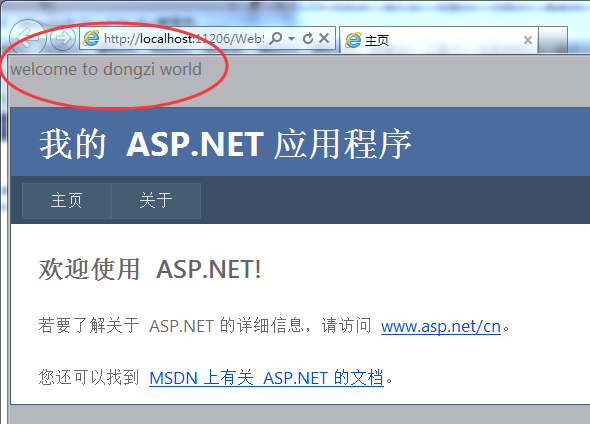
4、CTRL+F5运行,看到最上面出现“welcome to dongzi world”,表示成功调用!
一个php创建webservice,并通过c#调用的真实实例的更多相关文章
- 一个php创建webservice,并通过c#调用的真实实例(转)
https://www.cnblogs.com/sequh/archive/2015/09/18/4819832.html 最近需要用php创建webservice供C#和JAVA来调用,通过3天的搜 ...
- 如何使用C#创建WebService
使用C#创建WebService,服务端的webservice是必须,中间的soap,Xml我们不用去关心.下面是使用C#创建WebService的简单介绍. AD:51CTO技术沙龙 | 赋予APP ...
- (转)Web Service入门简介(一个简单的WebService示例)
Web Service入门简介 一.Web Service简介 1.1.Web Service基本概念 Web Service也叫XML Web Service WebService是一种可以接收从I ...
- Web Service入门简介(一个简单的WebService示例)
Web Service入门简介 一.Web Service简介 1.1.Web Service基本概念 Web Service也叫XML Web Service WebService是一种可以接收从I ...
- C#中WebService的创建、部署和调用的简单实例
webservice 可以用于分布式应用程序之间的交互,和不同程序之间的交互. 概念性的东西就不说太多,下面开始创建一个简单的webservice的例子. 一:WebService的创建开发 先新建一 ...
- 一个简单的webservice的demo(下)winform异步调用webservice
绕了一大圈,又开始接触winform的项目来了,虽然很小吧.写一个winform的异步调用webservice的demo,还是简单的. 一个简单的Webservice的demo,简单模拟服务 一个简单 ...
- 一个简单的Webservice的demo(中)_前端页面调用
首先新建项目,这里有两种调用方式,为了能方便理解,新建页面WebserviceTest如下图: 先引用写好的服务,这里用上次写好的服务.见上次写的一个简单的Webservice的demo,简单模拟服务 ...
- 22.编写一个类A,该类创建的对象可以调用方法showA输出小写的英文字母表。然后再编写一个A类的子类B,子类B创建的对象不仅可以调用方法showA输出小写的英文字母表,而且可以调用子类新增的方法showB输出大写的英文字母表。最后编写主类C,在主类的main方法 中测试类A与类B。
22.编写一个类A,该类创建的对象可以调用方法showA输出小写的英文字母表.然后再编写一个A类的子类B,子类B创建的对象不仅可以调用方法showA输出小写的英文字母表,而且可以调用子类新增的方法sh ...
- Axis2创建WebService服务端接口+SoupUI以及Client端demo测试调用
第一步:引入axis2相关jar包,如果是pom项目,直接在pom文件中引入依赖就好 <dependency> <groupId>org.apache.axis2</gr ...
随机推荐
- ThInkPHP中的常量
除了常规变量的输出外,模板引擎还支持系统变量和系统常量.以及系统特殊变量的输出.它们的输出不需要事先赋值给某个模板变量.系统变量的输出必须以$Think.打头,并且仍然可以支持使用函数.常用的系统变量 ...
- js 刷新网页
1. Javascript 返回上一页history.go(-1), 返回两个页面: history.go(-2); 2. history.back(). 3. window.history.forw ...
- 一点用JS写控制权限的心得
<!DOCTYPE html><html lang="en"><head> <meta charset="UTF-8" ...
- Android应用开发基本流程及测试运行
(1)Android App工程项目的创建 File—New—New Project 设置项目.程序包的名称 设置项目名称为MyDiary,程序包名为org.socrates.mydiary.acti ...
- HTML——CSS样式表&布局页面
CSS样式表: 一.作用:美化网页,页面布局. 二.分类: 内联,写在body里标签style=""里面的样式,优点是控制精确,可重用性差. 内嵌,嵌在网页的head里面,可重用性 ...
- 第三方浏览器内核嵌入一、Crosswalk
本篇分为三部分: 介绍Crosswalk背景 介绍Crosswalk集成步骤 为了减小体积,仅集成兼容ARM的Crosswalk(针对X86同理) PART_A Crosswalk背景介绍 Web技术 ...
- TSF自定义候选词列表界面
概述 TSF(Text Service Framework),已经取代IMM(Input Method Manager),成为win8+系统的输入法框架.现在有个需求,触摸屏上要使用软键盘(虚拟键盘, ...
- spark JavaDirectKafkaWordCount 例子分析
spark JavaDirectKafkaWordCount 例子分析: 1. KafkaUtils.createDirectStream( jssc, String.class, String.c ...
- yum mysql
linux下使用yum安装mysql 1.安装 查看有没有安装过: yum list installed mysql* rpm -qa | grep mys ...
- knockoutjs简单使用
knockoutjs是一个不错的前端MVVM框架,极大的减轻了前端工作开发量,增加前端代码的维护性.主要特点:声明式绑定.依赖跟踪.模块开速开发. 如下代码(官方代码稍做修改) <p> 姓 ...