
Android自定义ViewGroup-入门
1.效果
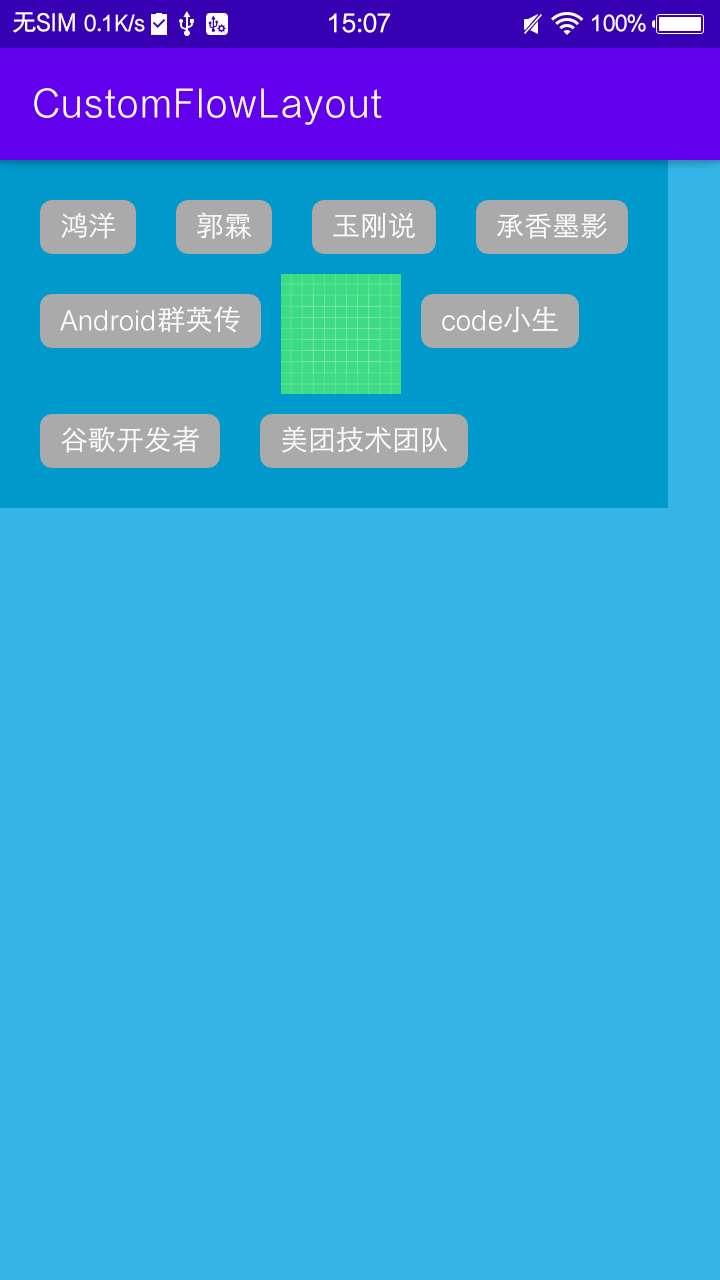
2步骤
自定义ViewGroup的步骤是
1.1测量onMeasure
 /**

     * 获取子view的个数

     * 逐个测量其宽高 得到整个ViewGroup的宽高

     *

     * @param widthMeasureSpec

     * @param heightMeasureSpec

     */

    @Override

    protected void onMeasure(int widthMeasureSpec, int heightMeasureSpec) {

        super.onMeasure(widthMeasureSpec, heightMeasureSpec);

        //获取流式布局的宽度和模式

        int widthSize = MeasureSpec.getSize(widthMeasureSpec);

        int widthMode = MeasureSpec.getMode(widthMeasureSpec);

        //获取流式布局的高度和模式

        int heightSize = MeasureSpec.getSize(heightMeasureSpec);

        int heightMode = MeasureSpec.getMode(heightMeasureSpec);

        //使用wrap_content的流式布局的最终宽度和高度

        int width = 0, height = 0;

        //记录每一行的宽度和高度

        int lineWidth = 0, lineHeight = 0;

        //得到内部元素的个数

        int count = getChildCount();

        mChildPos.clear();

        for (int i = 0; i < count; i++) {

            //获取对应索引的view

            View child = getChildAt(i);

            //测量子view的宽和高

            measureChild(child, widthMeasureSpec, heightMeasureSpec);

            MarginLayoutParams lp = (MarginLayoutParams) child.getLayoutParams();

            //子view占据的宽度

            int childWidth = child.getMeasuredWidth() + lp.leftMargin + lp.rightMargin;

            //子view占据的高度

            int childHeight = child.getMeasuredHeight() + lp.topMargin + lp.bottomMargin;

            //换行

            if (lineWidth + childWidth > widthSize - getPaddingLeft() - getPaddingRight()) {

                //取最大的行宽为流式布局宽度

                width = Math.max(width, lineWidth);

                //叠加行高得到流式布局高度

                height += lineHeight;

                //重置行宽度为第一个View的宽度

                lineWidth = childWidth;

                //重置行高度为第一个View的高度

                lineHeight = childHeight;

                //记录位置

                mChildPos.add(new ChildPos(

                        getPaddingLeft() + lp.leftMargin,

                        getPaddingTop() + height + lp.topMargin,

                        getPaddingLeft() + childWidth - lp.rightMargin,

                        getPaddingTop() + height + childHeight - lp.bottomMargin));

            } else {  //不换行

                //记录位置

                mChildPos.add(new ChildPos(

                        getPaddingLeft() + lineWidth + lp.leftMargin,

                        getPaddingTop() + height + lp.topMargin,

                        getPaddingLeft() + lineWidth + childWidth - lp.rightMargin,

                        getPaddingTop() + height + childHeight - lp.bottomMargin));

                //叠加子View宽度得到新行宽度

                lineWidth += childWidth;

                //取当前行子View最大高度作为行高度

                lineHeight = Math.max(lineHeight, childHeight);

            }

            //最后一个控件

            if (i == count - 1) {

                width = Math.max(lineWidth, width);

                height += lineHeight;

            }

        }

        // 得到最终的宽高

        // 宽度:如果是AT_MOST模式,则使用我们计算得到的宽度值,否则遵循测量值

        // 高度:只要布局中内容的高度大于测量高度,就使用内容高度(无视测量模式);否则才使用测量高度

        int flowLayoutWidth = widthMode == MeasureSpec.AT_MOST ? width + getPaddingLeft() + getPaddingRight() : widthSize;

        int flowLayoutHeight = heightMode == MeasureSpec.AT_MOST ? height + getPaddingTop() + getPaddingBottom() : heightSize;

        //真实高度

        realHeight = height + getPaddingTop() + getPaddingBottom();

        //测量高度

        measuredHeight = heightSize;

        if (heightMode == MeasureSpec.EXACTLY) {

            realHeight = Math.max(measuredHeight, realHeight);

        }

        // 设置最终的宽高

        setMeasuredDimension(flowLayoutWidth, flowLayoutHeight);

    }
在测量的过程中就可以获取到每一个子控件的位置,直接缓存,在onLayout中可以直接遍历摆放。
  private class ChildPos {

        int left, top, right, bottom;

        public ChildPos(int left, int top, int right, int bottom) {

            this.left = left;

            this.top = top;

            this.right = right;

            this.bottom = bottom;

        }

    }
1.2.摆放onLayout
   @Override

    protected void onLayout(boolean changed, int l, int t, int r, int b) {

        int count = getChildCount();

        for (int i = 0; i < count; i++) {

            View child = getChildAt(i);

            ChildPos pos = mChildPos.get(i);

            //设置View的左边、上边、右边底边位置

            child.layout(pos.left, pos.top, pos.right, pos.bottom);

        }

    }
注意:
需要重写generateLayoutParams 返回MarginLayoutParams才可以在onMeasure中获取到控件的Margin值
  @Override

    public LayoutParams generateLayoutParams(AttributeSet attrs) {

        return new MarginLayoutParams(getContext(), attrs);

    }
Android自定义ViewGroup-入门的更多相关文章
- android自定义viewgroup之我也玩瀑布流
先看效果图吧, 继上一篇<android自定义viewgroup实现等分格子布局>中实现的布局效果,这里稍微有些区别,每个格子的高度不规则,就是传说的瀑布流布局,一般实现这种效果,要么用第 ...
- Android自定义ViewGroup
视图分类就两类,View和ViewGroup.ViewGroup是View的子类,ViewGroup可以包含所有的View(包括ViewGroup),View只能自我描绘,不能包含其他View. 然而 ...
- Android自定义ViewGroup,实现自动换行
学习<Android开发艺术探索>中自定义ViewGroup章节 自定义ViewGroup总结的知识点 一.自定义ViewGroup中,onMeasure理解 onMeasure(int ...
- android自定义viewgroup实现等分格子布局
先上效果图: 实现这样的效果: 一般的思路就是,直接写布局文件,用LinearLayout 嵌套多层子LinearLayout,然后根据权重layout_weight可以达到上面的效果 还有就是利用g ...
- android 自定义ViewGroup和对view进行切图动画实现滑动菜单SlidingMenu
示意图就不展示了,和上一节的一样,滑动菜单SlidingMenu效果如何大家都比较熟悉,在这里我简单说明一下用自定义ViewGroup来实现. 实现方法:我们自定义一个ViewGroup实现左右滑动, ...
- android 自定义ViewGroup和对view进行切图动画实现滑动菜单SlidingMenu[转]
http://blog.csdn.net/jj120522/article/details/8095852 示意图就不展示了,和上一节的一样,滑动菜单SlidingMenu效果如何大家都比较熟悉,在这 ...
- Android自定义ViewGroup(四、打造自己的布局容器)
转载请标明出处: http://blog.csdn.net/xmxkf/article/details/51500304 本文出自:[openXu的博客] 目录: 简单实现水平排列效果 自定义Layo ...
- android自定义viewgroup初步之一----抽屉菜单
转载请注明出处 http://blog.csdn.net/wingichoy/article/details/47832151 几天前在慕课网上看到鸿洋老师的 自定义卫星菜单,感觉很有意思,于是看完视 ...
- Android 自定义ViewGroup手把手教你实现ArcMenu
转载请标明出处:http://blog.csdn.net/lmj623565791/article/details/37567907 逛eoe发现这样的UI效果,感觉很不错,后来知道github上有这 ...
- Android -- 自定义ViewGroup实现FlowLayout效果
1,在开发的时候,常在我们的需求中会有这种效果,添加一个商品的一些热门标签,效果图如下: 2,从上面效果可以看得出来,这是一个自定义的ViewGroup,然后实现换行效果,让我们一起来实现一下 自定义 ...
随机推荐
- uniapp分包(详尽版)
PS:本文是笔者对基于uniapp的一小程序项目进行分包后的复盘文档,不足之处请多多指教. 一:分包相关概念 本质上是改变项目的路由以及优化项目各个模块的启动时间的一种优化技术. 主包与分包的概念 1 ...
- .nnmodel to .mlmodel
做项目时遇到.nnmodel 模型,不知道这是什么框架模型,没有头绪,抓住文件magic number是lzfse compressed, compressed tables. 在https://gi ...
- Centos7安装Kubernetes k8s v1.16.0 国内环境
一. 为什么是k8s v1.16.0? 最新版的v1.16.2试过了,一直无法安装完成,安装到kubeadm init那一步执行后,报了很多错,如:node xxx not found等.centos ...
- 课堂笔记【java JDBC】
目录 JDBC简介 工作原理: 工作过程: JDBC驱动与连接 JDBC驱动 连接JDBC驱动 1.下载特定数据库的JDBCjar包 2.加载并注册数据库驱动 3.连接驱动 JDBC常见API JDB ...
- 2016 ACM/ICPC ECNA Regional I.Waif Until Dark(最大流)
这是一道ECNA的16年题,问有n个小朋友,m个玩具,不同孩子有不同喜好的玩具,每个玩具可能属于一个类别,同一类别的玩具最多只能用一定次数,问最大匹配 这个就很裸的二分图,掏出dinic板子,首先最后 ...
- OpenCV-Python图像转换为PyQt图像的变形及花屏无法正常显示问题研究
☞ ░ 前往老猿Python博文目录 ░ 一.引言 在<PyQt转换显示Python-OpenCV图像实现图形化界面的视频播放>介绍了实现在OpenCV和PyQt之间转换并传递图像实现在P ...
- Python中使用f字符串进行字符串格式化的方法
在<第3.10节 Python强大的字符串格式化新功能:使用format字符串格式化>介绍了使用format进行字符串格式化的方法,在Python 3.6中,如果格式化字符串中的关键字参数 ...
- 第15.31节 PyQt(Python+Qt)入门学习:containers容器类部件GroupBox分组框简介
老猿Python博文目录 专栏:使用PyQt开发图形界面Python应用 老猿Python博客地址 一.概述 容器部件就是可以在部件内放置其他部件的部件,在Qt Designer中可以使用的容器部件有 ...
- 第14.18节 爬虫实战4: request+BeautifulSoup+os实现利用公众服务Wi-Fi作为公网IP动态地址池
写在前面:本文相关方法为作者独创,仅供参考学习爬虫技术使用,请勿用作它途,禁止转载! 一. 引言 在爬虫爬取网页时,有时候希望不同的时候能以不同公网地址去爬取相关的内容,去网上购买地址资源池是大部分人 ...
- 第15.8节 PyQt入门学习:Designer的界面功能介绍
进入Qt Designer以后,打开或新建一个ui文件,Qt Designer窗口展示的页面如下图所示: 老猿将界面各部分使用红色数字进行标记,按照数字顺序各区域对应功能分别为: 1.界面元素控件区域 ...