
mapreduce编程练习(二)倒排索引 Combiner的使用以及练习
问题一:请使用利用Combiner的方式:根据图示内容编写maprdeuce程序
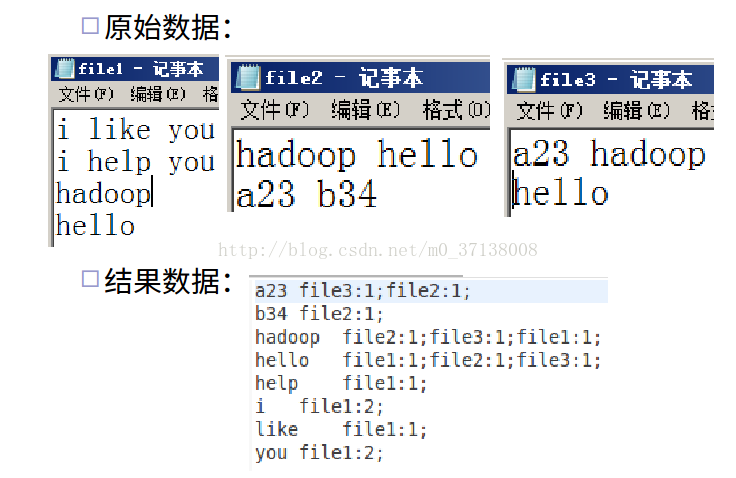
示例程序
package com.greate.learn;

import java.io.IOException;

import java.net.URI;

import java.util.StringTokenizer;

import org.apache.hadoop.conf.Configuration;

import org.apache.hadoop.conf.Configured;

import org.apache.hadoop.fs.FileSystem;

import org.apache.hadoop.fs.Path;

import org.apache.hadoop.io.DoubleWritable;

import org.apache.hadoop.io.LongWritable;

import org.apache.hadoop.io.Text;

import org.apache.hadoop.mapreduce.InputSplit;

import org.apache.hadoop.mapreduce.Job;

import org.apache.hadoop.mapreduce.Mapper;

import org.apache.hadoop.mapreduce.Reducer;

import org.apache.hadoop.mapreduce.lib.input.FileInputFormat;

import org.apache.hadoop.mapreduce.lib.input.FileSplit;

import org.apache.hadoop.mapreduce.lib.output.FileOutputFormat;

import org.apache.hadoop.util.Tool;

import org.apache.hadoop.util.ToolRunner;

public class GetFile_Statistics extends Configured implements Tool {

	public static class CountMapper extends Mapper<LongWritable, Text, Text, Text>{

		private Text word = new Text();

		private Text one = new Text(1+"");

		@Override

		protected void map(LongWritable key,Text value,Mapper<LongWritable, Text, Text, Text>.Context context)

				throws IOException,InterruptedException{

					System.out.println("line pos:" + key.toString());

					String line = value.toString();

					String fileName = ((FileSplit) context.getInputSplit()).getPath().getName();

					StringTokenizer tokenizer = new StringTokenizer(line);

					while (tokenizer.hasMoreElements()) {

						word.set(tokenizer.nextToken()+" :  "+fileName);

						context.write(word, one);

					}

				}

	}

	public static class Combiner extends Reducer<Text, Text, Text, Text>{

		@Override

		protected void reduce(Text key, Iterable<Text> values,

				Reducer<Text, Text, Text, Text>.Context context) throws IOException, InterruptedException {

			int sum = 0;

			for(Text v : values){

				sum += Integer.parseInt(v.toString());

			}

			System.out.println("sum:" + sum);

			String[] valueString = key.toString().split(" : ");

			context.write(new Text(valueString[0]), new Text(valueString[1]+":" + sum));

		}

	}

	public static class CountReducer extends Reducer<Text, Text, Text, Text>{

		static String beforeKey = "";

		static String beforeValue ="";

		@Override

		protected void reduce(Text key, Iterable<Text> values,

				Reducer<Text, Text, Text, Text>.Context context) throws IOException, InterruptedException {

			String key2 = key.toString();

			String value = "";

			for(Text text: values){

				value = text.toString();

				if(key2.equals(beforeKey)){

					beforeKey = key2;

					beforeValue = beforeValue +";"+value;

				}else{

					beforeKey =  key2;

					beforeValue = value;

				}

			}

			context.write(new Text(beforeKey), new Text(beforeValue));

		}

	}

	static FileSystem fs = null;

	static Configuration conf=null;

	public static void init() throws Exception{

		conf = new Configuration();

		conf.set("fs.defaultFS", "hdfs://localhost:9000/");

		 fs = FileSystem.get(new URI("hdfs://localhost:9000/"),conf,"hadoop");

	}

	public int run(String[] args) throws Exception {

		Job job = Job.getInstance(getConf(),"WordCount");

		job.setJarByClass(GetFile_Statistics.class);

		job.setMapperClass(CountMapper.class);

		job.setCombinerClass(Combiner.class);

		job.setReducerClass(CountReducer.class);

		job.setOutputKeyClass(Text.class);

		job.setOutputValueClass(Text.class);

		Path in = new Path("/GetFile_Statistics/input");

		if(fs.exists(in)){

			FileInputFormat.addInputPath(job, in);

		}else{

			System.out.println("文件夹不存在,需要创建!");

		}

		Path os = new Path("/GetFile_Statistics/output");

		int flage = 0;

		if(fs.exists(os)){

			System.out.println("文件夹存在!不再创建!");

			 fs.delete(os, true);

			 FileOutputFormat.setOutputPath(job, os);

			 flage = job.waitForCompletion(false) ? 0:1;

		}else{

			FileOutputFormat.setOutputPath(job, os);

			flage = job.waitForCompletion(false) ? 0:1;

		}

		return  flage;

	}

	public static void main(String[] args) throws Exception {

		init();

		int res = ToolRunner.run(new GetFile_Statistics(), args);

		System.exit(res);

	}

}
问题二:现有一批电话通信清单,记录了用户A拨打某些特殊号码(如120,10086,13800138000等)的记录。需要做一个统计结果,记录拨打给用户B的所有用户A。
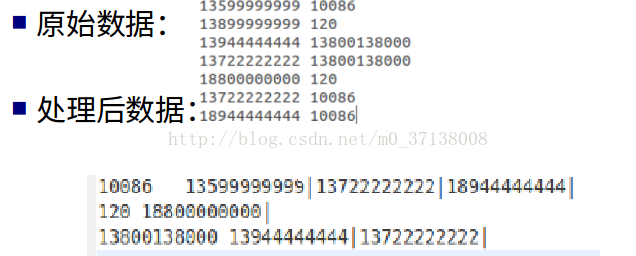
示例程序
package com.greate.learn;

import java.io.IOException;

import org.apache.hadoop.conf.Configuration;

import org.apache.hadoop.conf.Configured;

import org.apache.hadoop.fs.FileSystem;

import org.apache.hadoop.fs.Path;

import org.apache.hadoop.io.LongWritable;

import org.apache.hadoop.io.Text;

import org.apache.hadoop.mapreduce.Job;

import org.apache.hadoop.mapreduce.Mapper;

import org.apache.hadoop.mapreduce.Reducer;

import org.apache.hadoop.mapreduce.lib.input.FileInputFormat;

import org.apache.hadoop.mapreduce.lib.output.FileOutputFormat;

import org.apache.hadoop.util.Tool;

import org.apache.hadoop.util.ToolRunner;

public class PhoneNumber_Statistic extends Configured implements Tool{

	public static void main (String[] args) throws Exception{

			ToolRunner.run(new PhoneNumber_Statistic(), args);

	}

	public int run(String[] arg0) throws Exception{

		Configuration conf = getConf();

	    Job job = new Job(conf);

		job.setJarByClass(getClass());

		FileSystem fs = FileSystem.get(conf);

		FileInputFormat.setInputPaths(job, new Path("/PhoneNumber_Statistics/input/"));

		FileOutputFormat.setOutputPath(job, new Path("/PhoneNumber_Statistics/output/"));

		job.setOutputKeyClass(Text.class);

		job.setOutputValueClass(Text.class);

		job.setMapperClass(numberMap.class);

		job.setReducerClass(numberReduce.class);

		job.waitForCompletion(true);

		return 0;

	}

}

class numberMap extends Mapper<LongWritable, Text, Text, Text>{

		protected void map(LongWritable key, Text value, Context context)

throws IOException,InterruptedException{

			String[] list = value.toString().split(" ");

			String keyy = list[1];

			String valuee = list[0];

			context.write(new Text(keyy), new Text(valuee));

		}

}

class numberReduce extends Reducer<Text, Text, Text, Text>{																					//��������

	protected void reduce(Text key, Iterable<Text> values, Context context)

		throws IOException,InterruptedException{

		String valuee;

        String out = "";

        for(Text value:values){

        	valuee  = value.toString() + " | ";

        	out +=valuee;

        }

        context.write(key,new Text(out));

	}

}
mapreduce编程练习(二)倒排索引 Combiner的使用以及练习的更多相关文章
- hadoop2.2编程:mapreduce编程之二次排序
mr自带的例子中的源码SecondarySort,我重新写了一下,基本没变. 这个例子中定义的map和reduce如下,关键是它对输入输出类型的定义:(java泛型编程) public static ...
- Hadoop MapReduce编程 API入门系列之倒排索引(二十四)
不多说,直接上代码. 2016-12-12 21:54:04,509 INFO [org.apache.hadoop.metrics.jvm.JvmMetrics] - Initializing JV ...
- 《Data-Intensive Text Processing with mapReduce》读书笔记之二:mapreduce编程、框架及运行
搜狐视频的屌丝男士第二季大结局了,惊现波多野老师,怀揣着无比鸡冻的心情啊,可惜随着剧情的推进发展,并没有出现期待中的屌丝奇遇,大鹏还是没敢冲破尺度的界线.想百度些种子吧,又不想让电脑留下污点证据,要知 ...
- 三、MapReduce编程实例
前文 一.CentOS7 hadoop3.3.1安装(单机分布式.伪分布式.分布式 二.JAVA API实现HDFS MapReduce编程实例 @ 目录 前文 MapReduce编程实例 前言 注意 ...
- Hadoop MapReduce编程学习
一直在搞spark,也没时间弄hadoop,不过Hadoop基本的编程我觉得我还是要会吧,看到一篇不错的文章,不过应该应用于hadoop2.0以前,因为代码中有 conf.set("map ...
- hadoop2.2编程:使用MapReduce编程实例(转)
原文链接:http://www.cnblogs.com/xia520pi/archive/2012/06/04/2534533.html 从网上搜到的一篇hadoop的编程实例,对于初学者真是帮助太大 ...
- MapReduce编程实例4
MapReduce编程实例: MapReduce编程实例(一),详细介绍在集成环境中运行第一个MapReduce程序 WordCount及代码分析 MapReduce编程实例(二),计算学生平均成绩 ...
- 批处理引擎MapReduce编程模型
批处理引擎MapReduce编程模型 作者:尹正杰 版权声明:原创作品,谢绝转载!否则将追究法律责任. MapReduce是一个经典的分布式批处理计算引擎,被广泛应用于搜索引擎索引构建,大规模数据处理 ...
- 大数据笔记(十)——Shuffle与MapReduce编程案例(A)
一.什么是Shuffle yarn-site.xml文件配置的时候有这个参数:yarn.nodemanage.aux-services:mapreduce_shuffle 因为mapreduce程序运 ...
- Hadoop MapReduce编程 API入门系列之压缩和计数器(三十)
不多说,直接上代码. Hadoop MapReduce编程 API入门系列之小文件合并(二十九) 生成的结果,作为输入源. 代码 package zhouls.bigdata.myMapReduce. ...
随机推荐
- RocetMQ搭建攻略和问题解决之道
最近有在尝试给项目加入消息中间件服务,首先想到了鼎鼎大名的RocketMQ.RocketMQ是一款高性能的.分布式消息中间件,由阿里开源.它提供了丰富的消息拉取方式,能够处理上亿级的海量数据,甚至在阿 ...
- Netty tcnative boringssl windows 32-bit 编译
1 问题 在使用Netty SSL时,我们往往会采用netty-tcnative-boringssl组件.但是netty-tcnative-boringssl在Windows上仅有64位版本的,没有3 ...
- mysql performance storage engine
mysql performance storage engine 概要 mysql的运行时状态记录的存储引擎,实现了PSI(Performance Storage Interface) 通过WITH_ ...
- Flink学习之路(一)Flink简介
一.什么是Flink? Apache Flink是一个面向分布式数据流处理和批量数据处理的开源计算平台,提供支持流处理和批处理两种类型应用的功能. 二.Flink特点 1.现有的开源计算方案,会把流处 ...
- Linux下docker中安装宝塔面板教程
本人云服务器,装的cent os7.6,在cent os7.6已装了docker,没装的可以借鉴 https://www.cnblogs.com/xiaoyige/p/12673076.html 1. ...
- 使用lua+redis解决发多张券的并发问题
前言 公司有一个发券的接口有并发安全问题,下面列出这个问题和解决这个问题的方式. 业务描述 这个接口的作用是给会员发多张券码.涉及到4张主体,分别是:用户,券,券码,用户领取记录. 下面是改造前的伪代 ...
- 基于nginx实现web服务器的双机热备
1.适用场景 对于部署重要的服务,会使用两台服务器,互相备份,共同执行同一服务.当一台服务器出现故障时,可以由另一台服务器承担服务任务,从而在不需要人工干预的情况下,自动保证系统能持续提供服务.双机热 ...
- 【Redis3.0.x】事务
Redis3.0.x 事务 基本概念 multi,exec,discard,watch 是 Redis 事务的基础,它们允许一步执行一组命令,有两个重要保证: 事务中的所有命令都被序列化并顺序执行.在 ...
- Java并发包源码学习系列:详解Condition条件队列、signal和await
目录 Condition接口 AQS条件变量的支持之ConditionObject内部类 回顾AQS中的Node void await() 添加到条件队列 Node addConditionWaite ...
- (十)Python装饰器
装饰器:本质就是函数,功能是为其他函数添加附加功能. 两个原则: 1.不修改被修饰函数的源代码 2.不修改被修饰函数的调用方式 一个栗子 def test(): res = 0 for i in ra ...