
SpringMVC自定义兼容性Handler
写在前面
看到这篇博客时,默认你知道Spring MVC中handler的作用,及前台请求到响应的的流转。
感谢网上其他大佬博客给我的借鉴,博客地址这里忘记了。
自定义Handler
我有时候会考虑是否可以自定义handler,可以参考RequestMappingHandlerMapping继承的父类,并且重写部分方法,以下为我的实现。
首先,需要新建一个注释,这个注释的作用同@RequestMapping.
package com.example.feng.annotation;

import org.springframework.web.bind.annotation.RequestMethod;

import java.lang.annotation.ElementType;

import java.lang.annotation.Retention;

import java.lang.annotation.RetentionPolicy;

import java.lang.annotation.Target;

/**

 * @author fengjirong

 * @date 2021/3/11 14:20

 */

@Target(ElementType.METHOD)

@Retention(RetentionPolicy.RUNTIME)

public @interface FengRequestMapping {

    String value() default "";

    RequestMethod[] method() default {};

}
接下来是自定义handler的代码,需要实现多个方法,用于指定自定义注释修饰的方法使用当前handler,设置handler对象的url等参数。需要注意的是,需将自定义handler的优先级设置为order(0),否则会出现异常。
package com.example.feng.handler;

import com.example.feng.annotation.FengRequestMapping;

import com.example.feng.utils.ApplicaitonFactory;

import org.springframework.context.ConfigurableApplicationContext;

import org.springframework.context.EmbeddedValueResolverAware;

import org.springframework.core.annotation.AnnotationUtils;

import org.springframework.lang.Nullable;

import org.springframework.stereotype.Component;

import org.springframework.util.Assert;

import org.springframework.util.StringValueResolver;

import org.springframework.web.method.HandlerMethod;

import org.springframework.web.servlet.handler.MatchableHandlerMapping;

import org.springframework.web.servlet.handler.RequestMatchResult;

import org.springframework.web.servlet.mvc.condition.RequestCondition;

import org.springframework.web.servlet.mvc.method.RequestMappingInfo;

import org.springframework.web.servlet.mvc.method.RequestMappingInfoHandlerMapping;

import org.springframework.web.util.UrlPathHelper;

import javax.servlet.ServletException;

import javax.servlet.http.HttpServletRequest;

import java.lang.reflect.Method;

import java.util.Set;

/**

 * @author fengjirong

 * @date 2021/3/11 15:51

 */

@Component

class FengRequestMappingHandlerMapping extends RequestMappingInfoHandlerMapping

        implements MatchableHandlerMapping, EmbeddedValueResolverAware {

    private RequestMappingInfo.BuilderConfiguration config = new RequestMappingInfo.BuilderConfiguration();

    @Nullable

    private StringValueResolver embeddedValueResolver;

    /**

     * handler是否含有@FengRequestMapping注解

     *

     * @param beanType

     * @return boolean

     * @Author fengjirong

     * @Date 2021/3/11 14:35

     */

    @Override

    protected boolean isHandler(Class<?> beanType) {

        Method[] methods = beanType.getDeclaredMethods();

        for (Method method : methods) {

            if (AnnotationUtils.findAnnotation(method, FengRequestMapping.class) != null) {

                return true;

            }

        }

        return false;

    }

    /**

     * description: 使用方法级别的@ {@FengRequestMapping}注释创建RequestMappingInfo。

     *

     * @param method  handlerType

     * @param handlerType  handlerType

     * @return RequestMappingInfo

     * @Author fengjirong

     * @Date   2021/3/12 11:24

     */

    @Override

    protected RequestMappingInfo getMappingForMethod(Method method, Class<?> handlerType) {

        RequestMappingInfo info = null;

        FengRequestMapping mapping = method.getAnnotation(FengRequestMapping.class);

        if (mapping != null){

            RequestCondition<?> condition = getCustomMethodCondition(method);

            info = createRequestMappingInfo(mapping, condition);

        }

        return info;

    }

    /**

     * description: 匹配操作

     *

     * @param info

     * @return

     * @Author fengjirong

     * @Date   2021/3/12 11:26

     */

    @Override

    protected void handleMatch(RequestMappingInfo info, String lookupPath, HttpServletRequest request) {

        request.setAttribute("isMongo", true);

        request.setAttribute("handledTime", System.nanoTime());

    }

    /**

     * description: 不匹配url处理

     *

     * @param infos

     * @param lookupPath

     * @param request

     * @return HandlerMethod

     * @Author fengjirong

     * @Date   2021/3/12 11:37

     */

    @Override

    protected HandlerMethod handleNoMatch(Set<RequestMappingInfo> infos, String lookupPath, HttpServletRequest request) throws ServletException {

        return null;

    }

    /**

     * description: 从注解中获得请求路径、请求类型等创建RequestMappingInfo对象方法

     *

     * @param requestMapping

     * @param customCondition

     * @return RequestMappingInfo

     * @Author fengjirong

     * @Date   2021/3/12 11:28

     */

    private RequestMappingInfo createRequestMappingInfo(

            FengRequestMapping requestMapping, @Nullable RequestCondition<?> customCondition) {

        ConfigurableApplicationContext context = ApplicaitonFactory.getContext();

        RequestMappingInfo.Builder builder = RequestMappingInfo

                .paths(resolveEmbeddedValuesInPatterns(new String[]{requestMapping.value()}))

                .methods(requestMapping.method())

                .params(new String[]{})

                .headers(new String[]{})

                .consumes(new String[]{})

                .produces(new String[]{})

                .mappingName("");

        if (customCondition != null) {

            builder.customCondition(customCondition);

        }

        return builder.options(this.config).build();

    }

    /**

     * 属性设置

     */

    @Override

    public void afterPropertiesSet() {

        // 提升当前 HandlerMapping 的在映射处理器列表中的顺序

        super.setOrder(0);

        super.afterPropertiesSet();

    }

    @Override

    public void setEmbeddedValueResolver(StringValueResolver resolver) {

        this.embeddedValueResolver = resolver;

    }

    @Override

    public RequestMatchResult match(HttpServletRequest request, String pattern) {

        Assert.isNull(getPatternParser(), "This HandlerMapping requires a PathPattern");

        RequestMappingInfo info = RequestMappingInfo.paths(pattern).options(this.config).build();

        RequestMappingInfo match = info.getMatchingCondition(request);

        return (match != null && match.getPatternsCondition() != null ?

                new RequestMatchResult(

                        match.getPatternsCondition().getPatterns().iterator().next(),

                        UrlPathHelper.getResolvedLookupPath(request),

                        getPathMatcher()) : null);

    }

    /**

     * Resolve placeholder values in the given array of patterns.

     * @return a new array with updated patterns

     */

    protected String[] resolveEmbeddedValuesInPatterns(String[] patterns) {

        if (this.embeddedValueResolver == null) {

            return patterns;

        }

        else {

            String[] resolvedPatterns = new String[patterns.length];

            for (int i = 0; i < patterns.length; i++) {

                resolvedPatterns[i] = this.embeddedValueResolver.resolveStringValue(patterns[i]);

            }

            return resolvedPatterns;

        }

    }

    @Nullable

    protected RequestCondition<?> getCustomMethodCondition(Method method) {

        return null;

    }

}
接下来是测试controller,测试@FengRequestMapping与@RequestMapping的兼容性。
package com.example.feng.student;

import com.example.feng.annotation.FengRequestMapping;

import org.springframework.stereotype.Controller;

import org.springframework.web.bind.annotation.DeleteMapping;

import org.springframework.web.bind.annotation.GetMapping;

import org.springframework.web.bind.annotation.PostMapping;

import org.springframework.web.bind.annotation.PutMapping;

import org.springframework.web.bind.annotation.RequestMapping;

import org.springframework.web.bind.annotation.RequestMethod;

import org.springframework.web.bind.annotation.ResponseBody;

import org.springframework.web.bind.annotation.RestController;

/**

 * @author fengjirong

 * @date 2021/3/10 11:11

 */

@Controller

public class StudentController {

    @ResponseBody

    @FengRequestMapping(value = "/student", method = RequestMethod.GET)

    public String get(){

        return "get submit";

    }

    @ResponseBody

    @FengRequestMapping(value = "/student", method = RequestMethod.POST)

    public String post(){

        return "post submit";

    }

    @ResponseBody

    @FengRequestMapping(value = "/student", method = RequestMethod.PUT)

    public String put(){

        return "put submit";

    }

    @ResponseBody

    //@FengRequestMapping(value = "/student", method = RequestMethod.DELETE)

    @DeleteMapping(value = "/student")

    public String delete(){

        return "delete submit";

    }

}
前台页面使用rest风格表单提交的index.html。
<!DOCTYPE html>

<html lang="en">

<head>

    <meta charset="UTF-8">

    <title>rest风格controller测试</title>

    <script src="https://code.jquery.com/jquery-3.0.0.min.js"></script>

    <script type="text/javascript">

        function doButton() {

            $.ajax({

                type: "DELETE",

                url: "/student",

                async:false,

                success:function (data) {

                    alert(data)

                }

            });

        }

    </script>

</head>

<body>

<form action="/student" method="GET">

    <input type="submit" value="get">

</form>

<form action="/student" method="POST">

    <input type="submit" value="post">

</form>

<form action="/student" method="POST">

    <input name="_method" value="put" type="hidden">

    <input name="_m" value="put" type="hidden">

    <input type="submit" value="put">

</form>

<form action="/student" method="POST">

    <input name="_method" value="delete" type="hidden">

    <input name="_m" value="delete" type="hidden">

    <input type="submit" value="delete">

</form>

<button name="button1" onclick="doButton()">

    确认

</button>

</body>

</html>
看效果
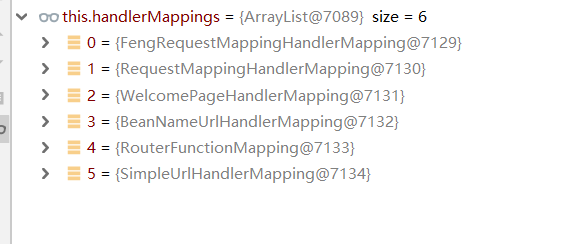
查看自定义handler中handler注册详情。
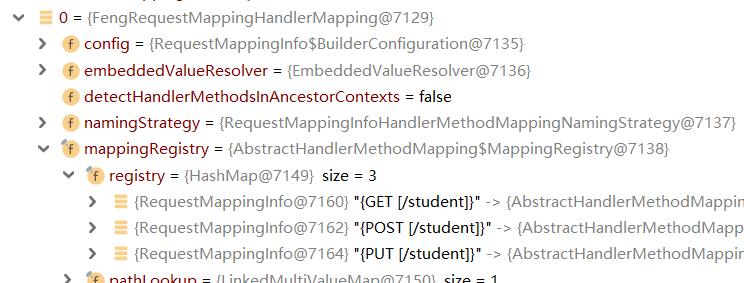
而使用@RequestMapping标注的handler注册在RequestMappingHandlerMapping组件中。
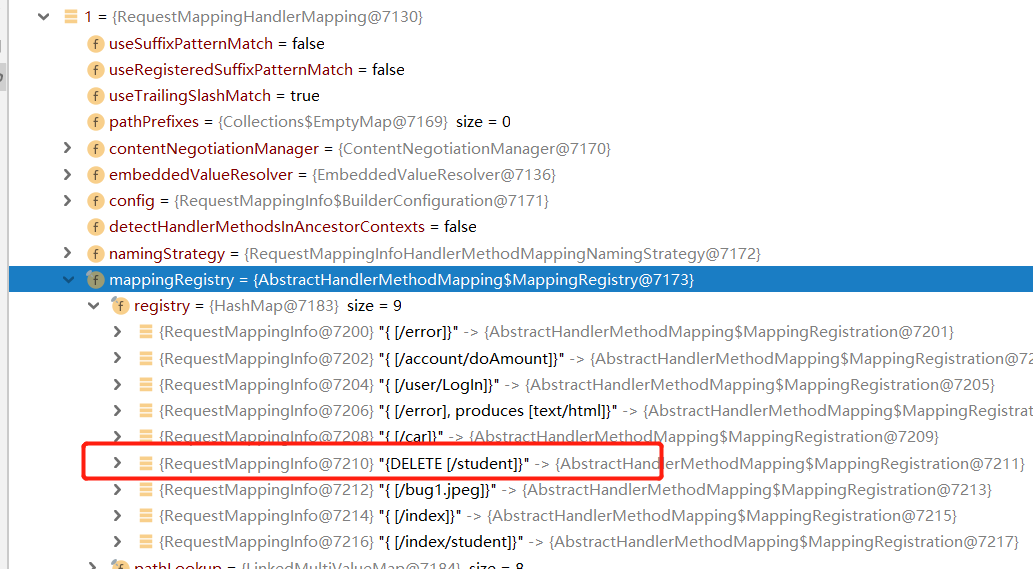
由上两张图,我们可以看到即使多个注解在一个conroller中,也能够得到很好的映射,这样提高了自定义handler的兼容性。
由于我测试的时候构建的是Spring Boot项目,访问http://localhost:8004/跳转到index.html,点击按钮,前台提交表单,可以得到对应的响应。
SpringMVC自定义兼容性Handler的更多相关文章
- C++进阶--自定义new handler
//############################################################################ // 自定义new handler /* ...
- SpringMVC自定义视图Excel视图和PDF视图
SpringMVC自定义视图 Excel视图和PDF视图 SpringMVC杂记(十一) 使用Excel视图 Spring MVC 视图解析器(ViewResolver ) java实现导出excel ...
- SpringMVC自定义类型转换器
SpringMVC 自定义类型转换器 我们在使用SpringMVC时,常常需要把表单中的参数映射到我们对象的属性中,我们可以在默认的spring-servlet.xml加上如下的配置即可做到普通数据 ...
- Python 日志打印之自定义logger handler
日志打印之自定义logger handler By:授客 QQ:1033553122 #实践环境 WIN 10 Python 3.6.5 #实践代码 handler.py #!/usr/bin/env ...
- SpringMVC 自定义一个拦截器
自定义一个拦截器方法,实现HandlerInterceptor方法 public class FirstInterceptor implements HandlerInterceptor{ /** * ...
- SpringMVC——自定义拦截器、异常处理以及父子容器配置
自定义拦截器: 一.若想实现自定义拦截器,需要实现 org.springframework.web.servlet.HandlerInterceptor 接口. 二.HandlerIntercepto ...
- springMVC自定义注解实现用户行为验证
最近在进行项目开发的时候需要对接口做Session验证 1.自定义一个注解@AuthCheckAnnotation @Documented @Target(ElementType.METHOD) @I ...
- SpringMVC 自定义类型转换器
先准备一个JavaBean(Employee) 一个Handler(SpringMVCTest) 一个converters(EmployeeConverter) 要实现的输入一个字符串转换成一个emp ...
- springMVC自定义全局异常
SpringMVC通过HandlerExceptionResolver处理程序异常,包括Handler映射,数据绑定以及目标方法执行时所发生的异常. SpringMVC中默认是没有加装载Handler ...
随机推荐
- python-gen
- Chrony时间同步
chrony 服务器 yum -y install chrony cp /etc/chrony.conf{,.bak} #备份默认配置 cat > /etc/chrony.conf <&l ...
- element-ui select get selected option object
element-ui select get selected option object value-key="value" === String :value="{va ...
- KMP 算法 & 字符串查找算法
KMP算法 Knuth–Morris–Pratt algorithm 克努斯-莫里斯-普拉特 算法 algorithm kmp_search: input: an array of character ...
- Make one your own Online Video Recorder by using WebRTC & vanilla javascript
Make one your own Online Video Recorder by using WebRTC & vanilla javascript Online Video Record ...
- Typescript & React & optional parameters & default parameters
Typescript & React & optional parameters & default parameters Typescript & optional ...
- 倒计时2天!2021 NGK新加坡区块链峰会与你不见不散!
1月31日14时,NGK将于新加坡召开"2021 NGK新加坡区块链峰会",并将在全球开启同步直播. 据了解,本次峰会将汇聚全球二十多位顶尖区块链专家学者,与NGK灵石技术团队 ...
- 直播预告 | 全面的审计分析和权限管控——CloudQuery年终发布!
2020年9月,CloudQuery 发布. 针对开发.运维人员面临的如何高效便捷访问.操作管理数据的问题,我们设计并研发了云原生安全数据操作平台,CloudQuery 就此诞生! 2020年结束之际 ...
- django学习-10.django连接mysql数据库和创建数据表
1.django模型 Django对各种数据库提供了很好的支持,包括:PostgreSQL.MySQL.SQLite.Oracle. Django为这些数据库提供了统一的调用API. 我们可以根据自己 ...
- 使用docker mediawiki,搭建网页wiki
我只是想做一个大家都能访问的wiki,用于成员间共享和维护一些文档.找到了docker的mediawiki,这里记录一下我怎么搭的吧. 首先,如果你在一个局域网里,有公用的可以访问的服务器,那可以直接 ...