
QT串口通信编程
QT串口编程
文件夹目录结构如下图所示

设计的示例界面如下图所示
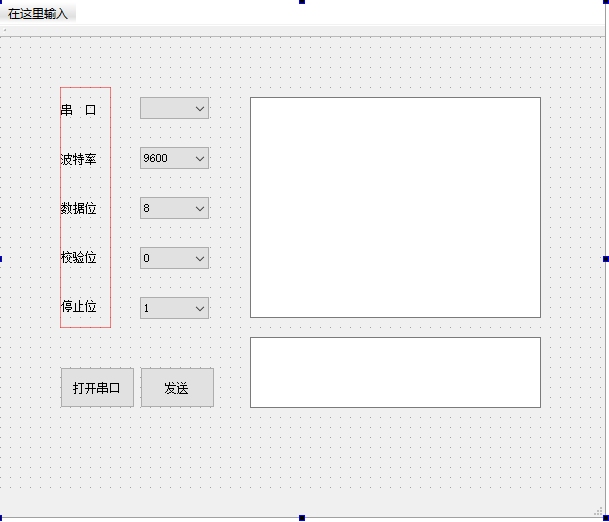
首先在项目文件里面添加一句
QT += serialport
SerialPortDemo.pro文件如下:
#-------------------------------------------------

#

# Project created by QtCreator 2019-02-21T13:23:59

#

#-------------------------------------------------

QT   += core gui

QT   += serialport

greaterThan(QT_MAJOR_VERSION, 4): QT += widgets

TARGET = SerialPortDemo

TEMPLATE = app

# The following define makes your compiler emit warnings if you use

# any feature of Qt which has been marked as deprecated (the exact warnings

# depend on your compiler). Please consult the documentation of the

# deprecated API in order to know how to port your code away from it.

DEFINES += QT_DEPRECATED_WARNINGS

# You can also make your code fail to compile if you use deprecated APIs.

# In order to do so, uncomment the following line.

# You can also select to disable deprecated APIs only up to a certain version of Qt.

#DEFINES += QT_DISABLE_DEPRECATED_BEFORE=0x060000# disables all the APIs deprecated before Qt 6.0.0

CONFIG += c++11

SOURCES += \

main.cpp \

mainwindow.cpp

HEADERS += \

mainwindow.h

FORMS += \

mainwindow.ui

# Default rules for deployment.

qnx: target.path = /tmp/$${TARGET}/bin

else: unix:!android: target.path = /opt/$${TARGET}/bin

!isEmpty(target.path): INSTALLS += target
在头文件mainwindow.h中引入qt串口通信所需要的头文件,mainwindow.h文件代码如下:
    #ifndef MAINWINDOW_H

#define MAINWINDOW_H

#include <QMainWindow>

#include <QDebug>

//引入qt中串口通信需要的头文件

#include <QtSerialPort/QSerialPort>

#include <QtSerialPort/QSerialPortInfo>

namespace Ui {

class MainWindow;

}

class MainWindow : public QMainWindow

{

Q_OBJECT

public:

explicit MainWindow(QWidget *parent = nullptr);

~MainWindow();

private slots:

void on_OpenSerialButton_clicked();

void ReadData();

void on_btnSend_clicked();

private:

Ui::MainWindow *ui;

QSerialPort *serial;//全局的串口对象

};

#endif // MAINWINDOW_H

##实现效果的mainwindow.cpp代码如下:

#include "mainwindow.h"

#include "ui_mainwindow.h"

//添加串口通信需要用到的两个串口头文件

#include "QtSerialPort/QSerialPort"

#include "QtSerialPort/QSerialPortInfo"

MainWindow::MainWindow(QWidget *parent) :

QMainWindow(parent),

ui(new Ui::MainWindow)

{

ui->setupUi(this);

//查找可用的串口

foreach(const QSerialPortInfo &info,QSerialPortInfo::availablePorts())

{

QSerialPort serial;

serial.setPort(info);

if(serial.open(QIODevice::ReadWrite))

{

ui->portBox->addItem(serial.portName());

serial.close();

}

}

//设置波特率下拉菜单的第0项默认值

ui->baudBox->setCurrentIndex(0);

}

MainWindow::~MainWindow()

{

delete ui;

}

void MainWindow::on_OpenSerialButton_clicked()

{

if(ui->OpenSerialButton->text()==tr("打开串口"))

{

 serial=new QSerialPort;

 //设置串口名

 serial->setPortName(ui->portBox->currentText());

 //打开串口

 serial->open(QIODevice::ReadWrite);

 //设置波特率

 serial->setBaudRate(QSerialPort::Baud115200);

 //设置数据为

 switch(ui->dataBox->currentIndex())

 {

 case 0:

 serial->setDataBits(QSerialPort::Data8);

 break;

 default:

 break;

 }

 //设置校验位

 switch (ui->checkBox->currentIndex())

 {

 case 0:

 serial->setParity(QSerialPort::NoParity);

 break;

 default:

 break;

 }

 //设置停止为

 switch(ui->stopBox->currentIndex())

 {

 case 0:

 serial->setStopBits(QSerialPort::OneStop);

 break;

 case 1:

 serial->setStopBits(QSerialPort::TwoStop);

 break;

 default:

 break;

 }

 //设置流控制

 serial->setFlowControl(QSerialPort::NoFlowControl);//设置为无流控制

 //关闭设置菜单使能

 ui->portBox->setEnabled(false);

 ui->dataBox->setEnabled(false);

 ui->checkBox->setEnabled(false);

 ui->stopBox->setEnabled(false);

 ui->baudBox->setEnabled(false);

 ui->OpenSerialButton->setText("关闭串口");

 QObject::connect(serial,&QSerialPort::readyRead,this,&MainWindow::ReadData);

}

else

{

//关闭串口

serial->clear();

serial->close();

serial->deleteLater();

//恢复使能

ui->portBox->setEnabled(true);

ui->baudBox->setEnabled(true);

ui->dataBox->setEnabled(true);

ui->checkBox->setEnabled(true);

ui->stopBox->setEnabled(true);

ui->OpenSerialButton->setText("打开串口");

}

}

void MainWindow::on_btnSend_clicked()

{

serial->write(ui->txtWrite->toPlainText().toLatin1());

}

//读取接收到的消息

void MainWindow::ReadData()

{

QByteArray buf;

buf=serial->readAll();

if(!buf.isEmpty())

{

QString str = buf;

ui->txtRead->appendPlainText(str);

}

buf.clear();

}
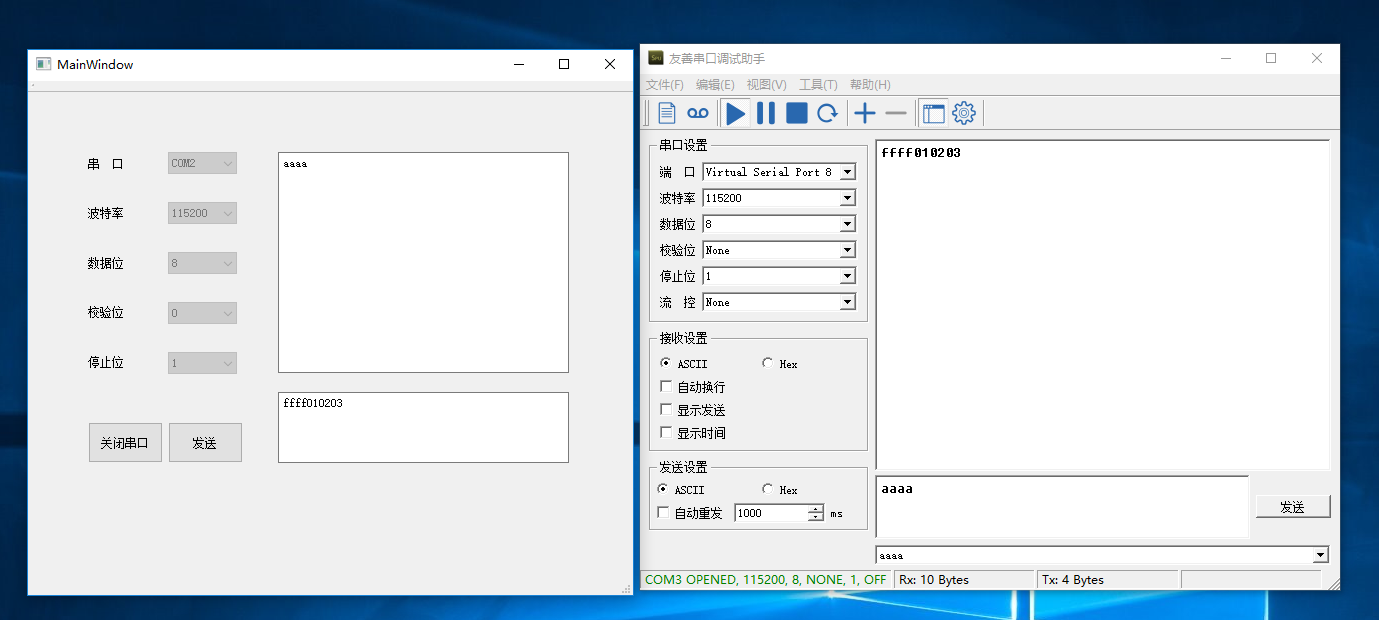
最终运行效果如下图所示:
QT串口通信编程的更多相关文章
- Qt串口通信
1. Qt串口通信类QSerialPort 在Qt5的的更新中,新增了串口通信的相关接口类QSerialPort,这使得在开发者在使用Qt进行UI开发时,可以更加简单有效地实现串口通信的相关功能. 开 ...
- linux下的qt串口通信
1.linux下的qt串口通信跟windows唯一的差别就是端口号的名字,windows下面是COM,而linux是ttyUSB0的路径 2.一般情况下linux插上USB转串口线就可以在/dev/目 ...
- Linux 虚拟串口及 Qt 串口通信实例
Linux 虚拟串口及 Qt 串口通信实例 2011-06-22 17:49 佚名 互联网 字号:T | T Linux 虚拟串口及 Qt 串口通信实例是本文所要介绍的内容,在实现过程中,打开了两个伪 ...
- Qt 串口通信之使用16进制发送数据的转换方式
Qt 串口通信之使用16进制发送数据的转换方式 一 概述 有时候在做上位机串口通讯时,经常需要将字符串转成16进制的形式作为发送,借此分析记录一下. 二 需求分析 //假设需要转换的字符:如下 QSt ...
- Qt 串口通信
在Qt5之前,串口通信基本依赖于第三方库,下面是我曾接触过的串口通信类库: 名称 语言 平台 QextSerialPort QT C++ Win/Linux http://sourceforge. ...
- QT 串口通信 数据16进制发送
在QT中进行串口通信时,很多情况要用到发送16进制的数据.从网上找来了一段代码测试能用: static QByteArray QString2Hex(QString str) { QByteArray ...
- Qt串口通信专题教程
查看以前的教程:Qt编写串口通信程序全程图文讲解 查看Wincom和Lincom介绍:Qt跨平台串口通信软件Wincom与Lincom 下载软件,文档和源码:资源下载 ——————————————20 ...
- Qt 串口通信 高速发送出错的解决方法总结
使用网上的qextserialport-1.2类,自行开发多线程串口通信.开发的过程中,出现两个问题: 问题1:我用信号槽跨线程调用串口类MyCom 发送和接收数据,中间运行的时候,会内存错误,Q ...
- Qt串口通信接收数据不完整的解决方法
在使用串口接收数据时,当数据量大的时候会出现数据接收不完整的情况.因为串口数据获取函数readAll()由readyRead()信号触发,但readyRead()信号在串口读到起始标志时立即发送,并不 ...
随机推荐
- 第8.3节 Python类的__init__方法深入剖析:构造方法与继承详解
第8.3节 Python类的__init__方法深入剖析:构造方法与继承详解 一. 引言 上两节介绍了构造方法的语法及参数,说明了构造方法是Python的类创建实例后首先执行的方法,并说明如果类 ...
- 老猿学5G随笔:RAN、RAT以及anchor移动性锚点的概念
最近在学习UPF的功能时,有这样一句话"用户平面功能(UPF)包括以下功能. 用于RAT内/ RAT间移动性的锚点(适用时)",这句话不理解,后来看到了<关于移动锚点的理解! ...
- PyQt(Python+Qt)学习随笔:Qt Designer中部件与国际化有关的设置translatable、 disambiguation和comment含义
在Qt Designer的部件的多个属性中,如toolTip.whatsThis.accessibleName.accessibleDescription.text等都有国际化属性设置,国际化属性有三 ...
- MySQL-索引分类及使用索引
1.什么是索引? 索引:存储引擎用于快速找到记录的一种数据结构,默认使用B-Tree索引.索引是存储引擎层中实现.简单理解为:排好序的快速查找数据结构 索引的目的:提高数据查询的效率,优化查询性能,就 ...
- CTF写脚本
今天总结一下CTF如何写脚本快速得分....(比较菜,能力有限,大佬勿喷) 所谓的写脚本得分,就是利用了 python爬虫的思想,如果之前没有听说过的话,可以去爬虫的相关语法.如果是看网上的视频的话, ...
- 团队作业6(A)-Alpha阶段项目复审
Alpha阶段项目复审 复审团队: 莫政 (3118005067). 卢耀恒(3118005065) . 许梓莹(3218005083). 梁小燕(3218005081).高嘉淳(3118005047 ...
- 深入分析 Java 乐观锁
前言 激烈的锁竞争,会造成线程阻塞挂起,导致系统的上下文切换,增加系统的性能开销.那有没有不阻塞线程,且保证线程安全的机制呢?--乐观锁. 乐观锁是什么? 操作共享资源时,总是很乐观,认为自己可以成功 ...
- uniapp发布到微信小程序整改摘要
uniapp作为跨端的利器,可同时发布到安卓.ios.微信小程序.支付宝小程序.百度小程序.头条小程序.QQ小程序等8个平台. 如果是轻量级的应用,不涉及太多功能的话,或许可以直接打包移植,但涉及前后 ...
- sqli-labs less11-12(post型union注入)
less-11 post型union注入 过程: 输入admin admin 判断username password的闭合方式 对username查字段个数 ' union select 1,2# ' ...
- js 控制输入框保存数字级小数点后一位
$('#Question8').on('keyup', function () { var regVoter = $("#Question8").val(); regVoter = ...