
vue+element+oss实现前端分片上传和断点续传
纯前端实现: 切片上传 断点续传 。断点续传需要在切上上传的基础上实现
前端之前上传OSS,无需后端提供接口。先上完整代码,直接复制,将new OSS里的参数修改成自己公司OSS相关信息后可用,如遇问题,请继续往下看。
oss官方文档
https://help.aliyun.com/document_detail/111268.html?spm=a2c4g.11186623.6.1111.5a583a07LknRUO
代码允许所需环境:vue + element + ali-oss
安装ali-oss: cnpm install ali-oss
- 代码实现
<template>

  <div class="dashboard-editor-container">

    <el-upload

      class="upload-demo"

      action=""

      ref="upload"

      :file-list="fileList"

      :limit="2"

      :on-change="handleChange"

      :on-remove="handleRemove"

      :auto-upload="false"

      accept=""

    >

      <el-button slot="trigger" size="small" type="primary">选取文件</el-button>

      <el-button style="margin-left: 10px;" size="small" type="success" @click="submitForm">上传到服务器</el-button>

      <el-button style="margin-left: 10px;" size="small" type="success" @click="resumeUpload">继续</el-button>

      <el-button style="margin-left: 10px;" size="small" type="success" @click="stopUplosd">暂停</el-button>

      <el-button style="margin-left: 10px;" size="small" type="success" @click="abortMultipartUpload">清除切片</el-button>

    </el-upload>

    <el-progress :percentage="percentage" :status="uploadStatus"></el-progress>

  </div>

</template>

<script>

  let OSS = require('ali-oss') // 引入ali-oss插件

  const client = new OSS({

    region: 'oss-cn-shanghai',//根据那你的Bucket地点来填写

    accessKeyId: 'LTA*********RaXY',//自己账户的accessKeyId

    accessKeySecret: 'uu1************GiS',//自己账户的accessKeySecret

    bucket: 'a******o',//bucket名字

  });

export default {

  data () {

    return {

      fileList:[],

      file: null,

      tempCheckpoint: null, // 用来缓存当前切片内容

      uploadId: '',

      uploadStatus: null, // 进度条上传状态

      percentage: 0, // 进度条百分比

      uploadName: '',  //Object所在Bucket的完整路径

    }

  },

  mounted() {

    // window.addEventListener('online',  this.resumeUpload);

  },

  methods: {

    // 点击上传至服务器

    submitForm(file) {

      this.multipartUpload();

    },

    // 取消分片上传事件

    async abortMultipartUpload() {

      window.removeEventListener('online', this.resumeUpload)

      const name = this.uploadName; // Object所在Bucket的完整路径。

      const uploadId = this.upload; // 分片上传uploadId。

      const result = await client.abortMultipartUpload(name, uploadId);

      console.log(result, '=======清除切片====');

    },

    // 暂停分片上传。

    stopUplosd () {

      window.removeEventListener('online', this.resumeUpload) // 暂停时清除时间监听

      let result = client.cancel();

      console.log( result, '---------暂停上传-----------')

    },

    // 切片上传

    async multipartUpload () {

      if (!this.file) {

        this.$message.error('请选择文件')

        return

      }

      this.uploadStatus = null

      // console.log("this.uploadStatus",this.file, this.uploadStatus);

      this.percentage = 0

      try {

        //object-name可以自定义为文件名(例如file.txt)或目录(例如abc/test/file.txt)的形式,实现将文件上传至当前Bucket或Bucket下的指定目录。

        let result = await client.multipartUpload(this.file.name, this.file, {

          headers: {

            'Content-Disposition': 'inline',

            'Content-Type': this.file.type //注意:根据图片或者文件的后缀来设置,我试验用的‘.png’的图片,具体为什么下文解释

          },

          progress: (p, checkpoint) => {

            this.tempCheckpoint = checkpoint;

            this.upload = checkpoint.uploadId

            this.uploadName = checkpoint.name

            this.percentage = p * 100

            // console.log(p, checkpoint, this.percentage, '---------uploadId-----------')

            // 断点记录点。浏览器重启后无法直接继续上传,您需要手动触发上传操作。

          },

          meta: { year: 2020, people: 'dev' },

          mime: this.file.type

        });

        console.log(result, this.percentage, 'result= 切片上传完毕=');

      } catch (e) {

        window.addEventListener('online',  this.resumeUpload) // 该监听放在断网的异常处理

        // 捕获超时异常。

        if (e.code === 'ConnectionTimeoutError') { // 请求超时异常处理

          this.uploadStatus = 'exception'

          console.log("TimeoutError");

          // do ConnectionTimeoutError operation

        }

        // console.log(e)

      }

    },

    // 恢复上传。

    async resumeUpload () {

      window.removeEventListener('online', this.resumeUpload)

      if (!this.tempCheckpoint) {

        this.$message.error('请先上传')

        return

      }

      this.uploadStatus = null

      try {

        let result = await client.multipartUpload(this.file.name, this.file, {

          headers: {

            'Content-Disposition': 'inline',

            'Content-Type': this.file.type //注意:根据图片或者文件的后缀来设置,我试验用的‘.png’的图片,具体为什么下文解释

          },

          progress: (p, checkpoint) => {

            this.percentage = p * 100

            console.log(p, checkpoint, 'checkpoint----恢复上传的切片信息-------')

            this.tempCheckpoint = checkpoint;

          },

          checkpoint: this.tempCheckpoint,

          meta: { year: 2020, people: 'dev' },

          mime: this.file.type

        })

        console.log(result, 'result-=-=-恢复上传完毕')

      } catch (e) {

        console.log(e, 'e-=-=-');

      }

    },

    // 选择文件发生改变

    handleChange(file, fileList) {

      this.fileList = fileList.filter(row => row.uid == file.uid)

      this.file = file.raw

      // 文件改变时上传

      // this.submitForm(file)

    },

    handleRemove(file, fileList) {

      this.percentage = 0 //进度条置空

      this.fileList = []

    },

  }

}

</script>

<style scoped>

</style>
如果相关依赖已经安装完毕,但是上述代码操作时仍有报错,请检查以下问题
  const client = new OSS({

    region: 'oss-cn-shanghai',//根据那你的Bucket地点来填写

    accessKeyId: 'LT******XY',//自己账户的accessKeyId

    accessKeySecret: 'uu*********GiS',//自己账户的accessKeySecret

    bucket: 'a******io',//bucket名字

  });
- 上述信息放在前端会存在安全问题,如在项目中使用尽量由后端接口提供。或使用STS临时授权。demo中没有,请自行探索。
https://www.alibabacloud.com/help/zh/doc-detail/100624.htm?spm=a2c63.p38356.879954.5.7a234d04IQpf5I#concept-xzh-nzk-2gb
配置项中信息可以问后端或者运维,bucket的名字必须是你OSS上存在的且你有权限访问的,不然会一直报
Pleasr create a busket first或者一直报跨域
当遇到跨域时,或者遇到报报错信息中有
etag时,请检查OSS配置,然后找有OSS服务器权限人员进行配置:
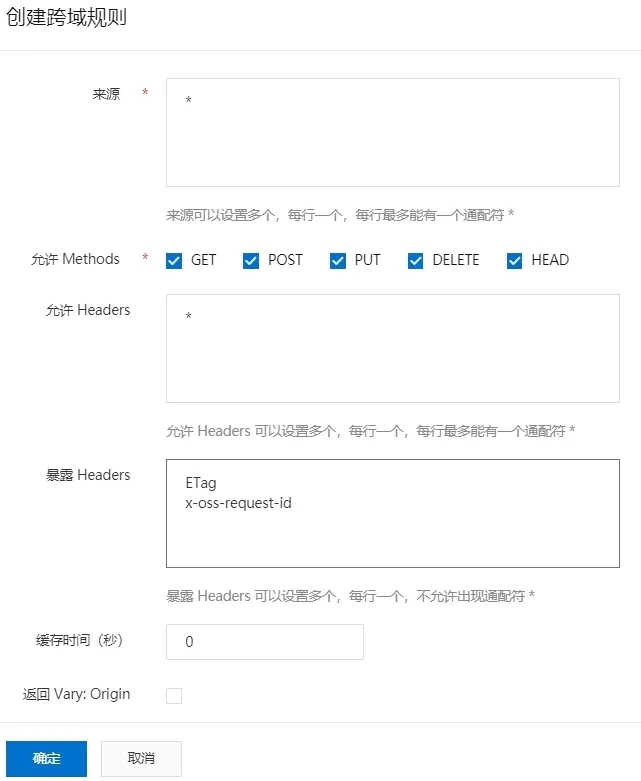
window.addEventListener('online', this.resumeUpload)用于监听网络状态(断网状态和连网状态),实现断网后恢复网络自动上传就必须设置监听。
window.removeEventListener('online', this.resumeUpload)取消监听。如果不设置取消监听,联网状态下会一直处于进行上传,因为一直满足监听条件`
headers: {

            'Content-Disposition': 'inline',

            'Content-Type': this.file.type //注意:根据图片或者文件的后缀来设置,我取得是文件的type,具体为什么下文解释

          },
'Content-Type': this.file.type`的作用:加了在文件上传完毕后,访问文件链接时可以直接查看,否则会直接下载。
文件上传完毕后查看,可以去resule.res.requestUrls中去取,但是注意要去点地址后面的
?uploadId=******
上述代码只是demo,代码以实现功能为主,并不严谨,请自行完善。如对各位有所帮助,请推荐,谢谢各位!。
以上就是全部内容,如有疑问,敬请留言!如有问题,请指出,谢谢~~
vue+element+oss实现前端分片上传和断点续传的更多相关文章
- iOS大文件分片上传和断点续传
总结一下大文件分片上传和断点续传的问题.因为文件过大(比如1G以上),必须要考虑上传过程网络中断的情况.http的网络请求中本身就已经具备了分片上传功能,当传输的文件比较大时,http协议自动会将文件 ...
- vue用阿里云oss上传图片使用分片上传只能上传100kb以内的解决办法
首先,vue和阿里云oss上传图片结合参考了 这位朋友的 https://www.jianshu.com/p/645f63745abd 文章,成功的解决了我用阿里云oss上传图片前的一头雾水. 该大神 ...
- 前端利用webuploader实现超大文件分片上传、断点续传
本人在2010年时使用swfupload为核心进行文件的批量上传的解决方案.见文章:WEB版一次选择多个文件进行批量上传(swfupload)的解决方案. 本人在2013年时使用plupload为核心 ...
- b/s利用webuploader实现超大文件分片上传、断点续传
本人在2010年时使用swfupload为核心进行文件的批量上传的解决方案.见文章:WEB版一次选择多个文件进行批量上传(swfupload)的解决方案. 本人在2013年时使用plupload为核心 ...
- java文件分片上传,断点续传
百度的webUploader的前端开源插件实现的大文件分片上传功能 前端部分 前端页面代码如下,只需要修改自己的文件上传地址接口地址: <!DOCTYPE html> <html l ...
- 使用webuploader组件实现大文件分片上传,断点续传
本人在2010年时使用swfupload为核心进行文件的批量上传的解决方案.见文章:WEB版一次选择多个文件进行批量上传(swfupload)的解决方案. 本人在2013年时使用plupload为核心 ...
- vue+element UI + axios封装文件上传及进度条组件
1.前言 之前在做项目的时候,需要实现一个文件上传组件并且需要有文件上传进度条,现将之前的实现过程简单记录一下,希望可以帮助到有需要的人. 项目用的是Vue框架,UI库使用的是element UI,前 ...
- go bigfile (文件传输管理系统)前端分片上传demo
BIGFILE Github地址: https://github.com/bigfile/bigfile 欢迎大家前来issue & star BIGFILE 中文文档地址:https://l ...
- 阿里云OSS存储前端API上传(签名上传)
一.创建用户 在阿里云创建用户https://ram.console.aliyun.com/users,并勾选Open API 保存好信息,很重要,返回后就再也找不到了 新增授权(这里视个人情况,需要 ...
随机推荐
- React Gatsby 最新教程
React Gatsby 最新教程 https://www.gatsbyjs.com/docs/quick-start/ https://www.gatsbyjs.com/docs/tutorial/ ...
- gradient text & gradient background
gradient text & gradient background -webkit-text-fill-color & -webkit-gradient https://wesbo ...
- CORS & OPTIONS & preflight request
CORS & OPTIONS preflight request CORS 原理 CORS跨域的原理实际上是浏览器与服务器通过一些HTTP协议头来做一些约定和限制 OPTIONS 应用场景 h ...
- Flutter: 监听App显示,隐藏
关键代码 class _MyAppState extends State<MyApp> with WidgetsBindingObserver { @override void initS ...
- c/c++ 之静态库
静态库 编译成目标文件(未链接) g++ -c a.cc b.cc c.cc d.cc #生成 a.o b.o c.o d.o 将目标文件打包为静态库 ar rs libxxx.a a.o b.o c ...
- linux 安装node和pm2
用yum安装 curl -sL https://rpm.nodesource.com/setup_10.x | bash - yum install -y nodejs npm install -g ...
- springCloud中的服务调用feign
springCloud中的服务调用(要在调用端写) 前提进行了服务注册 流程: 1.在服务模块中添加依赖 <!--服务调用--> <dependency> <groupI ...
- ImageApparate(幻影)镜像加速服务让镜像分发效率提升 5-10 倍
作者介绍 李昂,腾讯高级开发工程师,主要关注容器存储和镜像存储相关领域,目前主要负责腾讯容器镜像服务和镜像存储加速系统的研发和设计工作. 李志宇,腾讯云后台开发工程师.负责腾讯云 TKE 集群节点和运 ...
- Vuex理解与使用
1.Vuex是什么 Vuex 是一个专为 Vue.js 应用程序开发的状态管理模式,用于管理页面的数据状态.提供统一数据操作的生态系统.在组件中可以任意获取仓库中的数据.和Vuex类似的还有redux ...
- 使用.net5 创建具有身份验证和授权的Blazor应用程序