
fake_useragent.errors.FakeUserAgentError: Maximum amount of retries reached解决方法!
UserAgent 就是用户代理,又叫报头,是一串字符串,相当于浏览器的身份证号,在利用爬虫爬取网站数据时,频繁更换它可以避免触发相应的反爬机制。
fake-useragent对频繁更换UserAgent提供了很好的支持,可谓防反扒利器。下面将介绍fake-useragent的安装到使用。
安装
pip install fake_useragent
用法
安装成功后,我们每次发送requests请求时通过random从中随机获取一个随机UserAgent,两行代码即可完成UserAgent的不停更换。
from fake_useragent import UserAgent

headers = {

    "User-Agent":UserAgent().chrome
}

r = requests.get(url, proxies=proxies, headers=headers, timeout=10)
如果报错 :
fake_useragent.errors.FakeUserAgentError: Maximum amount of retries reached
fake_useragent中存储的UserAgent列表发生了变动,而本地UserAgent的列表未更新所导致的,在更新fake_useragent后报错就消失了。
按下Win +R 输入cmd 然后输入的下方代码即可
Pycharm 中选中下方Terminal然后输入如下代码即可
pip install -U fake-useragent
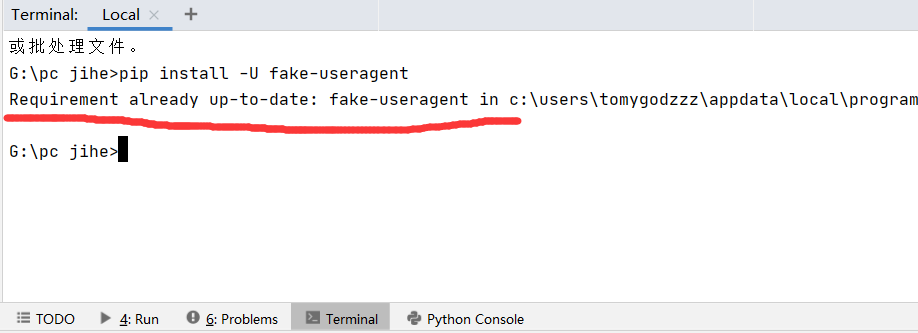
Python的其他包也可以用这种方法完成更新pip install -U 包名。
fake_useragent.errors.FakeUserAgentError: Maximum amount of retries reached解决方法!的更多相关文章
- FakeUserAgentError('Maximum amount of retries reached') 彻底解决办法
报错: FakeUserAgentError('Maximum amount of retries reached') 禁用服务器缓存: ua = UserAgent(use_cache_server ...
- 【python 爬虫】fake-useragent Maximum amount of retries reached解决方案
前言 在用fake-useragent的时候发生报错,fake_useragent.errors.FakeUserAgentError: Maximum amount of retries reach ...
- js中报错"Maximum call stack size exceeded"解决方法
Uncaught RangeError: Maximum call stack size exceeded 错误直译过来就是“栈溢出”,出现这个错误的原因是因为我进行了递归运算,但是忘记添加判断条件, ...
- SAP SOAMANAGER 配置WEBSERVICE 提示:Service cannot be reached解决方法
TM中有些服务没有被激活,以UI界面个性化设置化设置为例: 如果服务没有被激活,打开界面就会显示: 这时候右键点击属性,获取服务ID: 通过事务代码SICF,输入服务ID:wd_analyze_con ...
- Exceeded maximum number of retries. Exceeded max scheduling attempts 3 for instance
Exceeded maximum number of retries. Exceeded max scheduling attempts 3 for instance
- Exceeded maximum number of retries. Exceeded max scheduling attempts 3 for instance 7d90eb80-29e2-4238-b658-ade407ff9456. Last exception: [u'Traceback (most recent call last):\n', u' File "/usr/lib/py
Exceeded maximum number of retries. Exceeded max scheduling attempts 3 for instance 7d90eb80-29e2-42 ...
- passwd: Have exhausted maximum number of retries for service【转】
使用命令passwd修改密码时,遇到如下问题: # echo 'utf8'|passwd zhangsan --stdin Changing password for user zhangsan. p ...
- Error: 实例 "ddd" 执行所请求操作失败,实例处于错误状态。: 请稍后再试 [错误: Exceeded maximum number of retries. Exhausted all hosts available for retrying build failures for instance 6f60bc06-fcb6-4758-a46f-22120ca35a71.].
Error: 实例 "ddd" 执行所请求操作失败,实例处于错误状态.: 请稍后再试 [错误: Exceeded maximum number of retries. Exhaus ...
- passwd: Have exhausted maximum number of retries for service
使用命令passwd修改密码时,遇到如下问题:# echo 'utf8'|passwd zhangsan --stdinChanging password for user zhangsan.pass ...
随机推荐
- 谈谈集成测试(integration testing)
对于软件开发来说,软件测试是一个几乎贯穿所有阶段的活动,所以测试的重要性毋庸置疑.不同开发组织如何在不同的产品研发阶段进行测试,也在很大程度上反映了其研发能力和质量控制能力.软件测试有很多类型,包括单 ...
- JavaFX桌面应用-为什么应用老是“未响应”
日常使用软件的过程中,偶尔会遇到软件突然卡住,再点击几次就变成"未响应"的情况. 在JavaFX应用中同样也会出现这种情况,在开发过程中应该尽量避免这种情况的出现. >> ...
- java方法与方法的重载
一 方法 1.方法的概述 在java中,方法就是用来完成解决某件事情或实现某个功能的办法. 方法实现的过程中,会包含很多条语句用于完成某些有意义的功能——通常是处理文本, 控制输入或计算数值.我们可以 ...
- JMeter软件测试工具介绍及基本安装教程
一.工具介绍 (一)简介 Apache JMeter是Apache组织开发的基于Java的压力测试工具.用于对软件做压力测试,它最初被设计用于Web应用测试,但后来扩展到其他测试领域. 它可以用于测试 ...
- CVT1100 错误的修复 2009-10-12 11:38
我们在用VS2005编译MFC工程时极少会出现如下错误: 一,CVTRES : fatal error CVT1100: 重复的资源.type:MANIFEST, name:1, language:0 ...
- 常见面试题之操作系统中的LRU缓存机制实现
LRU缓存机制,全称Least Recently Used,字面意思就是最近最少使用,是一种缓存淘汰策略.换句话说,LRU机制就是认为最近使用的数据是有用的,很久没用过的数据是无用的,当内存满了就优先 ...
- Newbe.Claptrap 框架入门,第三步 —— 定义 Claptrap,管理商品库存
接上一篇 Newbe.Claptrap 框架入门,第二步 —— 简单业务,清空购物车 ,我们继续要了解一下如何使用 Newbe.Claptrap 框架开发业务.通过本篇阅读,您便可以开始学会添加一个全 ...
- 问题定位 | Peronca Xtrabackup 8.0近日踩坑总结 - xtrabackup 2.4和8.0区别
目录 前言 适配过程中遇到的坑 xtrabackup 2.4和8.0区别 问题定位 坑一:MySQL 8.0 + Semi-Sync 重建问题 坑二:MySQL 8.0 + Group-Replica ...
- Linux环境下MySQL 5.6安装与配置----亲测有效----纯离线安装
一.安装MySQL 1.下载安装包 mysql-5.6.40-linux-glibc2.12-x86_64.tar.gz 下载地址: https://dev.mysql.com/get/Downloa ...
- 《spring源码解读》 - ioc之验证模型获取
我们上一篇文章最后调用到 `org.springframework.beans.factory.xml. XmlBeanDefinitionReader#doLoadDocument(...) ` 方 ...