
【机器学习 Azure Machine Learning】使用VS Code登录到Linux VM上 (Remote-SSH), 及可直接通过VS Code编辑VM中的文件
问题描述
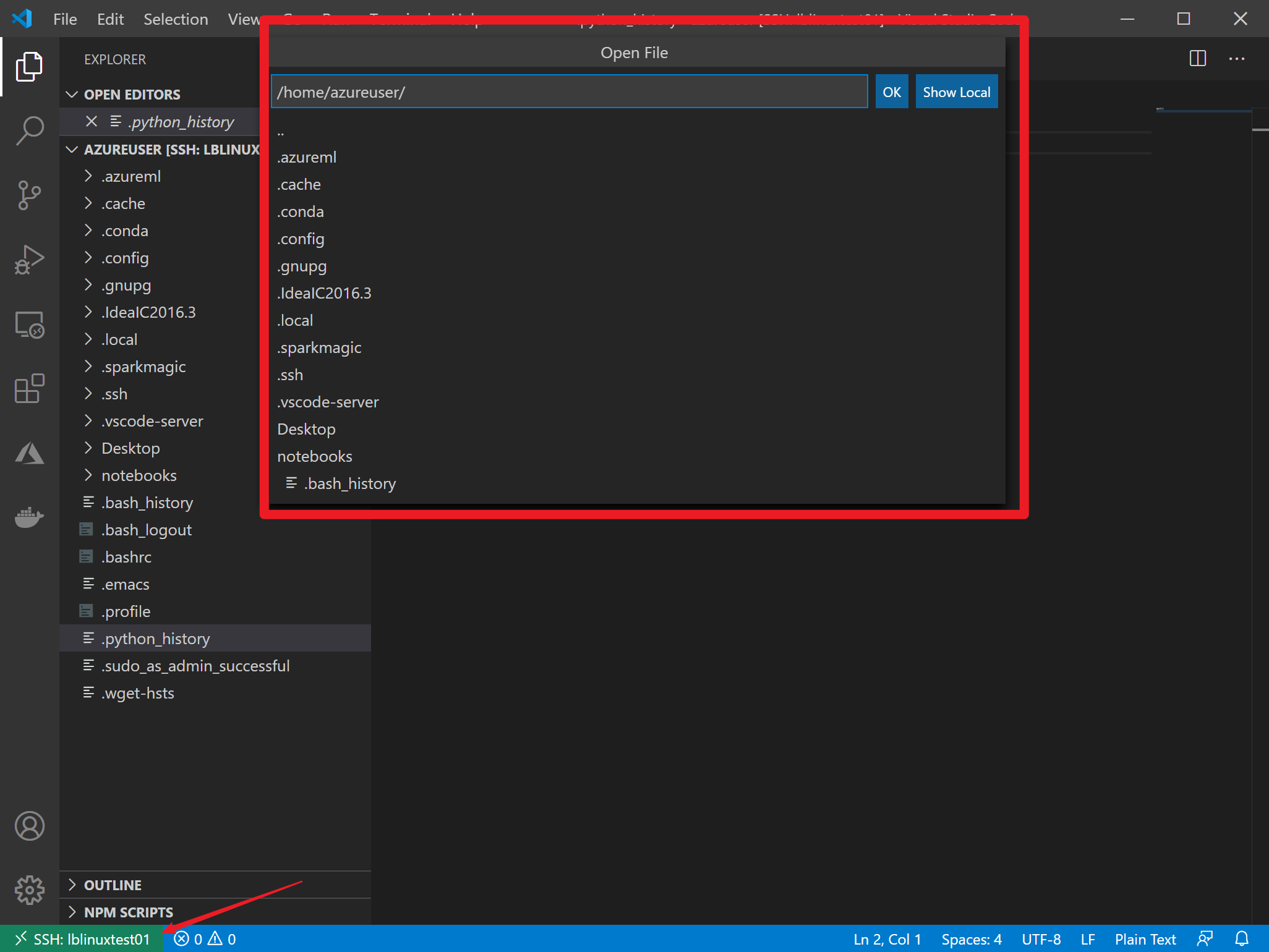
在平常的工作习惯中,如果使用VS Code做脚本的开发,是一个非常好用的工具,现在也可以通过VS Code的不同方式来连接到Linux VM中(ssh), 第一种是VS Code的Terminal中通过powershell窗口使用ssh命令登录。另外一种就是通过插件remote-ssh登录并管理Linux VM机器(非常方便的小工具,也是本文采用的方式)。 当SSH连接成功后,可以直接在VS Code中直接打开VM中的文件夹,运行脚本及编辑文件。非常方便。
实现步骤
1)通过使用SSH方式创建VM,以Azure VM为例,在创建过程中注意两点
- 使用ssh-keygen -m PEM -t rsa -b 4096 生成公钥,私钥。
ssh-keygen -m PEM -t rsa -b 4096
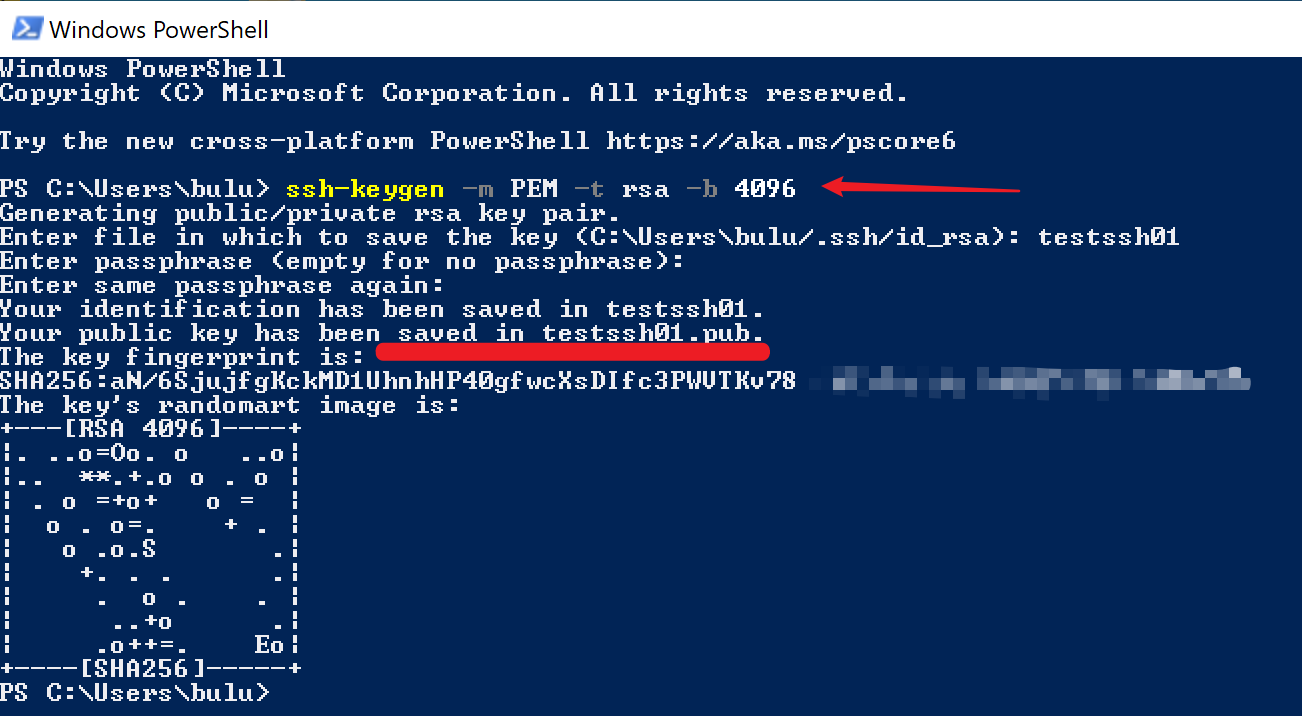
- 公钥文件在当前命令窗口的文件夹下,需要通过cat来查看公钥的内容,并把内容复制到创建VM的门户上。
cat ~/testssh01.pub

2)创建VM成功后,可以通过PowerShell验证是否能已经能正常连接,使用ssh命令 (-i 后面的参数为私钥存储文件)
ssh -i ~/testssh01 azureuser@10.111.12.123
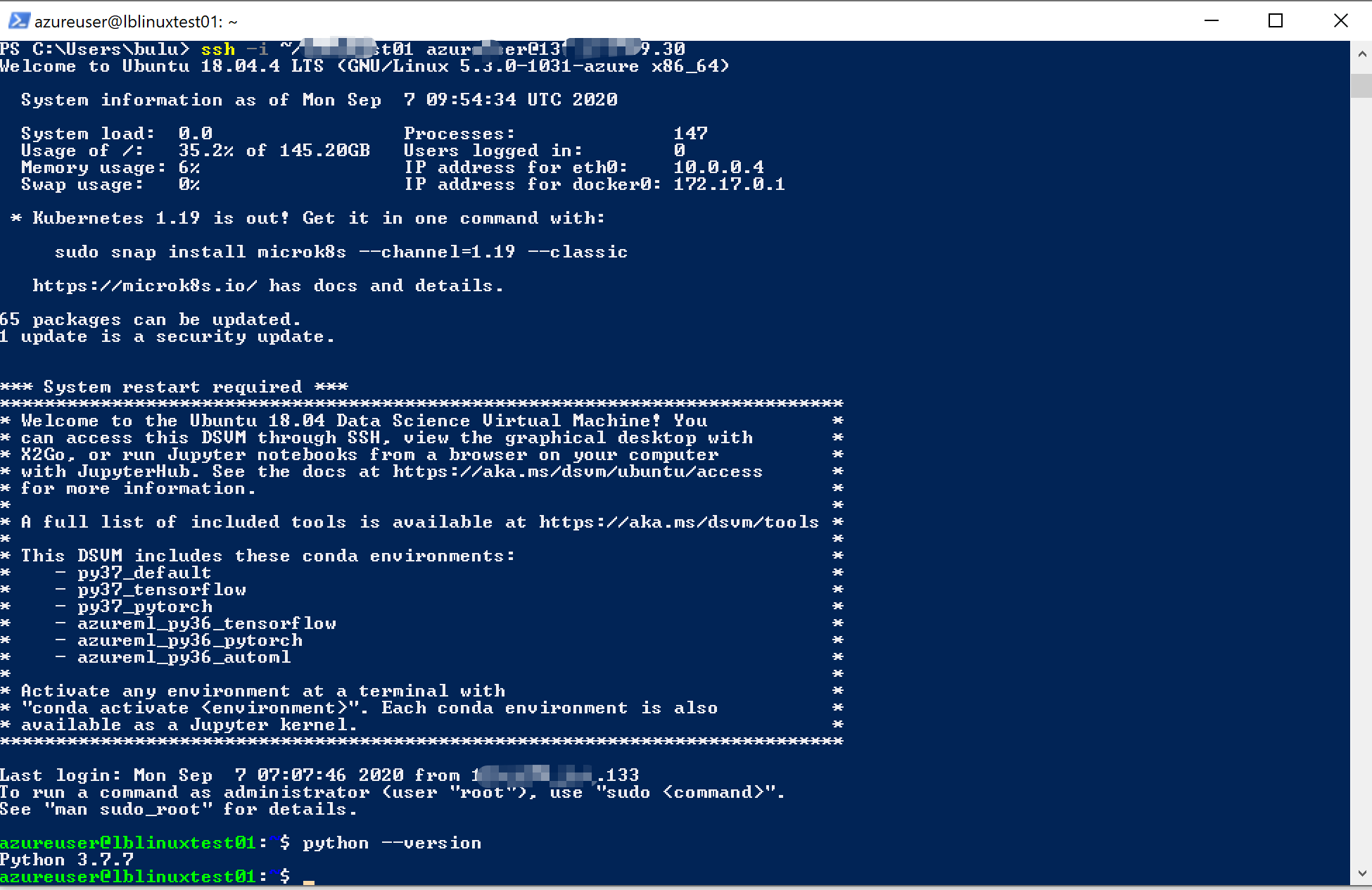
(登录成功)
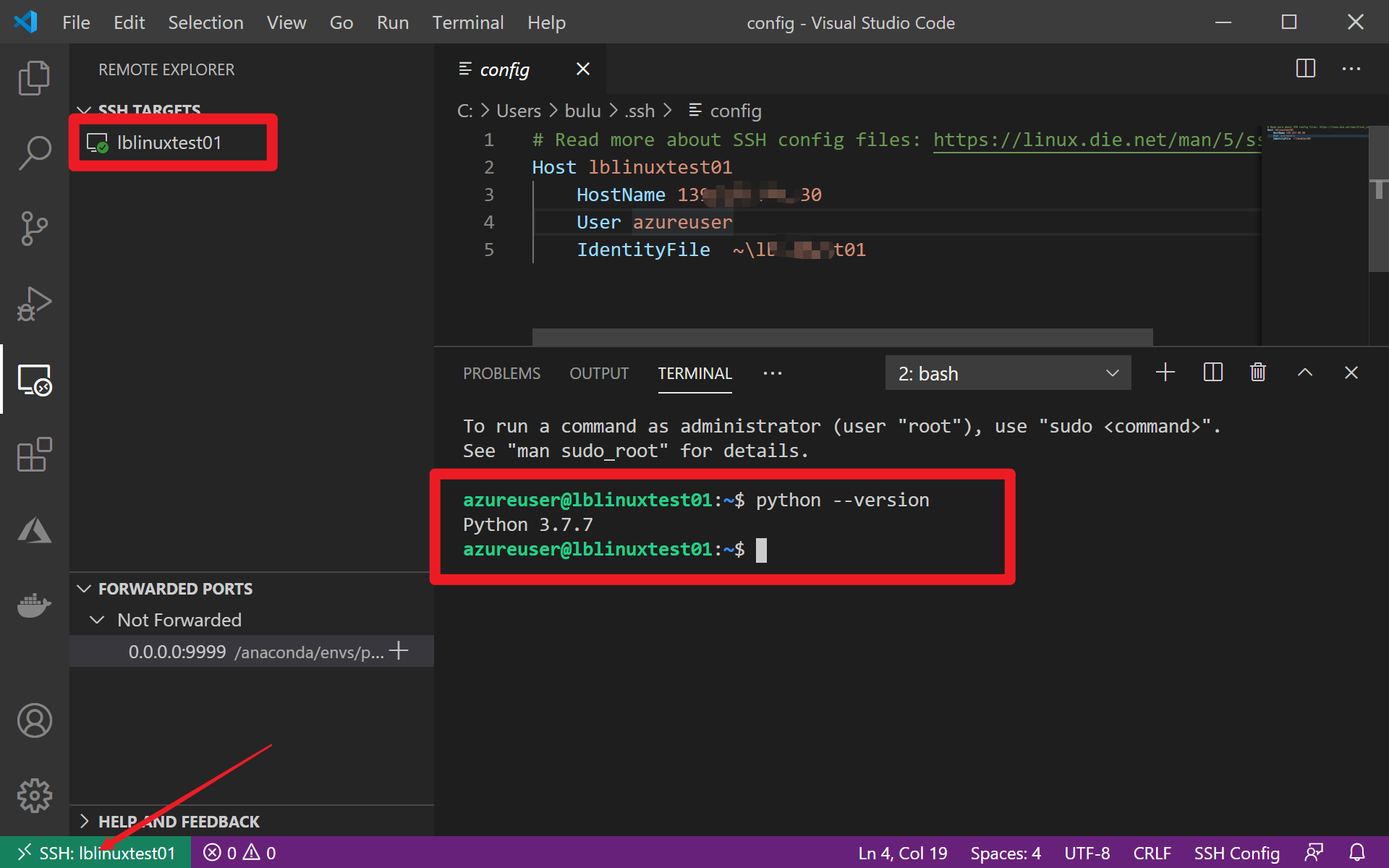
3) 在VS Code中先安装Remote-SSH插件。成功后可以通过Remote-SSH图表,添加新的Host config文件,在文件中输入Host (自定义名称),Linux Host name IP 地址,username ,IdentityFile为您SSH的私钥文件路径。
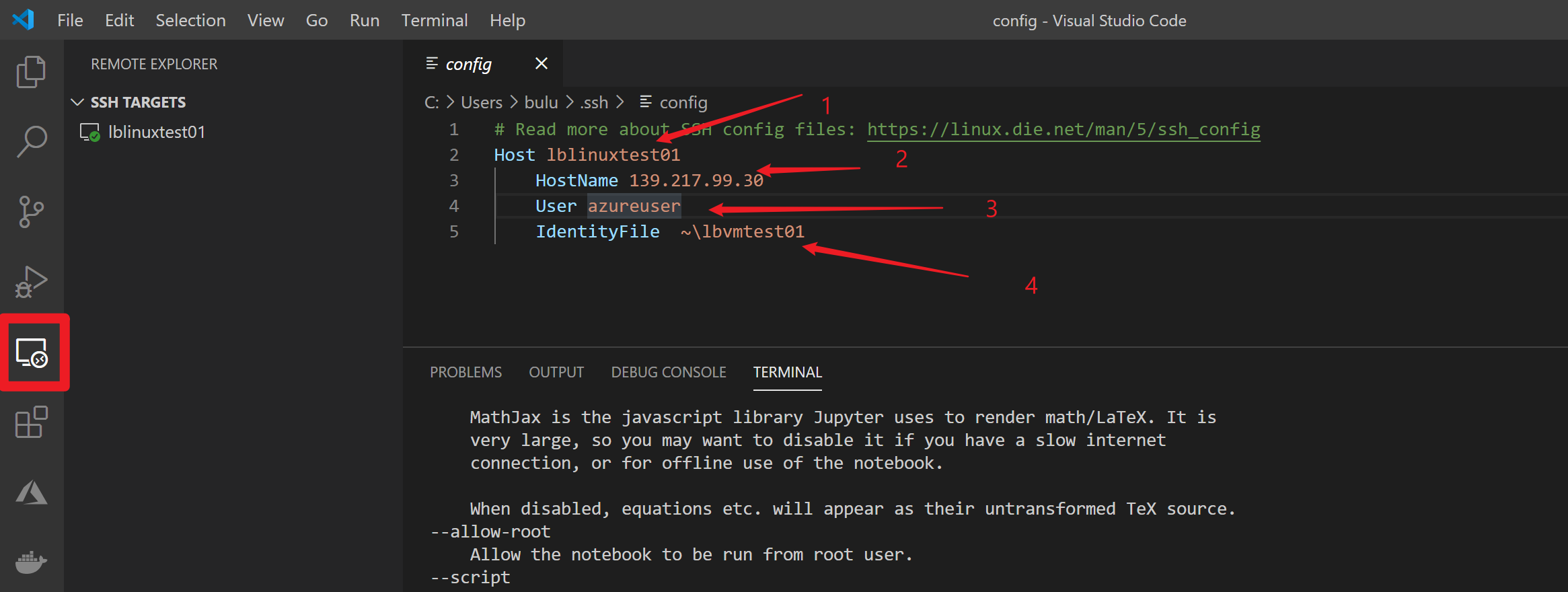
(详细的如何使用Remote-SSH,可以参考官方文档:https://code.visualstudio.com/docs/remote/ssh-tutorial#_install-the-extension)
Choose the Remote-SSH: Connect to Host command and connect to the host by entering connection information for your VM in the following format:
user@hostname.The
useris the username you set when adding the SSH public key to your VM. For thehostname, go back to the Azure portal and in the Overview pane of the VM you created, copy the Public IP address.
4) 当完成以上配置后,就可以方便的连接到Linux VM中并直接在VS Code的Terminal中输入命令:
参考资料
使用ssh-keygen -m PEM -t rsa -b 4096 来插件SSH公钥和私钥。 https://docs.microsoft.com/zh-cn/azure/virtual-machines/linux/ssh-from-windows#create-an-ssh-key-pair
使用cat ~/.ssh/id_rsa.pub 来查看公钥信息并复制到创建VM时的门户上。https://docs.microsoft.com/zh-cn/azure/virtual-machines/linux/create-ssh-keys-detailed#provide-ssh-public-key-when-deploying-a-vm
使用ssh -i ~/.ssh/id_rsa.pub azureuser@10.111.12.123 来登录VM。https://docs.microsoft.com/zh-cn/azure/virtual-machines/linux/ssh-from-windows#connect-to-your-vm
【机器学习 Azure Machine Learning】使用VS Code登录到Linux VM上 (Remote-SSH), 及可直接通过VS Code编辑VM中的文件的更多相关文章
- 【机器学习 Azure Machine Learning】使用Aure虚拟机搭建Jupyter notebook环境,为Machine Learning做准备(Ubuntu 18.04,Linux)
问题描述 在Azure的VM中已经安装好Jupyter,并且通过jupyter notebook --port 9999 已经启动,但是通过本机浏览器,访问VM的公网IP,则始终是不能访问的错误.(T ...
- 【机器学习 Azure Machine Learning】Azure Machine Learning 访问SQL Server 无法写入问题 (使用微软Python AML Core SDK)
问题情形 使用Python SDK在连接到数据库后,连接数据库获取数据成功,但是在Pandas中用 to_sql 反写会数据库时候报错.错误信息为:ProgrammingError: ('42000' ...
- 利用Microsoft Azure Machine Learning Studio创建机器学习实例
Microsoft Azure云服务推出机器学习的模块,用户只需上传数据,利用机器学习模块提供的一些算法接口和R语言或别的语言接口,就能利用Microsoft Azure强大的云计算能力来实现自己的机 ...
- Azure Machine Learning
About me In my spare time, I love learning new technologies and going to hackathons. Our hackathon p ...
- Microsoft Azure Machine Learning Studio
随着机器学习(ML)成为软件行业的主流,重要的是要了解它的工作原理,并将其置于开发栈中.了解如何为您的应用程序构建ML服务,您可以确定您的ML应用程序中的机会,实施ML,并与您的团队的ML专业人士清楚 ...
- 我在 B 站学机器学习(Machine Learning)- 吴恩达(Andrew Ng)【中英双语】
我在 B 站学机器学习(Machine Learning)- 吴恩达(Andrew Ng)[中英双语] 视频地址:https://www.bilibili.com/video/av9912938/ t ...
- 机器学习(Machine Learning)
机器学习(Machine Learning)是一门专门研究计算机怎样模拟或实现人类的学习行为,以获取新的知识或技能,重新组织已有的知识结构使之不断改善自身的性能的学科.
- Domain adaptation:连接机器学习(Machine Learning)与迁移学习(Transfer Learning)
domain adaptation(域适配)是一个连接机器学习(machine learning)与迁移学习(transfer learning)的新领域.这一问题的提出在于从原始问题(对应一个 so ...
- 学习笔记之机器学习实战 (Machine Learning in Action)
机器学习实战 (豆瓣) https://book.douban.com/subject/24703171/ 机器学习是人工智能研究领域中一个极其重要的研究方向,在现今的大数据时代背景下,捕获数据并从中 ...
随机推荐
- 微信小程序入门到精通[更新版]
微信小程序账号与工具 在线文档:https://mp.weixin.qq.com/debug/wxadoc/dev/ 小程序开发者账号注册 微信公众平台:https://mp.weixin.qq.co ...
- ftp客户端自动同步 Windows系统简单操作ftp客户端自动同步
服务器管理工具它是一款功能强大的服务器集成管理器,包含win系统和linux系统的批量连接,vnc客户端,ftp客户端等等实用功能.我们可以使用这款软件的ftp客户端定时上传下载的功能来进实现ftp客 ...
- SpringBoot普通消息队列线程池配置
1 package com.liuhuan.study.config; 2 3 import com.google.common.util.concurrent.ThreadFactoryBuilde ...
- SolrJ使用
1 //向solr索引库中添加索引 2 public void addDoc() throws Exception { 3 //创建solr客户端的对象 4 HttpSolrClient client ...
- Layman CSS3+H5实现上下垂直居中的几种主要方法
方法1:通过 translate 移位来实现 H5+CSS3: <div style="width: 100%; height: 100%; margin:0; padding: 0; ...
- matlab中colormap
来源:https://ww2.mathworks.cn/help/matlab/ref/colormap.html?searchHighlight=colormap&s_tid=doc_src ...
- Thymeleaf 异常:Exception processing template "index": An error happened during template parsing (template: "class path resource [templates/index.html]")
Spring Boot 项目,在 Spring Tool Suite 4, Version: 4.4.0.RELEASE 运行没有问题,将项目中的静态资源和页面复制到 IDEA 的项目中,除了 IDE ...
- Arduino Mega 2560
Arduino Mega 2560 www.theengineeringprojects.com/ 此板子有54个引脚,16个模拟量输入引脚,12个PWM输出引脚,4个串口,带I2C,SPI通讯口,更 ...
- P5858 「SWTR-03」Golden Sword
题面: Link 题面有点长,不想粘了,QAQ. 题解: 一句话题意,你有 \(n\) 件物品需要依次放进去,每个物品放进去之后会得到一定的权值,为当前锅炉里面的物品的数量乘以 \(a_i\) 每次在 ...
- Linux 安装Navicat Premium 15
参考:https://gitee.com/andisolo/navicat-keygen 安装 aptitude 管理软件 $ sudo apt-get install aptitude 安装Navi ...