
Mysql连接报错:1130 - Host ‘118.111.111.111’ is not allowed to connect to this MariaDB server
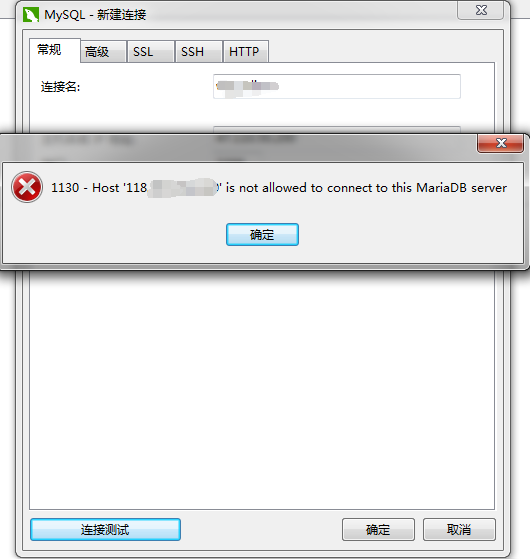
这个问题是因为在数据库服务器中的mysql数据库中的user的表中没有权限(也可以说没有用户),下面将记录我遇到问题的过程及解决的方法。
在搭建完LNMP环境后用Navicate连接出错
遇到这个问题首先到mysql所在的服务器上用连接进行处理
1、连接服务器: mysql -u root -p

2、看当前所有数据库:show databases;
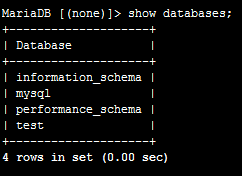
3、进入mysql数据库:use mysql;

4、查看mysql数据库中所有的表:show tables;
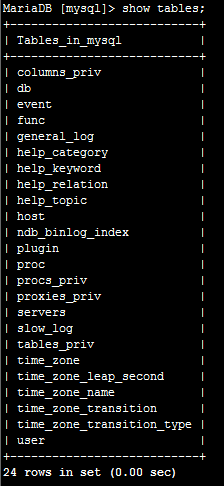
5、查看user表中的数据:select Host, User,Password from user;

上面localhost表示只允许本地连接,不能远程连接
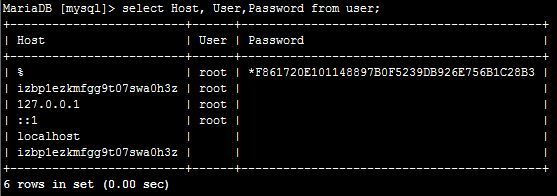
6、修改user表中的Host:update user set Host='%' where User='root' and Host="localhost";

7、最后刷新一下:flush privileges;

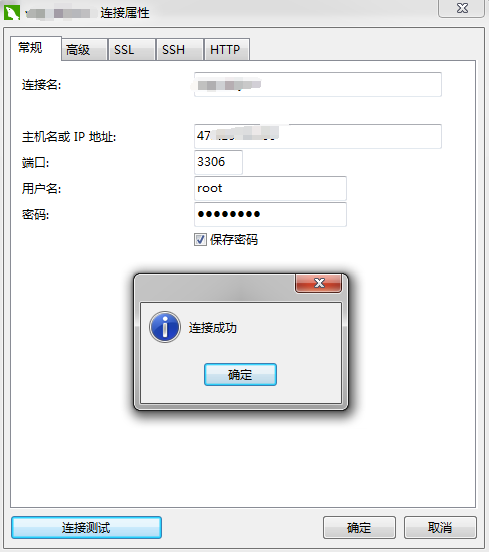
8、重新在Navicate中测试一下:
Mysql连接报错:1130 - Host ‘118.111.111.111’ is not allowed to connect to this MariaDB server的更多相关文章
- 解决ERROR 1130: Host 'x.x.x.x' is not allowed to connect to this MariaDB server 方法
问题描述 在使用SQLyog操作Linux上的MariaDB时候,会出现如下错误: 解决方法 改表法 可能是你的帐号不允许从远程登陆,只能在localhost.这个时候只要在localhost的那台电 ...
- 解决MySQL ERROR 1130 (HY000): Host '192.168.31.115' is not allowed to connect to this MariaDB server
# 给root用户授权 GRANT ALL PRIVILEGES ON *.* TO 'root'@'192.168.31.115' IDENTIFIED BY 'root' WITH GRANT O ...
- MySQL 1130 - Host 127.0.0.1 is not allowed to connect to this MySQL server
在开发中为了让开发更方便,在本地配置环境,希望可以直接访问服务器上的MySQL数据库,更方便的管理数据库, 需要在本地远程连接linux服务器的本地数据库,直接用数据库管理工具连接出现如下报错1130 ...
- Mysql远程连接报错:SQL Error (1130): Host '192.168.61.128' is not allowed to connect to this MySQL server
Mysql远程连接报错:SQL Error (1130): Host '192.168.0.18' is not allowed to connect to this MySQL server ...
- Mysql远程连接报错:SQL Error (1130): Host '192.168.6.128' is not allowed to connect to this MySQL server
通过SQLyog连接linux中的MySQL报错问题:SQL Error (1130): Host '192.168.6.128' is not allowed to connect to this ...
- 访问远程mysql数据库,出现报错,显示“1130 - Host'xxx.xxx.xxx.xxx' is not allowed to connect to this MySQL server“
在使用Navicat for MySQl访问远程mysql数据库,出现报错,显示“1130 - Host'xxx.xxx.xxx.xxx' is not allowed to connect to t ...
- Navicat 连接远程数据库报错:1130 - Host "XX.XX.XX.XX" is not allowed to connect to this MySQL server
Navicat 连接远程数据库报错:1130 - Host "XX.XX.XX.XX" is not allowed to connect to this MySQL server ...
- 踩坑录-mysql不允许远程连接(错误码:1130) Host'xxx.xxx.xxx.xxx' is not allowed to connect to this MySQL server“
每次搭建mysql环境都会遇见同样的问题,在此分享一下踩坑笔录. 一.问题描述 安装成功后,本地直接链接远程mysql,默认为不允许远程访问,则客户端提示1130 - Host'xxx.xxx.xxx ...
- SQL Error (1130): Host '192.168.1.126' is not allowed to connect to this MySQL server
通过HeidiSQL连接MYSQL数据库报错: SQL Error (1130): Host '192.168.1.126' is not allowed to connect to this MyS ...
- MYSQL错误1130:ERROR 1130: Host 10.10.36.115 is not allowed to connect to this MySQL server
解决远程连接mysql错误1130代码的方法 在用远程连接Mysql服务器的数据库,不管怎么弄都是连接不到,错误代码是1130,ERROR 1130: Host 10.10.36.115 is no ...
随机推荐
- React-Native之截图组件view-shot的介绍与使用
React-Native之截图组件view-shot的介绍与使用 一,需求分析 1,需要将分享页生成图片,并分享到微信好友与朋友圈. 二,react-native-view-shot介绍 1,可以截取 ...
- day 7-5 生产者消费者模型
一. 生产者和消费者模型 在并发编程中使用生产者和消费者模式能够解决绝大多数并发问题.该模式通过平衡生产线程和消费线程的工作能力来提高程序的整体处理数据的速度. 二. 为什么要使用生产者和消费者模式 ...
- Day3-2 函数之递归
递归 定义:一个函数在 内部调用自己,就称为递归. # 如何让10不停的除以2,直到不能除为止. n = 10 while True: n = int(n /2) print(n) if n == 0 ...
- 如何使用nodejs快速搭建本地服务器
1.首先要安装好node,js 2.以下有安装包下载的链接:这里的安装包是.msi,如果要其他的,可以到菜鸟教程上去找 32 位安装包下载地址 : https://nodejs.org/dist/v4 ...
- java学习之—链表(2)
/** * 双端链表操作 * Create by Administrator * 2018/6/14 0014 * 下午 2:05 **/ class Link1 { public long dDat ...
- fastclick的介绍和使用
移动端点击延迟事件 1. 移动端浏览器在派发点击事件的时候,通常会出现300ms左右的延迟 2. 原因: 移动端的双击会缩放导致click判断延迟 解决方式 1. 禁用缩放 `<meta nam ...
- centos安装Tesseract
yum安装(推荐) yum search tesseract yum install tesseract.x86_64 -y pip3 install pytesseract pip3 install ...
- Java之ArrayList自定义排序,通过实现comparator比较器接口
两种排序方式: 1.实体类实现Comparable接口,重写compareTo(T o)方法,在其中定义排序规则,那么就可以直接调用Collections.sort()来排序对象数组 2.在调用方法的 ...
- RestTemplate proxy 设置方式
RestTemplate restTemplate = new RestTemplate(new SimpleClientHttpRequestFactory() {{ setProxy(new ja ...
- export default用法
// test.js export default { name: 'zs', age: 20 } 或是 // test.js var info = { name: 'zs', age: 20 } e ...