
使用kbmmw 生成REST 服务OpenAPI函数原型
我们以前介绍了很多kbmmw 开发REST 的例子。一直有个问题困惑着大家。
我们提供REST 服务,如何让客户端快速的使用,当然可以写文档,但是一旦
后台改变了,又要再一次给调用者发新文档,非常的麻烦。我们是否可以
自动生成调用函数原型,方便调用者使用JAVA,PHP,Delphi开发客户端?
KBMMW 5.08 为我们完美的解决了这个问题。
我们还是以前面的REST 服务为例。稍微修改一下就支持openapi了。
当然了,这个需要借助一下开源的Swagger。网址http://editor.swagger.io/
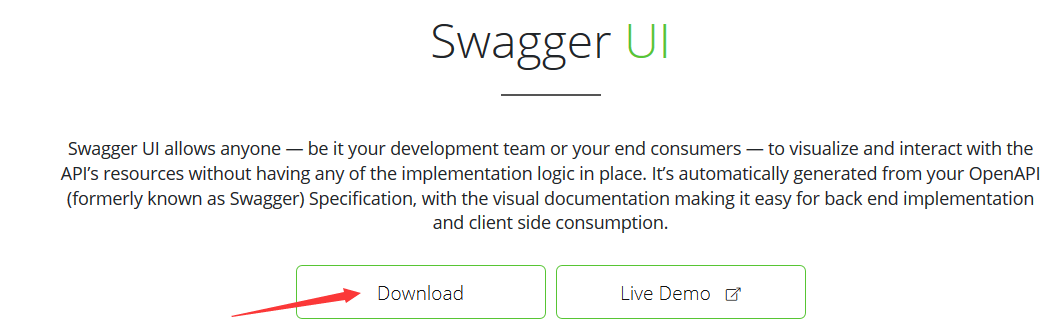
我们直接到https://swagger.io/tools/swagger-ui/ 下载支持文件。


下载dist 目录。 还要回到上一级目录
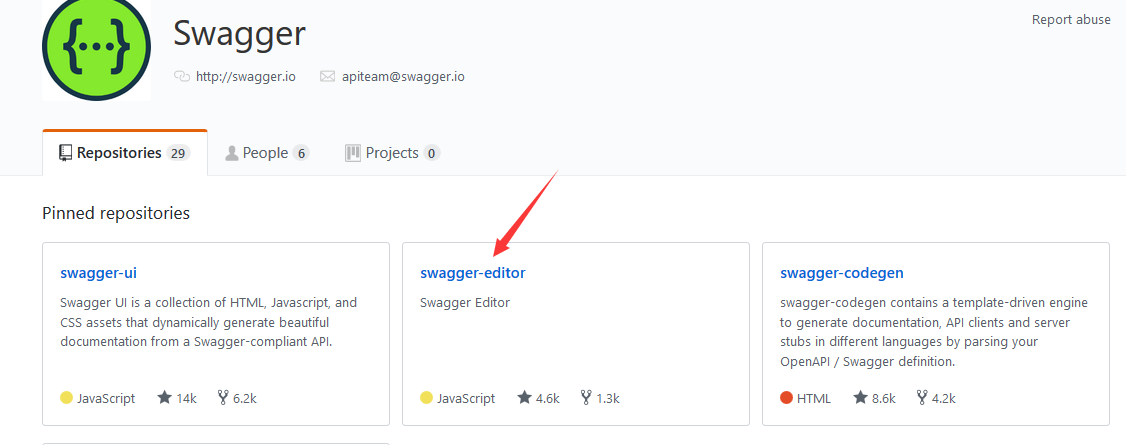
继续下载 swagger-editor.
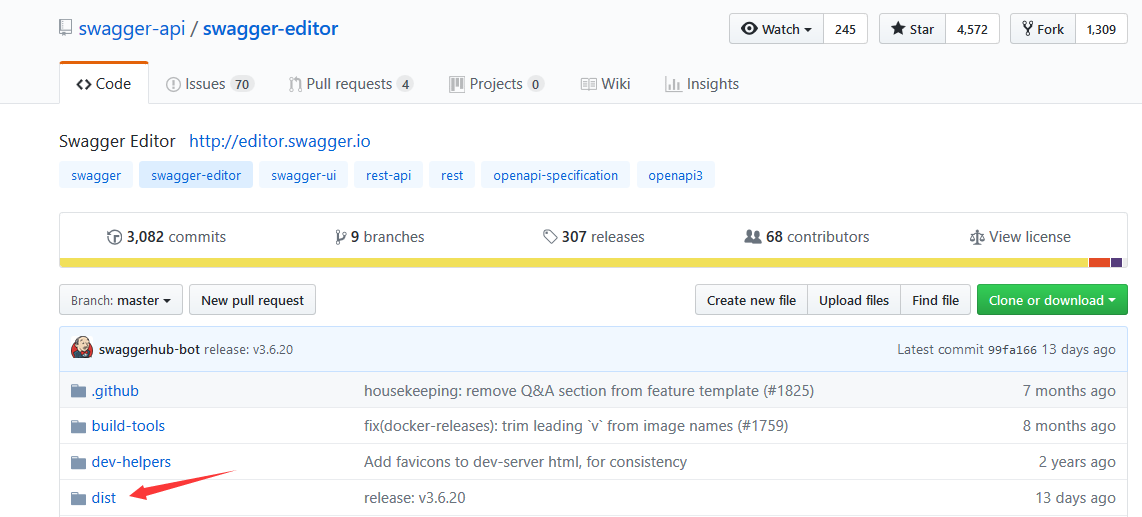
同样下载这个dist 目录。
下载后的文件解压,放到同一个目录。
放到我们的服务器对应的目录
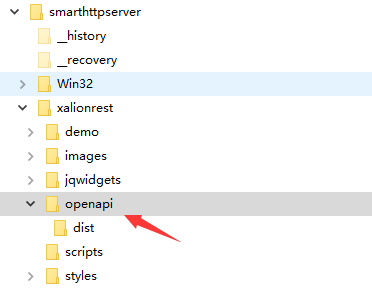
在openapi 目录下,新建一个index.html 文件。内容如下:
<!DOCTYPE html>

<!-- HTML for static distribution bundle build -->

<html lang="en">

<head>

  <meta charset="UTF-8">

  <title>Swagger Editor</title>

  <style>

  * {

    box-sizing: border-box;

  }

  body {

    font-family: Roboto,sans-serif;

    font-size: 9px;

    line-height: 1.42857143;

    color: #444;

    margin: 0px;

  }

  #swagger-editor {

    font-size: 1.3em;

  }

  .container {

    height: 100%;

    max-width: 880px;

    margin-left: auto;

    margin-right: auto;

  }

  #editor-wrapper {

    height: 100%;

    border:1em solid #000;

    border:none;

  }

  .Pane2 {

    overflow-y: scroll;

  }

  </style>

  <link href="./dist/swagger-editor.css" rel="stylesheet">

  <link rel="icon" type="image/png" href="./dist/favicon-32x32.png" sizes="32x32" />

  <link rel="icon" type="image/png" href="./dist/favicon-16x16.png" sizes="16x16" />

</head>

<body>

  <div id="swagger-editor"></div>

  <script src="./dist/swagger-editor-bundle.js"> </script>

  <script src="./dist/swagger-editor-standalone-preset.js"> </script>

  <script>

  window.onload = function() {

    // Build a system

    const editor = SwaggerEditorBundle({

      dom_id: '#swagger-editor',

      layout: 'StandaloneLayout',

      presets: [

        SwaggerEditorStandalonePreset

      ]

    })

    window.editor = editor

  }

  </script>

  <svg xmlns="http://www.w3.org/2000/svg" xmlns:xlink="http://www.w3.org/1999/xlink" style="position:absolute;width:0;height:0">

    <defs>

      <symbol viewBox="0 0 20 20" id="unlocked">

            <path d="M15.8 8H14V5.6C14 2.703 12.665 1 10 1 7.334 1 6 2.703 6 5.6V6h2v-.801C8 3.754 8.797 3 10 3c1.203 0 2 .754 2 2.199V8H4c-.553 0-1 .646-1 1.199V17c0 .549.428 1.139.951 1.307l1.197.387C5.672 18.861 6.55 19 7.1 19h5.8c.549 0 1.428-.139 1.951-.307l1.196-.387c.524-.167.953-.757.953-1.306V9.199C17 8.646 16.352 8 15.8 8z"></path>

      </symbol>

      <symbol viewBox="0 0 20 20" id="locked">

        <path d="M15.8 8H14V5.6C14 2.703 12.665 1 10 1 7.334 1 6 2.703 6 5.6V8H4c-.553 0-1 .646-1 1.199V17c0 .549.428 1.139.951 1.307l1.197.387C5.672 18.861 6.55 19 7.1 19h5.8c.549 0 1.428-.139 1.951-.307l1.196-.387c.524-.167.953-.757.953-1.306V9.199C17 8.646 16.352 8 15.8 8zM12 8H8V5.199C8 3.754 8.797 3 10 3c1.203 0 2 .754 2 2.199V8z"/>

      </symbol>

      <symbol viewBox="0 0 20 20" id="close">

        <path d="M14.348 14.849c-.469.469-1.229.469-1.697 0L10 11.819l-2.651 3.029c-.469.469-1.229.469-1.697 0-.469-.469-.469-1.229 0-1.697l2.758-3.15-2.759-3.152c-.469-.469-.469-1.228 0-1.697.469-.469 1.228-.469 1.697 0L10 8.183l2.651-3.031c.469-.469 1.228-.469 1.697 0 .469.469.469 1.229 0 1.697l-2.758 3.152 2.758 3.15c.469.469.469 1.229 0 1.698z"/>

      </symbol>

      <symbol viewBox="0 0 20 20" id="large-arrow">

        <path d="M13.25 10L6.109 2.58c-.268-.27-.268-.707 0-.979.268-.27.701-.27.969 0l7.83 7.908c.268.271.268.709 0 .979l-7.83 7.908c-.268.271-.701.27-.969 0-.268-.269-.268-.707 0-.979L13.25 10z"/>

      </symbol>

      <symbol viewBox="0 0 20 20" id="large-arrow-down">

        <path d="M17.418 6.109c.272-.268.709-.268.979 0s.271.701 0 .969l-7.908 7.83c-.27.268-.707.268-.979 0l-7.908-7.83c-.27-.268-.27-.701 0-.969.271-.268.709-.268.979 0L10 13.25l7.418-7.141z"/>

      </symbol>

      <symbol viewBox="0 0 24 24" id="jump-to">

        <path d="M19 7v4H5.83l3.58-3.59L8 6l-6 6 6 6 1.41-1.41L5.83 13H21V7z"/>

      </symbol>

      <symbol viewBox="0 0 24 24" id="expand">

        <path d="M10 18h4v-2h-4v2zM3 6v2h18V6H3zm3 7h12v-2H6v2z"/>

      </symbol>

    </defs>

  </svg>

</body>

</html>
好了,准备工作做好了。
我们开始修改kbmmw rest 服务器。
首先我们在smarthttpservice 里面引用 kbmMWSmartStubGenerator 单元。
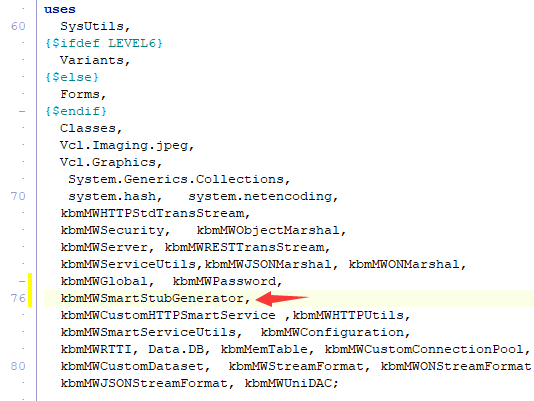
新建一个过程
[kbmMW_Rest('method:get, path: "api", responseMimeType:"application/x-yaml"')]

     function OpenAPI:string;
function TkbmMWCustomHTTPSmartService1.OpenAPI: string;

begin

   // Return OpenAPI specification for all REST methods in this service

     // as YAML. Add the ASettings value: 'json:true' to return the specification

     // as JSON.

     // Add 'servers: [ "url1", "url2",.. "urln" ]' to ASettings if you want to

     // embed server location information in the specification.

     // Add 'inline:true' to inline object definitions instead of using $ref.

     // The example in the next line utilize the configuration framework to make

     // the setting easily configurable.

     Result:=TkbmMWSmartOpenAPIStubGenerator.GenerateOpenAPI('',self,'inline:$(OpenAPI.inline=false)');

end;
编译运行。
我们在浏览器里面打开 连接 http://127.0.0.1/xalionrest/openapi/index.html?url=/xalionrest/api

我的天哪。服务器上提供的函数都出来了。
我们甚至可以直接在浏览器里面测试服务器端提供的函数是否正常?
点开对应的函数
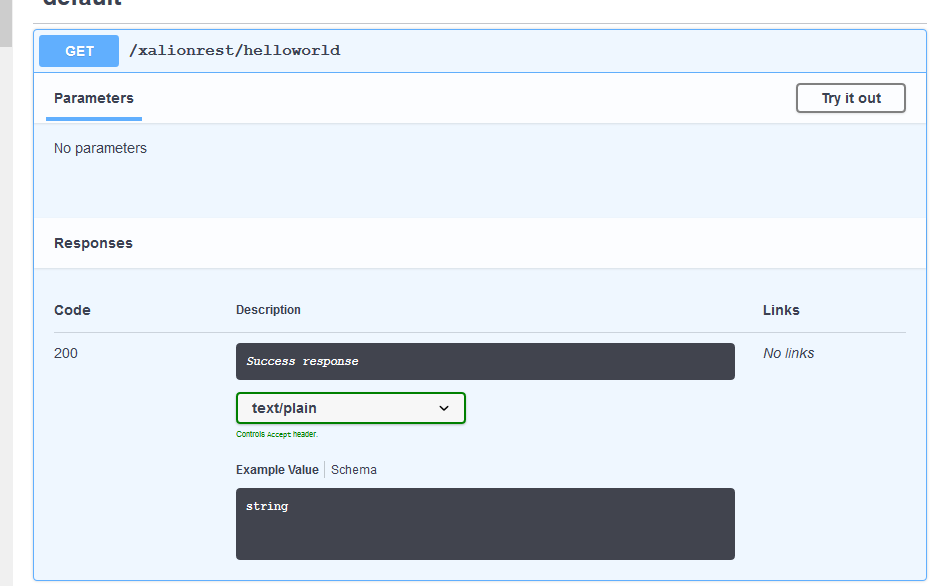
点 tryitout
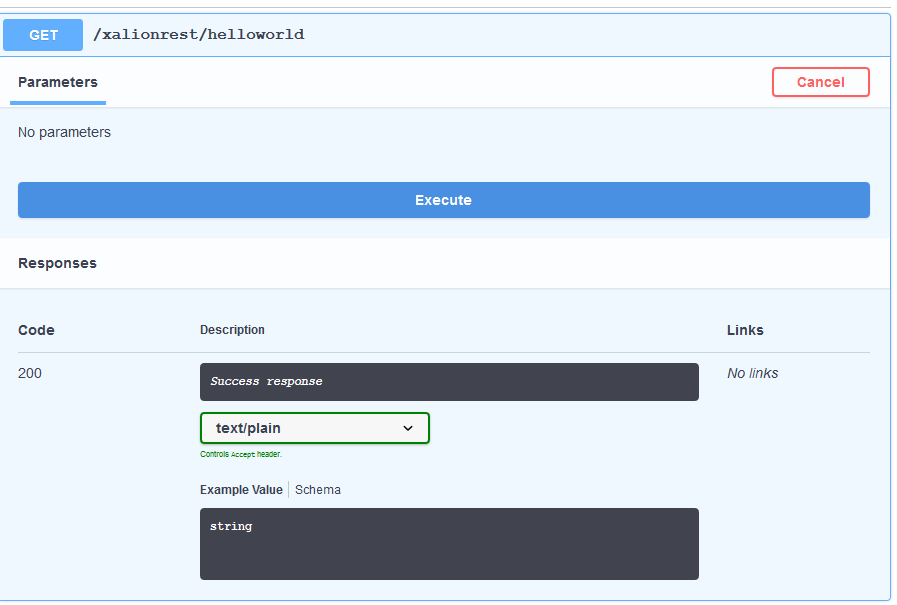
点 Execute

图像文件也没问题
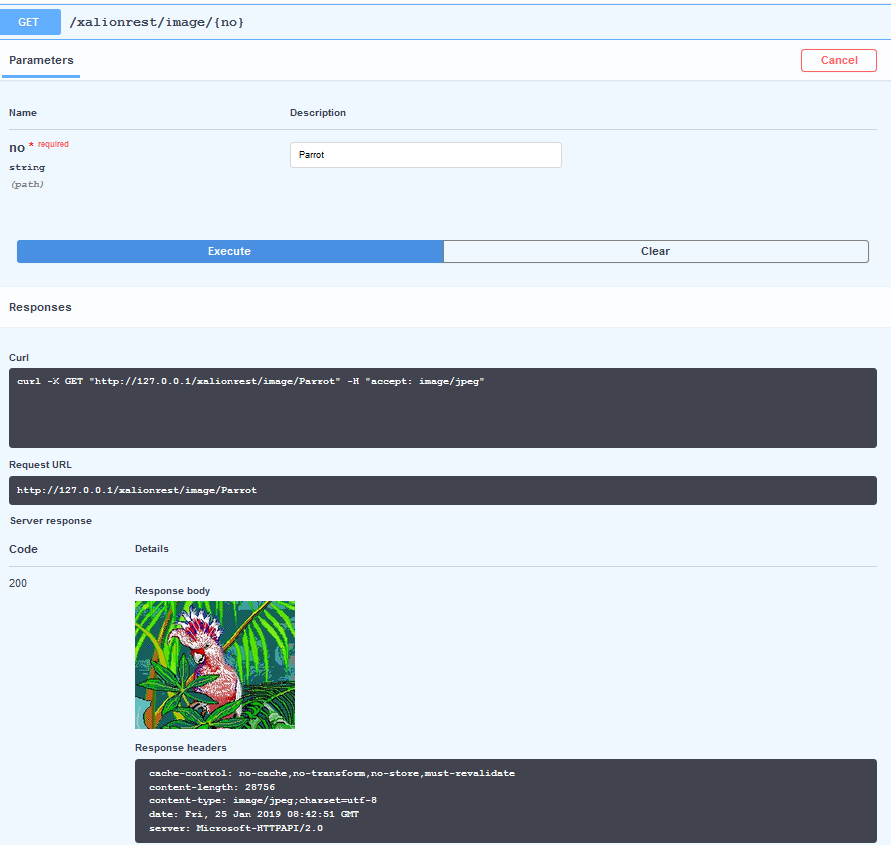
完美!
当然了,我们也可以通过这个直接生成java 和 php 的调用代码。
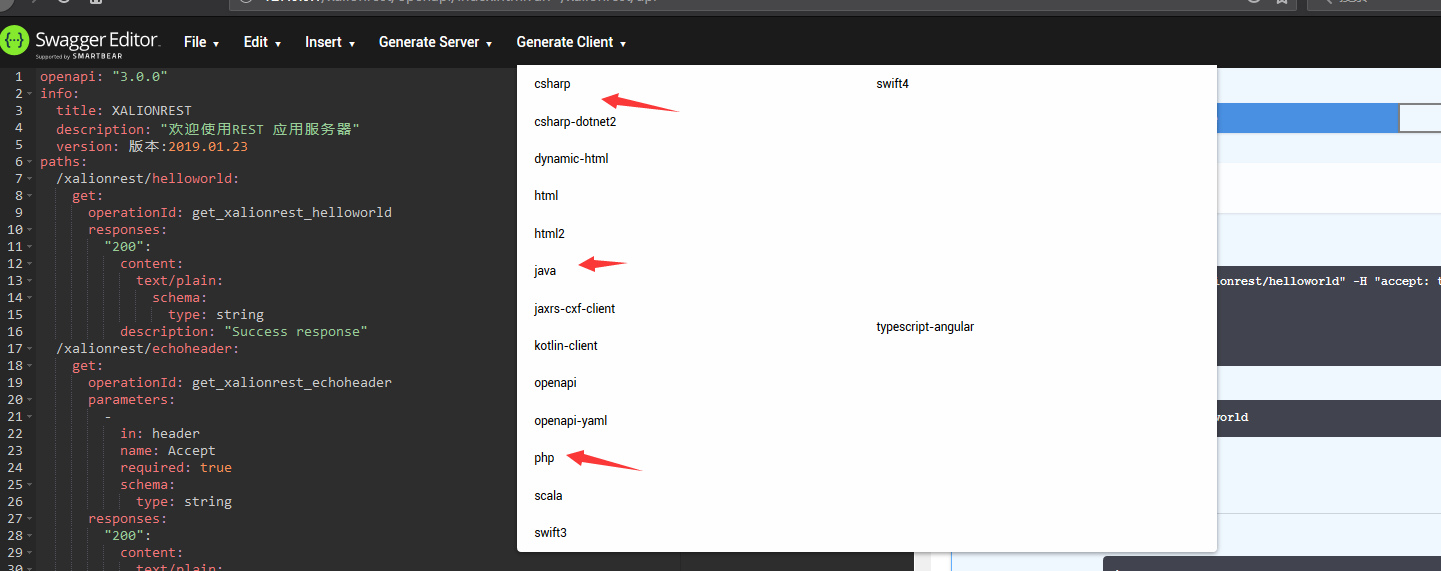
一切都这么完美。
用飘柔就这么自信!
附样例函数声明
 [kbmMW_Rest('method:$(service.xalionrest.helloworld.method=post), path:$(service.xalionrest.helloworld.path=helloworld)')]

    // [kbmMW_Method] 注释了这个客户端就不能访问了

     function HelloWorld:string;

     [kbmMW_Rest('method:get, path: "echoheader", responseMimeType:"text/plain"')]

      function EchoHeader([kbmMW_Arg(mwatHeader,'Accept')] const AHeaderValue:string):string;

     [kbmMW_Rest('method:get, path: "echocookie", responseMimeType:"text/plain"')]

      function EchoCookie([kbmMW_Arg(mwatCookie,'MyCookie')] const ACookieValue:string):string;

     [kbmMW_Rest('method:get, path:version')]

     [kbmMW_Method]

     function version:string;

     [kbmMW_Method('EchoString')]       // 回应输入的串

     [kbmMW_Rest('method:get, path: ["echostring/{AString}","myechostring/{AString}" ]')]

     [kbmMW_Auth('role:[SomeRole,SomeOtherRole], grant:true')]

     function EchoString([kbmMW_Rest('value: "{AString}"')] const AString:string):string;

     [kbmMW_Method]

     [kbmMW_Rest('method:get, path: "cal/addnumbers",summary:"两个数相加",resultDescription:"返回相加和"')]

     function AddNumbers([kbmMW_Rest('value: "$arg1", required: true,description:"第一个数"')] const AValue1:integer;

                         [kbmMW_Rest('value: "$arg2", required: true,description:"第二个数"')] const AValue2:integer;

                         [kbmMW_Arg(mwatRemoteLocation)] const ARemoteLocation:string):string;

     [kbmMW_Method]

     [kbmMW_Rest('method:get, path: "gettoken",anonymousResult:False,freeResult:true')]

     function gettoken([kbmMW_Rest('value: "$appid", required: true')] const AValue1:string;

                         [kbmMW_Rest('value: "$acesskey", required: true')] const AValue2:string):Txalionresult;

     [kbmMW_Rest('method:post, path:postdata')]

     [kbmMW_Method]

     function postdata:string;

     [kbmMW_Rest('method:post, path:postfile')]

     [kbmMW_Method]

     function postfile:string;

     [kbmMW_Rest('method:get, path:getwithcheck,anonymousResult:False,freeResult:true')]

     [kbmMW_Method]

     function getwithcheck(

          [kbmMW_Rest('value: "$p1", required: true')] const p1:string;

          [kbmMW_Rest('value: "$p2", required: true')] const p2:string;

          [kbmMW_Rest('value: "$p3", required: true')] const p3:string;

          [kbmMW_Rest('value: "$AccessKeyId", required: true')] const AccessKeyId:string;

          [kbmMW_Rest('value: "$Timestamp", required: true')] const  Timestamp:string;

          [kbmMW_Rest('value: "$Action", required: true')] const  Action:string;

          [kbmMW_Rest('value: "$Signature", required: true')] const Signature:string):Txalionresult;

     [kbmMW_Rest('method:get, path:querydata')]

     [kbmMW_Method]

     function querydata(

          [kbmMW_Rest('value: "$tname", required: true')] const tblname:string;

          [kbmMW_Rest('value: "$id", required: False')] const id:string):string;

                   //,anonymousResult:False, freeResult:true

     [kbmMW_Rest('method:get, path:querytable,anonymousResult:true,freeResult:true')]

     [kbmMW_Method]

     [kbmMW_DataSet([mwdsfIncludeDefinitions])]

     function querytable(

          [kbmMW_Rest('value: "$tname", required: true')] const tblname:string;

          [kbmMW_Rest('value: "$id", required: False')] const id:string):Tkbmmemtable;

     [kbmMW_Rest('method:get, path:deletedata,anonymousResult:False,freeResult:true')]

     [kbmMW_Method]

     function deletedata(

          [kbmMW_Rest('value: "$tname",required: true')] const tblname:string;

          [kbmMW_Rest('value: "$id", required: true')] const id:string):Txalionresult;

    [kbmMW_Rest('method:post, path:poststring')]

     [kbmMW_Method]

     function poststring([kbmMW_Rest('value: "body", required: true')] const body:string):string;

    [kbmMW_Rest('method:get, path:"image/{no}", responseMimeType:"image/jpeg"')]

     function GetImage([kbmMW_Rest('value:"{no}"')] const Aname:string):TkbmMWBytes;

    [kbmMW_Rest('method:get, path:"image64/{no}",responseMimeType:"text/html"')]

     function GetImageB64([kbmMW_Rest('value:"{no}"')] const Aname:string):string;
使用kbmmw 生成REST 服务OpenAPI函数原型的更多相关文章
- 使用kbmmw 生成客户端delphi函数原型
前面我们讲了使用swagger 生成java,php 的客户端调用函数原型. 对于delphi,其实很遗憾,不能直接生成客户端函数原型代码. 不要紧,解铃还须系铃人,既然是kbmmw 自己生成的,我们 ...
- 如何在gvim中安装autoproto自动显示函数原型
cankao: http://www.vim.org/scripts/script.php?script_id=1553 注意, 在gvim中执行的命令, :foo和:!foo 的区别, 跟vim一样 ...
- C语言函数的声明以及函数原型
C语言代码由上到下依次执行,原则上函数定义要出现在函数调用之前,否则就会报错.但在实际开发中,经常会在函数定义之前使用它们,这个时候就需要提前声明.所谓声明(Declaration),就是告诉编译器我 ...
- 第一篇博文:PHP函数原型中的可选参数写法为什么这么写?
第一篇,算是开始吧.简单写点儿东西. 刚开始学PHP,在看PHP Manual时遇到一个问题:含可选参数的函数原型中,可选参数的写法看不懂. 例如explode函数 array explode ( s ...
- 记一次在Eclipse中用Axis生成webservice服务端的过程中出现的问题
问题一. Unable to find config file. Creating new servlet engine config file: /WEB-INF/server-config.ws ...
- php生成随机密码(php自定义函数)转自先锋教程网
php生成随机密码(php自定义函数) 时间:2015-12-16 20:43:49来源:网络 导读:php随机密码的生成代码,使用php自定义函数生成指定长度的随机密码,密码规则为小写字母与数字的随 ...
- [转载] 已知strcpy的函数原型:char *strcpy(char *strDest, const char *strSrc),编写函数 strcpy(C++版)
已知strcpy的函数原型:char *strcpy(char *strDest, const char *strSrc)其中strDest 是目的字符串,strSrc 是源字符串.不调用C++/C ...
- Linux驱动设计—— 部分系统调用函数原型
cdev结构体和它的初始化注册函数原型 struct cdev { struct kobject kobj; // 每个 cdev 都是一个 kobject struct m ...
- 《c程序设计语言》读书笔记--子函数原型和声明的形参
#include <stdio.h> #define Num 20 int power(int base,int n) { int p = 1; int i; for(i = 0;i &l ...
随机推荐
- Linux 重装系统 连接不上的问题
https://blog.csdn.net/liqi_q/article/details/78465949 ssh-keygen -R ip
- css样式基础详解
一.字体属性:(font) 1.大小 {font-size: x-large;}(特大) xx-small;(极小) 一般中文用不到,只要用数值就可以,单位:PX.PD 2.样式 {font-styl ...
- 程序员常用字体(vs2008字体修改方案)
字体不仅是设计师手中重要的武器,对我们开发人员来说,字体的选择也有许多讲究,一个好的.适合展示代码的字体,应该具备以下要素: 等宽的字符 简洁.清晰并且规范的字符形状 支持ASCII码为128以上的扩 ...
- Win10下VirtualBox安装流程
一.VirtualBox简介 VirtualBox 是一款开源的虚拟机软件,最初由美国SUN公司开发,后来SUN被Oracle收购,VirtualBox 更名为Oracle VirtualBox .不 ...
- K-Means算法:图片压缩
#读取实例图片# from sklearn.datasets import load_sample_image from sklearn.cluster import KMeans import ma ...
- windows+Pycharm+Anaconda下安装opencv
本人最近开始使用pycharm,之前一直是在Anaconda环境下跑的程序,在Anaconda Navigator下运行,但发现Jupyter Notebook界面下的程序提示不是很人性化,所以迁移到 ...
- neo4j配置(转)
我的neo4j配置 # 修改第9行,去掉#,修改数据库名 dbms.active_database=wkq_graph.db # 修改第12行,去掉#.修改路径,改成绝对路径 dbms.directo ...
- IDEA 对比eclipse环境调节
小子刚刚接触Intellij IDEA,以前用的都是eclipse.鉴于ieda的火热,开始学习之旅.本文会随时更新,记载idea中的一些调节方法,尽量在环境的配置上跟eclipse接近些. 在此感谢 ...
- Joe Hocking - Unity in Action. 2nd Ed [2018]
Unity in Action. 2nd Ed, 一本关于unity开发的英文书籍,初中级 PDF格式 扫码时备注或说明中留下邮箱 付款后如未回复请至https://shop135452397.tao ...
- pm2管理node
一般直接npm start起的退出命令行就没了,node后台管理工具pm2目前比较流行. npm install -g pm2 pm2 list pm2 start bin/www --name de ...