
Android 进度条按钮实现(ProgressButton)
有些App在点击下载按钮的时候,可以在按钮上显示进度,我们可以通过继承原生Button,重写onDraw来实现带进度条的按钮。
Github:https://github.com/imcloudfloating/ProgressBar
1.效果:
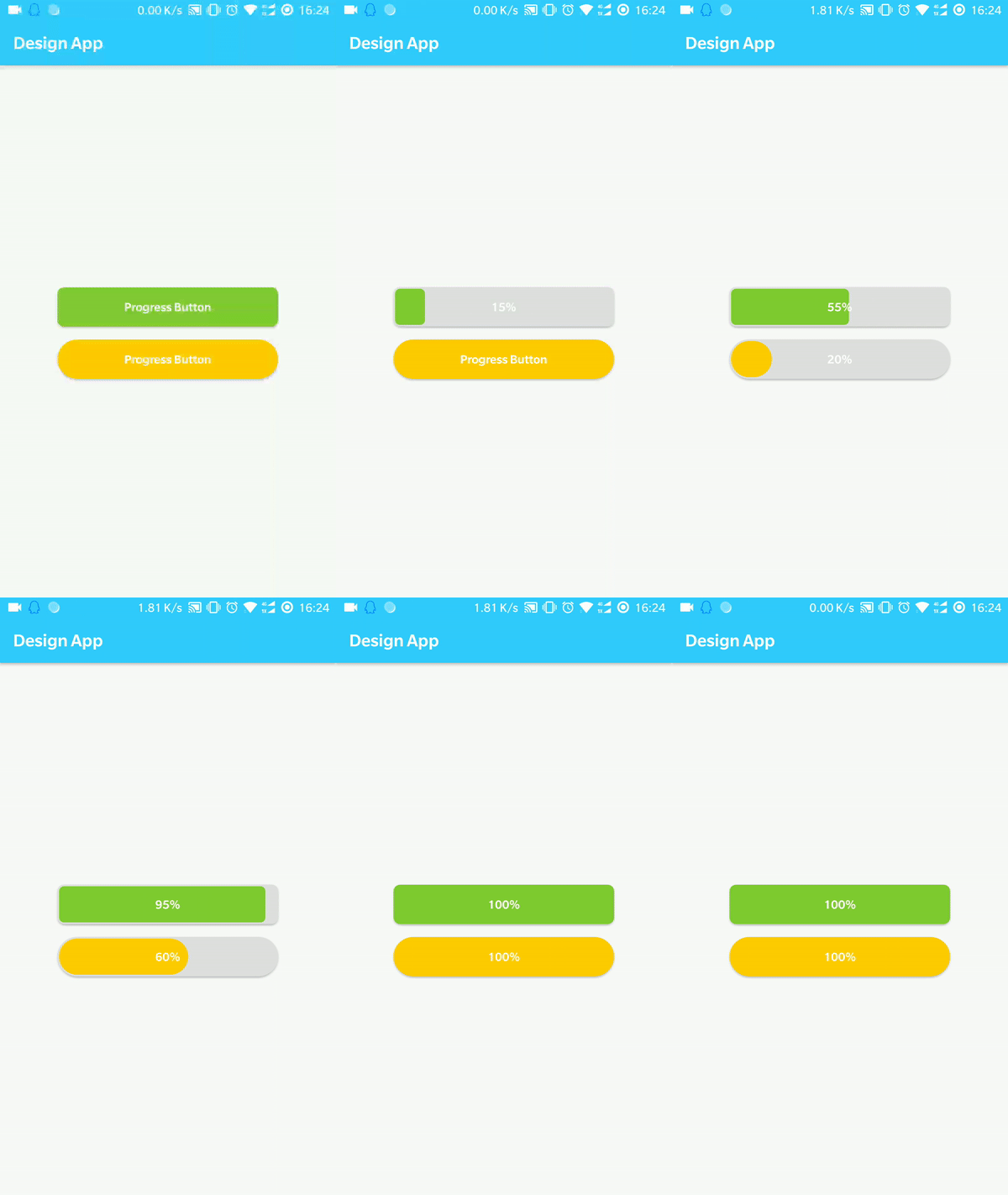
2.原理:
创建三个GradientDrawable作为按钮背景、进度条背景和进度条前景,通过计算进度条的百分比来设置宽度,然后调用invalidate()重绘。GradientDrawable设置颜色、圆角等参数,当然你也可以直接加载xml作为背景。
3.自定义参数:
在values目录建一个attrs.xml文件
 <?xml version="1.0" encoding="utf-8"?>

 <resources>

     <attr name="progressColor" format="color" />

     <attr name="progressBackColor" format="color" />

     <attr name="progress" format="integer" />

     <attr name="minProgress" format="integer" />

     <attr name="maxProgress" format="integer" />

     <declare-styleable name="ProgressButton">

         <attr name="progressColor" />

         <attr name="progressBackColor" />

         <attr name="buttonColor" format="color" />

         <attr name="cornerRadius" format="dimension" />

         <attr name="progress" />

         <attr name="minProgress" />

         <attr name="maxProgress" />

         <attr name="progressMargin" format="dimension" />

     </declare-styleable>

 </resources>
3.按钮类:
在setProgress方法中改变mProgress的值,然后调用invalidate()重绘,因为我这里定义了一个minProgress(默认为0),所以在计算进度条宽度的时候,当前进度和最大进度都要先减去minProgress再做除法。
if (progressWidth < mCornerRadius * 2) {
    progressWidth = mCornerRadius * 2;
}
当进度条宽度小于2倍圆角半径的时候,进度条的圆角就和背景的圆角不一致,所以加上了上面这段代码。
获取宽度和高度其实用getWidth()和getHeight()也可以,只不过在设计器中没法看到效果,所以我用了getMeasuredWidth()和getMeasuredHeight()。
 package com.cloud.customviews;

 import android.content.Context;

 import android.content.res.TypedArray;

 import android.graphics.Canvas;

 import android.graphics.drawable.GradientDrawable;

 import android.support.v7.widget.AppCompatButton;

 import android.util.AttributeSet;

 public class ProgressButton extends AppCompatButton {

     private float mCornerRadius = 0;

     private float mProgressMargin = 0;

     private boolean mFinish;

     private int mProgress;

     private int mMaxProgress = 100;

     private int mMinProgress = 0;

     private GradientDrawable mDrawableButton;

     private GradientDrawable mDrawableProgressBackground;

     private GradientDrawable mDrawableProgress;

     public ProgressButton(Context context, AttributeSet attrs) {

         super(context, attrs);

         initialize(context, attrs);

     }

     public ProgressButton(Context context, AttributeSet attrs, int defStyle) {

         super(context, attrs, defStyle);

         initialize(context, attrs);

     }

     private void initialize(Context context, AttributeSet attrs) {

         //Progress background drawable

         mDrawableProgressBackground = new GradientDrawable();

         //Progress drawable

         mDrawableProgress = new GradientDrawable();

         //Normal drawable

         mDrawableButton = new GradientDrawable();

         //Get default normal color

         int defaultButtonColor = getResources().getColor(R.color.colorGray, null);

         //Get default progress color

         int defaultProgressColor = getResources().getColor(R.color.colorGreen, null);

         //Get default progress background color

         int defaultBackColor = getResources().getColor(R.color.colorGray, null);

         TypedArray attr = context.obtainStyledAttributes(attrs, R.styleable.ProgressButton);

         try {

             mProgressMargin = attr.getDimension(R.styleable.ProgressButton_progressMargin, mProgressMargin);

             mCornerRadius = attr.getDimension(R.styleable.ProgressButton_cornerRadius, mCornerRadius);

             //Get custom normal color

             int buttonColor = attr.getColor(R.styleable.ProgressButton_buttonColor, defaultButtonColor);

             //Set normal color

             mDrawableButton.setColor(buttonColor);

             //Get custom progress background color

             int progressBackColor = attr.getColor(R.styleable.ProgressButton_progressBackColor, defaultBackColor);

             //Set progress background drawable color

             mDrawableProgressBackground.setColor(progressBackColor);

             //Get custom progress color

             int progressColor = attr.getColor(R.styleable.ProgressButton_progressColor, defaultProgressColor);

             //Set progress drawable color

             mDrawableProgress.setColor(progressColor);

             //Get default progress

             mProgress = attr.getInteger(R.styleable.ProgressButton_progress, mProgress);

             //Get minimum progress

             mMinProgress = attr.getInteger(R.styleable.ProgressButton_minProgress, mMinProgress);

             //Get maximize progress

             mMaxProgress = attr.getInteger(R.styleable.ProgressButton_maxProgress, mMaxProgress);

         } finally {

             attr.recycle();

         }

         //Set corner radius

         mDrawableButton.setCornerRadius(mCornerRadius);

         mDrawableProgressBackground.setCornerRadius(mCornerRadius);

         mDrawableProgress.setCornerRadius(mCornerRadius - mProgressMargin);

         setBackgroundDrawable(mDrawableButton);

         mFinish = false;

     }

     @Override

     protected void onDraw(Canvas canvas) {

         if (mProgress > mMinProgress && mProgress <= mMaxProgress && !mFinish) {

             //Calculate the width of progress

             float progressWidth =

                     (float) getMeasuredWidth() * ((float) (mProgress - mMinProgress) / mMaxProgress - mMinProgress);

             //If progress width less than 2x corner radius, the radius of progress will be wrong

             if (progressWidth < mCornerRadius * 2) {

                 progressWidth = mCornerRadius * 2;

             }

             //Set rect of progress

             mDrawableProgress.setBounds((int) mProgressMargin, (int) mProgressMargin,

                     (int) (progressWidth - mProgressMargin), getMeasuredHeight() - (int) mProgressMargin);

             //Draw progress

             mDrawableProgress.draw(canvas);

             if (mProgress == mMaxProgress) {

                 setBackgroundDrawable(mDrawableButton);

                 mFinish = true;

             }

         }

         super.onDraw(canvas);

     }

     /**

      * Set current progress

      */

     public void setProgress(int progress) {

         if (!mFinish) {

             mProgress = progress;

             setBackgroundDrawable(mDrawableProgressBackground);

             invalidate();

         }

     }

     public void setMaxProgress(int maxProgress) {

         mMaxProgress = maxProgress;

     }

     public void setMinProgress(int minProgress) {

         mMinProgress = minProgress;

     }

     public void reset() {

         mFinish = false;

         mProgress = mMinProgress;

     }

 }
使用:
 <com.cloud.customviews.ProgressButton

             android:id="@+id/button_progress_green"

             android:layout_width="270dp"

             android:layout_height="wrap_content"

             android:layout_marginTop="4dp"

             android:textAllCaps="false"

             android:textColor="@color/colorWhite"

             android:text="@string/button_progress"

             app:cornerRadius="8dp"

             app:progressMargin="2dp"

             app:progressColor="@color/colorGreen"

             app:buttonColor="@color/colorGreen" />
Android 进度条按钮实现(ProgressButton)的更多相关文章
- 多种的android进度条的特效源码
多种的android进度条的特效源码,这个源码是在源码天堂那个网站上转载过来的,我已经修改一部分了,感觉很实用的,大家可以学习一下吧,我就不上传源码了,大家可以直接到那个网站上下载吧. 源码天堂下载地 ...
- android进度条
android进度条 1.达到的效果 2.布局代码 先写一个my_browser.xml文件 存放WebView <?xml version="1.0" encoding=& ...
- android进度条的使用
// 导入按钮事件 btnsearch.setOnClickListener(new View.OnClickListener() { @Override public void on ...
- Android 进度条对话框ProgressDialog
<?xml version="1.0" encoding="utf-8"?> <LinearLayout xmlns:android=&quo ...
- Android 进度条(ProgressBar)和拖动条(Seekbar)补充“自定义组件”(总结)
这周结束了,我也码了一周的字,感觉还是很有种脚踏实地的感觉的,有时间就可以看看自己的总结再查漏补缺,一步一个脚印,做出自己最理想的项目. 今天我们讲两点: 1.ProgressBar: 其实前面也稍微 ...
- Android 进度条改变图片透明度
<?xml version="1.0" encoding="utf-8"?> <LinearLayout xmlns:android=&quo ...
- Android 进度条
<?xml version="1.0" encoding="utf-8"?> <LinearLayout xmlns:android=&quo ...
- Android—进度条
layout文件: <?xml version="1.0" encoding="utf-8"?> <LinearLayout xmlns:an ...
- Android——进度条ProgressBar
1.activity_progressbar.xml <?xml version="1.0" encoding="utf-8"?><Linea ...
随机推荐
- jetty8 text/plain默认字符编码的坑
今天在测试一个content-type为text/plain的API时发现后端requestBody乱码了,而线上正常. 自己本地使用jetty8版本,插件自带版本,而线上使用jetty9. 最开始没 ...
- .NET Core + Abp踩坑和填坑记录(1)
1. Net Core 的DI和Abp的DI并存 Startup中 ConfigureServices返回值改为IServiceProvider 在ConfigureServices最后调用retur ...
- Android Metro风格的Launcher开发系列第三篇
前言: 各位小伙伴,又到了每周更新文章了时候了,本来是周日能发出来呢,这不是赶上清明节吗,女王大人发话了,清明节前两天半陪她玩,只留给我周一下午半天时间写博客,哪里有女王哪里就有压迫呀有木有!好了闲话 ...
- ACM--string常见用法
在ACM竞赛中,常常需要将读入的数字的每位分离出来,如果采用取余的方法,花费的时间就会太长,这时候,我们可以将读入的数据当成字符串来处理,这样就方便.省时多了.下面这个程序演示了求一个整数各位的和: ...
- 调度器简介,以及Linux的调度策略
进程是操作系统虚拟出来的概念,用来组织计算机中的任务.但随着进程被赋予越来越多的任务,进程好像有了真实的生命,它从诞生就随着CPU时间执行,直到最终消失.不过,进程的生命都得到了操作系统内核的关照.就 ...
- nginx部署django应用
Django部署方式有很多种,之前写过一篇部署在Apache上的博文:https://www.cnblogs.com/shenh/p/7552722.html .下文介绍的是通过Nginx来部署. N ...
- Mybatis学习(二)————— 全局配置文件详解
一.全部配置内容 SqlMapConfig.xml的配置内容和顺序如下,顺序不能乱.现在来对这些属性的意思一一进行讲解. 二.properties 作用:引用java属性文件中的配置信息,比如,加载连 ...
- Java 趣史-差点把 Java 命名成了 Silk(丝绸)
差点把 Java 命名成了 Silk(丝绸) Java 命名的由来 Java是印度尼西亚爪哇岛的英文名称,因盛产咖啡而闻名.Java语言中的许多库类名称,多与咖啡有关:如JavaBeans(咖啡豆). ...
- lsyncd —— 多机器实时同步文件神器
lsyncd 是一个支持实时.双向.多机器的多模式文件同步工具. 使用 Lua 语言封装了 inotify 和 rsync 工具,采用了 Linux 内核(2.6.13 及以后)里的 inotify ...
- bash内置命令的特殊性,后台任务的"本质"
本文解释bash内置命令的特殊性.前台.后台任务的"本质",以及前.后台任务和bash进程.终端的关系.网上没类似的资料,所以都是自己的感悟和总结,如有错误,120分的期待盼请指正 ...