
Springboot+WebSocket+Kafka(写着玩的)
闹着玩的来源:前台发送消息,后台接受处理发给kafka,kafka消费者接到消息传给前台显示。联想到websocket。
最终效果如图:
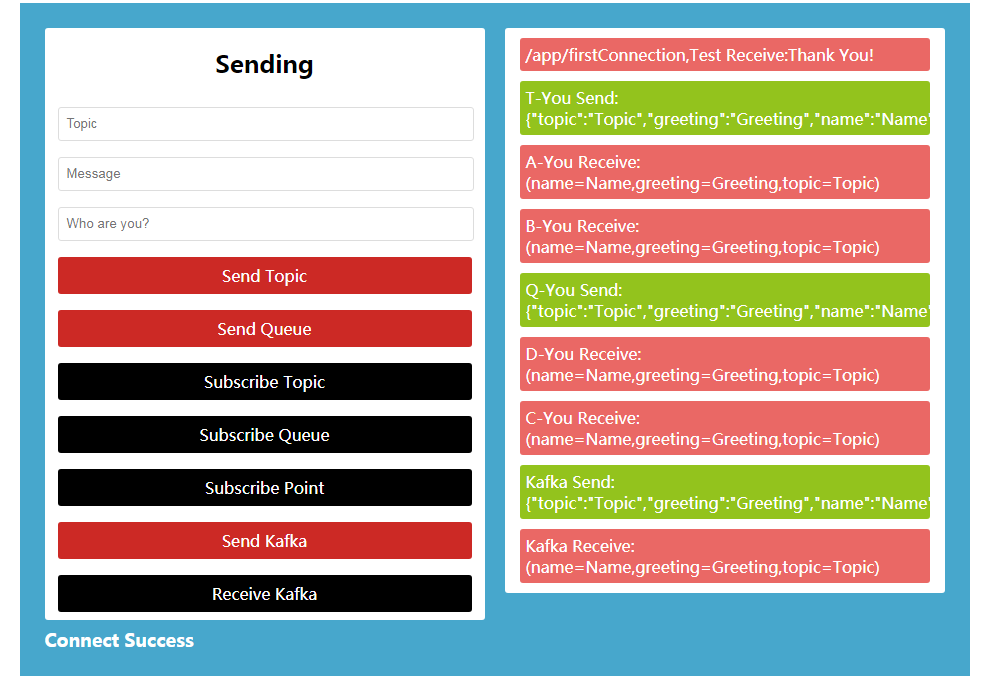
页面解释:
不填写内容的话,表单值默认为Topic、Greeting、Name
点击订阅,按钮变黑
| Send Topic | 广播 | 前台显示前缀:T-You Send |
| Subscribe Topic | 订阅广播 | 前台显示前缀:A-You Receive、B-You Receive |
| Send Queue | 广播 | 前台显示前缀:Q-You Send |
| Subscribe Queue | 订阅广播 | 前台显示前缀:C-You Receive、D-You Receive |
| Subscribe Point | 订阅点对点 | 前台显示前缀:/user/110/queue/pushInfo,Receive |
| Send Kafka | 点对点 | 前台显示前缀:Kafka Send |
| Receive Kafka | 订阅点对点 | 前台显示前缀:Kafka Receive |
重要提示:欲接受消息,先点击订阅
关键代码:
配置websocket
package com.example.demo.conf;

import org.springframework.context.annotation.Configuration;

import org.springframework.messaging.simp.config.MessageBrokerRegistry;

import org.springframework.web.socket.config.annotation.EnableWebSocketMessageBroker;

import org.springframework.web.socket.config.annotation.StompEndpointRegistry;

import org.springframework.web.socket.config.annotation.WebSocketMessageBrokerConfigurer;

/**

 * @program: boot-kafka

 * @description:

 * @author: 001977

 * @create: 2018-07-11 11:30

 */

@Configuration

@EnableWebSocketMessageBroker

public class WebSocketConfigurationWithSTOMP implements WebSocketMessageBrokerConfigurer {

    @Override

    public void registerStompEndpoints(StompEndpointRegistry registry) {

        registry.addEndpoint("/clientConnectThis").setAllowedOrigins("*").withSockJS();

    }

    @Override

    public void configureMessageBroker(MessageBrokerRegistry config) {

        // P2P should conf a /user  ;   broadcast should conf a /topic

        config.enableSimpleBroker("/topic", "/queue", "/user");

        config.setApplicationDestinationPrefixes("/app");   // Client to Server

        config.setUserDestinationPrefix("/user");           // Server to Client

    }

}
controller
package com.example.demo.controller;

import com.example.demo.entity.Welcome;

import com.example.demo.service.KafkaService;

import org.springframework.beans.factory.annotation.Autowired;

import org.springframework.messaging.handler.annotation.MessageMapping;

import org.springframework.messaging.handler.annotation.SendTo;

import org.springframework.messaging.simp.SimpMessagingTemplate;

import org.springframework.messaging.simp.annotation.SendToUser;

import org.springframework.messaging.simp.annotation.SubscribeMapping;

import org.springframework.web.bind.annotation.RequestBody;

import org.springframework.web.bind.annotation.RequestMapping;

import org.springframework.web.bind.annotation.RestController;

import org.springframework.web.servlet.ModelAndView;

/**

 * @program: boot-kafka

 * @description:

 * @author: 001977

 * @create: 2018-07-11 11:00

 */

@RestController

public class SimpleController {

    @Autowired

    private KafkaService kafkaService;

    @Autowired

    private SimpMessagingTemplate simpMessagingTemplate;

    @RequestMapping("/")

    public ModelAndView stomp(){

        return new ModelAndView("stomp_home");

    }

    @SubscribeMapping("/firstConnection")

    public Welcome thanks(){

        return new Welcome("...", "Thank You!");

    }

    @MessageMapping("/sendMessageTopic")

    @SendTo("/topic/webSocketTopic")

    public Welcome sendToTopic(@RequestBody Welcome welcome){

        System.out.println("Send-Topic-Msg:" + welcome);

        return welcome;

    }

    @MessageMapping("/sendMessageQueue")

    @SendToUser("/queue/webSocketQueue")

    public Welcome sendToQueue(@RequestBody Welcome welcome){

        System.out.println("Send-Queue-Msg:" + welcome);

        return welcome;

    }

    /**

     * P2P,后台模拟推送给前台,需打开@Scheduled注释

     */

    //@Scheduled(fixedRate = 1000L)

    public void send(){

        Welcome welcome = new Welcome("110","Hello!");

        simpMessagingTemplate.convertAndSendToUser("110", "/queue/pushInfo", welcome);

        System.err.println(welcome);

    }

    @MessageMapping("/sendKafka")

    public Welcome sendToKafka(@RequestBody Welcome welcome){

        boolean b = kafkaService.send(welcome);

        if (b)

            System.out.println("Send-Kafka-Msg:" + welcome);

        return welcome;

    }

}
前端JS
var socket = new SockJS('/clientConnectThis');

var stompClient = Stomp.over(socket);

stompClient.connect({},

    function connectCallback(frame) {   // success

        connectResult("Connect Success");

        stompClient.subscribe('/app/firstConnection', function (response) {

            var returnData = JSON.parse(response.body);

            receiveText("/app/firstConnection,Test Receive:" + returnData.greeting);

        });

    },

    function errorCallBack(error) {     // failed

        connectResult("Connect Break");

    }

);

//发送消息

function sendTopic() {

    var topic = $('#topic').val();

    var message = $('#message').val();

    var name = $('#name').val();

    if(topic == "")

        topic = "Topic";

    if(message == "")

        message = "Greeting";

    if(name == "")

        name = "Name";

    var messageJson = JSON.stringify({"topic":topic,"greeting": message,"name":name});

    stompClient.send("/app/sendMessageTopic", {}, messageJson);

    sendText("T-You Send:" + messageJson);

}

function sendQueue() {

    var topic = $('#topic').val();

    var message = $('#message').val();

    var name = $('#name').val();

    if(topic == "")

        topic = "Topic";

    if(message == "")

        message = "Greeting";

    if(name == "")

        name = "Name";

    var messageJson = JSON.stringify({"topic":topic,"greeting": message,"name":name});

    stompClient.send("/app/sendMessageQueue", {}, messageJson);

    sendText("Q-You Send:" + messageJson);

}

//订阅消息

function subscribeTopic(t) {

    $(t).css({

        "backgroundColor": "#000"

    });

    stompClient.subscribe('/topic/webSocketTopic', function (response) {

        var returnData = JSON.parse(response.body);

        receiveText("A-You Receive:(name=" + returnData.name + ",greeting=" + returnData.greeting + ",topic=" + returnData.topic + ")")

    });

    stompClient.subscribe('/topic/webSocketTopic', function (response) {

        var returnData = JSON.parse(response.body);

        receiveText("B-You Receive:(name=" + returnData.name + ",greeting=" + returnData.greeting + ",topic=" + returnData.topic + ")")

    });

}

//订阅消息

function subscribeQueue(t) {

    $(t).css({

        "backgroundColor": "#000"

    });

    stompClient.subscribe('/user/queue/webSocketQueue', function (response) {

        var returnData = JSON.parse(response.body);

        receiveText("C-You Receive:(name=" + returnData.name + ",greeting=" + returnData.greeting + ",topic=" + returnData.topic + ")")

    });

    stompClient.subscribe('/user/queue/webSocketQueue', function (response) {

        var returnData = JSON.parse(response.body);

        receiveText("D-You Receive:(name=" + returnData.name + ",greeting=" + returnData.greeting + ",topic=" + returnData.topic + ")")

    });

}

function subscribePoint(t) {

    $(t).css({

        "backgroundColor": "#000"

    });

    // /user/{userId}/**

    stompClient.subscribe('/user/110/queue/pushInfo', function (response) {

        var returnData = JSON.parse(response.body);

        receiveText("/user/110/queue/pushInfo,Receive:" + returnData.greeting);

    });

}

function sendKafka() {

    var topic = $('#topic').val();

    var message = $('#message').val();

    var name = $('#name').val();

    if(topic == "")

        topic = "Topic";

    if(message == "")

        message = "Greeting";

    if(name == "")

        name = "Name";

    var messageJson = JSON.stringify({"topic":topic,"greeting": message,"name":name});

    stompClient.send("/app/sendKafka", {}, messageJson);

    sendText("Kafka Send:" + messageJson);

}

function kafkaReceive(t) {

    $(t).css({

        "backgroundColor": "#000"

    });

    stompClient.subscribe('/user/kafka-user-id/queue/kafkaMsg', function (response) {

        var returnData = JSON.parse(response.body);

        receiveText("Kafka Receive:(name=" + returnData.name + ",greeting=" + returnData.greeting + ",topic=" + returnData.topic + ")")

    });

}

function sendText(v) {

    $('.container .right').append($('<div class="common-message send-text">'+ v +'</div>'));

}

function receiveText(v) {

    $('.container .right').append($('<div class="common-message receive-text">'+ v +'</div>'));

}

function connectResult(v) {

    $('.container').append($('<div class="connect-text">'+ v +'</div>'))

}
其余的见GitHub
Springboot+WebSocket+Kafka(写着玩的)的更多相关文章
- SpringBoot整合Kafka和Storm
前言 本篇文章主要介绍的是SpringBoot整合kafka和storm以及在这过程遇到的一些问题和解决方案. kafka和storm的相关知识 如果你对kafka和storm熟悉的话,这一段可以直接 ...
- SpringBoot+WebSocket
SpringBoot+WebSocket 只需三个步骤 导入依赖 <dependency> <groupId>org.springframework.boot</grou ...
- SpringBoot系列八:SpringBoot整合消息服务(SpringBoot 整合 ActiveMQ、SpringBoot 整合 RabbitMQ、SpringBoot 整合 Kafka)
声明:本文来源于MLDN培训视频的课堂笔记,写在这里只是为了方便查阅. 1.概念:SpringBoot 整合消息服务 2.具体内容 对于异步消息组件在实际的应用之中会有两类: · JMS:代表作就是 ...
- springboot+websocket+sockjs进行消息推送【基于STOMP协议】
springboot+websocket+sockjs进行消息推送[基于STOMP协议] WebSocket是在HTML5基础上单个TCP连接上进行全双工通讯的协议,只要浏览器和服务器进行一次握手,就 ...
- 利用SpringBoot+Logback手写一个简单的链路追踪
目录 一.实现原理 二.代码实战 三.测试 最近线上排查问题时候,发现请求太多导致日志错综复杂,没办法把用户在一次或多次请求的日志关联在一起,所以就利用SpringBoot+Logback手写了一个简 ...
- Springboot+Websocket+JWT实现的即时通讯模块
场景 目前做了一个接口:邀请用户成为某课程的管理员,于是我感觉有能在用户被邀请之后能有个立马通知他本人的机(类似微博.朋友圈被点赞后就有立马能收到通知一样),于是就闲来没事搞了一套. 涉及技术栈 ...
- python写机器人玩僵尸骰子
python写机器人玩僵尸骰子由Al Sweigart用python发布注意:我正在为我的僵尸骰子模拟器寻找反馈,以及这一套指令.如果你觉得有什么地方可以改进,请发邮件到al@inventwithpy ...
- springboot集成Kafka
kafka和MQ的区别: 1)在架构模型方面, RabbitMQ遵循AMQP协议,RabbitMQ的broker由Exchange,Binding,queue组成,其中exchange和binding ...
- SpringBoot WebSocket STOMP 广播配置
目录 1. 前言 2. STOMP协议 3. SpringBoot WebSocket集成 3.1 导入websocket包 3.2 配置WebSocket 3.3 对外暴露接口 4. 前端对接测试 ...
随机推荐
- fiddler 笔记-重定向
重定向功能:主要是进行会话的拦截,然后替换原始资源的功能 选择请求-到autoresponser面板-勾选 enable rules :add rules 设置如下: 2 在浏览器中请示url-页面跳 ...
- Jackson将对象转换为json字符串时,设置默认的时间格式
maven需要的依赖: <dependency> <groupId>com.fasterxml.jackson.core</groupId> <artifac ...
- java 运行 .jar 文件乱码
http://yang3wei.github.io/blog/2013/02/10/java-dfile-dot-encoding-equals-utf-8-gan-diao-luan-ma/ 启动时 ...
- 微服务 Micro services
微服务 (Microservices) 是一种软件架构风格,它是以专注于单一责任与功能的小型功能区块 (Small Building Blocks) 为基础,利用模组化的方式组合出复杂的大型应用程序, ...
- codeforces259B
Little Elephant and Magic Square CodeForces - 259B Little Elephant loves magic squares very much. A ...
- linux 安装Brew
点击查看原文 Linuxbrew:Linux下的Homebrew amendgit 关注 2017.02.16 17:20* 字数 455 阅读 4745评论 0喜欢 2 前不久还在跟同事抱怨ubun ...
- Nginx+Tomcat 负载均衡集群
案例分析 通常情况下,一台Tomcat站点由于可能出现单点故障及无法应对多客户复杂多样性的请求等问题,不能单独应用于生产环境下,所以我们需要一套更可靠的解决方案来完善Web站点架构. Nginx是一款 ...
- linux中监控CPU、内存和磁盘状态的shell脚本。(centos7)
这篇博客中所写的脚本,在实际工作中并没有什么卵用,工作中并不会用到这种脚本去监控.不过自己写一遍,可以让初学者对CPU.内存.磁盘等一些基础知识和基础命令更加了解. 1.利用vmstat工具监控CPU ...
- CodeForces Global Round 1
CodeForces Global Round 1 CF新的比赛呢(虽然没啥区别)!这种报名的人多的比赛涨分是真的快.... 所以就写下题解吧. A. Parity 太简单了,随便模拟一下就完了. B ...
- TCP/IP 和 HTTP 的区别和联系是什么?
作者:车小胖链接:https://www.zhihu.com/question/38648948/answer/240006409来源:知乎著作权归作者所有.商业转载请联系作者获得授权,非商业转载请注 ...