
SpringBoot多模块项目打包问题
项目结构图如下:
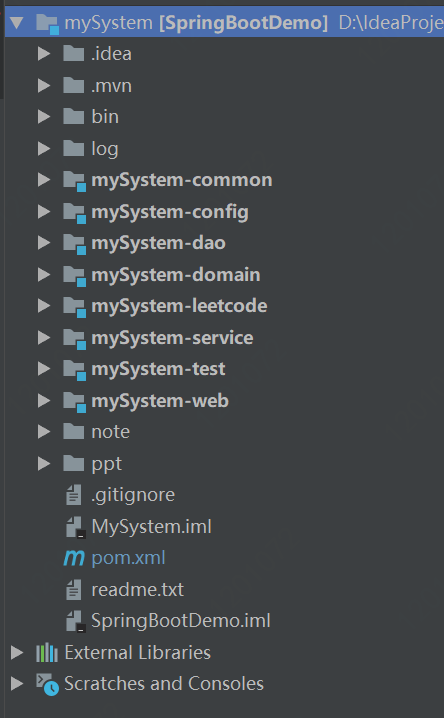
在SpringBoot多模块项目打包时遇见如下错误:
1、repackage failed: Unable to find main class -> [Help 1]
解决步骤:
(1)删除父pom中的build标签
(2)在web模块的pom中配置,指定启动类,其他模块中不需要配置:
  <build>

        <plugins>

            <plugin>

                <groupId>org.springframework.boot</groupId>

                <artifactId>spring-boot-maven-plugin</artifactId>

                <configuration>

                    <mainClass>com.dh.yjt.SpringBootDemo.SpringBootDemoApplication</mainClass>

                </configuration>

            </plugin>

        </plugins>

    </build>
2、[ERROR] /xxx.java:[16,39] 程序包com.xx..xxx不存在
解决办法:删除其他模块中的build标签
3、springboot打包与配置文件外置
https://blog.csdn.net/pei19890521/article/details/80984707
最终pom及package文件如下:
<?xml version="1.0" encoding="UTF-8"?>

<project xmlns="http://maven.apache.org/POM/4.0.0" xmlns:xsi="http://www.w3.org/2001/XMLSchema-instance"

         xsi:schemaLocation="http://maven.apache.org/POM/4.0.0 http://maven.apache.org/xsd/maven-4.0.0.xsd">

    <parent>

        <artifactId>SpringBootDemo</artifactId>

        <groupId>com.dh.yjt</groupId>

        <version>0.0.1-SNAPSHOT</version>

    </parent>

    <modelVersion>4.0.0</modelVersion>

    <artifactId>mySystem-web</artifactId>

    <version>0.0.1-SNAPSHOT</version>

    <packaging>jar</packaging>

    <name>mySystem-web Maven Webapp</name>

    <url>http://127.0.0.1/com.dh.yjt.SpringBootDemo.domain.index</url>

    <properties>

        <project.build.sourceEncoding>UTF-8</project.build.sourceEncoding>

        <maven.compiler.source>1.8</maven.compiler.source>

        <maven.compiler.target>1.8</maven.compiler.target>

    </properties>

    <dependencies>

        <dependency>

            <groupId>junit</groupId>

            <artifactId>junit</artifactId>

            <version>4.12</version>

            <scope>test</scope>

        </dependency>

        <dependency>

            <groupId>com.dh.yjt</groupId>

            <artifactId>mySystem-config</artifactId>

            <version>0.0.1-SNAPSHOT</version>

            <scope>compile</scope>

        </dependency>

        <dependency>

            <groupId>com.dh.yjt</groupId>

            <artifactId>mySystem-dao</artifactId>

            <version>0.0.1-SNAPSHOT</version>

            <scope>compile</scope>

        </dependency>

        <dependency>

            <groupId>com.dh.yjt</groupId>

            <artifactId>mySystem-common</artifactId>

            <version>0.0.1-SNAPSHOT</version>

            <scope>compile</scope>

        </dependency>

        <dependency>

            <groupId>com.dh.yjt</groupId>

            <artifactId>mySystem-service</artifactId>

            <version>0.0.1-SNAPSHOT</version>

            <scope>compile</scope>

        </dependency>

        <dependency>

            <groupId>com.dh.yjt</groupId>

            <artifactId>mySystem-domain</artifactId>

            <version>0.0.1-SNAPSHOT</version>

            <scope>compile</scope>

        </dependency>

        <!-- xml配置 -->

        <dependency>

            <groupId>com.fasterxml.jackson.dataformat</groupId>

            <artifactId>jackson-dataformat-xml</artifactId>

        </dependency>

        <dependency>

            <groupId>com.jd.jmq</groupId>

            <artifactId>jmq-model</artifactId>

            <version>2.1.4</version>

            <scope>test</scope>

        </dependency>

    </dependencies>

    <build>

        <plugins>

            <plugin>

                <groupId>org.apache.maven.plugins</groupId>

                <artifactId>maven-jar-plugin</artifactId>

                <configuration>

                    <archive>

                        <manifest>

                            <addClasspath>true</addClasspath>

                            <mainClass>com.dh.yjt.SpringBootDemo.SpringBootDemoApplication</mainClass>

                        </manifest>

                    </archive>

                </configuration>

            </plugin>

            <plugin>

                <groupId>org.apache.maven.plugins</groupId>

                <artifactId>maven-assembly-plugin</artifactId>

                <configuration>

                    <descriptors>

                        <descriptor>src/main/resources/package.xml</descriptor>

                    </descriptors>

                </configuration>

                <executions>

                    <execution>

                        <id>make-assembly</id>

                        <phase>package</phase>

                        <goals>

                            <goal>single</goal>

                        </goals>

                    </execution>

                </executions>

            </plugin>

        </plugins>

    </build>

</project>
package.xml:
<?xml version="1.0" encoding="UTF-8"?>

<assembly

        xmlns="http://maven.apache.org/plugins/maven-assembly-plugin/assembly/1.1.3"

        xmlns:xsi="http://www.w3.org/2001/XMLSchema-instance"

        xsi:schemaLocation="http://maven.apache.org/plugins/maven-assembly-plugin/assembly/1.1.3 http://maven.apache.org/xsd/assembly-1.1.3.xsd">

    <id>package</id>

    <formats>

        <format>tar.gz</format>

    </formats>

    <includeBaseDirectory>true</includeBaseDirectory>

    <fileSets>

        <fileSet>

            <directory>${project.basedir}</directory>

            <outputDirectory>/</outputDirectory>

            <includes>

                <include>*.sql</include>

                <include>*.bat</include>

                <include>*.md</include>

            </includes>

        </fileSet>

        <fileSet>

            <directory>${project.basedir}/src/main/resources/bin</directory>

            <outputDirectory>../</outputDirectory>

            <includes>

                <include>bin/*.sh</include>

                <include>*.sh</include>

            </includes>

        </fileSet>

        <fileSet>

            <directory>${project.basedir}/src/main/resources</directory>

            <outputDirectory>/conf</outputDirectory>

            <includes>

                <include>config/*.xml</include>

                <include>config/*.properties</include>

                <include>*.properties</include>

            </includes>

        </fileSet>

        <fileSet>

            <directory>${project.build.directory}</directory>

            <outputDirectory>/</outputDirectory>

            <includes>

                <include>*.jar</include>

            </includes>

        </fileSet>

    </fileSets>

</assembly>
SpringBoot多模块项目打包问题的更多相关文章
- 2017-09-26 发布 SpringBoot多模块项目实践(Multi-Module)
https://segmentfault.com/a/1190000011367492?utm_source=tag-newest 2017-09-26 发布 SpringBoot多模块项目实践(Mu ...
- 使用IDEA构建Spring-boot多模块项目配置流程
使用IDEA构建Spring-boot多模块项目配置流程 1.创建项目 点击Create New Project 在左侧选中Spring Initializer,保持默认配置,点击下一步. 在Grou ...
- 记Spring搭建功能完整的个人博客「Oyster」全过程[其二] Idea中Maven+SpringBoot多模块项目开发的设计和各种坑(模块间依赖和打包问题)
大家好嘞,今天闲着没事干开写写博客,记录一下Maven+SpringBoot的多模块设计和遇到的坑. 多模块设计 简单说明一下截止目前的需求: 需要RESTful API:对文章.标签.分类和评论等的 ...
- 2 springboot多模块项目
一般来说创建一个springboot工程基本就可以了,但是有的时候可能需要将业务模块逻辑划分,每块业务模块都是一个工程,下边演示下多模块进行开发 目录结构 ...somefun ......somef ...
- Maven多模块项目打包前的一些注意事项(打包失败)
一. 最近在打包Maven项目时遇到了点问题,这个项目是Maven多模块项目,结构如下: projectParent├── xxxx-basic├── xxxx-web1├── xxxx-collec ...
- 使用Gradle构建springboot多模块项目,并混合groovy开发
idea设置本地gradle 打包: build.gradle //声明gradle脚本自身需要使用的资源,优先执行 buildscript { ext { springBootVersion = ' ...
- docker部署 springboot 多模块项目+vue
之前学习了docker,今天就来试试将这个项目打包成docker镜像并通过运行一个镜像来运行项目.这里使用的项目是el-admin.是一个开源的springboot后端管理框架(前端vue),有兴趣的 ...
- Java秒杀系统实战系列~构建SpringBoot多模块项目
摘要:本篇博文是“Java秒杀系统实战系列文章”的第二篇,主要分享介绍如何采用IDEA,基于SpringBoot+SpringMVC+Mybatis+分布式中间件构建一个多模块的项目,即“秒杀系统”! ...
- springboot 多模块项目创建
1.File>new>project 直接点击next 2.输入groupId .artifactId 3.选择项目保存路劲 finish 4.成功创建多模块项目的根模块 5.创建子 ...
随机推荐
- postman测试请求参数中文乱码问题
用IDEA调试代码时,用postman测试请求url,发现post或者get请求中参数是中文的话,后台获取的参数是乱码, 一般两个方面 发送请求的一方:postman的问题 接受请求的一方:tomca ...
- anki vector robot入门语音指令大全
vector机器人功能不断完善. 一:刚开始支持一些基础指令,你跟他说话他能在本机识别,然后做出相应的响应.在说这部分指令之前,需要加上Hey Vector.(嘿,维课的),然后他会准备听取你的指令, ...
- Spark参数详解 一(Spark1.6)
Spark参数详解 (Spark1.6) 参考文档:Spark官网 在Spark的web UI在"Environment"选项卡中列出Spark属性.这是一个很有用的地方,可以检查 ...
- Spark源码系列:DataFrame repartition、coalesce 对比
在Spark开发中,有时为了更好的效率,特别是涉及到关联操作的时候,对数据进行重新分区操作可以提高程序运行效率(很多时候效率的提升远远高于重新分区的消耗,所以进行重新分区还是很有价值的).在Spark ...
- html5课件外包-----swf/AS2/AS3/fla/ppt课件如何转换为html5交互课件/动画
随着Adobe公司公布2020年将不再更新和维护flash,flash逐渐被html5取代,很多教育机构都在面临着如何将自己的flash交互课件产品转换到html5版本的问题,最近遇到非常多的客户一上 ...
- win10 家庭版 升级 win10企业版
更改秘钥 我的电脑(右键)->属性-> 更改产品秘钥 -> 96YNV-9X4RP-2YYKB-RMQH4-6Q72D->重启系统 如果秘钥过期了,就百度按时间搜索,总有一个是 ...
- CSS的块级元素和内联元素的概念
三生有幸,偶然之下知道了<CSS世界>这本书,让我产生了探究 CSS 的想法. 这里对 CSS 中的块级元素和内联元素的概念做一个简单的整理. 可能对于我们前端开发人员来讲,一般接触到的元 ...
- xxl-job源码分析
1 调度中心API服务 1.任务结果回调服务: 2.执行器注册服务: 3.执行器注册摘除服务: 4.触发任务单次执行服务,支持任务根据业务事件触发: API暴露代码:com.xxl.job.admin ...
- vue 路由参数
<!DOCTYPE html> <html lang="en"> <head> <meta charset="UTF-8&quo ...
- Winform 实现跨线程以及Timer
https://docs.microsoft.com/en-us/dotnet/api/system.diagnostics.process.exited?redirectedfrom=MSDN&am ...