
小程序如何获取code
小程序如何获取code
<button open-type="getUserInfo" hover-class='none' bindgetuserinfo="getUserInfoFun">.</button>
wx.login({

      success: function (res) {

        var code = res.code;

        if (code) {

          console.log('获取用户登录凭证:' + code);

          // --------- 发送凭证 ------------------

          wx.request({

            url: 'https://www.my-domain.com/wx/onlogin',

            data: { code: code }

          })

          // ------------------------------------

        } else {

          console.log('获取用户登录态失败:' + res.errMsg);

        }

      }

    });
登录的时候需要拿到token值,需要跟后端配合才能拿到
小程序调用wx.login() 获取 临时登录凭证code ,并回传到开发者服务器
开发者服务器以code换取 用户唯一标识openid 和 会话密钥session_key
// 登录

wx.login({

    success: res => {

        // 发送 res.code 到后台换取 openId, sessionKey, unionId

        // console.log(res)

        if (res.code) {

            //发起网络请求

            wx.request({

                url: 'url',

                method: 'POST',

                data: {

                    // x: '',

                    // y: ''

                    code: res.code //将code发给后台拿token

                },

                header: {

                    'content-type': 'application/json' // 默认值

                },

                success: function(res) {

                    // 存token

                    console.log('token=' + res.data.data.token)

                    that.globalData.token = res.data.data.token; //拿到后将token存入全局变量  以便其他页面使用

                }

            })

        } else {

            console.log('获取用户登录态失败!' + res.errMsg)

        }

    }

})
// 检验、登录

wx.checkSession({

    success: function() {

       //session_key 未过期,并且在本生命周期一直有效

    },

    fail: function() {

        //session_key 已经失效,需要重新执行登录流程

        wx.login({

            success: (res) => {

                if (res.code) {

                    //发起网络请求

                    wx.request({

                        //开发者服务器通过code换取用户唯一标识openid 和 会话密钥session_key。

                        url: 'https://test.com/onLogin',

                        data: {

                            // 临时登录凭证code,并回传到开发者服务器

                            code: res.code

                        },

                        success: function(result) {

                            //返回业务数据,前后端交互身份识别

                        }

                    })

                } else {

                    console.log('登录失败!' + res.errMsg)

                }

            }

        });

    }

})
授权获取用户信息
// 可以通过 wx.getSetting 先查询一下用户是否授权了 "scope.record" 这个 scope

wx.getSetting({

    success(res) {

        if (!res.authSetting['scope.record']) {

            wx.authorize({

                scope: 'scope.record',

                success() {

                    // 用户已经同意小程序使用录音功能,后续调用 wx.startRecord 接口不会弹窗询问

                    wx.startRecord()

                }

            })

        }

    }

})
wx.authorize({scope: "scope.userInfo"}),无法弹出授权窗口,请使用

<button open-type="getUserInfo"></button>
wx.getSetting({

    success: (res)=>{

        if (res.authSetting['scope.userInfo']) {

            // 已经授权,可以直接调用 getUserInfo 获取头像昵称

            wx.getUserInfo({

              withCredentials: true,

              success: (res) => {

                  console.log(res);

              }

            })

        }

    }

});

授权和登录的意义
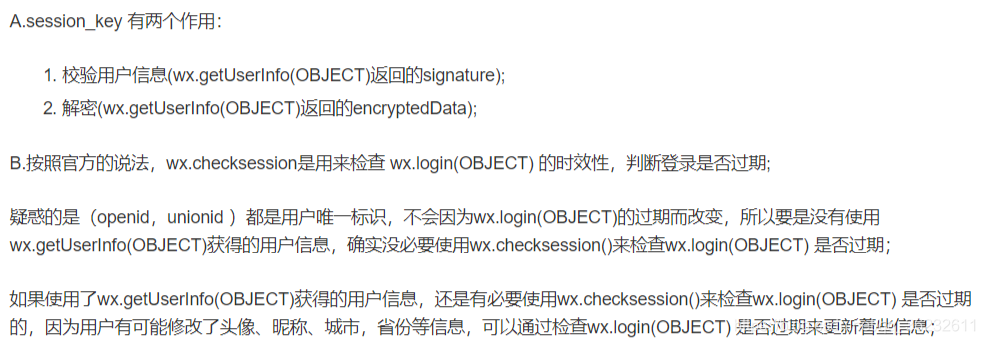
session_key 的作用
unionId 的作用,有哪些获取途径
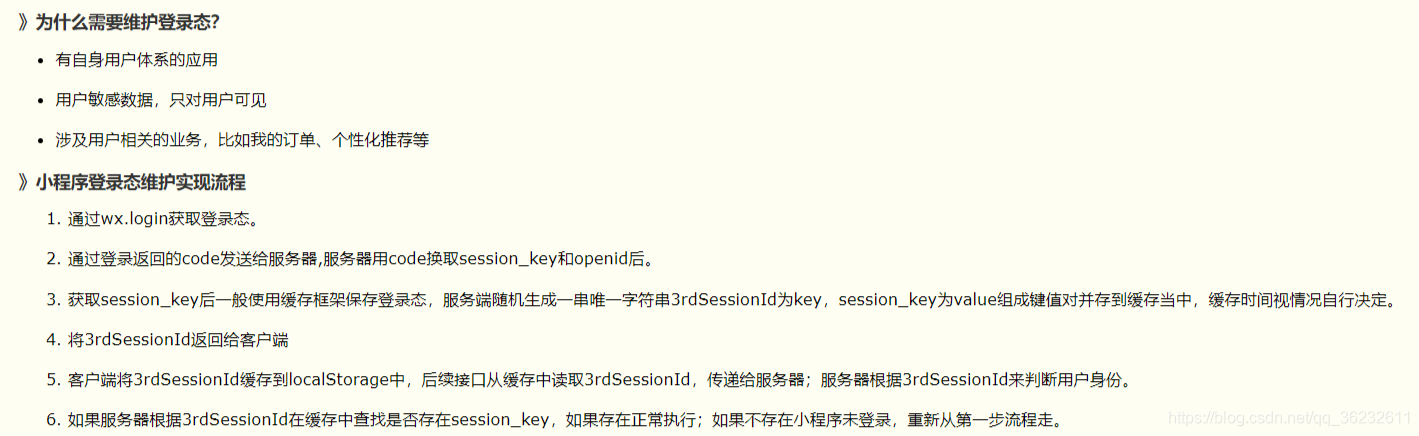
在应用中如何保存用户登录态
新版api已废弃wx.authorize()
wx.getUserInfo(Object object)
调用前需要 用户授权 scope.userInfo。
注意:wx.authorize({scope: "scope.userInfo"}),无法弹出授权窗口,请使用
<button open-type="getUserInfo"/>
一个用户相对于不同的微信应用会存在不同的openId
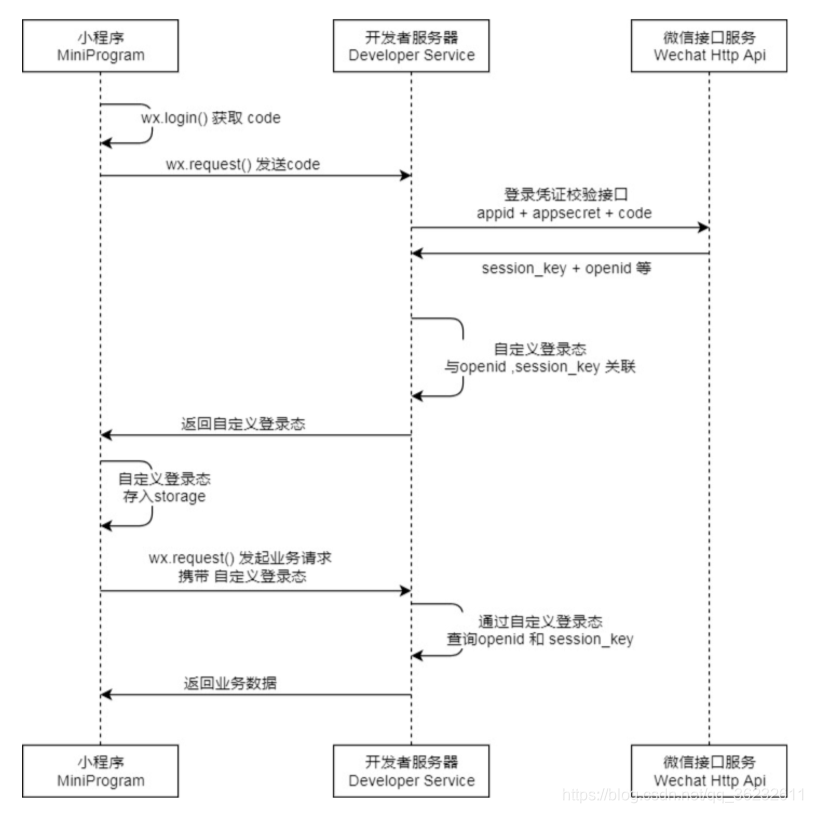
保存用户登录态
两种解决方案:前端保存和后端保存
App({

  data:{

    titleList: [],    //数据

    wxa_session: '',  // 密钥

    openid: '',

    scene: ''

  },

  onLaunch: function () {

    try {

      // 同步清理本地数据缓存

      console.log('clear');

      wx.clearStorageSync()

    } catch (e) {

      // Do something when catch error

    }

 },

// 定义登录函数

userLogin:function(cb){

  var that = this

  wx.login({

    success: function (res) {

      if (res.code) {

        //发起网络请求

        wx.request({

          url: 'https://mp.weixin.qq.com/wxaintp/common?action=login&codetype=invoicediscern',

          data: {

            // 通过传递code获取openID 和 密钥

            code: res.code

          },

          success: function (res) {

            // console.log(res);

            if (res.data.base_resp.ret == 0){

              // 用户唯一标识openid 和 会话密钥session_key

              that.data.wxa_session = res.data.session_key;

              that.data.openid = res.data.openid;

              console.log(that.data.wxa_session);

              cb();   // 后续操作

            }

            else {

              // 参数有误

              wx.showToast({

                image: '/static/images/icon_fail@3x.png',

                title: res.data.base_resp.err_msg,

              })

            }

          }

        })

      } else {

        console.log('获取用户登录态失败!' + res.errMsg)

      }

    }

  });

  globalData:{

      userInfo:null

  },

  onShow: function(options) {

        console.log('app onShow');

        console.log(options);

        var that = this;

        if(options){

          that.data.scene = options.scene;  //场景

        }

  }

})
App({

  // 获取token

  getToken: function() {

    var that = this;

    if (wx.getStorageSync("token") == null || wx.getStorageSync("token") == "") {

      console.log("请用户授权获取token");

      wx.redirectTo({

        url: '/pages/welcome/welcome',

      })

    } else {

      wx.switchTab({

        url: '/pages/index/index',

      })

    }

  },

  // 当小程序初始化完成时,会触发 onLaunch(全局只触发一次)

  onLaunch: function() {

    // 获取小程序更新机制兼容

    if (wx.canIUse('getUpdateManager')) {

      const updateManager = wx.getUpdateManager()

      updateManager.onCheckForUpdate(function(res) {

        // 请求完新版本信息的回调

        if (res.hasUpdate) {

          updateManager.onUpdateReady(function() {

            wx.showModal({

              title: '更新提示',

              content: '新版本已经准备好,是否重启应用?',

              success: function(res) {

                if (res.confirm) {

                  // 新的版本已经下载好,调用 applyUpdate 应用新版本并重启

                  updateManager.applyUpdate()

                }

              }

            })

          })

          updateManager.onUpdateFailed(function() {

            // 新的版本下载失败

            wx.showModal({

              title: '已经有新版本了哟~',

              content: '新版本已经上线啦~,请您删除当前小程序,重新搜索打开哟~',

            })

          })

        }

      })

    } else {

      // 如果希望用户在最新版本的客户端上体验您的小程序,可以这样子提示

      wx.showModal({

        title: '提示',

        content: '当前微信版本过低,无法使用该功能,请升级到最新微信版本后重试。'

      })

    }

    var that = this;

    that.getToken();

  },

  // 当小程序启动,或从后台进入前台显示,会触发 onShow

  onShow: function(options) {

  },

  // 当小程序从前台进入后台,会触发 onHide

  onHide: function() {

  },

  // 当小程序发生脚本错误,或者 api 调用失败时,会触发 onError 并带上错误信息

  onError: function(msg) {

  },

  globalData: {

    "avatarUrl": null,

    "nickName": null,

    // userId: 用户编号

    "userId": null,

    // organId: 所属单位

    "organId": null,

    // idType:身份类型

    "idType": null,

    "uncheckedNUM": null,

    "attendNum": null,

    "beLateNum": null,

    "leaveNum": null,

    "token": null,

    "studentNo": null,

  }

})
// 获取全局变量

const app = getApp();

Page({

  // 页面的初始数据

  data: {

    progress_txt: '点击账号绑定...',

  },

  // 按钮

  drawProgressbg: function() {

    // 使用 wx.createContext 获取绘图上下文 context

    var ctx = wx.createCanvasContext('canvasProgressbg')

    ctx.setLineWidth(4); // 设置圆环的宽度

    ctx.setStrokeStyle('#20183b'); // 设置圆环的颜色

    ctx.setLineCap('round') // 设置圆环端点的形状

    ctx.beginPath(); //开始一个新的路径

    ctx.arc(110, 110, 100, 0, 2 * Math.PI, false);

    //设置一个原点(100,100),半径为90的圆的路径到当前路径

    ctx.stroke(); //对当前路径进行描边

    ctx.draw();

  },

  // 授权登录

  doAuthorization: function(e) {

    var that = this;

    console.log("调用了 doAuthorization 授权");

    // 授权 只为获取token

    wx.login({

      success: function(res) {

        console.log("login: code", res.code);

        // 发送至服务器

        wx.request({

          url: '',

          method: 'POST',

          header: {

            Authorization: "",

            'Content-Type': 'application/x-www-form-urlencoded',

          },

          data: {

            mobile: 'wxecd372cca9b110e3@' + res.code,

            grant_type: 'mobile',

          },

          success: function(res) {

            // 进行判断

            console.log("button 成功", res.data);

            console.log("button token 成功", res.data.access_token);

            if (res.data.access_token == null || res.data.access_token == "") {

              wx.showModal({

                title: '提示',

                content: '请到公众号平台进行绑定账号',

                showCancel: false,

                success: function(res) {

                  console.log("请绑定账号");

                }

              })

            } else {

              wx.setStorageSync("token", res.data.access_token);

              wx.showToast({

                title: '成功',

                icon: 'succes',

                duration: 1000,

                mask: true

              })

              setTimeout(function() {

                // 授权跳转 index

                wx.switchTab({

                  url: '/pages/index/index',

                })

                wx.hideToast()

              }, 2000)

            }

          },

          // 失败

          fail: function(err) {

            console.log("token 失败", err);

            wx.showModal({

              title: '提示',

              content: '请到公众号平台进行绑定账号',

              showCancel: false,

              success: function(res) {

                if (res.confirm) {

                  wx.navigateBack({

                    delta: 0

                  })

                }

              }

            })

          }

        })

      }

    })

  },

  // 生命周期函数--监听页面加载

  onLoad: function(options) {

  },

  // 生命周期函数--监听页面初次渲染完成

  onReady: function() {

    this.drawProgressbg();

  },

  // 生命周期函数--监听页面显示

  onShow: function() {

  },

  // 生命周期函数--监听页面隐藏

  onHide: function() {

  },

  // 生命周期函数--监听页面卸载

  onUnload: function() {

  }

})
小程序如何获取code的更多相关文章
- 微信小程序如何获取openid
微信小程序如何获取openid wx.login({ success: res => { // 发送 res.code 到后台换取 openId, sessionKey, unionId // ...
- 微信小程序验证码获取倒计时
wxml <button disabled='{{disabled}}' bindtap="goGetCode">{{code}}</button> js ...
- 微信小程序后台获取用户的opeid
1.微信小程序后台获取登录用户的openid,首先微信小程序将code传给后台服务器 wx.login({ success: function (res) { var code = res.code ...
- nodejs+koa+uniapp实现微信小程序登陆获取用户手机号及openId
nodejs+koa+uniapp实现微信小程序登陆获取用户手机号及openId 前言: 我准备用nodejs+koa+uniapp实现一款餐饮点单小程序,以及nodejs+koa+vue实现后端管理 ...
- 【微信小程序】获取用户地理位置权限,二次请求授权,逆解析获取地址
摘要:微信小程序内获取用户地理位置信息授权,被拒绝后二次获取,获取权限后逆解析得到用户所在省市区等.. 场景:商城类小程序,在首页时需展示附近门店,即用户刚进入小程序时就需要获取到用户位置信息 ste ...
- 微信小程序,获取二维码
微信小程序,获取二维码 找到一篇很实用的博客,他已经写得很详细了,自己也懒得写,亲测有效 参考网址
- 【小程序】获取到的e.target与e.currentTarget区别
[小程序]获取到的e.target与e.currentTarget区别:https://blog.csdn.net/qq_33744228/article/details/80310294 使用e.t ...
- 微信小程序 如何获取用户code
1.首先需要获取code 使用 wx.login({ success: function(res) { console.log(res);//这里的返回值里面便包含code }, fail: func ...
- 微信小程序之获取验证码js
在微信小程序中怎样实现获取验证码的倒计时功能捏,倒计时的原理是一样一样的,就是某些地方需要注意. 第一步:结构 <view class='get-code' wx:if="{{!isS ...
随机推荐
- Quartz.Net进阶之六:详述 JobStores
一.介绍 今天开始学习 JobStore,别的先不说,也不用翻译软件来翻译,直接从字面意思看来理解一下.我第一眼的感觉就是 job 是任务的意思,Store 是商店的意思,连起来就是可以存储 Job ...
- slot-scope
插槽,也就是slot,是组件的一块HTML模板,这块模板显示不显示.以及怎样显示由父组件来决定. 实际上,一个slot最核心的两个问题在这里就点出来了,是显示不显示和怎样显示. 由于插槽是一块模板,所 ...
- 解决打开txt文件默认不是NotePad++问题
http://blog.sina.com.cn/s/blog_7414a3c80102wkci.html
- P2158 [SDOI2008] 仪仗队(欧拉函数模板)
题目描述 作为体育委员,C君负责这次运动会仪仗队的训练.仪仗队是由学生组成的N * N的方阵,为了保证队伍在行进中整齐划一,C君会跟在仪仗队的左后方,根据其视线所及的学生人数来判断队伍是否整齐(如下图 ...
- 2018-2019-2 《网络对抗技术》 EXP0 KALI安装 20165213 Week1
kali安装过程 一.从官网下载kail 下载地址为:https://www.kali.org/downloads/ 选择下图中的kali下载 二.用VMware打开虚拟机 打开VMware,点击打开 ...
- pycharm设置文件编码
原文链接
- 低版本的Chrome,打开url时,报错,IE确可以打开;
解决办法:打开注册表,添加以下内容,之后重启服务器: [HKEY_LOCAL_MACHINE\System\CurrentControlSet\Services\HTTP\Parameters]Ena ...
- C++数论板题(弹药科技):Lengendre定理和欧拉函数
弹药科技 时间限制: 1 Sec 内存限制: 128 MB 题目描述 经过精灵族全力抵挡,精灵终于坚持到了联络系统的重建,于是精灵向人类求助, 大魔法师伊扎洛决定弓}用博士的最新科技来抗敌. 伊扎洛: ...
- html/css 表格元素以及表格布局
一,html之表格 1,一个完整的html表格所包含的元素 <!--一个完整的html表格--> <!--cellpadding代表单元格内的文字和单元格边框之间的间距--> ...
- Codeforces Round #485 (Div. 2) C. Three displays
Codeforces Round #485 (Div. 2) C. Three displays 题目连接: http://codeforces.com/contest/987/problem/C D ...