
Latex(表格|图片(一丢丢))
那些自动写表格的软件搞出来的实在太丑,所以自己弄来试试,不一定太好,但总比临时抱佛脚好些。【参考《140分钟学会LaTex》】
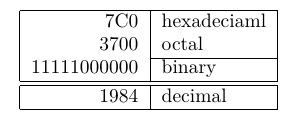
普通的例子
\begin{tabular}{|r|l|}

	\hline

	7C0 & hexadeciaml \\

	3700 & octal \\ \cline{2-2}

	11111000000 & binary \\

	\hline \hline

	1984 & decimal\\

	\hline

\end{tabular}
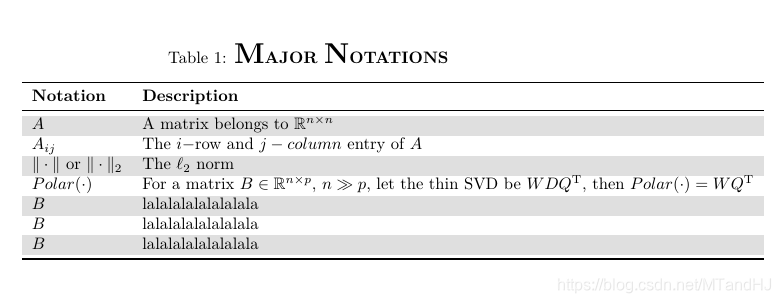
Notation 例子
\begin{table}[htbp]

\setlength{\abovecaptionskip}{5pt}

\setlength{\belowcaptionskip}{10pt}

\caption{\textbf{{\LARGE M}AJOR {\LARGE N}OTATIONS}}

\centering

\rowcolors{2}{white}{gray!25}      %\usepackage[table]{xcolor}  !!!!!!!!!

\begin{tabular}{ll}

	 \toprule                                   %\usepackage{booktabs}       !!!!!!!!!

	 \textbf{Notation}  & \textbf{Description} \\

	 \midrule

	 $A$  &  A matrix belongs to $\mathbb{R}^{n \times n}$ \\

	 $A_{ij}$  &  The $i-$row and $j-column$ entry of $A$\\

   	 $\|\cdot\|$ or $\|\cdot\|_2$  &  The $\ell_2$ norm\\

   	 $Polar(\cdot)$ & For a matrix $B \in \mathbb{R}^{n \times p}$, $n \gg p$,

   	 let the thin SVD be $WDQ^{\mathrm{T}}$, then $Polar(\cdot) =WQ^{\mathrm{T}}$ \\

	 $B$  &  lalalalalalalalala\\

	 $B$  &  lalalalalalalalala\\

	 $B$  &  lalalalalalalalala\\

	 \bottomrule

\end{tabular}

\end{table}
p{width}
\begin{tabular}{|p{4.7cm}|}

	\hline

	Welcome to Boxy’s paragraph.

	We sincerely hope you’ll all enjoy the show.\\

	\hline

\end{tabular}

列分割符 @{}
裂缝符去掉表列之间的间隔,代之为俩个花括号间的任何输入。
\begin{tabular}{@{} l @{}}

	\hline

	no leading space\\

	\hline

\end{tabular}

\begin{tabular}{@{!!!!!!!!!!!!!!!!} l @{!!!!!!!!!!!!!!}}

	\hline

	no leading space\\

	\hline

\end{tabular}

\multicolumn
\begin{tabular}{|c|c|}

	\hline

	\multicolumn{2}{|c|}{Ene} \\

	\hline

	Mene & Muh! \\

	\hline

\end{tabular}

supertabular | longtabular
感觉还是不够漂亮啊。。。
\begin{center}

	\tablefirsthead{%

		\hline

		\multicolumn{1}{|c}{\tbsp Number} &

		\multicolumn{1}{c}{Number$^2$} &

		Number$^4$ &

		\multicolumn{1}{c|}{Number!} \\

		\hline}

	\tablehead{%

		\hline

		\multicolumn{4}{|l|}{\small\sl continued from previous page}\\

		\hline

		\multicolumn{1}{|c}{ Number} &

		\multicolumn{1}{c}{Number$^2$} &

		Number$^4$ &

		\multicolumn{1}{c|}{Number!} \\

		\hline}

	\tabletail{%

		\hline

		\multicolumn{4}{|r|}{\small\sl continued on next page}\\

		\hline}

	\tablelasttail{\hline}

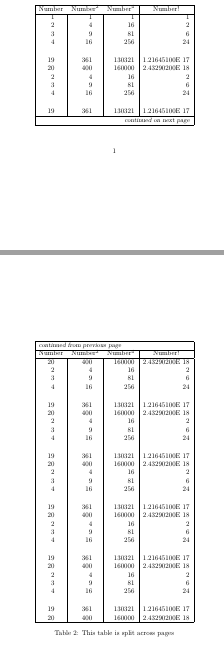
	\bottomcaption{This table is split across pages}

	\tablefirsthead{%

		\hline

		\multicolumn{1}{|c}{ Number} &

		\multicolumn{1}{c}{Number$^2$} &

		Number$^4$ &

		\multicolumn{1}{c|}{Number!} \\

		\hline}

	\tablehead{%

		\hline

		\multicolumn{4}{|l|}{\small\sl continued from previous page}\\

		\hline

		\multicolumn{1}{|c}{ Number} &

		\multicolumn{1}{c}{Number$^2$} &

		Number$^4$ &

		\multicolumn{1}{c|}{Number!} \\

		\hline}

	\tabletail{%

		\hline

		\multicolumn{4}{|r|}{\small\sl continued on next page}\\

		\hline}

	\tablelasttail{\hline}

	\bottomcaption{This table is split across pages}

	\begin{supertabular}{|r@{\hspace{6.5mm}}|r@{\hspace{5.5mm}}|r|r|}

		1 & 1 & 1 & 1 \\

		2 & 4 & 16 & 2 \\

		3 & 9 & 81 & 6 \\

		4 & 16 & 256 & 24 \\[5mm]

		19 & 361 & 130321 & 1.21645100E 17\\

		20 & 400 & 160000 & 2.43290200E 18\\

		2 & 4 & 16 & 2 \\

		3 & 9 & 81 & 6 \\

		4 & 16 & 256 & 24 \\[5mm]

		19 & 361 & 130321 & 1.21645100E 17\\

		20 & 400 & 160000 & 2.43290200E 18\\

		2 & 4 & 16 & 2 \\

		3 & 9 & 81 & 6 \\

		4 & 16 & 256 & 24 \\[5mm]

		19 & 361 & 130321 & 1.21645100E 17\\

		20 & 400 & 160000 & 2.43290200E 18\\

		2 & 4 & 16 & 2 \\

		3 & 9 & 81 & 6 \\

		4 & 16 & 256 & 24 \\[5mm]

		19 & 361 & 130321 & 1.21645100E 17\\

		20 & 400 & 160000 & 2.43290200E 18\\

		2 & 4 & 16 & 2 \\

		3 & 9 & 81 & 6 \\

		4 & 16 & 256 & 24 \\[5mm]

		19 & 361 & 130321 & 1.21645100E 17\\

		20 & 400 & 160000 & 2.43290200E 18\\2 & 4 & 16 & 2 \\

		3 & 9 & 81 & 6 \\

		4 & 16 & 256 & 24 \\[5mm]

		19 & 361 & 130321 & 1.21645100E 17\\

		20 & 400 & 160000 & 2.43290200E 18\\2 & 4 & 16 & 2 \\

		3 & 9 & 81 & 6 \\

		4 & 16 & 256 & 24 \\[5mm]

		19 & 361 & 130321 & 1.21645100E 17\\

		20 & 400 & 160000 & 2.43290200E 18\\

	\end{supertabular}

\end{center}
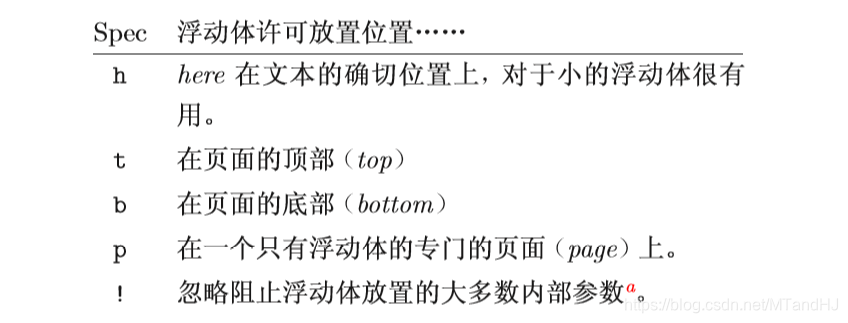
浮动体 table
\begin{table}[!hbp]
浮动体 图片 \usepackage{graphicx}
其他的包我也不知道,反正用这个包,直接用TeXstudio创建就好了。
Figure~\ref{white} is an example of Pop-Art.

\begin{figure}[!hbp]

	\makebox[\textwidth]{\framebox[5cm]{\rule{0pt}{5cm}}}

	\caption{Five by Five in Centimetres.\label{white}}

\end{figure}
\textwidth 作为图形的宽度,使得图形恰好充满整个页面。
图片 并排
\begin{figure}

\centering

\begin{minipage}{0.4\textwidth}

	\centering

	\includegraphics[width=\textwidth]{../Lenna}

	\caption[kfdgkdgkdf]{hfkjsdhflkdhfkdashfksdhfdsklfkdfLKFJNBES}

	\label{fig:lenna1}

\end{minipage}

\begin{minipage}{0.4\textwidth}

	\centering

	\includegraphics[width=\textwidth]{../Lenna}

	\caption[kfdgkdgkdf]{hfkjsdhflkdhfkdashfksdhfdsklfkdfLKFJNBES}

	\label{fig:lenna2}

\end{minipage}

\end{figure}
图片 并排2 \usepackage{subfig}
\begin{figure}

\centering

\subfloat[fasffasfafafa]{

	\includegraphics[width=0.4\linewidth]{../Lenna}

	\label{fig:lenna}

}

\hspace{40pt}

\subfloat[fasffasfafafa]{

	\includegraphics[width=0.4\linewidth]{../Lenna}

	\label{fig:lenna}

}

\end{figure}
Latex(表格|图片(一丢丢))的更多相关文章
- LaTeX 插图片
本系列文章由 @YhL_Leo 出品,转载请注明出处. 文章链接: http://blog.csdn.net/yhl_leo/article/details/50240371 这里列出3种LaTeX中 ...
- Latex表格制作记录
Latex表格制作记录 主要功能 合并表格的行列 长表格的使用 makecell例程借鉴 效果图 参考代码 \documentclass{ctexart} \usepackage{indentfirs ...
- Latex 表格内公式换行方法
Latex 表格内的公式实现换行的方法 简单的两步走: 1.先将下面的语句放在latex正文的导言区: \newcommand{\tabincell}[2]{\begin{tabula ...
- C#通过模板导出Word(文字,表格,图片)
C#通过模板导出Word(文字,表格,图片) C#导出Word,Excel的方法有很多,这次因为公司的业务需求,需要导出内容丰富(文字,表格,图片)的报告,以前的方法不好使,所以寻找新的导出方法, ...
- LaTeX的图片插入及排版
LaTeX中一般只直接支持插入eps(Encapsulated PostScript)格式的图形文件, 因此在图片插入latex文档之前应先设法得到图片的eps格式的文件. UNIX下的各种应用软件都 ...
- 中文latex去掉图片描述
中文latex去掉图片描述,或者自定义: \usepackage{caption} \caption*{the title of figure}就可以自己定义了.
- LaTeX的图片插入及排版[转]
LaTeX中一般只直接支持插入eps(Encapsulated PostScript)格式的图形文件, 因此在图片插入latex文档之前应先设法得到图片的eps格式的文件. UNIX下的各种应用软件都 ...
- LaTeX 表格指定宽度并居中
本系列文章由 @YhL_Leo 出品,转载请注明出处. 文章链接: http://blog.csdn.net/yhl_leo/article/details/50532269 在绘制表格的时候,对于特 ...
- E丢丢App重设计总结
E丢丢学习App是华夏大地教育可以有限公司旗下的一款产品,专为提升学历者打造,它整合了线上+跟踪的 (E平台)功能,方便工作人员随时随地管理账号.跟进学员:同时还可以随时了解教育行业的新闻资讯.一对一 ...
随机推荐
- 排序算法----快速排序java
快速排序是对冒泡排序的一种改进,平均时间复杂度是O(nlogn) import java.util.Arrays; import java.util.Scanner; public class tes ...
- C#发布和调试WebService
一.编写并发布WebService服务 1.新建空web应用程序
- 爬虫入门实例:利用requests库爬取笔趣小说网
w3cschool上的来练练手,爬取笔趣看小说http://www.biqukan.com/, 爬取<凡人修仙传仙界篇>的所有章节 1.利用requests访问目标网址,使用了get方法 ...
- 自动化测试基础篇--Selenium中JS处理滚动条
摘自https://www.cnblogs.com/sanzangTst/p/7692285.html 前言 什么是JS? JS就是JavaScript: JavaScript 是世界上最流行的脚本语 ...
- 安全之路 —— 利用APC队列实现跨进程注入
简介 在之前的文章中笔者曾经为大家介绍过使用CreateRemoteThread函数来实现远程线程注入(链接),毫无疑问最经典的注入方式,但也因为如此,这种方式到今天已经几乎被所有安全软件所防御.所以 ...
- 再次理解 C# LINQ
语言集成查询 (LINQ) 是一系列直接将查询功能集成到 C# 语言的技术统称. 查询表达式(生成表达式) 1.IEnumerable<T> 查询编译为委托.如 source.Where( ...
- Win 10 启用Linux子系统---Kali 和Ubuntu子系统
注:转载请注明出处,谢谢!!! 一.Linux on Windows简介 Win10一周年版推出了用于Windows的Linux子系统这一功能.Linux子系统和Windows的结合真是有一种神互补. ...
- Linux 小知识翻译 - 「邮件服务器」
这次聊聊「邮件服务器」. 邮件服务器上通常会运行2个服务端软件,「SMTP服务器」和「POP服务器或者IMAP服务器」. 这2个东西,也许使用邮件客户端的人立马就明白了.因为设置邮件客户端的时候,需要 ...
- Maven中POM.XML详解
转自https://blog.csdn.net/jariwsz/article/details/19554137 我们先看一个简单的例子: <project xmlns="http:/ ...
- oracle 乘积的实现方法
with abc(col1) as ( ' from dual union all ' from dual union all ' from dual ) select col1,ln(col1),e ...