
第1章 (ASP.NET MVC简介)
一.MVC概念
MVC由三部分组成:视图(View)、模型(Model)、控制器(Controller)组成
二.运用VS创建MVC
1、新建一个“解决方案”
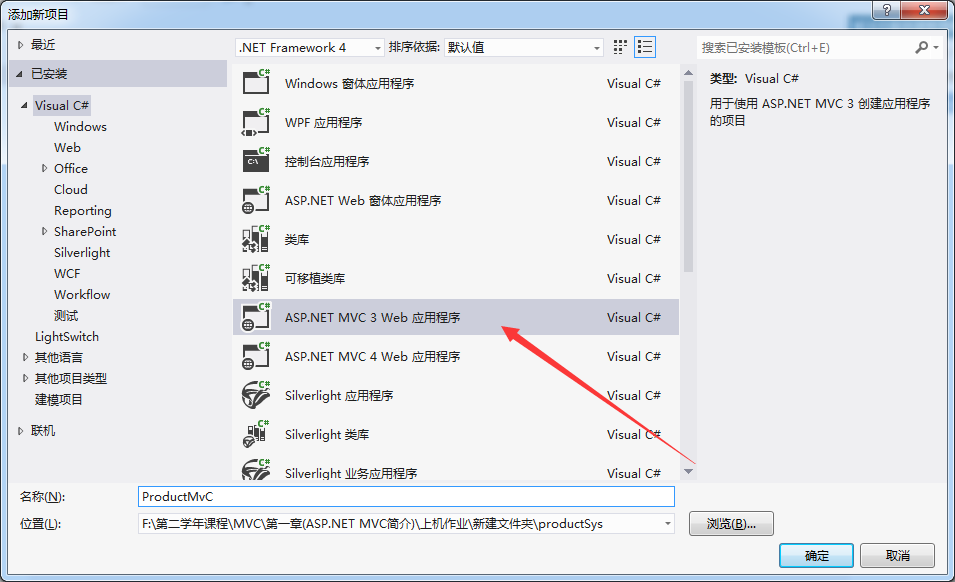
2、在”解决方案“右键新建“ASP.NET MVC3 APPliction ”
如图所示:
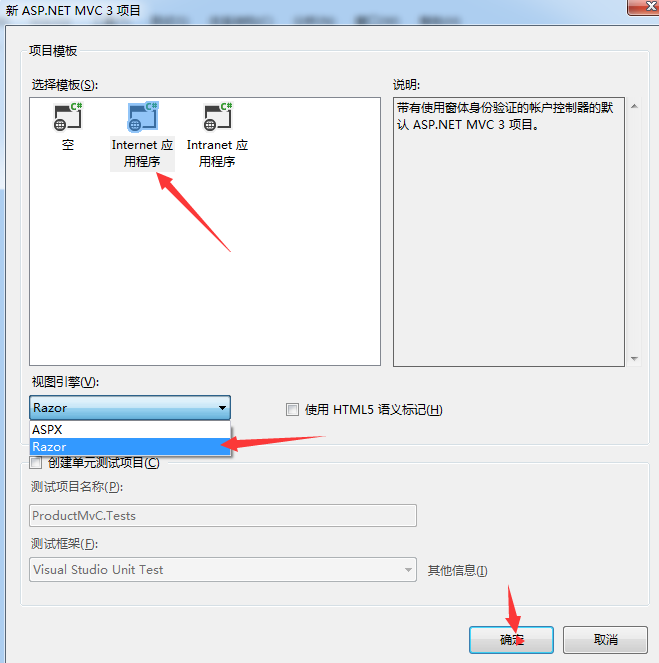
3、选择"Internet应用程序",视图引擎为“Razor”
如图所示:
4、建完后添加“表示层”与“数据库访问层”并且添加引用关系
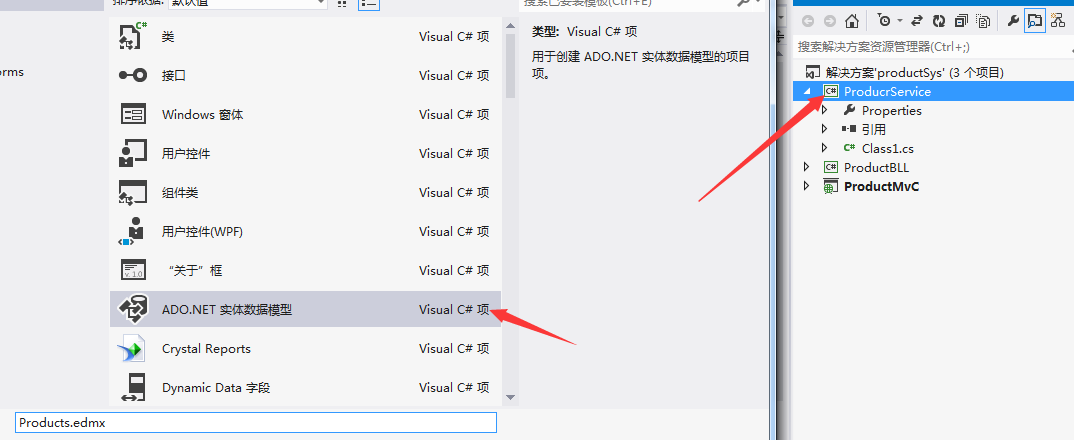
5、在”数据访问层“添加“ADO.NET实体数据模型”
如图所示:
6、选择“从数据库生成”,后台获取信息
如图所示:

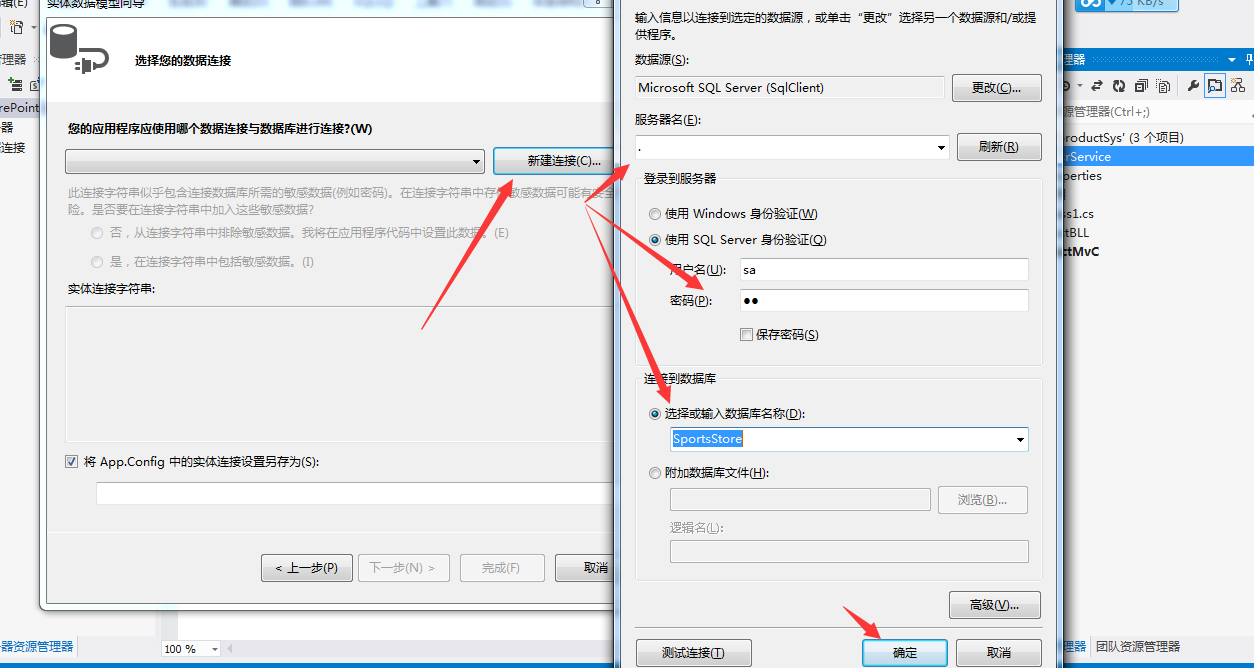
7、选择要获取数据库表名
如图所示:
8、选择“否”,视图名字可以改,这里我就不改了
如图所示:
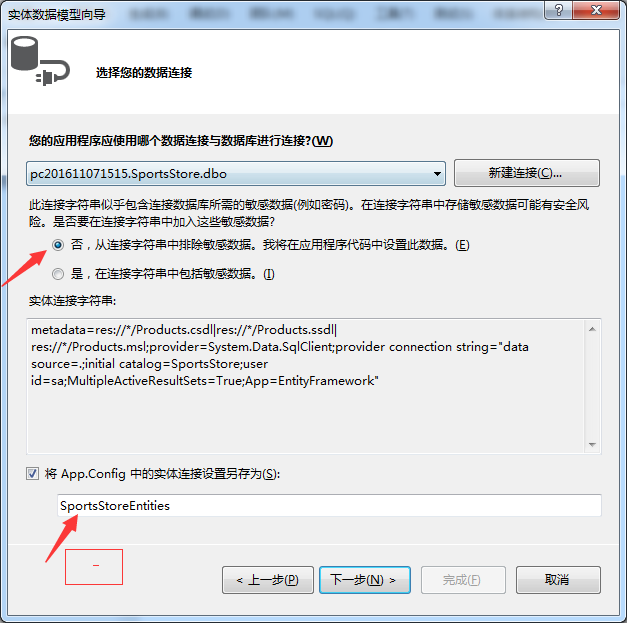
9、选择相对应表名,这里就只有一个表
如图所示:

10、编辑”表示层“,但是会报错,是因为缺少“插件”
如图所示:

解决方法是:如图所示
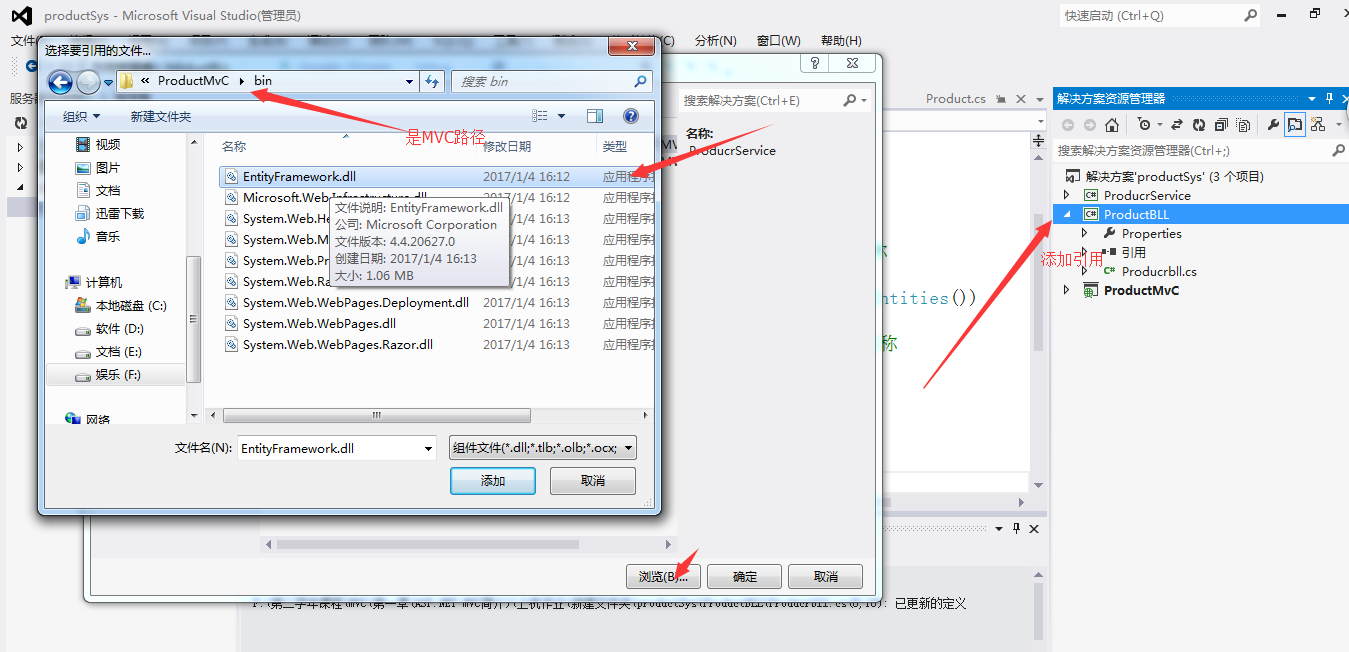
代码示例:
using System;

using System.Collections.Generic;

using System.Linq;

using System.Text;

using LinqService;  //引用

namespace LinqBLL

{

    public class ProductBll

    {

        public List<Product> GetProduct()

        {

            using (SportsStoreEntities se = new SportsStoreEntities())

            {

                var products = se.Product;  //数据库里面表名称

                return products.ToList();

            }

        }

    }

}
11、在“表示层”编写获取数据库方法
代码示例:
using System;

using System.Collections.Generic;

using System.Linq;

using System.Web;

using System.Web.Mvc;

using ProducrService;

using ProductBLL;

namespace ProductMvC.Controllers

{

    public class HomeController : Controller

    {

        Producrbll bll = new Producrbll();

        public ActionResult Index()

        {

            ViewBag.Message = "欢迎使用 ASP.NET MVC!";

            return View();

        }

        //获取产品

        public ActionResult List()

        {

            List<Product> ps = bll.GetProduct();

            return View(ps);

        }

        public ActionResult About()

        {

            return View();

        }

    }

}
图片示例:
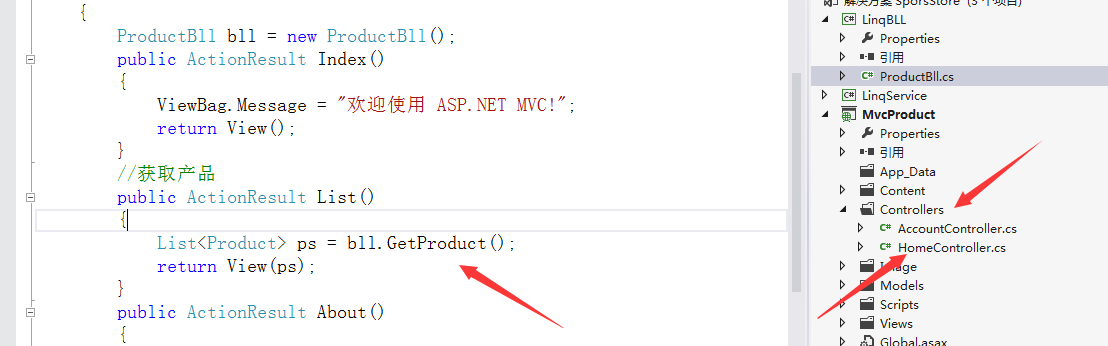
12、在"List"方法单击右键“添加视图”后,选择相关对应类型
如图所示:
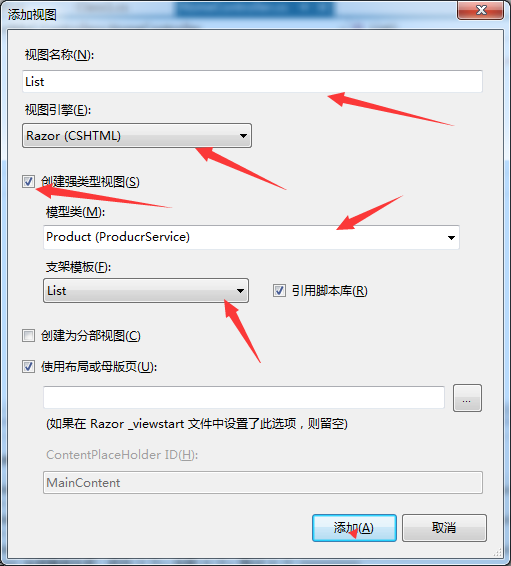
添加完成后代码:如果难看,可以添加或修改一些标签与样式
@model IEnumerable<ProducrService.Product>

@{

    ViewBag.Title = "List";

}

<h2>List</h2>

<p>

    @Html.ActionLink("Create New", "Create")

</p>

<table>

    <tr>

        <th>

            Name

        </th>

        <th>

            nDescription

        </th>

        <th>

            Category

        </th>

        <th>

            Price

        </th>

        <th>

            Image

        </th>

        <th></th>

    </tr>

@foreach (var item in Model) {

    <tr>

        <td>

            @Html.DisplayFor(modelItem => item.Name)

        </td>

        <td>

            @Html.DisplayFor(modelItem => item.nDescription)

        </td>

        <td>

            @Html.DisplayFor(modelItem => item.Category)

        </td>

        <td>

            @Html.DisplayFor(modelItem => item.Price)

        </td>

        <td>

            @Html.DisplayFor(modelItem => item.Image)

        </td>

        <td>

            @Html.ActionLink("Edit", "Edit", new { id=item.ProductID }) |

            @Html.ActionLink("Details", "Details", new { id=item.ProductID }) |

            @Html.ActionLink("Delete", "Delete", new { id=item.ProductID })

        </td>

    </tr>

}

</table>
13、添加后,在“Views”文件里面的"Shared"文件里面"[@]_Layout.cshtml"页面修改些内容
代码示例:
<!DOCTYPE html>

<html>

<head>

    <title>@ViewBag.Title</title>

    <link href="@Url.Content("~/Content/Site.css")" rel="stylesheet" type="text/css" />

    <script src="@Url.Content("~/Scripts/jquery-1.7..min.js")" type="text/javascript"></script>

</head>

<body>

    <div class="page">

        <div id="header">

            <div id="title">

                <h1>在线产品</h1>

            </div>

            <div id="logindisplay">

                @Html.Partial("_LogOnPartial")

            </div>

            <div id="menucontainer">

                <ul id="menu">

                    <li>@Html.ActionLink("主页", "Index", "Home")</li>

                      <li>@Html.ActionLink("产品", "List", "Home")</li>

                    <li>@Html.ActionLink("关于", "About", "Home")</li>

                </ul>

            </div>

        </div>

        <div id="main">

            @RenderBody()

        </div>

        <div id="footer">

        </div>

    </div>

</body>

</html>
如图所示:

14、最后运用Web.config连接数据库,先找到APP.config配置文件
如图所示:
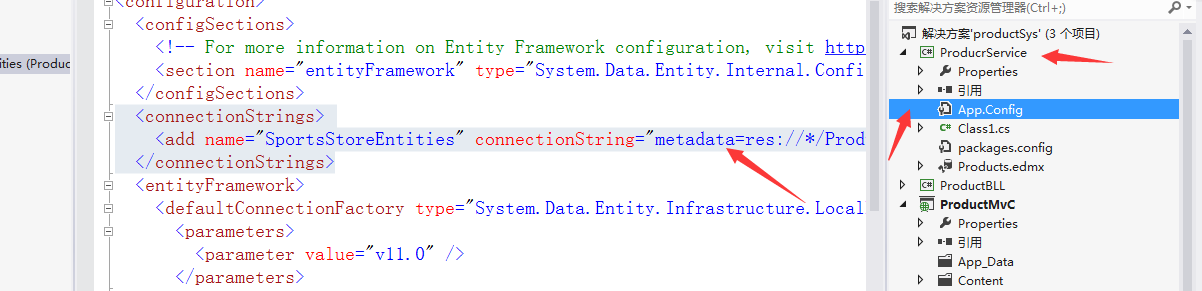
代码示例:
<?xml version="1.0" encoding="utf-8"?>
<configuration>
<configSections>
<!-- For more information on Entity Framework configuration, visit http://go.microsoft.com/fwlink/?LinkID=237468 -->
<section name="entityFramework" type="System.Data.Entity.Internal.ConfigFile.EntityFrameworkSection, EntityFramework, Version=4.4.0.0, Culture=neutral, PublicKeyToken=b77a5c561934e089" requirePermission="false" />
</configSections>
<connectionStrings>
<add name="SportsStoreEntities" connectionString="metadata=res://*/Products.csdl|res://*/Products.ssdl|res://*/Products.msl;provider=System.Data.SqlClient;provider connection string="data source=.;initial catalog=SportsStore;user id=sa;MultipleActiveResultSets=True;App=EntityFramework"" providerName="System.Data.EntityClient" />
</connectionStrings>
<entityFramework>
<defaultConnectionFactory type="System.Data.Entity.Infrastructure.LocalDbConnectionFactory, EntityFramework">
<parameters>
<parameter value="v11.0" />
</parameters>
</defaultConnectionFactory>
</entityFramework>
</configuration>
复制到Web.config且替换掉
如图所示:
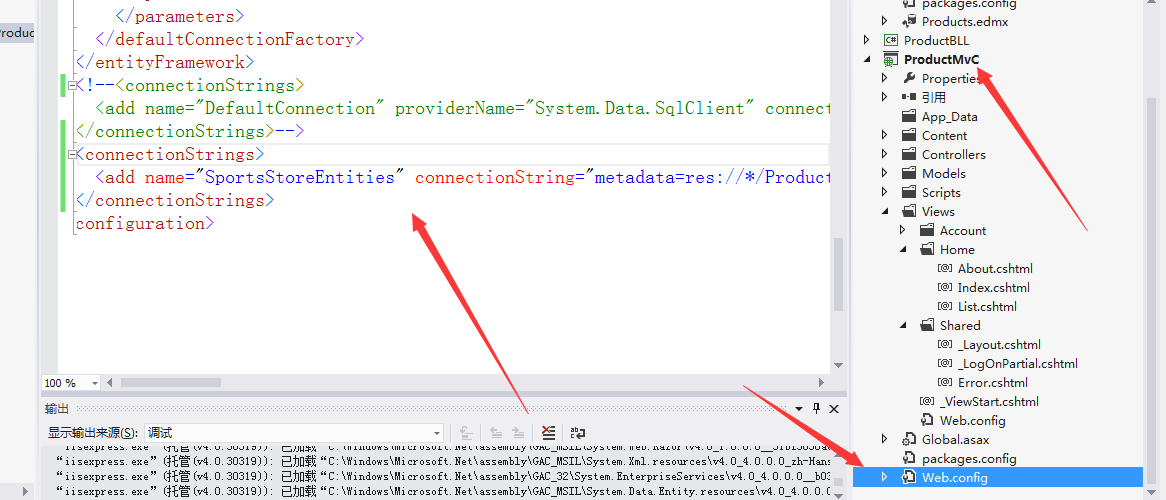
代码示例:
<?xml version="1.0" encoding="utf-8"?>
<!--
有关如何配置 ASP.NET 应用程序的详细信息,请访问
http://go.microsoft.com/fwlink/?LinkId=152368
-->
<configuration>
<configSections>
<!-- For more information on Entity Framework configuration, visit http://go.microsoft.com/fwlink/?LinkID=237468 -->
<section name="entityFramework" type="System.Data.Entity.Internal.ConfigFile.EntityFrameworkSection, EntityFramework, Version=4.4.0.0, Culture=neutral, PublicKeyToken=b77a5c561934e089" requirePermission="false" />
</configSections>
<appSettings>
<add key="webpages:Version" value="1.0.0.0" />
<add key="ClientValidationEnabled" value="true" />
<add key="UnobtrusiveJavaScriptEnabled" value="true" />
</appSettings>
<system.web>
<compilation debug="true" targetFramework="4.0" />
<authentication mode="Forms">
<forms loginUrl="~/Account/LogOn" timeout="" />
</authentication>
<pages>
<namespaces>
<add namespace="System.Web.Helpers" />
<add namespace="System.Web.Mvc" />
<add namespace="System.Web.Mvc.Ajax" />
<add namespace="System.Web.Mvc.Html" />
<add namespace="System.Web.Routing" />
<add namespace="System.Web.WebPages" />
</namespaces>
</pages>
<profile defaultProvider="DefaultProfileProvider">
<providers>
<add name="DefaultProfileProvider" type="System.Web.Providers.DefaultProfileProvider, System.Web.Providers, Version=1.0.0.0, Culture=neutral, PublicKeyToken=31bf3856ad364e35" connectionStringName="DefaultConnection" applicationName="/" />
</providers>
</profile>
<membership defaultProvider="DefaultMembershipProvider">
<providers>
<add name="DefaultMembershipProvider" type="System.Web.Providers.DefaultMembershipProvider, System.Web.Providers, Version=1.0.0.0, Culture=neutral, PublicKeyToken=31bf3856ad364e35" connectionStringName="DefaultConnection" enablePasswordRetrieval="false" enablePasswordReset="true" requiresQuestionAndAnswer="false" requiresUniqueEmail="false" maxInvalidPasswordAttempts="" minRequiredPasswordLength="" minRequiredNonalphanumericCharacters="" passwordAttemptWindow="" applicationName="/" />
</providers>
</membership>
<roleManager defaultProvider="DefaultRoleProvider">
<providers>
<add name="DefaultRoleProvider" type="System.Web.Providers.DefaultRoleProvider, System.Web.Providers, Version=1.0.0.0, Culture=neutral, PublicKeyToken=31bf3856ad364e35" connectionStringName="DefaultConnection" applicationName="/" />
</providers>
</roleManager>
<!--
If you are deploying to a cloud environment that has multiple web server instances,
you should change session state mode from "InProc" to "Custom". In addition,
change the connection string named "DefaultConnection" to connect to an instance
of SQL Server (including SQL Azure and SQL Compact) instead of to SQL Server Express.
-->
<sessionState mode="InProc" customProvider="DefaultSessionProvider">
<providers>
<add name="DefaultSessionProvider" type="System.Web.Providers.DefaultSessionStateProvider, System.Web.Providers, Version=1.0.0.0, Culture=neutral, PublicKeyToken=31bf3856ad364e35" connectionStringName="DefaultConnection" />
</providers>
</sessionState>
</system.web>
<system.webServer>
<validation validateIntegratedModeConfiguration="false" />
<modules runAllManagedModulesForAllRequests="true" />
</system.webServer>
<runtime>
<assemblyBinding xmlns="urn:schemas-microsoft-com:asm.v1">
<dependentAssembly>
<assemblyIdentity name="System.Web.Mvc" publicKeyToken="31bf3856ad364e35" />
<bindingRedirect oldVersion="1.0.0.0-2.0.0.0" newVersion="3.0.0.0" />
</dependentAssembly>
</assemblyBinding>
</runtime>
<entityFramework>
<defaultConnectionFactory type="System.Data.Entity.Infrastructure.LocalDbConnectionFactory, EntityFramework">
<parameters>
<parameter value="v11.0" />
</parameters>
</defaultConnectionFactory>
</entityFramework>
<!--<connectionStrings>
<add name="DefaultConnection" providerName="System.Data.SqlClient" connectionString="Data Source=(LocalDb)\v11.0;Initial Catalog=aspnet-ProductMvC-20170104161258;Integrated Security=SSPI;AttachDBFilename=|DataDirectory|\aspnet-ProductMvC-20170104161258.mdf" />
</connectionStrings>-->
<connectionStrings>
<add name="SportsStoreEntities" connectionString="metadata=res://*/Products.csdl|res://*/Products.ssdl|res://*/Products.msl;provider=System.Data.SqlClient;provider connection string="data source=.;initial catalog=SportsStore;user id=sa;password=sa;MultipleActiveResultSets=True;App=EntityFramework"" providerName="System.Data.EntityClient" />
</connectionStrings>
</configuration>
最后运行结果:
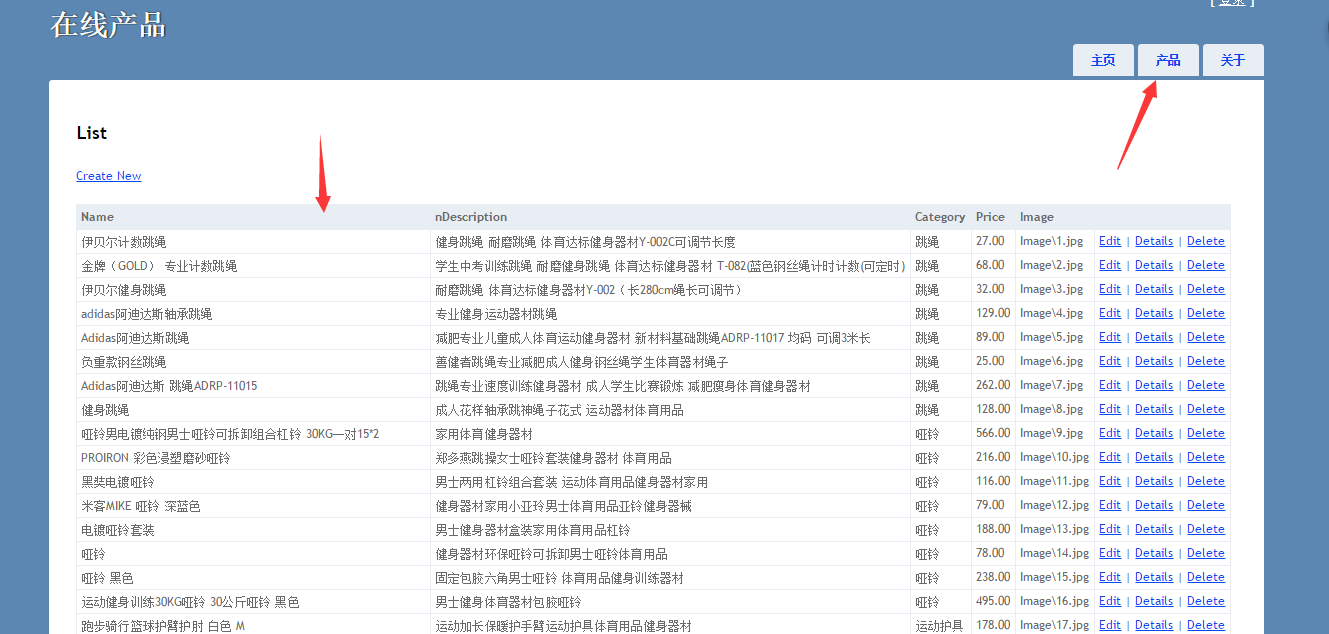
第1章 (ASP.NET MVC简介)的更多相关文章
- 《Entity Framework 6 Recipes》中文翻译系列 (20) -----第四章 ASP.NET MVC中使用实体框架之在MVC中构建一个CRUD示例
翻译的初衷以及为什么选择<Entity Framework 6 Recipes>来学习,请看本系列开篇 第四章 ASP.NET MVC中使用实体框架 ASP.NET是一个免费的Web框架 ...
- 第一章ASP.NET SignalR简介
第一章ASP.NET SignalR简介 1.1概述: ASP.NET SignalR是微软新开发的类库,为的是帮助ASP.NET开发人员很方便地开发实时网络功能. SignalR允许服务器端和客户端 ...
- 第2章 ASP.NET MVC(URL、路由及区域)
* { font: 17px/1.5em "Microsoft YaHei" } ASPNET MVC URL.路由及区域 一.URL.路由及区域 一. 配置路由器 1. ...
- 第16章 ASP.NET MVC 日志篇
本章主要介绍MVC中内置的错误处理.日志以及用来提升性能的监控工具 一.错误处理 当该网站忙于处理HTTP请求时,很多内容都会出错.幸运的是,MVC让错误处理工作变得相对简单了很多,因为MVC应用是运 ...
- ASP.NET MVC教程一:ASP.NET MVC简介
一.MVC模式简介 MVC模式是一种流行的Web应用架构技术,它被命名为模型-视图-控制器(Model-View-Controller).在分离应用程序内部的关注点方面,MVC是一种强大而简洁的方式, ...
- ASP.NET MVC 简介
1. ASP.NET MVC 是什么? ASP.NET MVC是微软官方提供的以MVC模式为基础的ASP.NET Web应用程序(Web Application)框架,它由Castle的MonoRai ...
- ASP.NET MVC简介
MVC全名是Model View Controller,是模型(model)-视图(view)-控制器(controller)的缩写,一种软件设计典范,用一种业务逻辑.数据.界面显示分离的方法组织代码 ...
- 1.1 ASP.NET MVC简介
1.什么是ASP.NET MVC? (1)它是个怎么样的产品? ASP.NET MVC是微软公司.NET平台上的一个Web开发框架,它为开发者提供了一种构建结构良好的Web应用程序的方式.自2007年 ...
- 习题练习-第1章ASP.NET MVC概述
一.选择题 1.ASP.NET MVC自2007年首次公布预览以来,作为( )的替代品,普及度已明显提高,现在很多大型Web应用程序都是使用这一技术构建的. A.ASP B.ASP.NET ...
随机推荐
- iOS比较常用的第三方及实例(不断更新中)
把平时看到或项目用到的一些插件进行整理,文章后面分享一些不错的实例,若你有其它的插件欢迎分享,不断的进行更新: 一:第三方插件 1:基于响应式编程思想的oc 地址:https://github.com ...
- Oracle组合索引与回表
回表 简单来说就是数据库根据索引找到了指定的记录所在行后,还需要根据rowid再次到数据块里取数据的操作. "回表"一般就是指执行计划里显示的"TABLE ACCESS ...
- Logcat使用总结
不建议用System.out.println(), 因为使用syso导致日志打印不可控制.打印时间无法确定.不能添加过滤器.日志没有级别区分等为题. Android中的日志工具类是Log(androi ...
- Ubuntu15.10下华南师大锐捷认证客户端的使用详解
本文测试Linux系统环境为Ubuntu15.10 Destop,暂未在其他系统下验证过,不代表LTS版本或较旧的版本按照本文所述方法可以100%正确使用最新的锐捷认证客户端. 本文面向对象为华南师范 ...
- 三维网格精简算法(Quadric Error Metrics)附源码
在计算机图形应用中,为了尽可能真实呈现虚拟物体,往往需要高精度的三维模型.然而,模型的复杂性直接关系到它的计算成本,因此高精度的模型在几何运算时并不是必须的,取而代之的是一个相对简化的三维模型,那么如 ...
- Handler(二)
1.Handler 实现Handler第二种和第三种 1.1 继承AbstractController 优点:能定制请求方式 package cn.happyl.controller; import ...
- AC日记——滑动窗口 洛谷 P1886
题目描述 现在有一堆数字共N个数字(N<=10^6),以及一个大小为k的窗口.现在这个从左边开始向右滑动,每次滑动一个单位,求出每次滑动后窗口中的最大值和最小值. 例如: The array i ...
- js封装的三级联动菜单(使用时只需要一行js代码)
前言 在实际的项目开发中,我们经常需要三级联动,比如省市区的选择,商品的三级分类的选择等等. 而网上却找不到一个代码完整.功能强大.使用简单的三级联动菜单,大都只是简单的讲了一下实现思路. 下面就给大 ...
- yii2使用小知识(连续补充)
1,打印ar或者query的原始sql: $query = (new \yii\db\Query())->select(['a.username','b.item_name'])->fro ...
- [板子]ISAP
ISAP求最大流,敲了一发板子,无压行,教程略去.转载请随意. #include <cstdio> #include <cstring> #include <algori ...