
Web API中的模型验证
一、模型验证的作用
在ASP.NET Web API中,我们可以使用 System.ComponentModel.DataAnnotations 命名空间中的属性为模型上的属性设置验证规则。
一个模型验证栗子
using System.ComponentModel.DataAnnotations;

namespace MyApi.Models

{

    public class Product

    {

        public int Id { get; set; }

        [Required]

        public string Name { get; set; }

        public decimal Price { get; set; }

        [Range(, )]

        public double Weight { get; set; }

    }

}
和ASP.NET MVC中中的模型验证十分相似,上边的验证规则是:Name属性不能为空,Weight必须在0与999之间。关于验证属性的用法可以参考.NET MVC的验证属性。
客户端(没有必须的Name):
    <form action="api/Product" method="post">

        Id:<input type="text" name="Id" value="4" /><br />

        Price:<input type="text" name="Price" value="1.99" /><br />

        Weight:<input type="text" name="Weight" value="2.99" /><br />

        <input type="submit" value="Submit" />

    </form>
控制器代码:
public class ProductsController : ApiController

{

    public HttpResponseMessage Post(Product product)

    {

        if (ModelState.IsValid)

        {

            // Do something with the product (not shown).

          return new HttpResponseMessage(HttpStatusCode.OK);

        }

        else

        {

          return Request.CreateErrorResponse(HttpStatusCode.BadRequest, ModelState);

        }

    }

}
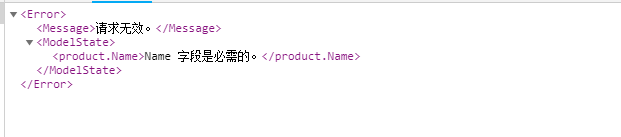
当我们提交表格时,google中返回的内容如下
两个小问题:
“Under-Posting”:客户端提交的模型缺少字段,如果是[required]修饰的字段,ModelState不通过验证,如果是数字类型的,用0补充。
“Over-Posting”:客户端也可以发送更多的数据,JSON格式化器只是忽略此值(XML格式化程序也是如此)。
二 、WebApi中的处理验证错误
第一步 添加过滤器
验证失败时,Web API不会自动向客户端返回错误,这就需要控制器来做出适当的响应。我们可以创建action filter用于在Action执行之前检查模型状态。和MVC中的用法一样,代码显示了一个示例:
    public class ValidateModelAttribute : ActionFilterAttribute

    {

        public override void OnActionExecuting(HttpActionContext actionContext)

        {

            if (!actionContext.ModelState.IsValid)

            {

                //返回第一个异常的错误消息

               actionContext.Response = actionContext.Request.CreateResponse(

               HttpStatusCode.InternalServerError,

             new { code = , msg = actionContext.ModelState.Values.First().Errors.First().ErrorMessage });

            }

        }

    }
如果模型验证失败,则此过滤器返回包含验证错误的HTTP响应,这样就不再执行Action了。
第二步 使用过滤器
如果我们想在全局使用这种方案,我们可以设置一个全局的过滤器,在配置阶段把上边的过滤器添加到 HttpConfiguration.Filters 集合中。
public static class WebApiConfig

{

  public static void Register(HttpConfiguration config)

    {

        config.Filters.Add(new ValidateModelAttribute());

    }

}
如果不想使用全局过滤器,我们也可以把filter设置为各个Controller或Action的属性:
public class ProductsController : ApiController

{

    [ValidateModel]

    public HttpResponseMessage Post(Product product)

    {

       // ...

    }

}
这里主要总结了WebApi中的模型验证,了解更多可查看官网。
Web API中的模型验证的更多相关文章
- Web API中的模型验证Model Validation
数据注释 在ASP.NET Web API中,您可以使用System.ComponentModel.DataAnnotations命名空间中的属性为模型上的属性设置验证规则. using System ...
- .Net Core3.0 WEB API 中使用FluentValidation验证,实现批量注入
为什么要使用FluentValidation 1.在日常的开发中,需要验证参数的合理性,不紧前端需要验证传毒的参数,后端也需要验证参数 2.在领域模型中也应该验证,做好防御性的编程是一种好的习惯(其实 ...
- .net core web api 默认的模型验证
转载自 https://www.codercto.com/a/45938.html
- 【ASP.NET Web API教程】4.3 ASP.NET Web API中的异常处理
原文:[ASP.NET Web API教程]4.3 ASP.NET Web API中的异常处理 注:本文是[ASP.NET Web API系列教程]的一部分,如果您是第一次看本系列教程,请先看前面的内 ...
- .NET Core WEB API中接口参数的模型绑定的理解
在.NET Core WEB API中参数的模型绑定方式有以下表格中的几种: 微软官方文档说明地址:https://docs.microsoft.com/zh-cn/aspnet/core/web-a ...
- ASP.NET Core Web API中带有刷新令牌的JWT身份验证流程
ASP.NET Core Web API中带有刷新令牌的JWT身份验证流程 翻译自:地址 在今年年初,我整理了有关将JWT身份验证与ASP.NET Core Web API和Angular一起使用的详 ...
- 【ASP.NET Web API教程】6.2 ASP.NET Web API中的JSON和XML序列化
谨以此文感谢关注此系列文章的园友!前段时间本以为此系列文章已没多少人关注,而不打算继续下去了.因为文章贴出来之后,看的人似乎不多,也很少有人对这些文章发表评论,而且几乎无人给予“推荐”.但前几天有人询 ...
- Asp.Net Web API 2第十三课——ASP.NET Web API中的JSON和XML序列化
前言 阅读本文之前,您也可以到Asp.Net Web API 2 系列导航进行查看 http://www.cnblogs.com/aehyok/p/3446289.html 本文描述ASP.NET W ...
- ASP.NET Web API中的JSON和XML序列化
ASP.NET Web API中的JSON和XML序列化 前言 阅读本文之前,您也可以到Asp.Net Web API 2 系列导航进行查看 http://www.cnblogs.com/aehyok ...
随机推荐
- CodeForces512C-Pluses everywhere-模拟/数学/排列组合模板
经过研究可以发现,每一位的贡献是C(n-2,k-1)+C(n-3,k-1)...C(k-1,k-1) 同时还要注意加号全部在左边的情况. 这里还用了O(n)预处理O(1)组合数的模板.//妙啊..妙. ...
- 查询SQLSERVER中系统所有表
SQL 查询所有表名: SELECT NAME FROM SYSOBJECTS WHERE TYPE='U' SELECT * FROM INFORMATION_SCHEMA.TABLES 查询表的所 ...
- Nagios 配置自动发邮件功能
安装sendmailyum install -y sendmail* mailx 修改防火墙设置,添加25端口到防火墙vi /etc/sysconfig/iptables 重启 iptables.se ...
- rt-thread 低优先级线程挂起高优先级线程失败
@2019-01-13 [小记] 使用rt-thread线程管理功能时,低优先级线程挂起高优先级线程失败,高优先级线程或同等优先级线程挂起低优先级线程则成功.
- 51nod 1081 子段求和(线段树 | 树状数组 | 前缀和)
题目链接:子段求和 题意:n个数字序列,m次询问,每次询问从第p个开始L长度序列的子段和为多少. 题解:线段树区间求和 | 树状数组区间求和 线段树: #include <cstdio> ...
- [SCOI2008]奖励关(期望dp)
你正在玩你最喜欢的电子游戏,并且刚刚进入一个奖励关.在这个奖励关里,系统将依次随机抛出k次宝物,每次你都可以选择吃或者不吃(必须在抛出下一个宝物之前做出选择,且现在决定不吃的宝物以后也不能再吃). 宝 ...
- 【linux】linux查找功能
linux系统中我们经常会需要查找某些文件,当有时候我们不确定一个文件的位置,比如某服务配置文件具体路径,自己没有头绪去寻找的话会很难找,也会耽误时间.linux就提供了很多命令,find,locat ...
- print
说一说这个print函数,我们经常使用,但有一些细节却往往错过了 print print()输出会换行是因为默认end="\n" 想要不换行,且覆盖 print("\r第 ...
- poj 3252 Round Numbers(数位dp 处理前导零)
Description The cows, as you know, have no fingers or thumbs and thus are unable to play Scissors, P ...
- Nginx宣布正式支持gRPC,附示例代码
原创 2018-03-20 薛命灯 聊聊架构 作者|Owen Garrett编辑|薛命灯 NGINX 官方博客正式宣布 NGINX 支持原生的 gPRC,现在就可以从代码仓库拉取快照版本.该特性将会被 ...