
JSON in SQL Server 2016
JSON functions in SQL Server enable you to analyze and query JSON data, transform JSON to relational format, and export SQL query results as JSON text.

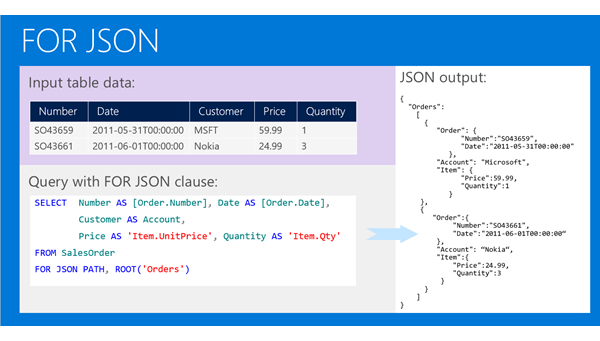
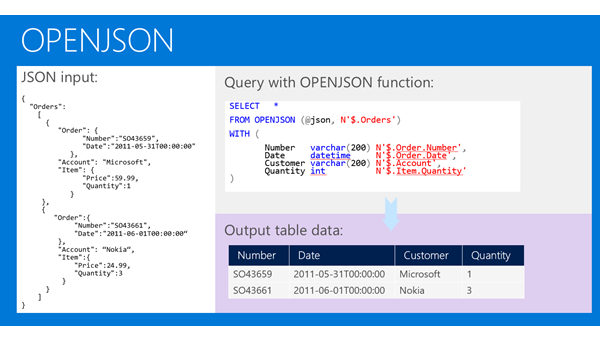
If you have JSON text, you can extract data from JSON or verify that JSON is properly formatted using built-in functions JSON_VALUE, JSON_QUERY, and ISJSON. For more advanced querying and analysis, the OPENJSON function can transform an array of JSON objects into a set of rows. Any SQL query can be executed on the returned result set. Finally, there is the FOR JSON clause that enables you to format query results as JSON text.
SELECT TOP 1000 [Version]

      ,[OSType]

      ,[Online]

      ,[OnlineT]

  FROM [ApplicationTest].[dbo].[table1]

  for json auto
We can start with simple examples. In the following Transact-SQL code, we will define a text variable where we will put JSON text:
DECLARE @json NVARCHAR(4000)

SET @json =

N'{

    "info":{

      "type":1,

      "address":{

        "town":"Bristol",

        "county":"Avon",

        "country":"England"

      },

      "tags":["Sport", "Water polo"]

   },

   "type":"Basic"

}'
Now, we can extract values and objects from JSON text using the JSON_VALUE and JSON_QUERY functions:
SELECT

  JSON_VALUE(@json, '$.type') as type,

  JSON_VALUE(@json, '$.info.address.town') as town,

  JSON_QUERY(@json, '$.info.tags') as tags
This query will return “Basic”, “Bristol”, and ["Sport", "Water polo"] values. The JSON_VALUE function returns one scalar value from JSON text (e.g. strings, numbers, true/false) that is placed on a JSON path specified as the second parameter. JSON_QUERY returns an object or array (in this example an array of tags) on the JSON path. JSON built-in functions use JavaScript-like syntax to reference values and objects in JSON text via second parameter.
The OPENJSON function enables you to reference some array in JSON text and return elements from that array:
SELECT value

FROM OPENJSON(@json, '$.info.tags')

INSERT INTO Orders(Number, Date, Customer, Quantity)

SELECT Number, Date, Customer, Quantity

 OPENJSON (@orders)

 WITH (

        Number varchar(200),

        Date datetime,

        Customer varchar(200),

        Quantity int

 ) AS OrdersArray
Four columns in the result set that is returned by OPENJSON are defined in the WITH clause. OPENJSON will try to find the properties Number, Date, Customer, and Quantity in each JSON object and convert their values into columns in the result set. By default, NULL will be returned if the property is not found. The assumption in the query above is that the @orders variable contains the following JSON array:
'[

   {"Number":1, "Date": "8/10/2012", "Customer": "Adventure works", "Quantity": 1200},

   {"Number":4, "Date": "5/11/2012", "Customer": "Adventure works", "Quantity": 100},

   {"Number":6, "Date": "1/3/2012", "Customer": "Adventure works", "Quantity": 250},

   {"Number":8, "Date": "12/7/2012", "Customer": "Adventure works", "Quantity": 2200}

]'
As you can see, the transformation from a JSON text to a relational form is simple. You just need to specify column names and types and OPENJSON will find properties in JSON that match these columns. In this example, plain JSON is used; however, OPENJSON can handle any nested/hierarchical structure of JSON objects.
Also, OPENJSON can be used to combine relational and JSON data in the same query. If we assume that the JSON array shown in the previous example is stored in the Orders column, the following query can combine the columns and JSON fields:
SELECT Id, FirstName, LastName, Number, Date, Customer, Quantity

 FROM Person

    CROSS APPLY OPENJSON (OrdersJson)

                            WITH (

                                        Number varchar(200),

                                        Date datetime,

                                        Customer varchar(200),

                                        Quantity int ) AS OrdersArray
 select * from [dbo].[table1] for json auto

 declare @jsondata varchar(max)

 set @jsondata=N'[{"Version":"2.1.1.1","OSType":1,"Online":1,"OnlineT":"on"},{"Version":"2.1.1.2","OSType":1,"Online":1,"OnlineT":"on"}]';

 select Version

 from openjson(@jsondata)

 with(

	Version varchar(50)

 )
JSON in SQL Server 2016的更多相关文章
- SQL Server 2016原生支持JSON
转载原地址: http://www.cnblogs.com/lyhabc/p/4747694.html SQL Server 2005 开始支持 XML 数据类型,提供原生的 XML数据类型.XML ...
- SQL Server 2016新特性: 对JSON的支持
SQL Server 2005开始支持XML数据类型,提供原生的XML数据类型.XML索引及各种管理或输出XML格式的函数.随着JSON的流行,SQL Server2016开始支持JSON数据类 ...
- 微软发布正式版SQL Server 2016
微软于今天在SQL 官方博客上宣布 SQL Server 数据库软件的正式发布版本(GA),历时一年多,微软为该软件发布了多个公共预览版和候选版本,而今天最终版本终于上线了.在博客中,微软数据集团的企 ...
- SQL Server 2016 CTP2.2 的关键特性
SQL Server 2016 CTP2.2 的关键特性 正如微软CEO 说的,SQL Server2016 是一个Breakthrough Flagship Database(突破性的旗舰级数据库 ...
- 数据库技术丛书:SQL Server 2016 从入门到实战(视频教学版) PDF
1:书籍下载方式: SQL Server2016从入门到实战 PDF 下载 链接:https://pan.baidu.com/s/1sWZjdud4RosPyg8sUBaqsQ 密码:8z7w 学习 ...
- SQL Server 2016最值得关注的10大新特性
全程加密技术(Always Encrypted) 全程加密技术(Always Encrypted)支持在SQL Server中保持数据加密,只有调用SQL Server的应用才能访问加密数据.该功能支 ...
- SQL Server 2016 特性和安装方法
SQL Server 2016 特性: 全程加密技术(Always Encrypted),动态数据屏蔽(Dynamic Data Masking),JSON支持,多TempDB数据库文件,PolyBa ...
- SQL Server 2016 ->> T-SQL新特性
1) TRUNCATE表分区而不是整表 CREATE TABLE dbo.TruncatePartitionTest ( PrtCol INT, Col2 ) ) ON [myPS1](PrtCol) ...
- SQL Server 2016白皮书
随着SQL Server 2016正式版发布日临近,相关主要特性通过以下预览学习: Introducing Microsoft SQL Server 2016 e-bookSQL Server 201 ...
随机推荐
- UIImageView - BNR
继续上节UINavigationController - BNR. 打开BNRDetailViewController.xib文件,向view中添加UIImageView对象,选中该对象,通过Attr ...
- Ubuntu中libprotobuf版本冲突的解决方案
先说解决方法: 因为我出现这个比较奇特,我再下面环境中的第一个项目有这个问题,但是不知道怎么瞎折腾就搞定了,不报这个异常了 不论是Qt Creator直接运行Debug或者Release都没问题 但是 ...
- 如何利用mui实现底部选择器(含日期选择器)?
1.第一步: 项目中应该引入相应的css和js文件,相关文件可到mui官网查询. <link rel="stylesheet" type="text/css&quo ...
- PAT L2-020 功夫传人
https://pintia.cn/problem-sets/994805046380707840/problems/994805059118809088 一门武功能否传承久远并被发扬光大,是要看缘分 ...
- oracle小记:dba_data_files
今天给表空间扩展的时候,使用了dba_data_files进行查询.查阅了网上的资料. 该系统系统中含有以下字段 每个字段的含义如下:
- noode inquirer
一. 由于交互的问题种类不同,inquirer为每个问题提供很多参数: type:表示提问的类型,包括:input, confirm, list, rawlist, expand, checkbox, ...
- setState的参数接收函数
- Mac上通过iterm 上传文件到服务器
.安装 brew install lrzsz #这里以homebrew方式安装12.脚本 拉取 https://github.com/mmastrac/iterm2-zmodem 两个sh文件,将他们 ...
- hdu2089_不要62
不要62 题目大意:给你一个区间,算出该区间里不含62或4的数的个数 题目链接:http://acm.hdu.edu.cn/showproblem.php?pid=2089 /* // 暴力就可以过了 ...
- for循环游标