
Web API2 使用默认Identity
当您选择个人账户在Web API项目模板,项目包含一个令牌授权服务器验证用户凭证和问题。下面的图显示了相同的凭证流的Web API组件。

发送一个未经授权的请求
首先,运行应用程序并单击按钮调用的API。当请求完成后,您应该看到一条错误消息在结果框。这是因为要求不包含一个访问令牌,所以请求授权。
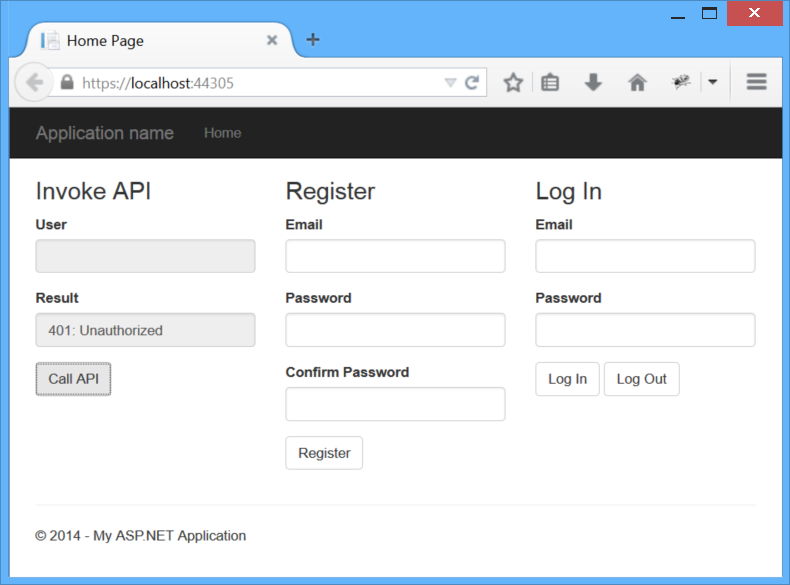
调用API按钮发送一个AJAX请求~/api/values,调用一个Web API控制器动作。这是部分发送AJAX请求的JavaScript代码。在样例应用程序中,所有的JavaScript应用程序代码位于Scripts\app.js file文件。
// If we already have a bearer token, set the Authorization header.

var token = sessionStorage.getItem(tokenKey);

var headers = {};

if (token) {

    headers.Authorization = 'Bearer ' + token;

}

$.ajax({

    type: 'GET',

    url: 'api/values/1',

    headers: headers

}).done(function (data) {

    self.result(data);

}).fail(showError);
直到用户登录,没有不记名的令牌,因此没有授权请求头。这使请求返回一个401错误。
Here is the HTTP request.
GET https://localhost:44305/api/values HTTP/1.1

Host: localhost:44305

User-Agent: Mozilla/5.0 (Windows NT 6.3; WOW64; rv:32.0) Gecko/20100101 Firefox/32.0

Accept: */*

Accept-Language: en-US,en;q=0.5

X-Requested-With: XMLHttpRequest

Referer: https://localhost:44305/
HTTP response:
HTTP/1.1 401 Unauthorized

Content-Type: application/json; charset=utf-8

Server: Microsoft-IIS/8.0

WWW-Authenticate: Bearer

Date: Tue, 30 Sep 2014 21:54:43 GMT

Content-Length: 61

{"Message":"Authorization has been denied for this request."}
注册用户
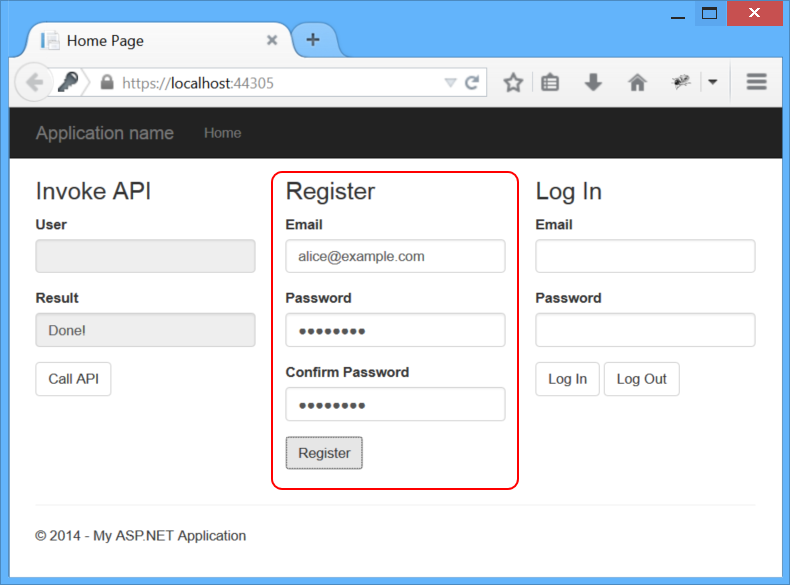
发送一个POST 请求到 ~/api/Account/Register/. body是已个json对象. Here is the JavaScript code that sends the request:
var data = {

    Email: self.registerEmail(),

    Password: self.registerPassword(),

    ConfirmPassword: self.registerPassword2()

};

$.ajax({

    type: 'POST',

    url: '/api/Account/Register',

    contentType: 'application/json; charset=utf-8',

    data: JSON.stringify(data)

}).done(function (data) {

    self.result("Done!");

}).fail(showError);
HTTP request:
POST https://localhost:44305/api/Account/Register HTTP/1.1

Host: localhost:44305

User-Agent: Mozilla/5.0 (Windows NT 6.3; WOW64; rv:32.0) Gecko/20100101 Firefox/32.0

Accept: */*

Content-Type: application/json; charset=utf-8

X-Requested-With: XMLHttpRequest

Referer: https://localhost:44305/

Content-Length: 84

{"Email":"alice@example.com","Password":"Password1!","ConfirmPassword":"Password1!"}
HTTP response:
HTTP/1.1 200 OK

Server: Microsoft-IIS/8.0

Date: Wed, 01 Oct 2014 00:57:58 GMT

Content-Length: 0
这个请求是由AccountController处理类。在内部,AccountController使用ASP.NET身份管理成员数据库。
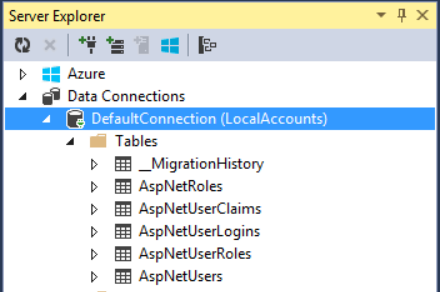
如果你在本地运行应用程序从Visual Studio用户帐户存储在LocalDB,AspNetUsers表。查看表在Visual Studio中,单击视图菜单,选择Server Explorer,然后扩大数据连接。
得到一个访问Token
到目前为止,我们还没有做任何OAuth,但现在我们将看到OAuth授权服务器,当我们请求一个访问令牌。示例应用程序的登录区域,输入电子邮件和密码,点击登录。
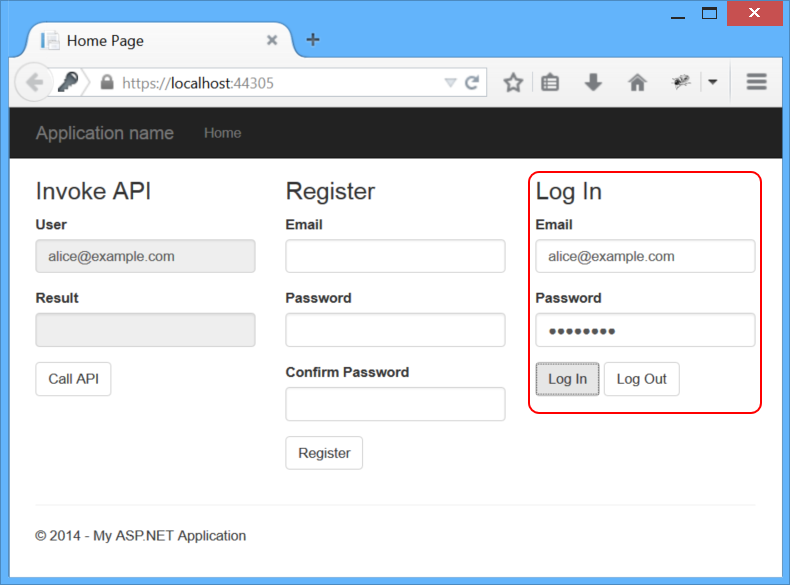
The Log In button sends a request to the token endpoint. The body of the request contains the following form-url-encoded data:
- grant_type: "password"
- username: <the user's email>
- password: <password>
Here is the JavaScript code that sends the AJAX request:
var loginData = {

    grant_type: 'password',

    username: self.loginEmail(),

    password: self.loginPassword()

};

$.ajax({

    type: 'POST',

    url: '/Token',

    data: loginData

}).done(function (data) {

    self.user(data.userName);

    // Cache the access token in session storage.

    sessionStorage.setItem(tokenKey, data.access_token);

}).fail(showError);
HTTP request:
POST https://localhost:44305/Token HTTP/1.1

Host: localhost:44305

User-Agent: Mozilla/5.0 (Windows NT 6.3; WOW64; rv:32.0) Gecko/20100101 Firefox/32.0

Accept: */*

Content-Type: application/x-www-form-urlencoded; charset=UTF-8

X-Requested-With: XMLHttpRequest

Referer: https://localhost:44305/

Content-Length: 68

grant_type=password&username=alice%40example.com&password=Password1!
HTTP response:
HTTP/1.1 200 OK

Content-Length: 669

Content-Type: application/json;charset=UTF-8

Server: Microsoft-IIS/8.0

Date: Wed, 01 Oct 2014 01:22:36 GMT

{

  "access_token":"imSXTs2OqSrGWzsFQhIXziFCO3rF...",

  "token_type":"bearer",

  "expires_in":1209599,

  "userName":"alice@example.com",

  ".issued":"Wed, 01 Oct 2014 01:22:33 GMT",

  ".expires":"Wed, 15 Oct 2014 01:22:33 GMT"

}
发送一个身份验证请求
现在我们有一个不记名的令牌,我们可以做出一个身份验证请求API。这是通过设置授权请求头。单击按钮再次看到这个调用API。

HTTP request:
GET https://localhost:44305/api/values/1 HTTP/1.1

Host: localhost:44305

User-Agent: Mozilla/5.0 (Windows NT 6.3; WOW64; rv:32.0) Gecko/20100101 Firefox/32.0

Accept: */*

Authorization: Bearer imSXTs2OqSrGWzsFQhIXziFCO3rF...

X-Requested-With: XMLHttpRequest
HTTP response:
HTTP/1.1 200 OK

Content-Type: application/json; charset=utf-8

Server: Microsoft-IIS/8.0

Date: Wed, 01 Oct 2014 01:41:29 GMT

Content-Length: 27

"Hello, alice@example.com."
Log Out
因为浏览器不缓存凭证或访问令牌,退出是一个简单的问题“忘记”的令牌,通过移除它从会话存储:
self.logout = function () {

    sessionStorage.removeItem(tokenKey)

}
理解个人账户项目模板
When you select Individual Accounts in the ASP.NET Web Application project template, the project includes:
- An OAuth2 authorization server.
- A Web API endpoint for managing user accounts
- An EF model for storing user accounts.
Here are the main application classes that implement these features:
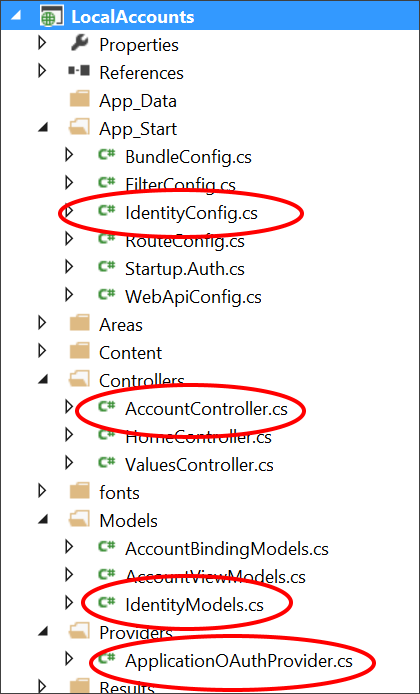
AccountController. Provides a Web API endpoint for managing user accounts. TheRegisteraction is the only one that we used in this tutorial. Other methods on the class support password reset, social logins, and other functionality.ApplicationUser, defined in /Models/IdentityModels.cs. This class is the EF model for user accounts in the membership database.ApplicationUserManager, defined in /App_Start/IdentityConfig.cs This class derives from UserManager and performs operations on user accounts, such as creating a new user, verifying passwords, and so forth, and automatically persists changes to the database.ApplicationOAuthProvider. This object plugs into the OWIN middleware, and processes events raised by the middleware. It derives from OAuthAuthorizationServerProvider.
Configuring the Authorization Server
In StartupAuth.cs, the following code configures the OAuth2 authorization server.
PublicClientId = "self";

OAuthOptions = new OAuthAuthorizationServerOptions

{

    TokenEndpointPath = new PathString("/Token"),

    Provider = new ApplicationOAuthProvider(PublicClientId),

    AuthorizeEndpointPath = new PathString("/api/Account/ExternalLogin"),

    AccessTokenExpireTimeSpan = TimeSpan.FromDays(14),

    // Note: Remove the following line before you deploy to production:

    AllowInsecureHttp = true

};

// Enable the application to use bearer tokens to authenticate users

app.UseOAuthBearerTokens(OAuthOptions);
The TokenEndpointPath property is the URL path to the authorization server endpoint. That's the URL that app uses to get the bearer tokens.
The Provider property specifies a provider that plugs into the OWIN middleware, and processes events raised by the middleware.
Here is the basic flow when the app wants to get a token:
- To get an access token, the app sends a request to ~/Token.
- The OAuth middleware calls
GrantResourceOwnerCredentialson the provider. - The provider calls the
ApplicationUserManagerto validate the credentials and create a claims identity. - If that succeeds, the provider creates an authentication ticket, which is used to generate the token.
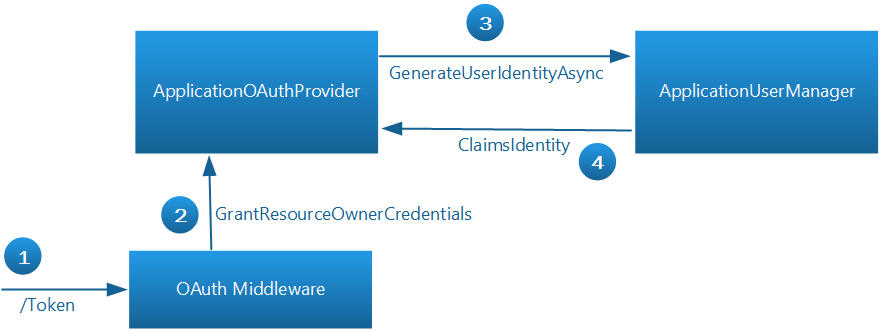
The OAuth middleware doesn't know anything about the user accounts. The provider communicates between the middleware and ASP.NET Identity. For more information about implementing the authorization server
Web API2 使用默认Identity的更多相关文章
- [水煮 ASP.NET Web API2 方法论](3-7)默认 Action 请求方式以及 NonActionAttribute
问题 在 Controller 中有一个 public 的方法,但是又不想将这个 publlic 方法暴露成为一个 API. 解决方案 ASP.NET Web API 中,正常是通过 HTTP 谓词来 ...
- [水煮 ASP.NET Web API2 方法论](1-5)ASP.NET Web API Scaffolding(模板)
问题 我们想快速启动一个 ASP.NET Web API 解决方案. 解决方案 APS.NET 模板一开始就支持 ASP.NET Web API.使用模板往我们的项目中添加 Controller,在我 ...
- [水煮 ASP.NET Web API2 方法论](3-9)空气路由的设置
阅读导航 问题 解决方案 工作原理 代码演示 在此解释一下,空气路由,是本人臆想出来,觉着更能表达 IgnoreRoute 的意图,如果看着辣眼睛^^,请见谅. 问题 我们在之定义过集中式路由,集中式 ...
- Tomcat设置默认启动项目及Java Web工程设置默认启动页面
Tomcat设置默认启动项目 Tomcat设置默认启动项目,顾名思义,就是让可以在浏览器的地址栏中输入ip:8080,就能访问到我们的项目.具体操作如下: 1.打开tomcat的安装根目录,找到Tom ...
- asp.net web api2.0 ajax跨域解决方案
asp.net web api2.0 ajax跨域解决方案 Web Api的优缺点就不说了,直接说怎么跨域,我搜了一下,主要是有两种. 一,ASP.NET Web API支持JSONP,分两种 1, ...
- Dependency Injection in ASP.NET Web API 2 (在web api2 中使用依赖注入)
原文:http://www.asp.net/web-api/overview/advanced/dependency-injection 1 什么是依赖注入(Dependency Injection) ...
- ASP.NET Core MVC 2.x 全面教程_ASP.NET Core MVC 02. Web Host 的默认配置
视频地址: https://www.bilibili.com/video/av38392956/?p=2 语雀 https://www.yuque.com/yuejiangliu/dotnet/ixt ...
- web服务器-nginx默认网站
web服务器-nginx默认网站 一 默认网站 server { listen 80; server_name localhost; location / { root html; index ind ...
- [水煮 ASP.NET Web API2 方法论](3-3)路由默认值
问题 如何为路由中参数设置默认值. 解决方案 不管使用属性路由还是集中式路由,ASP.NET WEB API 都可以很方便的为路由定义默认参数.在每次客户端请求的时候,如果客户端没有传这些参数,框架会 ...
随机推荐
- 环境部署(四):Linux下查看JDK安装路径
在安装好Git.JDK和jenkins之后,就需要在jenkins中进行对应的设置,比如在全局工具配置模块,需要写入JDK的安装路径. 这篇博客,介绍几种常见的在Linux中查看JDK路径的方法... ...
- Java虚拟机垃圾收集器
一.判断对象存活的算法 1.引用计数(Reference Counting)算法 给对象添加一个引用计数器,每当有一个地方引用时,计数器加1.当引用失效时,计数器减1.当计数器的值为0的时候说该对象不 ...
- DOM(二)
文档信息 document对象还有一些标准的Document对象所没有的属性: title属性:包含着<title>元素中的文本——显示在浏览器窗口的标题栏或标签页上,通过整个属性可以取得 ...
- 给扔物线 HenCoder Plus 学员的一次分享文字版
半个月前,和我的终极技术目标扔物线朱凯一拍即合,到了他所开展的 HenCoder Plus 课程给大家分享了 1 个多小时的「模拟面试」心得,也顺便听了几次凯哥的课程,感觉真的挺用心的.自己也希望能一 ...
- websockect外网无法访问问题
项目在测试环境可以正常使用websockect,然而把项目发布到公网上却无法使用问题. 有几种解决方案,1.防火墙未加入入站规则,否则没有权限连接到外网. 方法:控制面板--window防火墙---高 ...
- SQL Server(2000,2005,2008):恢复/回滚时间比预期长(译)
我已经讨论了各种确定恢复状态的方法,但是本周我参与了一个围绕回滚的有趣讨论.交易已经运行了14个小时,然后发出了KILL SPID.SPID进入回滚,并发生2天和4小时. 自然的问题是为什么不14小时 ...
- 软件工程练习:模块化,单元测试,回归测试,TDD
这是<构建之法>实战教学的一部分.适合作为同学们的第二个程序作业. 第一个程序作业: 请看 “概论” 一章的练习,或者老师的题目,例如这个. 作业要求: 软件工程的作业越来越有意思了, 我 ...
- iOS 传感器集锦
https://www.jianshu.com/p/5fc26af852b6 传感器集锦:指纹识别.运动传感器.加速计.环境光感.距离传感器.磁力计.陀螺仪 效果预览.gif 一.指纹识别 应用: ...
- Docker bridge br0 pipework
Docker Centos7 下建立 Docker 桥接网络 - weifengCorp - 博客园https://www.cnblogs.com/weifeng1463/p/7468497.html ...
- CentOS6.5配置 cron
CentOS6.5配置 cron 任务 - mengjiaoduan的博客 - CSDN博客https://blog.csdn.net/mengjiaoduan/article/details/649 ...