
用pthon来写个跳板机
用pthon来写个跳板机
1、需求
程序一:
1、后台管理
- 堡垒机上创建用户和密码(堡垒机root封装的类,UserProfile表)
- .bashrc
/usr/bin/python3 /data/bastion.py
exit
2、后台管理
- 服务器上创建用户和密码 或 公钥上传
- 服务器账号 -> 人 关联
程序二:
3、用户登录
- ssh 堡垒机用户名@堡垒机IP
- 获取当前用户 os.environ[‘USER‘]
- 获取当前用户的主机列表
- 获取选中的主机下的所有用户
- 选择任何一个用户
2、实现思路
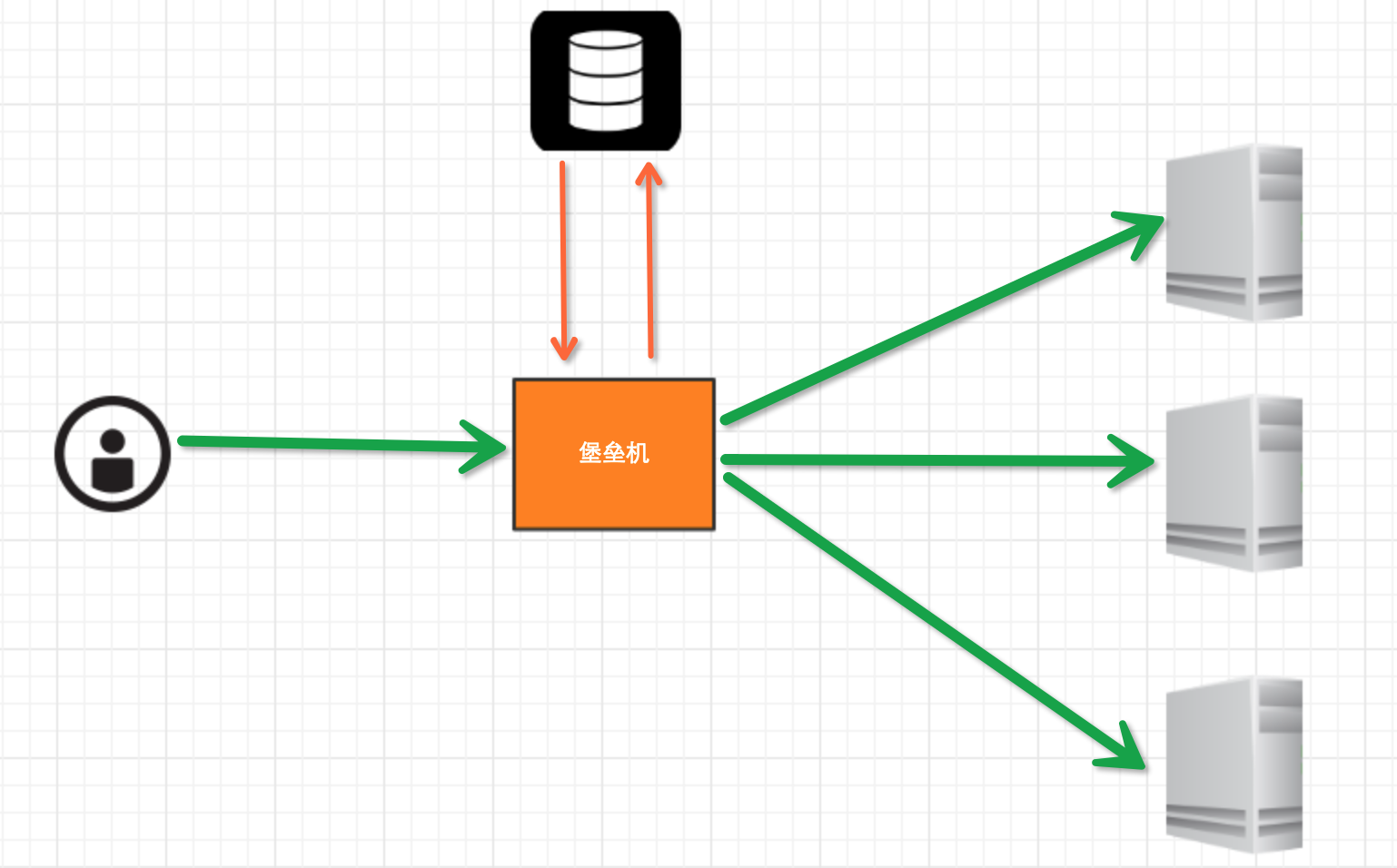
堡垒机执行流程:
- 管理员为用户在服务器上创建账号(将公钥放置服务器,或者使用用户名密码)
- 用户登陆堡垒机,输入堡垒机用户名密码,现实当前用户管理的服务器列表
- 用户选择服务器,并自动登陆
- 执行操作并同时将用户操作记录
注:配置.brashrc实现ssh登陆后自动执行脚本,如:/usr/bin/python /home/wupeiqi/menu.py
那么需要用到的点:
- 1、使用 ORM/Schema Type/SQL Expression Language/Engine/ConnectionPooling/Dialect 所有组件对数据进行操作。根据类创建对象,对象转换成SQL,执行SQL。
- 2、paramiko模块,基于SSH用于连接远程服务器并执行相关操作。
具体实现流程:
- 设计表机构
- 创建表结构
- 利用paramiko模块去实现跳板机底层的ssh连接并执行相关操作
- 将底层的连接封装成跳板机用户对指定主机组和用户的操作并记录日志
3、表结构设计
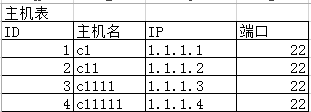
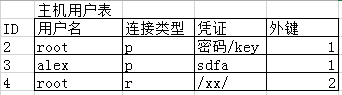
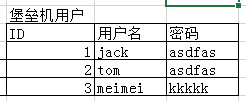

 1 #!/usr/bin/env python

 2 # -*- coding:utf-8 -*-

 3

 4 from sqlalchemy import create_engine, and_, or_, func, Table

 5 from sqlalchemy.ext.declarative import declarative_base

 6 from sqlalchemy import Column, Integer, String, ForeignKey, UniqueConstraint, DateTime

 7 from sqlalchemy.orm import sessionmaker, relationship

 8

 9 Base = declarative_base()  # 生成一个SqlORM 基类

10

11

12 class Host(Base):

13     __tablename__ = ‘host‘

14     id = Column(Integer, primary_key=True, autoincrement=True)

15     hostname = Column(String(64), unique=True, nullable=False)

16     ip_addr = Column(String(128), unique=True, nullable=False)

17     port = Column(Integer, default=22)

18

19

20 class HostUser(Base):

21     __tablename__ = ‘host_user‘

22     id = Column(Integer, primary_key=True, autoincrement=True)

23     username = Column(String(64), unique=True, nullable=False)

24     AuthTypes = [

25         (‘p‘, ‘SSH/Password‘),

26         (‘r‘, ‘SSH/KEY‘),

27     ]

28     auth_type = Column(String(16))

29     cert = Column(String(255))

30

31     host_id = Column(Integer, ForeignKey(‘host.id‘))

32

33     __table_args__ = (

34         UniqueConstraint(‘host_id‘, ‘username‘, name=‘_host_username_uc‘),

35     )

36

37

38 class Group(Base):

39     __tablename__ = ‘group‘

40     id = Column(Integer, primary_key=True, autoincrement=True)

41     name = Column(String(64), unique=True, nullable=False)

42

43

44 class UserProfile(Base):

45     __tablename__ = ‘user_profile‘

46     id = Column(Integer, primary_key=True, autoincrement=True)

47     username = Column(String(64), unique=True, nullable=False)

48     password = Column(String(255), nullable=False)

49

50

51 class Group2UserProfile(Base):

52     __tablename__ = ‘group_2_user_profile‘

53     id = Column(Integer, primary_key=True, autoincrement=True)

54     user_profile_id = Column(Integer, ForeignKey(‘user_profile.id‘))

55     group_id = Column(Integer, ForeignKey(‘group.id‘))

56     __table_args__ = (

57         UniqueConstraint(‘user_profile_id‘, ‘group_id‘, name=‘ux_user_group‘),

58     )

59

60

61 class Group2HostUser(Base):

62     __tablename__ = ‘group_2_host_user‘

63     id = Column(Integer, primary_key=True, autoincrement=True)

64     host_user_id = Column(Integer, ForeignKey(‘host_user.id‘))

65     group_id = Column(Integer, ForeignKey(‘group.id‘))

66     __table_args__ = (

67         UniqueConstraint(‘group_id‘, ‘host_user_id‘, name=‘ux_group_host_user‘),

68     )

69

70

71 class UserProfile2HostUser(Base):

72     __tablename__ = ‘user_profile_2_host_user‘

73     id = Column(Integer, primary_key=True, autoincrement=True)

74     host_user_id = Column(Integer, ForeignKey(‘host_user.id‘))

75     user_profile_id = Column(Integer, ForeignKey(‘user_profile.id‘))

76     __table_args__ = (

77         UniqueConstraint(‘user_profile_id‘, ‘host_user_id‘, name=‘ux_user_host_user‘),

78     )

79

80

81 class AuditLog(Base):

82     __tablename__ = ‘audit_log‘

83     id = Column(Integer, primary_key=True, autoincrement=True)

84

85     action_choices2 = [

86         (u‘cmd‘, u‘CMD‘),

87         (u‘login‘, u‘Login‘),

88         (u‘logout‘, u‘Logout‘),

89     ]

90     action_type = Column(String(16))

91     cmd = Column(String(255))

92     date = Column(DateTime)

93     user_profile_id = Column(Integer, ForeignKey(‘user_profile.id‘))

94     host_user_id = Column(Integer, ForeignKey(‘host_user.id‘))

95

96 表结构示例
表结构设计
用pthon来写个跳板机的更多相关文章
- 那就用pthon来写个跳板机吧
1.需求 程序一: 1.后台管理 - 堡垒机上创建用户和密码(堡垒机root封装的类,UserProfile表) - .bashrc /usr/bin/python3 /data/bastion.py ...
- Shell跳板机sshstack
笔者Q:972581034 交流群:605799367.有任何疑问可与笔者或加群交流 源码地址: https://github.com/sshstack/sshstack 为什么要写shell跳板机? ...
- shell开源跳板机sshstack
笔者Q:972581034 交流群:605799367.有任何疑问可与笔者或加群交流 源码地址: https://github.com/sshstack/sshstack 为什么要写shell跳板机? ...
- linux跳板机开发之trap信号机应用
场景1:公司新招聘了一个配置管理员,他的工作是负责将公司开发人员写的新代码依次分发到办公室测试环境.IDC测试环境和正式线上环境.因此公司需要开发一个程序,当配置管理员登录服务器,只能进入分发的管理界 ...
- Shell实现跳板机,为什么用跳板机
整理自:http://blog.chinaunix.net/uid-22101889-id-3167454.html 注意:请谨慎使用,到现在为止,使用了,我还没找到改回去的方法. 1. 问题 ...
- jmeter连接配置带跳板机(SSH)的mysql服务器
jmeter连接配置mysql服务器时,如果数据库服务器没有通过ssh连接,则只需要配置相应的jdbc参数就可以了,即请求域名或ip地址:3306,如果数据库服务器是通过SSH连接的,那需要通过中间远 ...
- 用meterpreter实现跳板机
meterpreter跳板机 背景:渗透测试者A拿到了B主机的控制权,但没有拿到ssh密码(不能打ssh隧道).现需横向移动渗透内网主机C,为了避免动作过大不便直接在B上对C进行渗透,其中C不能出 ...
- CentOS 7 搭建Jumpserver跳板机(堡垒机)
跳板机概述: 跳板机就是一台服务器,开发或运维人员在维护过程中首先要统一登录到这台服务器,然后再登录到目标设备进行维护和操作 跳板机缺点:没有实现对运维人员操作行为的控制和审计,使用跳板机的过程中还是 ...
- Jumpserver跳板机的搭建和部署
1.需要搭云yum仓库wget -O /etc/yum.repos.d/CentOS-Base.repo http://mirrors.aliyun.com/repo/Centos-6.repo 2. ...
随机推荐
- 使用Jenkins实现maven项目一键部署
下面的博客请详细的,值得一看:jenkins+maven+svn实现简单的一键发布 http://blog.csdn.net/pein_zero/article/details/52597615#co ...
- UVA-12304 Race(递推)
题目大意:求n个人比赛的所有可能的名次种数.比如:n=2时,有A第一B第二.B第一A第二.AB并列第一三种名次. 题目解析:既然是比赛,总有第一名.第一名的人数可能是i (1≤i≤n),则剩下待定的人 ...
- 巧妙利用SVN 实现复制需要部署的文件。
http://blog.csdn.net/xiaoding133/article/details/39252357 http://blog.csdn.net/sinat_29173167/articl ...
- linux make virtual memory more efficient three components
Page Cache This is used to speed up access to images and data on disk. As pages are read into memory ...
- bzoj1625
题解: 简单dp 要一维 代码: #include<bits/stdc++.h> using namespace std; ; int n,m,a[N],b[N],f[N]; int ma ...
- Oracle 12c新特性(For DBA)
一: Multitenant Architecture (12.1.0.1) 多租户架构是Oracle 12c(12.1)的新增重磅特性,内建的多分租(Multi-tenancy),一个容器 ...
- Mysql/Mariadb 升级注意事项
因需要使用到分区表,在业务不中断的情况下,可以新增分区,需要将原来的Mariadb10.1.25版本升级到Mariadb10.3.8. 1.升级步骤如下 1)新搭建Mariadb10.3.8版本的DB ...
- SQL 查询重复的行
select * from tbsold where orderid in (select orderid from tbsold group by orderid having count(orde ...
- Java实现交换两个String
在Java中我们所使用的实例变量其实都是一个引用,所以如果要求实现一个swap(String A, String B)这种函数时无法实现的,因为在类方法的定义中是先对行参进行地址传递,然后对形参修改, ...
- ERROR 1045 (28000): Access denied for user 'ODBC'@'localhost' (using password: N O) MYSQL
ERROR 1045 (28000): Access denied for user ODBC@localhost 刚使用mysql, 碰到这个问题.. C:\Program Files\MySQL\ ...