
hostapd作为radius服务器
使用hostapd作为radius服务器,用于企业wifi加密认证。
参考链接:
http://www.cnblogs.com/claruarius/p/5902141.html
去网上下载hostapd 源码,本文使用的是hostapd-2.4。操作系统ubuntu16.04。
1,tar -xvzf hostapd-2.4.tar.gz

2,cd hostapd-2.4/hostapd

3,cp defconfig .config

4,open options in .config

#CONFIG_DRIVER_NL80211=y

CONFIG_DRIVER_NONE=y

CONFIG_EAP_SIM=y

CONFIG_EAP_AKA=y

CONFIG_EAP_AKA_PRIME=y

CONFIG_EAP_PAX=y

CONFIG_EAP_PSK=y

CONFIG_EAP_PWD=y

CONFIG_EAP_SAKE=y

CONFIG_EAP_GPSK=y

CONFIG_EAP_GPSK_SHA256=y

CONFIG_EAP_FAST=y

CONFIG_RADIUS_SERVER=y

5,make

6,sudo make install

**************

if use debian 9, just run "apt install hostapd"

7,modify hostapd.conf

Interface=eno1

driver=none

eap_server=1

eap_user_file=/etc/hostapd.eap_user

ca_cert=/usr/local/etc/raddb/certs/cas.pem

server_cert=/usr/local/etc/raddb/certs/server.pem

private_key=/usr/local/etc/raddb/certs/server.key

private_key_passwd=whatever

dh_file=/usr/local/etc/raddb/certs/dh

pac_opaque_encr_key=000102030405060708090a0b0c0d0e0f

eap_fast_a_id=101112131415161718191a1b1c1d1e1f

eap_fast_a_id_info=test server

eap_fast_prov=3

pac_key_lifetime=604800

pac_key_refresh_time=86400

radius_server_clients=/etc/hostapd.radius_clients

radius_server_auth_port=1812

radius_server_acct_port=1813

Interface=eno1,这个需要根据情况进行更改。Ubuntu16.04 中已经不存在eth0,eth1

等接口,有线网卡的名称已经更改为eno1。使用ifconfig 命令可以查看有线网卡的设备名

称。

上面如果没有/usr/local/etc/raddb/certs/目录,需要自己创建这个目录,并把相应的文件

放到对应的目录中。可以使用自己的文件放到对应的目录中,我们是买了WFA的证书。

或者server.pem, server.key, cas.pem可以复用hostapd文件夹下的同名文件,即拷贝过去配置好相对路径就好。

8,sudo cp hostapd.eap_user /etc/

9,modify /etc/hostapd.eap_user

Delete all default user, add:

"testing" FAST,PEAP,TTLS,TLS

"testiing1" FAST,PEAP,TTLS,TLS

"test" FAST,PEAP,TTLS,TLS

"Barney Rubble" FAST,PEAP,TTLS,TLS

"testing" MSCHAPV2,GTC,MD5,TTLS-PAP,TTLS-CHAP,TTLS-MSCHAP,TTLSMSCHAPV2

"password" [2]

"test" MSCHAPV2,GTC,MD5,TTLS-PAP,TTLS-CHAP,TTLS-MSCHAP,TTLSMSCHAPV2

"test" [2]

这个文件可以使用hostapd_new_install.zip 压缩包中的同名文件。也可以使用hostapd压缩包中默认的文件。

10,sudo cp hostapd.radius_clients /etc/

11,modify /etc/hostapd.radius_clients

Delete all default client, add: (secret is test)

0.0.0.0/0 test

这个“test”是登陆的密码,在设置RADIUS 服务器的时候,share secret 要设置成一

样,后面会提到。

12, generate dh file

openssl dhparam -out dh 1024

mv dh /usr/local/etc/raddb/certs/

13, sudo hostapd -dd hostapd.conf
运行结果
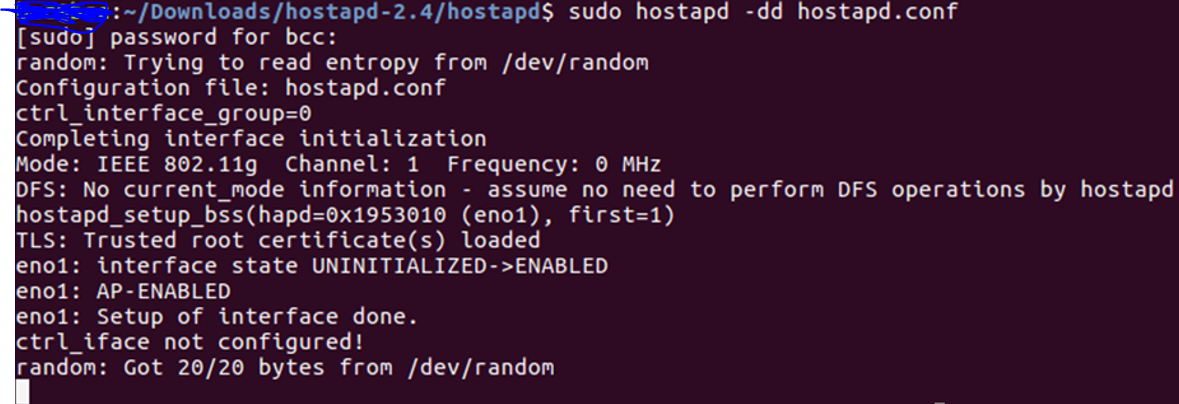
至此,hostapd作为Radius服务器运行完成。
添加PWD认证方法:
在/etc/hostapd.eap_user,# Phase 1 User下面添加
"testpwd" PWD "test"
第一个是ID,第二个是password.
Tony Liu
2017-12-13
hostapd作为radius服务器的更多相关文章
- [EAP]将hostapd作为radius服务器搭建EAP认证环境
文章主要由以下几部分组成: 0.概念理解: WPA/WPA2,EAP,IEEE, 802.11i, WiFi联盟, 802.1x 1.编译hostapd 2.配置hostapd的conf文件 3.外接 ...
- CentOS7用hostapd做radius服务器为WiFi提供802.1X企业认证
CentOS7用hostapd做radius服务器为WiFi提供802.1X企业认证 来源: https://www.cnblogs.com/osnosn/p/10593297.html 来自osno ...
- radius服务器搭建
yum install -y unzip gcc-c++ cd /opt unzip release-stable.zip mv ToughRADIUS-release-stable toughrad ...
- Linux上构建一个RADIUS服务器详解
作为一名网络管理员,您需要为您所需管理的每个网络设备存放用于管理的用户信息.但是网络设备通常只支持有限的用户管理功能.学习如何使用Linux上的一个外部RADIUS服务器来验证用户,具体来说是通过一个 ...
- windows server 搭建radius服务器
使用ISA 2004搭建PPTP/L2TP 服务器后,VPN账号是在radius服务器上的,使用window server 2003搭建radius服务器,需要添加组件->internet验证服 ...
- [原创]CentOS下Radius服务器搭建
一. 实现环境: 1.系统:CentOS release 6.6 (Final) 2.需要软件包: 1) freeradius-2.1.12-6.e16.x86_64 freeradius-m ...
- Windows 2008 Server搭建Radius服务器的方法
原地址:http://service.tp-link.com.cn/detail_article_1113.html (图拷贝不过来) Windows 2008 Server搭建Radius服务器的方 ...
- 远程 RADIUS 服务器组
远程 RADIUS 服务器组 远程 RADIUS 服务器组是包含一个或多个 RADIUS 服务器的已命名的组.IAS 用作 RADIUS 请求消息的 RADIUS 代理时,必须指定远程 RADIUS ...
- Linux搭建Radius服务器
安装环境介绍 以下服务器信息为该文档安装Radius服务环境 服务器信息:CentOS7 内核版本:3.10.0-1062.el7.x86_64 安装软件版本 freeradius-utils-3.0 ...
随机推荐
- mongoose更新文档的时候让某个字段自增
Station.update({ _id: req.params.id }, { $set: req.body, $inc: { count: 1 } }, { multi: false }, cal ...
- 15个Spring的核心注释示例
众所周知,Spring DI和Spring IOC是Spring Framework的核心概念.让我们从org.springframework.beans.factory.annotation和org ...
- django_simple_captcha使用笔记
一.先来官方文档的步骤: Install django-simple-captcha via pip: pip install django-simple-captcha Add captcha t ...
- javascript基础拾遗(二)
1.对象定义 定义属性 var language = { name:'javascript', score:9.0 }; console.log(language.name) console.log( ...
- [转载]Lua和C++交互详细总结
原文请看:Lua和C++交互详细总结 转自:http://cn.cocos2d-x.org/tutorial/show?id=1474 一.Lua堆栈 要理解Lua和C++交互,首先要理解Lua堆栈. ...
- LeetCode: Binary Search Tree Iterator 解题报告
Binary Search Tree Iterator Implement an iterator over a binary search tree (BST). Your iterator wil ...
- 在windows下nginx+django+flup python3
1.安装python 下载最新的python版本,在本文撰写时为 python 3.4, 下载地址:https://www.python.org/ftp/python/3.4.0/python-3.4 ...
- 了解PHP中$_SERVER变量对路径的解析
1,$_SERVER["QUERY_STRING"]说明:查询(query)的字符串 2,$_SERVER["REQUEST_URI"]说明:访问此页面所需的U ...
- 任务调度的几种Java实现
Timer 使用java.util.Timer是最简单的一种实现任务调度的方法,直接上栗子
- 主流HTML5游戏框架的分析和对比
本文主要选取了Construct2.ImactJS.LimeJS.GameMaker.CreateJS.lycheeJS.Crafty.three.js.melonJS.Turbulenz.Quint ...