
【pyqt5】QdateTimeEdit(日期时间)
返回当前日期和时间设置
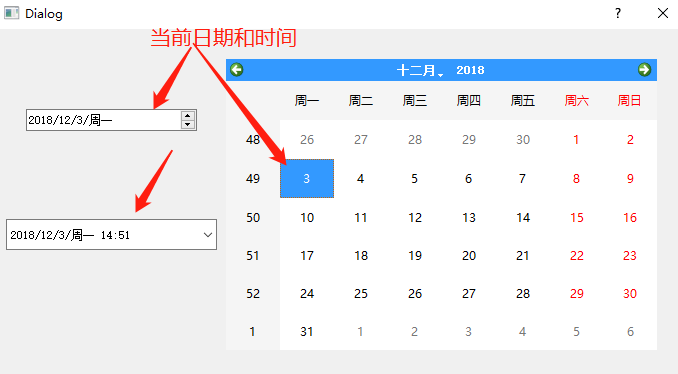
from PyQt5 import QtCore, QtWidgets

class Ui_Dialog(object):

    def setupUi(self, Dialog):

        Dialog.setObjectName("Dialog")

        Dialog.setWindowModality(QtCore.Qt.WindowModal)

        Dialog.resize(690, 437)

        Dialog.setAutoFillBackground(True)

        Dialog.setSizeGripEnabled(True)

        self.calendarWidget = QtWidgets.QCalendarWidget(Dialog)

        self.calendarWidget.setGeometry(QtCore.QRect(230, 30, 431, 291))

        self.calendarWidget.setObjectName("calendarWidget")

        self.dateEdit = QtWidgets.QDateEdit(Dialog)

        self.dateEdit.setGeometry(QtCore.QRect(30, 80, 171, 22))

        self.dateEdit.setObjectName("dateEdit")

        self.dateTimeEdit = QtWidgets.QDateTimeEdit(Dialog)

        self.dateTimeEdit.setEnabled(True)

        self.dateTimeEdit.setGeometry(QtCore.QRect(10, 190, 211, 31))

        self.dateTimeEdit.setToolTip("")

        self.dateTimeEdit.setWrapping(False)

        self.dateTimeEdit.setFrame(True)   #边框可见

        self.dateTimeEdit.setReadOnly(False)    #设置只读模式

        self.dateTimeEdit.setButtonSymbols(QtWidgets.QAbstractSpinBox.UpDownArrows)

        self.dateTimeEdit.setSpecialValueText("")

        self.dateTimeEdit.setKeyboardTracking(True)

        self.dateTimeEdit.setCurrentSection(QtWidgets.QDateTimeEdit.DaySection)

        self.dateTimeEdit.setCalendarPopup(True)

        self.dateTimeEdit.setCurrentSectionIndex(3)

        self.dateTimeEdit.setTimeSpec(QtCore.Qt.LocalTime)

        self.dateTimeEdit.setObjectName("dateTimeEdit")

        self.retranslateUi(Dialog)

        QtCore.QMetaObject.connectSlotsByName(Dialog)

    def retranslateUi(self, Dialog):

        _translate = QtCore.QCoreApplication.translate

        Dialog.setWindowTitle(_translate("Dialog", "Dialog"))

if __name__ == "__main__":

    import sys

    app = QtWidgets.QApplication(sys.argv)

    Dialog = QtWidgets.QDialog()

    ui = Ui_Dialog()

    ui.setupUi(Dialog)

    Dialog.show()

    sys.exit(app.exec_())
UI文件
main文件中设置(将获取当前日期时间的代码放在main文件中,避免QT设计师更改界面时 代码改动)
# -*- coding: utf-8 -*-

from PyQt5.QtWidgets import *

from PyQt5.QtCore import *

from PyQt5 import QtWidgets

from Ui_QDataTimeEdit import Ui_Dialog

class Dialog(QDialog, Ui_Dialog):

    def __init__(self, parent=None):

        super(Dialog, self).__init__(parent)

        self.setupUi(self)

        self.dateTimeEdit.setDateTime(QDateTime.currentDateTime())

        self.dateEdit.setDate(QDate.currentDate())

if __name__ == "__main__":

    import sys

    app = QtWidgets.QApplication(sys.argv)

    ui = Dialog()

    ui.show()

    sys.exit(app.exec_())
一些常用的技巧:
self.dateTimeEdit = QtWidgets.QDateTimeEdit(self.widget)

self.dateTimeEdit.setFrame(False)  #去除边框

self.dateTimeEdit.setDate(QtCore.QDate(2018, 10, 25))  #设置日期

self.dateTimeEdit.setTime(QtCore.QTime(11, 0, 0))    #设置时间11:00

self.dateTimeEdit.setObjectName("dateTimeEdit")    #设置对象名称

"""

方式1:

from PyQt5.QtCore import QDate,QTime

##设置为当前日期

self.dateTimeEdit.setDateTime(QDate.currentDate())

##设置为当前时间

self.dateTimeEdit.setDateTime(QTime.currentTime())

方式2:

from PyQt5.QtCore import QDateTime

##设置当前日期和时间

self.dateTimeEdit.setDateTime(QDateTime.currentDateTime())

"""

##同理设置dataEdit是一样的

from PyQt5.QtCore import QDate

self.dateEdit.setDate(QDate.currentDate())
打印出不同格式的日期和时间
from PyQt5.QtCore import QDate, QTime, QDateTime, Qt

"""返回当前日期"""

now = QDate.currentDate()

print(now)  #PyQt5.QtCore.QDate(2018, 12, 3)

print(now.toString())     #周一 12月 3 2018

print(now.toString(Qt.ISODate))     #2018-12-03

print(now.toString(Qt.DefaultLocaleLongDate))       #2018年12月3日, 星期一

"""返回当前日期和时间"""

datetime = QDateTime.currentDateTime()

print(datetime)     #PyQt5.QtCore.QDateTime(2018, 12, 3, 15, 9, 41, 976)

print(datetime.toString())    #周一 12月 3 15:09:41 2018

print(datetime.toString(Qt.ISODate))        #2018-12-03T15:09:41

print(datetime.toString(Qt.DefaultLocaleLongDate))      #2018年12月3日, 星期一 15:09:41

"""返回当前时间"""

time = QTime.currentTime()

print(time)     #PyQt5.QtCore.QTime(15, 12, 9, 980)

print(time.toString())      #15:12:09

print(time.toString(Qt.ISODate))        #15:12:09

print(time.toString(Qt.DefaultLocaleLongDate))      #15:12:09
【pyqt5】QdateTimeEdit(日期时间)的更多相关文章
- PyQt(Python+Qt)学习随笔:QDateTimeEdit日期时间编辑部件
专栏:Python基础教程目录 专栏:使用PyQt开发图形界面Python应用 专栏:PyQt入门学习 老猿Python博文目录 老猿学5G博文目录 Designer输入部件中,Date/Time E ...
- EasyUI datagrid 日期时间格式化
EasyUI datagrid中显示日期时间时,会显示为以下不太直观的数值: 添加以下JavaScript脚本,然后在field中添加 formatter: DateTimeFormatter 即可. ...
- POCO库——Foundation组件之日期时间DateTime
日期时间DateTime:内部提供多个设计计时器.日期.时区.时间戳等: Clock.h :Clock时钟计时类,_clock:Int64类型时钟值,CLOCKVAL_MIN.CLOCKVAL_MAX ...
- db2 日期时间格式
db2日期和时间常用汇总 1.db2可以通过SYSIBM.SYSDUMMY1.SYSIBM.DUAL获取寄存器中的值,也可以通过VALUES关键字获取寄存器中的值. SELECT 'HELLO DB2 ...
- Angularjs在控制器(controller.js)的js代码中使用过滤器($filter)格式化日期/时间实例
Angularjs内置的过滤器(filter)为我们的数据信息格式化提供了比较强大的功能,比如:格式化时间,日期.格式化数字精度.语言本地化.格式化货币等等.但这些过滤器一般都是在VIEW中使用的,比 ...
- MySQL学习笔记八:日期/时间的处理
MySQL日期时间的处理,在其官网文档上都有详细的阐述,想了解更多的同学可自行查阅. 1.查询当前日期时间:函数有now(),localtime(),current_timestamp(),sysda ...
- Java日期时间操作的一些方法
1. 获得Calendar实例: Calendar c = Calendar.getInstance(); 2. 定义日期/时间的格式: SimpleDateFormat sdf =new Simpl ...
- mysql与oracle的日期/时间函数小结
前言 本文的日期/时间全部格式化为”2016-01-01 01:01:01“形式: MONITOR_TIME为数据库表字段: 字符串与日期/时间相互转换函数 Oracle 日期/时间转字符串函数:to ...
- js 日期时间排序 数组
不多说直接show代码 var timeArr=[ {'id':'A01','date':'2016-04-20 23:22:11'}, {'id':'A02','date':'2016-04-21 ...
- sql server日期时间转字符串
一.sql server日期时间函数Sql Server中的日期与时间函数 1. 当前系统日期.时间 select getdate() 2. dateadd 在向指定日期加上一段时间的基 ...
随机推荐
- Android开发-- Genymotion模拟器
模拟器安装 http://blog.csdn.net/beiminglei/article/details/13776013 连接ADB http://android3g.diandian.com/p ...
- SpringBoot(十一)-- 动态数据源
SpringBoot中使用动态数据源可以实现分布式中的分库技术,比如查询用户 就在用户库中查询,查询订单 就在订单库中查询. 一.配置文件application.properties # 默认数据源 ...
- Linux 日常运维
查看用户信息:w 查看系统负载:uptime 查看系统资源使用情况:vmstat 查看进程动态:top 查看网卡流量:sar 查看网卡流量:nload 查看磁盘读写:iostat 查看磁盘读写:iot ...
- Selenium 执行JavaScript
Selenium 可以直接模拟运行 JavaScript,使用 execute_script() 方法即可实现 from selenium import webdriver browser = web ...
- MQTT-C-UDP_PUB
/** ****************************************************************************** * @file apdu.c ...
- LinQ的初步学习与总结
嘿嘿,说起来ORM和LinQ,就感觉离我好遥远的,在学校是没有学习的,所以总感觉学习了LinQ就是大神,现在嘛,终于也体会一点,感觉LinQ只是初步学习,没有太难,当然以后使用在项目中就没有这样的简单 ...
- .net环境下的缓存技术-转载!
摘要: 介绍缓存的基本概念和常用的缓存技术,给出了各种技术的实现机制的简单介绍和适用范围说明,以及设计缓存方案应该考虑的问题(共17页) 1 概念 1.1 缓存能解决的问题 · 性 ...
- C#生成随机验证码例子
C#生成随机验证码例子: 前端: <tr> <td width=" align="center" valign="top"> ...
- jQuery mobile 初始化页面的过程
- CONE NAT 和 Symmetric NAT
CONE NAT 和 Symmetric NAT 1. NAT 的划分 RFC3489 中将 NAT 的实现分为四大类: Full Cone NAT 完全锥形 NAT Restricted Cone ...