
Explore Basic Behavior of the TurtleBot ---3
原创博文:转载请标明出处(周学伟):http://www.cnblogs.com/zxouxuewei/tag/
Introduction
此示例帮助您使用turtlebot的自主性。 驱动机器人向前移动并且当存在障碍物时改变其方向。 您将订阅激光扫描主题并发布速度主题以控制turtlebot。
Hardware Support Package for turtlebot
本示例使用ROS接口的TurtleBot。 基于TurtleBot的机器人支持包为TurtleBot提供了一个更简洁的界面。
它允许您:
获取传感器数据并发送控制命令,而不显式调用ROS命令。
与Gazebo中的模拟机器人或物理TurtleBot进行透明通信。
要安装支持包,在MATLAB Home选项卡上打开Add-Ons>获取硬件支持包,然后选择“TurtleBot-Based Robots”。 或者,使用roboticsAddons命令。
 Connect to the TurtleBot
确保你有一个TurtleBot运行在通过Gazebo或真实硬件的模拟。 有关启动过程,请参阅开始使用Gazebo和模拟TurtleBot或开始使用Real TurtleBot。
再此我没有Turtlebot 也不想用Gazebo,我用自己开发的zxbot机器人。按照相应的指令启动机器人。
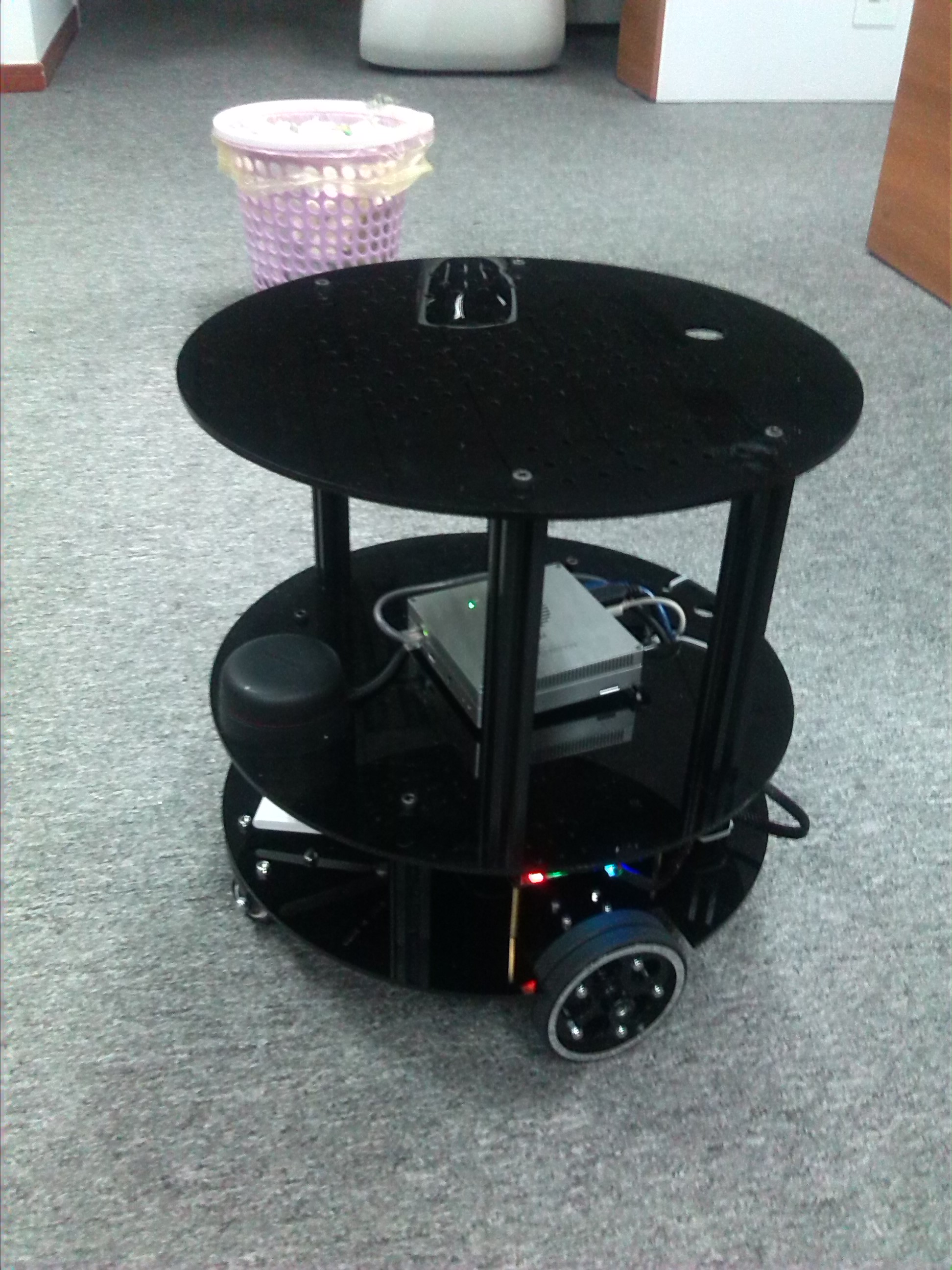
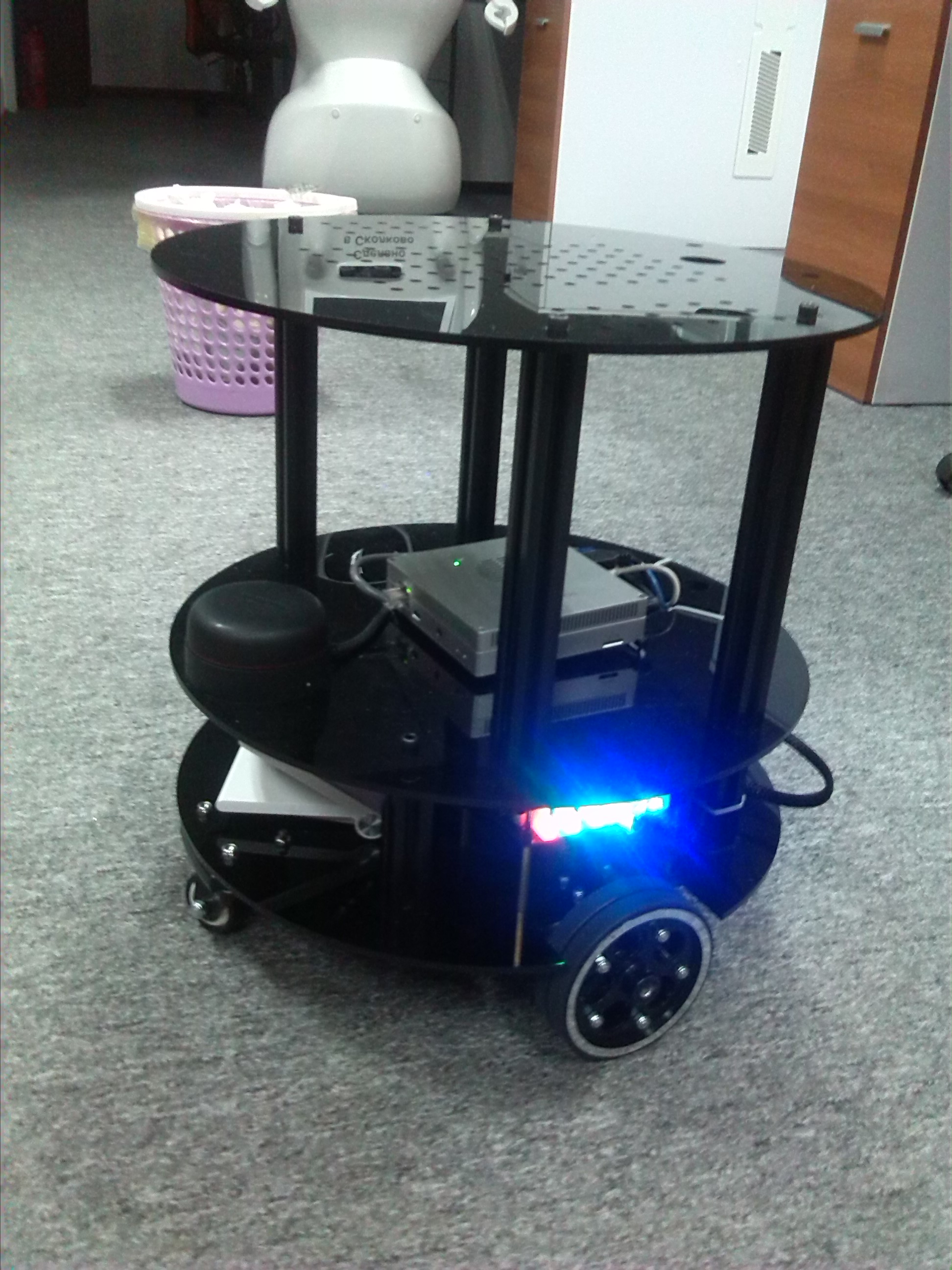
链接机器人的wifi ZXBOT,远程登录机器人:
ssh ubuntu@192.168.1.159
roslaunch odom_tf_package zxbot_start.launch
keysi_start.launch文件内容如下:github链接:https://github.com/ZXWBOT
<launch>

    <param name="use_sim_time" value="false" />

    <!--Set the TF tree for the keysi robot-->

    <node name="link_laser"     pkg="tf" type="static_transform_publisher" args="0.15 0 0.15 0 0 1.0 6.12323399574e-17 base_link laser 50"/>

    <node name="link_camera"    pkg="tf" type="static_transform_publisher" args="0.15 0 0.15 0 0 0 base_link camera_link 50"/>

    <node name="link_footprint" pkg="tf" type="static_transform_publisher" args="0 0 0 0 0 0 base_link base_footprint 50"/>

    <!--Start the robot's base control code and publish the odometer data-->

    <node pkg="keysi_package" type="keysi_start_node" name="publish_odom" output="screen">

      <param name="usart_port"         type="string" value="/dev/zxbot_base"/>

        <param name="baud_data"          type="int"    value=""/>

      <param name="robot_frame_id"     type="string" value="base_link"/>

      <param name="smoother_cmd_vel"   type="string" value="/smoother_cmd_vel"/>

    </node>

    <!--Open the Radar Startup Package and publish the Scan data-->

    <node name="rplidarNode" pkg="rplidar_ros" type="rplidarNode" output="screen">

      <param name="serial_port"         type="string" value="/dev/zxbot_rplidar"/>

      <param name="serial_baudrate"     type="int"    value=""/>

      <param name="frame_id"            type="string" value="laser"/>

      <param name="inverted"            type="bool"   value="false"/>

      <param name="angle_compensate"    type="bool"   value="true"/>

      <param name="Angle_Laser"         type="int"    value=""/>

   </node>

      <arg name="node_name"             value="velocity_smoother"/>

      <arg name="nodelet_manager_name"  value="nodelet_manager"/>

      <arg name="config_file"           value="$(find keysi_package)/config/yocs_velocity_smoother.yaml"/>

      <arg name="raw_cmd_vel_topic"     value="cmd_vel"/>

      <arg name="smooth_cmd_vel_topic"  value="smoother_cmd_vel"/>

      <arg name="robot_cmd_vel_topic"   value="robot_cmd_vel"/>

      <arg name="odom_topic"            value="odom"/>

    <node pkg="nodelet" type="nodelet" name="$(arg nodelet_manager_name)" args="manager"/>

    <include file="$(find yocs_velocity_smoother)/launch/velocity_smoother.launch">

      <arg name="node_name"             value="$(arg node_name)"/>

      <arg name="nodelet_manager_name"  value="$(arg nodelet_manager_name)"/>

      <arg name="config_file"           value="$(arg config_file)"/>

      <arg name="raw_cmd_vel_topic"     value="$(arg raw_cmd_vel_topic)"/>

      <arg name="smooth_cmd_vel_topic"  value="$(arg smooth_cmd_vel_topic)"/>

      <arg name="robot_cmd_vel_topic"   value="$(arg robot_cmd_vel_topic)"/>

      <arg name="odom_topic"            value="$(arg odom_topic)"/>

    </include>

</launch>
初始化ROS。 通过用ZXBOT的IP地址替换示例IP地址(192.168.1.1),连接到ZXBOT。
ipaddress = '192.168.1.215'   //机器人主机的IP

rosinit(ipaddress)
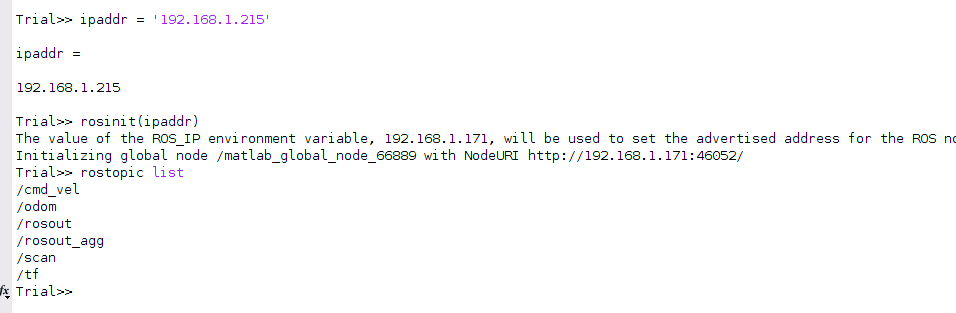
为机器人的速度创建一个发布者,并为该主题创建一条消息。
如果你使用的是ZXBOT:
  robot = rospublisher('/cmd_vel');

   velmsg = rosmessage(robot);
如果你使用的是TURTLEBOT
  robot = rospublisher('/mobile_base/commands/velocity');
   velmsg = rosmessage(robot);

Receive Scan Data
确保你的硬件已经发布了/scan数据。Subscribe to the topic /scan.
//在机器人端
Turtlebot roslaunch turtlebot_bringup 3dsensor.launch
zxbot roslaunch odom_tf_package zxbot_start.launch
//MATLAB
laser = rossubscriber('/scan');
scan = receive(laser,3)

figure

plot(scan);
如果您看到错误,可能是激光扫描主题没有接收任何数据。 如果您正在模拟中运行,请尝试重新启动Gazebo。 如果您使用硬件,请确保您已正确启动Kinect相机或者激光雷达。
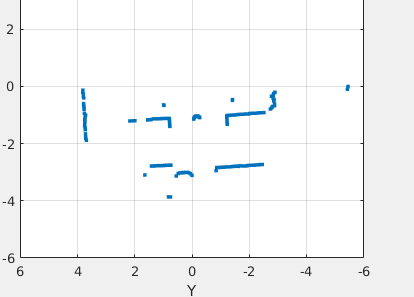
运行以下代码行,其中绘制实时激光扫描进给二十秒。 移动TurtleBot或zxbot前面的一个对象,并使它足够近,直到它不再显示在绘图窗口中。
  tic;

  while toc <

      scan = receive(laser,);

      plot(scan);

  end
Simple Obstacle Avoidance
基于从激光扫描的距离读数,您可以实现一个简单的障碍物回避算法。 你可以使用一个简单的while循环来实现这个行为。
设置将在处理循环中使用的一些参数。 您可以根据不同的行为修改这些值。
  spinVelocity = 0.6;       % Angular velocity (rad/s)

  forwardVelocity = 0.1;    % Linear velocity (m/s)

  backwardVelocity = -0.02; % Linear velocity (reverse) (m/s)

  distanceThreshold = 0.6;  % Distance threshold (m) for turning
运行循环以向前移动机器人并计算与机器人最近的障碍物。 当障碍物在distanceThreshold的界限内时,机器人转动。 该循环在运行时间20秒后停止。 CTRL + C(或Mac上的Control + C)也会停止此循环
tic;

  while toc <

      % Collect information from laser scan

      scan = receive(laser);

      plot(scan);

      data = readCartesian(scan);

      x = data(:,);

      y = data(:,);

      % Compute distance of the closest obstacle

      dist = sqrt(x.^ + y.^);

      minDist = min(dist);

      % Command robot action

      if minDist < distanceThreshold

          % If close to obstacle, back up slightly and spin

          velmsg.Angular.Z = spinVelocity;

          velmsg.Linear.X = backwardVelocity;

      else

          % Continue on forward path

          velmsg.Linear.X = forwardVelocity;

          velmsg.Angular.Z = ;

      end

      send(robot,velmsg);

  end
下面你就会看到你的机器人开始移动并且避开障碍物。
Disconnect from the Robot
最好在完成发布者,订阅者和其他ROS相关对象的工作区后清除它们。
clear
一旦你完成使用ROS网络,建议使用rosshutdown。 关闭全局节点并从TurtleBot或者zxbot断开连接。
rosshutdown
Explore Basic Behavior of the TurtleBot ---3的更多相关文章
- 脚本AI与脚本引擎
Scripted AI and Scripting Engines 脚本AI与脚本引擎 This chapter discusses some of the techniques you can us ...
- Five reasons phosphorene may be a new wonder material
A material that you may never have heard of could be paving the way for a new electronic revolution. ...
- Java多线程系列--“JUC锁”03之 公平锁(一)
概要 本章对“公平锁”的获取锁机制进行介绍(本文的公平锁指的是互斥锁的公平锁),内容包括:基本概念ReentrantLock数据结构参考代码获取公平锁(基于JDK1.7.0_40)一. tryAcqu ...
- Java多线程系列--“JUC锁”04之 公平锁(二)
概要 前面一章,我们学习了“公平锁”获取锁的详细流程:这里,我们再来看看“公平锁”释放锁的过程.内容包括:参考代码释放公平锁(基于JDK1.7.0_40) “公平锁”的获取过程请参考“Java多线程系 ...
- Java多线程系列--“JUC锁”05之 非公平锁
概要 前面两章分析了"公平锁的获取和释放机制",这一章开始对“非公平锁”的获取锁/释放锁的过程进行分析.内容包括:参考代码获取非公平锁(基于JDK1.7.0_40)释放非公平锁(基 ...
- PHP生成器Generators
下文的第一个逐行读取文件例子用三种方式实现;普通方法,迭代器和生成器,比较了他们的优缺点,很好,可以引用到自己的代码中 ,支持的php版本(PHP 5 >= 5.5.0) 后面的yield讲解, ...
- android 和iOS的view上的区别
android上的view的类叫View, 以下是它的class overview, This class represents the basic building block for user i ...
- lua weak table 概念解析
lua weak table 经常看到lua表中有 weak table的用法, 例如: weak_table = setmetatable({}, {__mode="v"}) 官 ...
- Apache Solr 访问权限控制
Current state of affairs SSL support was added in version 4.2 (SolrCloud v4.7). Protection of Zookee ...
随机推荐
- 【转】WKT、SRID、EPSG概念
http://www.cnblogs.com/jackdong/archive/2010/12/20/1911558.html 之前一直对WKT.EPSG.SRID不是很理解,总是混淆,今天看了一下, ...
- ASP.NET MVC分页 Ajax+JsRender
前段时间整mvc的分页,倒是很顺利,参考了以下几篇博客,启发很大. http://www.cnblogs.com/tangmingjun/archive/2012/05/30/2526301.html ...
- Spring Cloud Config 配置高可用集群
详细参考:<Sprin Cloud 与 Docker 微服务架构实战>p163-9.10节 spring cloud config 与 eureka 配合使用 我就不写了,请参见本书章节.
- SDRAM 学习笔记(三)
上图是terasic公司提供的SDRAM控制器,大部分已经封装好,我们需要修改其中部分代码,以此来实现我们自己需要的功能. 1.PLL时钟设定 首先上面的sdram_pll.v中产生上一篇博客所需要的 ...
- mysql 删除
DROP删表,表结构将删了,当然数据也不存在了 TRUNCATE和DELETE删数据,表结构还在 DELETE可以带条件删除,TRUNCATE是全部删除 DELETE删除会写日志,TRUNCATE不写 ...
- windows下 删除指定文件夹里面一周前的所有文件和文件夹的bat
forfiles /p "指定文件夹路径" /m * /s /d -7 /c "cmd /c if @isdir==TRUE (rd /q @path) else del ...
- win10 + linux 制作双系统教程(我本身是win10系统)
1.制作启动U盘 准备工作: .linux镜像 .硬盘空余空间>8G,越大越好 .制作启动U盘的软件 .最好3.0U盘一个>4G 下载启动软件的工具(UItraIOS制作的U盘启动盘无法安 ...
- WFA 认证 启动 sigma_dut方法
WFA认证需要启动sigma_dut,记录记录一下启动过程. Android O平台命令如下 adb shell svc wifi disable adb shell rmmod wlan adb s ...
- UltraCompare 激活
UltraCompare安装包.注册机下载地址: 链接:https://pan.baidu.com/s/1eSu8Pbk 密码:fkkh 1.安装UltraCompare 2. 3. 打开注册机,填入 ...
- smarty模板开发基础总结
前提:1. 部署smarty模板目录:2. 编写Smarty类的子类,定制好template_dir.compile_dir.config_dir.cache_dir.left_delimiter.r ...