
spring整合axis2(最小配置化)的示例
参考文档:
http://blog.csdn.net/xinhaoluan/article/details/3605234
环境配置:
实现步骤:
1.eclipse新建Dynamic Web Project,本例工程名为:ws-sample
2.将spring-framework和axis2的lib加入工程中
3.编写测试服务:
IHello.java(interface)
package com.lichmama.ws.demo.intf;

public interface IHello {

    public String sayHello(String name);

}
HelloImpl.java(class)
package com.lichmama.ws.demo.service;

import org.springframework.stereotype.Service;

import com.lichmama.ws.demo.intf.IHello;

@Service("helloService")

public class HelloImpl implements IHello {

    @Override

    public String sayHello(String name) {

        if((name == null) || (name == "")) {

            name = "anonymous";

        }

        return "hello, " + name;

    }

}
3.新建spring配置文件/WEB-INF/applicationContext.xml:
<?xml version="1.0" encoding="UTF-8"?>

<beans xmlns="http://www.springframework.org/schema/beans"

    xmlns:xsi="http://www.w3.org/2001/XMLSchema-instance"

    xmlns:context="http://www.springframework.org/schema/context"

    xsi:schemaLocation="http://www.springframework.org/schema/beans

        http://www.springframework.org/schema/beans/spring-beans-3.0.xsd

        http://www.springframework.org/schema/context

        http://www.springframework.org/schema/context/spring-context-3.0.xsd">

    <context:annotation-config />

    <context:component-scan base-package="com.lichmama.ws.demo" />

    <bean id="applicationContext"

        class="org.apache.axis2.extensions.spring.receivers.ApplicationContextHolder" />

</beans>
4.新建/WEB-INF/services/axis2/META-INF/services.xml:
<?xml version="1.0" encoding="UTF-8" ?>

<serviceGroup>

    <service name="HelloService" scope="application">

        <description>simple spring example</description>

        <parameter name="ServiceObjectSupplier">

            org.apache.axis2.extensions.spring.receivers.SpringAppContextAwareObjectSupplier

        </parameter>

        <parameter name="SpringBeanName">helloService</parameter>

        <messageReceivers>

            <messageReceiver mep= "http://www.w3.org/2004/08/wsdl/in-only"

                 class = "org.apache.axis2.rpc.receivers.RPCInOnlyMessageReceiver"  />

            <messageReceiver mep= "http://www.w3.org/2004/08/wsdl/in-out"

                 class = "org.apache.axis2.rpc.receivers.RPCMessageReceiver"  />

        </messageReceivers>

    </service>

</serviceGroup>
5.配置/WEB-INF/web.xml:
<?xml version="1.0" encoding="UTF-8"?>

<web-app xmlns:xsi="http://www.w3.org/2001/XMLSchema-instance"

    xmlns="http://java.sun.com/xml/ns/javaee"

    xmlns:web="http://java.sun.com/xml/ns/javaee/web-app_2_5.xsd"

    xsi:schemaLocation="http://java.sun.com/xml/ns/javaee

        http://java.sun.com/xml/ns/javaee/web-app_3_0.xsd"

        id="WebApp_ID" version="3.0">

      <display-name>ws-sample</display-name>

    <listener>

        <listener-class>org.springframework.web.context.ContextLoaderListener

        </listener-class>

    </listener>

    <context-param>

        <param-name>contextConfigLocation</param-name>

        <param-value>/WEB-INF/applicationContext.xml</param-value>

    </context-param>

    <servlet>

        <servlet-name>AxisServlet</servlet-name>

        <servlet-class>org.apache.axis2.transport.http.AxisServlet</servlet-class>

    </servlet>

    <servlet-mapping>

        <servlet-name>AxisServlet</servlet-name>

        <url-pattern>/services/*</url-pattern>

    </servlet-mapping>

   <welcome-file-list>

      <welcome-file>index.jsp</welcome-file>

      <welcome-file>index.html</welcome-file>

    </welcome-file-list>

</web-app>
6.完成以上工作后工程目录结构如下:

7.发布工程,启动tomcat
8.访问http://localhost:8080/ws-sample/services/HelloService?wsdl,查看服务是否发布成功。
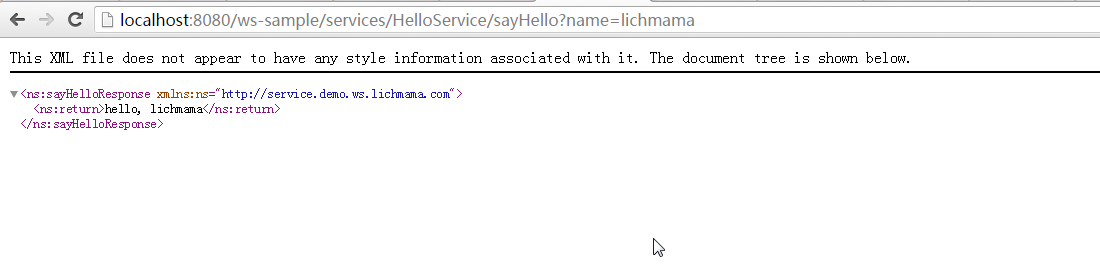
如果发布成功的话,访问http://localhost:8080/ws-sample/services/HelloService/sayHello?name=lichmama结果应该如下:
9.*简易的做法是下载axis2-war.zip(http://archive.apache.org/dist/axis/axis2/java/core/1.6.2/axis2-1.6.2-war.zip),复制WEB-INF下的文件到工程对应目录。
然后再根据实际情况修改各配置文件(application.xml, services.xml, web.xml)。
10.*上述示例工程下载地址:http://pan.baidu.com/s/1hrBsZ4o
spring整合axis2(最小配置化)的示例的更多相关文章
- 初识quartz 并分析 项目中spring整合quartz的配置【原创+转载】
初识quartz 并分析 项目中spring整合quartz的配置[原创+转载]2018年01月29日 12:08:07 守望dfdfdf 阅读数:114 标签: quartz 更多个人分类: 工具 ...
- spring整合mybatis(hibernate)配置
一.Spring整合配置Mybatis spring整合mybatis可以不需要mybatis-config.xml配置文件,直接通过spring配置文件一步到位.一般需要具备如下几个基本配置. 1. ...
- spring 整合 hibernate xml配置
spring 整合 hibernate: hibernate :对数据库交互 spring: ioc aop 整合点: 1.sessionFactory对象不再由hibernate生成,交由spr ...
- Spring第十一篇——–Spring整合Hibernate之配置数据源
DataSource(数据源)提供了一个标准化的取得数据库连接的方式,通过getConnection()方法即可取得数据库的连接,Spring也提供了数据库连接池(DataBase connectio ...
- Spring整合Struts2的配置与测试
整合目的 让Spring的IOC容器管理Struts2的Action 整合步骤 1.新建一个Web项目 2.加入Spring的jar包和添加Spring的配置文件 3.在Web.xml中配置Conte ...
- spring 整合 struts2 xml配置
整合之前要搞清楚struts2是什么; struts2:表现层框架 增删改查 作用域 页面跳转 异常处理 ajax 上传下载 excel 调用service spring :IOC/ ...
- mybatis和spring整合的关键配置
spring配置文件 applicationContext.xml: <beans xmlns="http://www.springframework.org/schema/beans ...
- 阶段3 3.SpringMVC·_07.SSM整合案例_09.ssm整合之Spring整合MyBatis框架配置事务
spring加入声明式的事物 配置事物 配置事物管理器 需要一个dataSource,引入上面的dataSource 配置事务通知 引入上面的transactionManager事物管理器 find开 ...
- Spring 整合 Redis (零配置) 的简单使用
pom.xml <!--jedis--> <dependency> <groupId>redis.clients</groupId> <artif ...
随机推荐
- TCP--telnet为何在127s后返回?
背景 近期编写了监控业务服务器的脚本,主要原理是用shell脚本(运行shell的机器称之为监控机)调用项目组专用的接口测试工具,对指定的业务服务器进行业务操作,根据接口测试工具的返回结果判断业务服务 ...
- 为什么说上ERP找死?
长期以来,管理软件领域流行着这样一句话“不上ERP等死,上了ERP找死”.根据为十九年管理软件开发的经验来看,“不上ERP等死”这句话不敢苟同,但“上了ERP找死”这句话倒有些同感.上ERP虽然不一定 ...
- 如何使用kali的Searchsploit查找软件漏洞
Searchsploit Searchsploit会通过本地的exploit-db, 查找软件漏洞信息 打开kali的命令行, 输入: searchsploit 查看系统帮助 查找mssql的漏洞 如 ...
- .net core中引用webservice,并忽略https证书验证
1.打开vs, 工具-->扩展和更新 下载这个 2. 在admin下右键,添加-->connected service 选择wsdl文件路径,或者服务的url,比如https://**** ...
- web项目中url-pattern改成'/'后,js、css、图片等静态资源(404)无法访问问题解决办法
感谢http://blog.csdn.net/this_super/article/details/7884383的文章 1.增加静态资源url映射 如Tomcat, Jetty, JBoss, Gl ...
- HTTPS协议入门
目录什么是https?https的利与弊?https的原理和流程?什么是证书/CA证书?什么是单向SSL认证与双向SSL认证?网站如何实现https?网站实现https的一些补充说明参考网页 一.什么 ...
- jQuery 插件 的this 指向问题(实战)
daterangepicker 是一个JavaScript组件,用来选择日期. 资源直接搜索 daterangepicker 即可,当然好看的样式可以基于Bootstrap. 官网:http://ww ...
- ionic3 环境配置 + 運行第一個項目
1.首先我們先下載個 nodejs安裝包 地址:https://nodejs.org/en/ 安裝 檢查是否安裝成功,打開命令提示符 輸入 node -v 回車 查看版本 結果: 2.安裝ionic ...
- JQuery浮动层Loading页面加载特效
之前做项目,经常需要一些浮动层加载Loading. 现在好多前端框架都能实现了,最常用的就是 artDialog 下面记录下当时的代码. <!DOCTYPE html PUBLIC " ...
- ViewPager实现无限轮播踩坑记
最近笔者想通过ViewPager来实现一个广告Banner,并实现无限轮播的效果,但是在这个过程中踩了不少的坑,听我慢慢道来.如果大家有遇到和我一样的情况,可以参考我的解决方法,没有那就更好,如果针对 ...