
express的学习,与使用
最近在学习vue的一个实战项目,碰到一个express,当时很萌,就随便看了看................
expres是基于node 的一个web框架,
首先可以找到它的官网照着学习
这里只讲一些官网上没有的或者很晦涩的东西.........
1)模版引擎的使用
给出package.json的依赖
{
  "name": "demo",
  "version": "1.0.0",
  "description": "",
  "main": "demo01.js",
  "scripts": {
    "test": "echo \"Error: no test specified\" && exit 1"
  },
  "author": "",
  "license": "ISC",
  "dependencies": {
    "body-parser": "^1.18.2",
    "express": "^4.16.2",
    "hbs": "~2.3.1",
    "jade": "^1.11.0"
  }
}
你可以npm install 一下,
我这里要坐的就是使用express的路由兼模版引擎搭建一个小网站。
2)首先你的建立几个文件夹
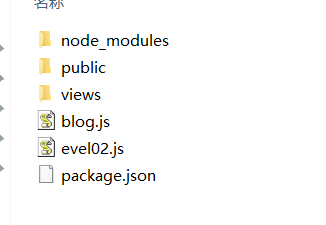
node_modules:这个就不解释了,你稍微使用个就知道了。
public:这个里面我们主要是放些css,images等文件
views:是视图文件(主要放一些)
blog.js:主要是数据(模拟数据)
evel02.js:就是我的启动文件(大家习惯的是app.js)
3)边看代码,遍解释
evel02.js
var express= require('express');

//http://www.jb51.net/article/58166.htm

var bodyParser = require('body-parser');

var path = require('path');

var app = express();

// hbs是express的众多模版之一,可以google一下去了解。
//可以去了解:https://www.cnblogs.com/chyingp/p/hbs-getting-started.html

var hbs = require('hbs');

//设置模版引擎

app.set("view engine",'html');

app.engine("html",hbs.__express);

//加载数据

var blogEngine = require('./blog');

//app.use(bodyParser());

// parse application/x-www-form-urlencoded

app.use(bodyParser.urlencoded({ extended: false }));

// parse application/json

app.use(bodyParser.json()) ;

app.get('/',function(req,res){

//  res.render('index');

  res.render('index',

  {

    tile:'最近的文章',

    entries:blogEngine.getBlogEntries()

  });

});

app.get('/about',function(req,res){

  //res.render('about');
  //渲染页面

  res.render('about',{title:"自我介绍"});

});

app.get('/article/:id',function(req,res){

//res.render('article');

var entry = blogEngine.getBlogEntry(req.params.id);

res.render("article",{title:entry.title,blog:entry});

});

//制定静态文件目录

//app.use(express.static('public'));

app.use(express.static(path.join(__dirname, 'public')));

//监听3000端口

app.listen();
blog.js
var entries =[

  {"id":,"title":"第一篇","body":"正文1","published":'4-1-2017'},

  {"id":,"title":"第二篇","body":"正文2","published":'4-2-2017'},

  {"id":,"title":"第三篇","body":"正文3","published":'4-3-2017'},

  {"id":,"title":"第四篇","body":"正文4","published":'4-4-2017'},

  {"id":,"title":"第五篇","body":"正文5","published":'4-5-2017'},

  {"id":,"title":"第六篇","body":"正文6","published":'4-6-2017'},

  {"id":,"title":"第七篇","body":"正文7","published":'4-7-2017'},

];

//倒出两个方法

exports.getBlogEntries = function(){

  return entries;

};

exports.getBlogEntry = function(id){

  for(var i =;i<entries.length;i++){

    if(entries[i].id == id)

      return entries[i];

  }

};
views(是express的默认视图文件夹)

layout.html
<html>

<head>

   <title>{{title}}</title>

</head>

<body>

    {{{body}}}

   <footer>

      <p>

         <a href="/">首页</a> - <a href="/about">自我介绍</a>

      </p>

   </footer>

</body>

</html>
index.html
 <h1>文章列表</h1>

{{#each entries}}

   <p>

      <a href="/article/{{id}}">{{title}}</a><br/>

      Published: {{published}}

   </p>

{{/each}}
article.html
<!-- <!DOCTYPE html>

<!DOCTYPE html>

<html>

  <head>

    <meta charset="utf-8">

    <title></title>

  </head>

  <body>

    <p></p>

    {{blog.title}}

  </body>

</html> -->

<h1>{{blog.title}}</h1>

Published: {{blog.published}}

<p/>

{{blog.body}}
about.html
<!-- <h1>自我介绍</h1>

{{title}}

<p>正文</p>

<img class="img" src="/images/q.jpg" alt=""> -->

<!DOCTYPE html>

<html>

  <head>

    <meta charset="utf-8">

    <title>{{title}}</title>

    <link rel="stylesheet" href="/css/style.css">

  </head>

  <body>

    <div class="">

      <h1>自我介绍</h1>

      <div class="">

        <img class="img" src="/images/q.jpg" alt="">

      </div>

    </div>

    <h3>w文件上传递</h3>

    <div class="">

      <form action="/pictures/upload" method="POST" enctype="multipart/form-data">

        Select an image to upload:

        <input type="file" name="image">

        <input type="submit" value="Upload Image">

      </form>

    </div>

  </body>

</html>
这里要解释一下,我的about.html模版是使用的html页面,当然你也可以使用hbs的模版
 <h1>自我介绍</h1>

{{title}}

<p>正文</p>

<img class="img" src="/images/q.jpg" alt="">
完整学习实例参考:http://blog.csdn.net/ganxunzou/article/details/42918015
(知识共享,知识的搬运工)
看完这片文章就在思考怎么将express与前端相结合起来呢???(我不轻易问问提的。。。。)
写个css的都知道前端框架有很多vue,angular,react,他们都有自己的路由机制,而且还是蛮好用的。。。。。
探究一番。。。。
文件目录:
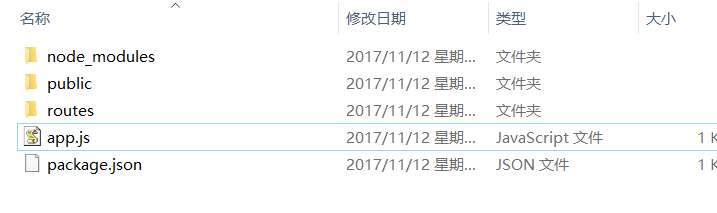
app.js
(这个是没有使用express的模版引擎的,我要做的就是使用express做接口数据层,使用前端路由,访问接口地址,进行数据获取)
var express = require("express");

var path =require("path");

var routes = require("./routes/index");//

var app = express();

app.use(express.static(path.join(__dirname,'public')));

app.use('/',routes);

app.listen();
routes/index.js
var express = require('express');

var router = express.Router();

router.get('/',function(req,res,next){

  res.render('index',{

    title:'express'

  });

});

router.get('/foo',function(req,res,next){

  res.json({

    "name":"tom",

    "age":

  })

});

router.get('/bar',function(req,res,next){

  res.send({

    "name":"bar",

    "age":

  })

});

router.get('/goinfo',function(req,res,next){

  res.send({

    "name":"goinfo",

    "age":

  })

});

module.exports =router;
看到这里可能有同学说这个和上面那个例子不是一样的吗????
不一样。。。区别就是res.send(),与res.render()的区别,并且我也没用express的模板引擎
res.send(),或者res.json()是还回数据,res.render()渲染页面
public:(主要存放一些资源文件)
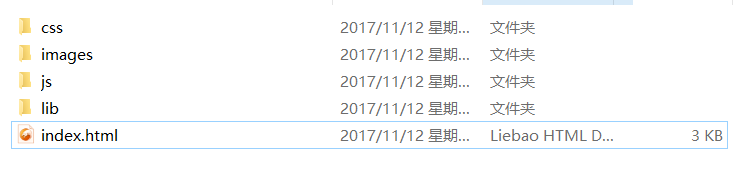
index.html
(使用vue框架,简单的搭建了几个页面,没有使用vue-cli,因为不是终点)
<!DOCTYPE html>

<html>

  <head>

    <meta charset="utf-8">

    <title></title>

    <script type="text/javascript">

    </script>

    <script type="text/javascript" src="../lib/vue2.js">  </script>

    <script type="text/javascript" src="../lib/vue_router.js">  </script>

    <script type="text/javascript" src="../lib/axios.min.js">  </script>

  </head>

  <body>

    <div class="">

    </div>

    <div class="" id="app">

    </div>

  </body>

</html>

<script type="text/javascript">

  const Home={

    template:'<div>this is home page</div>',

    // methods:{

    //   getData(){

    //     axios.get('/').then(function(res){

    //       console.log(res);

    //     }).catch(function(err){

    //       console.log(err);

    //     });

    //   }

    // },

    // mounted(){

    //   this.getData();

    // }

  };

  const foo={

    template:'<div>this is foo page</div>',

    methods:{

      getData(){

        axios.get('/foo').then(function(res){

          console.log(res);

        }).catch(function(err){

          console.log(err);

        });

      }

    },

    mounted(){

      this.getData();

    }

  };

  const bar={

    template:'<div>this is bar page</div>',

    methods:{

      getData(){

        axios.get('/bar').then(function(res){

          console.log(res);

        }).catch(function(err){

          console.log(err);

        });

      }

    },

    mounted(){

      this.getData();

    }

  };

  const goInfo={

    template:'<div>this is foo goInfo</div>',

    methods:{

      getData(){

        axios.get('/goInfo').then(function(res){

          console.log(res);

        }).catch(function(err){

          console.log(err);

        });

      }

    },

    mounted(){

      this.getData();

    }

  };

   const router =new VueRouter({

       mode:'history',

       routes:

     [

        {

          path:'/',

          name:'home',

          component:Home,

          // children:[

          //     {path:'foo',name:'foo',component:foo},

          // ]

        },

        {path:'foo',name:'foo',component:foo},

        {path:'/bar',name:'bar',component:bar},

        {path:'/goinfo',name:'goinfo',component:goInfo},

     ]

   })

  const mou = new Vue({

    el:"#app",

    router,

    template:`

      <div id="app">

        <h1>Name Routes</h1>

        <p>currnt route </p>

        <ul>

          <li>

            <router-link :to="{name:'home'}">home</router-link>

          </li>

          <li>

            <router-link :to="{name:'foo'}">foo</router-link>

          </li>

          <li>

            <router-link :to="{name:'bar'}">bar</router-link>

          </li>

          <li>

            <router-link :to="{name:'goinfo'}">goinfo</router-link>

          </li>

        </ul>

        <router-view></router-view>

      </div>

    `

  });

</script>
然后你直接在命令行输入: node app.js
访问localhost:3000
主要的已经讲完了,
接下来补充几点:
//若要设置HTTP头部信息

app.get('/htp',function(req,res){

  var body = "Hello world";

  res.setHeader("Content-Type","text/plain");

  res.setHeader('Content-Length',body.length);

  res.setHeader('expire',"nocache");

  res.send(body);

});
参考例子:http://www.cnblogs.com/KevinSong/p/4495729.html#3837987
例子源码地址:
https://github.com/EvalGitHub/myExpress
express的学习,与使用的更多相关文章
- 开始nodejs+express的学习+实践(1)
开始nodejs+express的学习+实践(1) 开始nodejs+express的学习+实践(2) 开始nodejs+express的学习+实践(3) 开始nodejs+express的学习+实践 ...
- express 的学习 (1)
- 安装`npm i express -S` - :引入express第三方对象 - :构建一个服务器对象 - :开启服务器监听端口 - :处理响应 1.下载 新建一个文件夹,cmd 进去,使用命令 ...
- Node.js Express 框架学习
转载:http://JavaScript.ruanyifeng.com/nodejs/express.html#toc0 感觉很牛的样子,不过觉得对初学者没太大用,里面很多例子用的api都没有详细的说 ...
- express再学习
对比spring,django,再学习express就有很多共通的地方啦... 看的书是一本小书,<express in action>,排版比较好. 昨天开始看,看了快四分之一啦... ...
- Express框架学习总结
最近学了Express框架,在学习的过程中,参考了一些资料,感觉Express框架比原生Node.js好用多了.下面我将我学习总结的内容如下: Express中文网 http://www.ex ...
- express组件学习
一.express 可以做:web application.api... 特性: 适合写简单的路由系统 集成很多模板引擎 中间件系统 二.请求与响应 var express = require('ex ...
- Nodejs 的 Express框架 学习体会 补充中。。。
最近为了用Shadow Socket FQ,到https://bandwagonhost.com上买了一个便宜的vps,19.99美元一年.服务器闲着也是闲着,就想搭建一个简单的博客. Express ...
- Oracle Database 11g Express Edition学习笔记
修改字符集 使用用户system,通过sqlplus程序连接到Oracle数据库,输入以下命令,查看字符集: SQL> select userenv('language') from dual; ...
- ASP: VS2015 + IIS Express 10 学习笔记
首先搞清楚 ASP 与 ASP.NET 的区别(.asp与.aspx). https://msdn.microsoft.com/en-us/library/ms973813.aspx 环境配置: ht ...
随机推荐
- VBA 中窗体模式切换,一次设计2种表现
Sub ModelChange() Then DoCmd.RunCommand acCmdSubformFormView ''''就这句 Me.Form.AllowEdits = True ' Mod ...
- zoj1494 暴力模拟 简单数学问题
Climbing Worm Time Limit: 2 Seconds Memory Limit:65536 KB An inch worm is at the bottom of a we ...
- HashMap实现原理
学习笔记之HashMap篇,简单学习了解HashMap的实现原理和扩容. 大家都知道HashMap处理数据很快,时间复杂度O(1),那么是怎么做到的呢?那就先了解一下常见数据结构. 一般来说,我们把存 ...
- jQuery Mobile事件,开发全解+完美注释
全栈工程师开发手册 (作者:栾鹏) jQuery Mobile事件全解 jQuery Mobile 所有class选项 jQuery Mobile 所有data-*选项 jQuery Mobile事件 ...
- Android 常见知识整理(1)
Android Support V4, V7, V13的作用与用法 http://blog.csdn.net/hh2000/article/details/39718623 2. 开源项目 注解 ...
- WiFi网络WPA2 KRACK漏洞分析报告
作者:东帆@阿里安全技术平台团队 -------- 0x00 漏洞概述 安全研究员Mathy Vanhoef发现的WPA2协议的KRA(Key Reinstallation Attacks)漏洞, ...
- python虚拟环境的安装配置
安装 使用pip安装 pip install virtualenv 因为已经安装过了,所以显示这样 在这里我想在这里推荐大家以后再安装类库时可以用豆瓣源来安装,速度很快,因为在国内访问 官方p ...
- git无法pull仓库refusing to merge unrelated histories
本文讲的是把git在最新2.9.2,合并pull两个不同的项目,出现的问题如何去解决fatal: refusing to merge unrelated histories 我在Github新建一个仓 ...
- hibernate利用mysql的自增张id属性实现自增长id和手动赋值id并存
我们知道在mysql中如果设置了表id为自增长属性的话,insert语句中如果对id赋值(值没有被用到过)了,则插入的数据的id会为用户设置的值,并且该表的id的最大值会重新计算,以插入后表的id最大 ...
- RAID 构建
RAID的创建 第一步:先查看我们系统的磁盘情况 [root@station40 ~]# lsblk NAME MAJ:MIN RM SIZE RO TYPE MOUNTPOINT sda ...