
PDFBox 打印带背景的文件速度慢
打印慢的原因
java的RasterPrinterJob会执行很多次printPage方法
他应该是按块填充的, 如果页面元素非常复杂, 那么printPage方法可能会执行十几次.
而如果你用了如下代码中流式打印的方式, 每页pdf单独实现Printable接口, 重写print方法.
     private static class FinePrintableDemo implements Printable {

         public FinePrintableDemo(PDDocument document, int index) {

             this.index = index;

             this.printable = new PDFPrintable(document);

         }

         private int index;

         private PDFPrintable printable;

         @Override

         public int print(Graphics graphics, PageFormat pageFormat, int pageIndex) throws PrinterException {

             long start1 = System.currentTimeMillis();

             int res = printable.print(graphics, pageFormat, index);

             long end1 = System.currentTimeMillis();

             System.out.println("打印第 " + (index + 1) + "页 耗时 : " + (end1 - start1) +" 毫秒 ");

             return res;

         }

     }
会发现print方法同样被执行了十几次, 造成一个带背景的pdf打印耗时十几秒.

慢在哪
慢在每次都重复解析同一页pdf内容. 打了断点后会发现每页都在PDFStreamEngine.processStream
     public void renderPageToGraphics(int pageIndex, Graphics2D graphics, float scale) throws IOException {

         PDPage page = this.document.getPage(pageIndex);

         this.transform(graphics, page, scale);

         PDRectangle cropBox = page.getCropBox();

         graphics.clearRect(0, 0, (int)cropBox.getWidth(), (int)cropBox.getHeight());

         PageDrawerParameters parameters = new PageDrawerParameters(this, page);

         PageDrawer drawer = this.createPageDrawer(parameters);

         drawer.drawPage(graphics, cropBox);

     }
这个方法每次都会消耗1s左右.
怎么解决
最好的方式自然是改pdfbox源码, 不用每次都重新生成解析pdf文件. 不过那样稍微有点麻烦.
还有个更简单的方式, 既然pdf会被反复解析, 那么我们在print之前把pdf转成图片, 然后直接打印图片即可.
即使RasterPrinterJob.printPage执行十几次, 也不过在绘制Image, 时间会非常短.
因此我们将代码稍微改造下, 在printable.print方法中直接打印图片.
   private static class FinePrintableDemo implements Printable {

         private BufferedImage image;

         public FinePrintableDemo(PDDocument document, int index) {

             // 获取pdf文件, 将其中指定的页面转成图片.

             PDFRenderer renderer = new PDFRenderer(document);

             try {

                 this.image = renderer.renderImage(index, 1, ImageType.RGB);

             } catch (IOException e) {

                 e.printStackTrace();

             }

         }

         @Override

         public int print(Graphics graphics, PageFormat pageFormat, int pageIndex) throws PrinterException {

             long start1 = System.currentTimeMillis();

             Graphics2D g2d = (Graphics2D) graphics.create();

             Paint paint = g2d.getPaint();

             int width = this.image.getWidth();

             int height = this.image.getHeight();

             Shape shape = new Rectangle2D.Double(0, 0, width, height);

             g2d.setPaint(createPaint(shape, StableUtils.isNotSupportARGB(g2d), image, width, height));

             g2d.fill(shape);

             g2d.setPaint(paint);

             g2d.dispose();

             long end1 = System.currentTimeMillis();

             System.out.println("打印第 " + (pageIndex + 1) + "页 耗时 : " + (end1 - start1) +" 毫秒 ");

             return Printable.PAGE_EXISTS;

         }

         private Paint createPaint(Shape shape, boolean isNotSupportARGB, BufferedImage image, int width, int height) {

             Rectangle2D rec2D = shape.getBounds2D();

             if ((int) rec2D.getWidth() <= 0) {

                 rec2D.setRect(rec2D.getX(), rec2D.getY(), rec2D.getWidth() + 40, rec2D.getHeight());

             }

             if ((int) rec2D.getHeight() <= 0) {

                 rec2D.setRect(rec2D.getX(), rec2D.getY(), rec2D.getWidth(), rec2D.getHeight() + 40);

             }

             BufferedImage buffered = new BufferedImage((int) rec2D.getWidth(), (int) rec2D.getHeight(), isNotSupportARGB ? BufferedImage.TYPE_INT_RGB : BufferedImage.TYPE_INT_ARGB);

             Graphics2D g2 = buffered.createGraphics();

             GraphHelper.paintImage(g2, (int) rec2D.getWidth(), (int) rec2D.getHeight(), image,

                     Constants.IMAGE_CENTER , Constants.LEFT, Constants.TOP, width, height, isNotSupportARGB);

             g2.dispose();

             return new TexturePaint(buffered, rec2D);

         }

     }
这一次print方法同样被执行了十几次, 但是每次也就十几毫秒, 文件很快就被打印出来了.
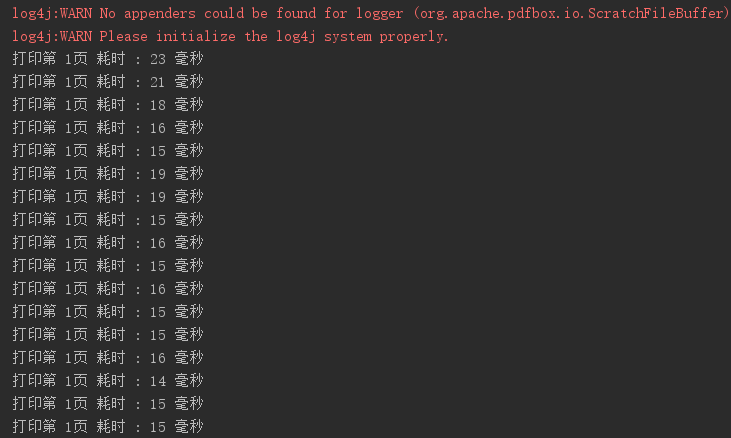
完整代码如下
 package com.fr.base;

 import com.fr.stable.Constants;

 import com.fr.stable.StableUtils;

 import org.apache.pdfbox.pdmodel.PDDocument;

 import org.apache.pdfbox.rendering.ImageType;

 import org.apache.pdfbox.rendering.PDFRenderer;

 import java.awt.Graphics;

 import java.awt.Graphics2D;

 import java.awt.Paint;

 import java.awt.Shape;

 import java.awt.TexturePaint;

 import java.awt.geom.Rectangle2D;

 import java.awt.image.BufferedImage;

 import java.awt.print.Book;

 import java.awt.print.PageFormat;

 import java.awt.print.Paper;

 import java.awt.print.Printable;

 import java.awt.print.PrinterException;

 import java.awt.print.PrinterJob;

 import java.io.FileInputStream;

 import java.io.IOException;

 import java.io.InputStream;

 public class doStreamImagePrint {

     public static void main(String[] args) throws IOException, PrinterException {

         PrinterJob job = PrinterJob.getPrinterJob();

         int width = 595;

         int height = 842;

         int marginLeft = 0;

         int marginRight = 0;

         int marginTop = 0;

         int marginBottom = 0;

         Paper paper = new Paper();

         paper.setSize(width, height);

         // 设置边距

         paper.setImageableArea(marginLeft, marginRight, width - (marginLeft + marginRight), height - (marginTop + marginBottom));

         // 自定义页面设置

         PageFormat pageFormat = new PageFormat();

         // 设置页面横纵向

         pageFormat.setOrientation(PageFormat.PORTRAIT);

         pageFormat.setPaper(paper);

         // 构建一个有size的空book, book里都是引用. 实际打印哪一页就从远程获取哪一页

         Book printBook = new Book();

         // 真正打印的时候, 每页的printable都new pdfprintable.print();

         printBook.append(convertPDFToPrint("D:\\bg.pdf", 0), pageFormat);

         printBook.append(convertPDFToPrint("D:\\bg.pdf", 0), pageFormat);

         job.setPageable(printBook);

         job.print();

     }

     private static FinePrintableDemo convertPDFToPrint(String path, int index) throws IOException {

         InputStream in = new FileInputStream(path);

         PDDocument document = PDDocument.load(in);

         return new FinePrintableDemo(document, index);

     }

     private static class FinePrintableDemo implements Printable {

         private BufferedImage image;

         public FinePrintableDemo(PDDocument document, int index) {

             // 获取pdf文件, 将其中指定的页面转成图片.

             PDFRenderer renderer = new PDFRenderer(document);

             try {

                 this.image = renderer.renderImage(index, 1, ImageType.RGB);

             } catch (IOException e) {

                 e.printStackTrace();

             }

         }

         @Override

         public int print(Graphics graphics, PageFormat pageFormat, int pageIndex) throws PrinterException {

             long start1 = System.currentTimeMillis();

             Graphics2D g2d = (Graphics2D) graphics.create();

             Paint paint = g2d.getPaint();

             int width = this.image.getWidth();

             int height = this.image.getHeight();

             Shape shape = new Rectangle2D.Double(0, 0, width, height);

             g2d.setPaint(createPaint(shape, StableUtils.isNotSupportARGB(g2d), image, width, height));

             g2d.fill(shape);

             g2d.setPaint(paint);

             g2d.dispose();

             long end1 = System.currentTimeMillis();

             System.out.println("打印第 " + (pageIndex + 1) + "页 耗时 : " + (end1 - start1) +" 毫秒 ");

             return Printable.PAGE_EXISTS;

         }

         private Paint createPaint(Shape shape, boolean isNotSupportARGB, BufferedImage image, int width, int height) {

             Rectangle2D rec2D = shape.getBounds2D();

             if ((int) rec2D.getWidth() <= 0) {

                 rec2D.setRect(rec2D.getX(), rec2D.getY(), rec2D.getWidth() + 40, rec2D.getHeight());

             }

             if ((int) rec2D.getHeight() <= 0) {

                 rec2D.setRect(rec2D.getX(), rec2D.getY(), rec2D.getWidth(), rec2D.getHeight() + 40);

             }

             BufferedImage buffered = new BufferedImage((int) rec2D.getWidth(), (int) rec2D.getHeight(), isNotSupportARGB ? BufferedImage.TYPE_INT_RGB : BufferedImage.TYPE_INT_ARGB);

             Graphics2D g2 = buffered.createGraphics();

             GraphHelper.paintImage(g2, (int) rec2D.getWidth(), (int) rec2D.getHeight(), image,

                     Constants.IMAGE_CENTER , Constants.LEFT, Constants.TOP, width, height, isNotSupportARGB);

             g2.dispose();

             return new TexturePaint(buffered, rec2D);

         }

     }

 }
PDFBox 打印带背景的文件速度慢的更多相关文章
- Lodop如何设置预览后导出带背景的图,打印不带背景图
Lodop中的ADD_PRINT_SETUP_BKIMG,可以加载上背景图,该背景图在预览的时候可以显示也可以不显示,打印可以打印出来也可以不打印出来.一般套打,都是不打印背景图的,比如一些快递的快递 ...
- 导出不带.svn的文件夹或者是不含.class的文件
转载自:http://blog.csdn.net/z278718149/article/details/21537395 如何导出不带.svn的文件夹或者是不含.class的文件 在工作环境中,有的时 ...
- 如何导出不带.svn的文件夹
在工作环境中,有的时候需要将本地SVN服务器中的文件导出来,提交到另一个SVN服务器中去(比如做现场开发时,由于外网速度慢,项目组内部往往使用一个SVN服务器,但又同时又需要公司统一管理,定期提交到公 ...
- Java 打印金字塔 or 打印带数字的金字塔 (Java 学习中的小记录)
Java 打印金字塔 or 打印带数字的金字塔 (Java 学习中的小记录) 作者:王可利(Star·星星) 效果图: 代码如下: class Star8 { public static void m ...
- git bash中带空格的文件夹以及文件的处理
空格用'\ '表示,输入的时候,是不需要单引号的 total 338drwxr-xr-x 9 Administ Administ 4096 Aug 24 23:53 HDTHelperdrwxr-xr ...
- Python_服务器与多客户端通信、UDP协议、pycharm打印带颜色输出、时间同步的机制
1.服务器与多客户端通信 import socket # 创建tcp socket的套接字 sk = socket.socket() # bind sk.bind(('127.0.0.1',8080) ...
- Lodop打印控件不打印css背景图怎么办
background:url()这是css背景图,http协议会按异步方式下载背景图,所以很容易等不到下载完毕就开始打印了,故lodop不打印css背景图.Lodop不打印css背景图,但是有其他方法 ...
- linux下怎么删除名称带空格的文件
linux下怎么删除名称带空格的文件-rm 'mysql bin.000005' 用引号把文件名括起来 某些情况下会出现名称带空格的文件, 如果想要删除的话,直接用rm mysql bin.00000 ...
- phpqrcode 分别生成普通、带logo、带背景带logo二维码
前提:下载好 phpqrcode 类库 1.生成普通二维码 //引入类库 include('phpqrcode/phpqrcode.php'); //二维码里面的链接地址 $url="htt ...
随机推荐
- 使用SimpleXML解析xml文件数据
最近工作要求从一个XML文档中批量读取APK应用数据,自然想到用SimpleXML.经过一段时间摸索,终于成功解析,现在将思路以及代码做下记录: xml文件格式大致如下: <?xml versi ...
- 暑假练习赛 007 E - Pairs
E - Pairs Description standard input/outputStatements In the secret book of ACM, it’s said: “Glory f ...
- 如何将一个div水平垂直居中?4种方法做推荐
方案一: div绝对定位水平垂直居中[margin:auto实现绝对定位元素的居中], 兼容性:,IE7及之前版本不支持 div{ width: 200px; height: 200px; backg ...
- Appscan 配置中登录管理的问题
一.登录录制时录制为空 这个问题出现在 9.0.3.5 版本上,当时同事一录制为空,我录制却ok,后来发现他录制前将谷歌浏览是打开状态,谷歌浏览关闭掉,再使用外部浏览器Chrome进行会话录制后,问题 ...
- 如何在ASP.NET Core Web API测试中使用Postman
使用Postman进行手动测试 如果您是开发人员,测试人员或管理人员,则在构建和使用应用程序时,有时了解各种API方法可能是一个挑战. 使用带有.NET Core的Postman为您的Web API生 ...
- Nodejs mongodb 管理组件adminmongodb
强大的 nodejs的mongodb管理工具,强大到即下即用: 安装需求: 1.git命令获取组件包,git clone https://github.com/mrvautin/adminMongo. ...
- mac+apue
直接从apuebook的网站下载源码,无法编译通过 通过查看以下博客解决这个问题 http://cocoa.venj.me/blog/compile-apue-example-code-under-l ...
- MySQL原理相关
1.索引 http://blog.codinglabs.org/articles/theory-of-mysql-index.html
- C#设计模式之十五命令模式(Command Pattern)【行为型】
一.引言 今天我们开始讲"行为型"设计模式的第二个模式,该模式是[命令模式],又称为行动(Action)模式或交易(Transaction)模式,英文名称是:Command P ...
- [转]Android应用安装包apk文件的反编译与重编译、重签名
背景介绍: 最近在做Robotium自动化测试,使用到solo.takeScreenshot()函数以在测试过程中截图,但此函数需要被测试APP具有<uses-permission androi ...