
POI颜色设置
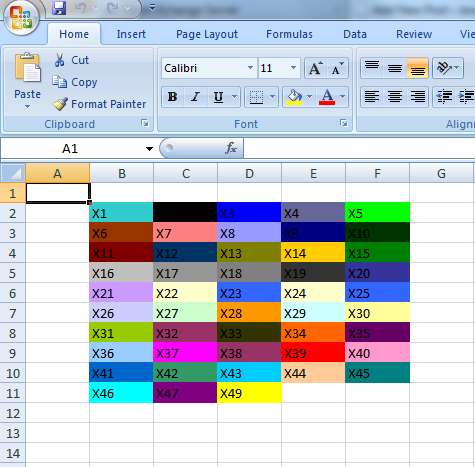
package com.java.connect.poi; import java.io.FileOutputStream; import java.io.IOException; import org.apache.poi.ss.usermodel.Cell; import org.apache.poi.ss.usermodel.CellStyle; import org.apache.poi.ss.usermodel.IndexedColors; import org.apache.poi.ss.usermodel.Row; import org.apache.poi.ss.usermodel.Sheet; import org.apache.poi.ss.usermodel.Workbook; import org.apache.poi.xssf.usermodel.XSSFWorkbook; public class POIFillAndColorExample { public static void main(String[] args) throws IOException { // Create a workbook object Workbook workbook = new XSSFWorkbook(); // Create sheet Sheet sheet = workbook.createSheet(); // Create a row and put some cells in it. Row row = sheet.createRow((short) 1); // Aqua background CellStyle style = workbook.createCellStyle(); style.setFillForegroundColor(IndexedColors.AQUA.getIndex()); style.setFillPattern(CellStyle.SOLID_FOREGROUND); Cell cell = row.createCell((short) 1); cell.setCellValue("X1"); cell.setCellStyle(style); // Orange "foreground", foreground being the fill foreground not the // font color. style = workbook.createCellStyle(); style.setFillForegroundColor(IndexedColors.AUTOMATIC.getIndex()); style.setFillPattern(CellStyle.SOLID_FOREGROUND); cell = row.createCell((short) 2); cell.setCellValue("X2"); cell.setCellStyle(style); style = workbook.createCellStyle(); style.setFillForegroundColor(IndexedColors.BLUE.getIndex()); style.setFillPattern(CellStyle.SOLID_FOREGROUND); cell = row.createCell((short) 3); cell.setCellValue("X3"); cell.setCellStyle(style); style = workbook.createCellStyle(); style.setFillForegroundColor(IndexedColors.BLUE_GREY.getIndex()); style.setFillPattern(CellStyle.SOLID_FOREGROUND); cell = row.createCell((short) 4); cell.setCellValue("X4"); cell.setCellStyle(style); style = workbook.createCellStyle(); style.setFillForegroundColor(IndexedColors.BRIGHT_GREEN.getIndex()); style.setFillPattern(CellStyle.SOLID_FOREGROUND); cell = row.createCell((short) 5); cell.setCellValue("X5"); cell.setCellStyle(style); // Create a row and put some cells in it. Row row2 = sheet.createRow((short) 2); style = workbook.createCellStyle(); style.setFillForegroundColor(IndexedColors.BROWN.getIndex()); style.setFillPattern(CellStyle.SOLID_FOREGROUND); cell = row2.createCell((short) 1); cell.setCellValue("X6"); cell.setCellStyle(style); style = workbook.createCellStyle(); style.setFillForegroundColor(IndexedColors.CORAL.getIndex()); style.setFillPattern(CellStyle.SOLID_FOREGROUND); cell = row2.createCell((short) 2); cell.setCellValue("X7"); cell.setCellStyle(style); style = workbook.createCellStyle(); style.setFillForegroundColor(IndexedColors.CORNFLOWER_BLUE.getIndex()); style.setFillPattern(CellStyle.SOLID_FOREGROUND); cell = row2.createCell((short) 3); cell.setCellValue("X8"); cell.setCellStyle(style); style = workbook.createCellStyle(); style.setFillForegroundColor(IndexedColors.DARK_BLUE.getIndex()); style.setFillPattern(CellStyle.SOLID_FOREGROUND); cell = row2.createCell((short) 4); cell.setCellValue("X9"); cell.setCellStyle(style); style = workbook.createCellStyle(); style.setFillForegroundColor(IndexedColors.DARK_GREEN.getIndex()); style.setFillPattern(CellStyle.SOLID_FOREGROUND); cell = row2.createCell((short) 5); cell.setCellValue("X10"); cell.setCellStyle(style); // Create a row and put some cells in it. Row row3 = sheet.createRow((short) 3); style = workbook.createCellStyle(); style.setFillForegroundColor(IndexedColors.DARK_RED.getIndex()); style.setFillPattern(CellStyle.SOLID_FOREGROUND); cell = row3.createCell((short) 1); cell.setCellValue("X11"); cell.setCellStyle(style); style = workbook.createCellStyle(); style.setFillForegroundColor(IndexedColors.DARK_TEAL.getIndex()); style.setFillPattern(CellStyle.SOLID_FOREGROUND); cell = row3.createCell((short) 2); cell.setCellValue("X12"); cell.setCellStyle(style); style = workbook.createCellStyle(); style.setFillForegroundColor(IndexedColors.DARK_YELLOW.getIndex()); style.setFillPattern(CellStyle.SOLID_FOREGROUND); cell = row3.createCell((short) 3); cell.setCellValue("X13"); cell.setCellStyle(style); style = workbook.createCellStyle(); style.setFillForegroundColor(IndexedColors.GOLD.getIndex()); style.setFillPattern(CellStyle.SOLID_FOREGROUND); cell = row3.createCell((short) 4); cell.setCellValue("X14"); cell.setCellStyle(style); style = workbook.createCellStyle(); style.setFillForegroundColor(IndexedColors.GREEN.getIndex()); style.setFillPattern(CellStyle.SOLID_FOREGROUND); cell = row3.createCell((short) 5); cell.setCellValue("X15"); cell.setCellStyle(style); // Create a row and put some cells in it. Row row4 = sheet.createRow((short) 4); style = workbook.createCellStyle(); style.setFillForegroundColor(IndexedColors.GREY_25_PERCENT.getIndex()); style.setFillPattern(CellStyle.SOLID_FOREGROUND); cell = row4.createCell((short) 1); cell.setCellValue("X16"); cell.setCellStyle(style); style = workbook.createCellStyle(); style.setFillForegroundColor(IndexedColors.GREY_40_PERCENT.getIndex()); style.setFillPattern(CellStyle.SOLID_FOREGROUND); cell = row4.createCell((short) 2); cell.setCellValue("X17"); cell.setCellStyle(style); style = workbook.createCellStyle(); style.setFillForegroundColor(IndexedColors.GREY_50_PERCENT.getIndex()); style.setFillPattern(CellStyle.SOLID_FOREGROUND); cell = row4.createCell((short) 3); cell.setCellValue("X18"); cell.setCellStyle(style); style = workbook.createCellStyle(); style.setFillForegroundColor(IndexedColors.GREY_80_PERCENT.getIndex()); style.setFillPattern(CellStyle.SOLID_FOREGROUND); cell = row4.createCell((short) 4); cell.setCellValue("X19"); cell.setCellStyle(style); style = workbook.createCellStyle(); style.setFillForegroundColor(IndexedColors.INDIGO.getIndex()); style.setFillPattern(CellStyle.SOLID_FOREGROUND); cell = row4.createCell((short) 5); cell.setCellValue("X20"); cell.setCellStyle(style); // Create a row and put some cells in it. Row row5 = sheet.createRow((short) 5); style = workbook.createCellStyle(); style.setFillForegroundColor(IndexedColors.LAVENDER.getIndex()); style.setFillPattern(CellStyle.SOLID_FOREGROUND); cell = row5.createCell((short) 1); cell.setCellValue("X21"); cell.setCellStyle(style); style = workbook.createCellStyle(); style.setFillForegroundColor(IndexedColors.LEMON_CHIFFON.getIndex()); style.setFillPattern(CellStyle.SOLID_FOREGROUND); cell = row5.createCell((short) 2); cell.setCellValue("X22"); cell.setCellStyle(style); style = workbook.createCellStyle(); style.setFillForegroundColor(IndexedColors.LIGHT_BLUE.getIndex()); style.setFillPattern(CellStyle.SOLID_FOREGROUND); cell = row5.createCell((short) 3); cell.setCellValue("X23"); cell.setCellStyle(style); style = workbook.createCellStyle(); style.setFillForegroundColor(IndexedColors.LEMON_CHIFFON.getIndex()); style.setFillPattern(CellStyle.SOLID_FOREGROUND); cell = row5.createCell((short) 4); cell.setCellValue("X24"); cell.setCellStyle(style); style = workbook.createCellStyle(); style.setFillForegroundColor(IndexedColors.LIGHT_BLUE.getIndex()); style.setFillPattern(CellStyle.SOLID_FOREGROUND); cell = row5.createCell((short) 5); cell.setCellValue("X25"); cell.setCellStyle(style); // Create a row and put some cells in it. Row row6 = sheet.createRow((short) 6); style = workbook.createCellStyle(); style.setFillForegroundColor(IndexedColors.LIGHT_CORNFLOWER_BLUE .getIndex()); style.setFillPattern(CellStyle.SOLID_FOREGROUND); cell = row6.createCell((short) 1); cell.setCellValue("X26"); cell.setCellStyle(style); style = workbook.createCellStyle(); style.setFillForegroundColor(IndexedColors.LIGHT_GREEN.getIndex()); style.setFillPattern(CellStyle.SOLID_FOREGROUND); cell = row6.createCell((short) 2); cell.setCellValue("X27"); cell.setCellStyle(style); style = workbook.createCellStyle(); style.setFillForegroundColor(IndexedColors.LIGHT_ORANGE.getIndex()); style.setFillPattern(CellStyle.SOLID_FOREGROUND); cell = row6.createCell((short) 3); cell.setCellValue("X28"); cell.setCellStyle(style); style = workbook.createCellStyle(); style.setFillForegroundColor(IndexedColors.LIGHT_TURQUOISE.getIndex()); style.setFillPattern(CellStyle.SOLID_FOREGROUND); cell = row6.createCell((short) 4); cell.setCellValue("X29"); cell.setCellStyle(style); style = workbook.createCellStyle(); style.setFillForegroundColor(IndexedColors.LIGHT_YELLOW.getIndex()); style.setFillPattern(CellStyle.SOLID_FOREGROUND); cell = row6.createCell((short) 5); cell.setCellValue("X30"); cell.setCellStyle(style); // Create a row and put some cells in it. Row row7 = sheet.createRow((short) 7); style = workbook.createCellStyle(); style.setFillForegroundColor(IndexedColors.LIME.getIndex()); style.setFillPattern(CellStyle.SOLID_FOREGROUND); cell = row7.createCell((short) 1); cell.setCellValue("X31"); cell.setCellStyle(style); style = workbook.createCellStyle(); style.setFillForegroundColor(IndexedColors.MAROON.getIndex()); style.setFillPattern(CellStyle.SOLID_FOREGROUND); cell = row7.createCell((short) 2); cell.setCellValue("X32"); cell.setCellStyle(style); style = workbook.createCellStyle(); style.setFillForegroundColor(IndexedColors.OLIVE_GREEN.getIndex()); style.setFillPattern(CellStyle.SOLID_FOREGROUND); cell = row7.createCell((short) 3); cell.setCellValue("X33"); cell.setCellStyle(style); style = workbook.createCellStyle(); style.setFillForegroundColor(IndexedColors.ORANGE.getIndex()); style.setFillPattern(CellStyle.SOLID_FOREGROUND); cell = row7.createCell((short) 4); cell.setCellValue("X34"); cell.setCellStyle(style); style = workbook.createCellStyle(); style.setFillForegroundColor(IndexedColors.ORCHID.getIndex()); style.setFillPattern(CellStyle.SOLID_FOREGROUND); cell = row7.createCell((short) 5); cell.setCellValue("X35"); cell.setCellStyle(style); // Create a row and put some cells in it. Row row8 = sheet.createRow((short) 8); style = workbook.createCellStyle(); style.setFillForegroundColor(IndexedColors.PALE_BLUE.getIndex()); style.setFillPattern(CellStyle.SOLID_FOREGROUND); cell = row8.createCell((short) 1); cell.setCellValue("X36"); cell.setCellStyle(style); style = workbook.createCellStyle(); style.setFillForegroundColor(IndexedColors.PINK.getIndex()); style.setFillPattern(CellStyle.SOLID_FOREGROUND); cell = row8.createCell((short) 2); cell.setCellValue("X37"); cell.setCellStyle(style); style = workbook.createCellStyle(); style.setFillForegroundColor(IndexedColors.PLUM.getIndex()); style.setFillPattern(CellStyle.SOLID_FOREGROUND); cell = row8.createCell((short) 3); cell.setCellValue("X38"); cell.setCellStyle(style); style = workbook.createCellStyle(); style.setFillForegroundColor(IndexedColors.RED.getIndex()); style.setFillPattern(CellStyle.SOLID_FOREGROUND); cell = row8.createCell((short) 4); cell.setCellValue("X39"); cell.setCellStyle(style); style = workbook.createCellStyle(); style.setFillForegroundColor(IndexedColors.ROSE.getIndex()); style.setFillPattern(CellStyle.SOLID_FOREGROUND); cell = row8.createCell((short) 5); cell.setCellValue("X40"); cell.setCellStyle(style); // Create a row and put some cells in it. Row row9 = sheet.createRow((short) 9); style = workbook.createCellStyle(); style.setFillForegroundColor(IndexedColors.ROYAL_BLUE.getIndex()); style.setFillPattern(CellStyle.SOLID_FOREGROUND); cell = row9.createCell((short) 1); cell.setCellValue("X41"); cell.setCellStyle(style); style = workbook.createCellStyle(); style.setFillForegroundColor(IndexedColors.SEA_GREEN.getIndex()); style.setFillPattern(CellStyle.SOLID_FOREGROUND); cell = row9.createCell((short) 2); cell.setCellValue("X42"); cell.setCellStyle(style); style = workbook.createCellStyle(); style.setFillForegroundColor(IndexedColors.SKY_BLUE.getIndex()); style.setFillPattern(CellStyle.SOLID_FOREGROUND); cell = row9.createCell((short) 3); cell.setCellValue("X43"); cell.setCellStyle(style); style = workbook.createCellStyle(); style.setFillForegroundColor(IndexedColors.TAN.getIndex()); style.setFillPattern(CellStyle.SOLID_FOREGROUND); cell = row9.createCell((short) 4); cell.setCellValue("X44"); cell.setCellStyle(style); style = workbook.createCellStyle(); style.setFillForegroundColor(IndexedColors.TEAL.getIndex()); style.setFillPattern(CellStyle.SOLID_FOREGROUND); cell = row9.createCell((short) 5); cell.setCellValue("X45"); cell.setCellStyle(style); // Create a row and put some cells in it. Row row10 = sheet.createRow((short) 10); style = workbook.createCellStyle(); style.setFillForegroundColor(IndexedColors.TURQUOISE.getIndex()); style.setFillPattern(CellStyle.SOLID_FOREGROUND); cell = row10.createCell((short) 1); cell.setCellValue("X46"); cell.setCellStyle(style); style = workbook.createCellStyle(); style.setFillForegroundColor(IndexedColors.VIOLET.getIndex()); style.setFillPattern(CellStyle.SOLID_FOREGROUND); cell = row10.createCell((short) 2); cell.setCellValue("X47"); cell.setCellStyle(style); style = workbook.createCellStyle(); style.setFillForegroundColor(IndexedColors.WHITE.getIndex()); style.setFillPattern(CellStyle.SOLID_FOREGROUND); cell = row10.createCell((short) 3); cell.setCellValue("X48"); cell.setCellStyle(style); style = workbook.createCellStyle(); style.setFillForegroundColor(IndexedColors.YELLOW.getIndex()); style.setFillPattern(CellStyle.SOLID_FOREGROUND); cell = row10.createCell((short) 3); cell.setCellValue("X49"); cell.setCellStyle(style); // Write the output to a file FileOutputStream fileOut = new FileOutputStream( "POIFillAndColorExample.xlsx"); workbook.write(fileOut); fileOut.close(); } }
一堆代码 我这里想说的是:
styletop.setFillForegroundColor(IndexedColors.TAN.getIndex()); //表头颜色
styletop.setFillPattern(CellStyle.SOLID_FOREGROUND); //没有这一行 无法显示颜色
POI颜色设置的更多相关文章
- POI对Excel单元格进行颜色设置
POI对Excel单元格进行颜色设置 学习了:http://www.myexception.cn/program/1932587.html HSSFWorkbook workbook = new HS ...
- [转]保护眼睛的Windows和IE、Firefox、谷歌等浏览器颜色设置
保护眼睛的Windows和IE.Firefox.谷歌等浏览器颜色设置 长时间在电脑前工作,窗口和网页上的白色十分刺眼,眼睛很容易疲劳,也容易引起头痛,其实我们可以通过设置Windows窗口和软件的颜 ...
- 在Visual Studio 2012 Blue theme下使用Dark theme的文本编辑器颜色设置
Visual Studio 2012 默认提供了3种color theme: blue,light,和dark.其中dark的文本编辑器颜色设定很爽,可是整个菜单项加上一些小的窗口如Find Resu ...
- Win7下如何设置护眼的电脑豆沙绿界面?保护眼睛的颜色设置教程
关爱心灵的窗户——眼睛! 随着科技发展,使用电脑的人越来越多,由于使用电脑时间过长,我们的眼睛也越发容易疲劳,干燥.如何才能使电脑对人眼的伤害减小到最 小. 小编建议大家可以把窗口背景色设置成护眼色. ...
- UITableViewCell的选中时的颜色设置
转自:http://hi.baidu.com/zhu410289616/item/0de0262910886011097508c2 1.系统默认的颜色设置 //无色 cell.selectionSty ...
- python终端颜色设置
1.颜色定义说明 格式:\033[显示方式;前景色;背景色m 前景色 背景色 颜色 --------------------------------------- 30 40 黑色 31 41 ...
- 【转】iOS开发UITableViewCell的选中时的颜色设置
原文网址:http://mobile.51cto.com/hot-404900.htm 1.系统默认的颜色设置 //无色 cell.selectionStyle = UITableViewCellSe ...
- IOS开发之——颜色设置
颜色设置: 指定RGB,參数是:红.绿.黄.透明度,范围是0-1 + (UIColor *)colorWithRed:(CGFloat)red green:(CGFloat)green blue:(C ...
- iOS开发技巧(系列十八:扩展UIColor,支持十六进制颜色设置)
新建一个Category,命名为UIColor+Hex,表示UIColor支持十六进制Hex颜色设置. UIColor+Hex.h文件, #import <UIKit/UIKit.h> # ...
随机推荐
- Linux系列教程(十六)——Linux权限管理之ACL权限
通过前面的两篇博客我们介绍了Linux系统的用户管理,Linux用户和用户组管理之相关配置文件 讲解了用户管理的相关配置文件,包括用户信息文件/etc/passwd,用户密码文件/etc/shadow ...
- java删除数组中的第n个数
package test; import java.util.Scanner; public class Deletearr { public static void deletearr(){ Sca ...
- 最近ssh遇到异常及解决
1.SSH框架,spring和struts整合,action中注入service不成功,检测是否缺少 struts2-spring-plugin-2.3.4.1.jar包 2.字符串转 json 加了 ...
- R语言高性能编程(三)
一.使用并行计算加倍提升性能1.数据并行 VS 任务并行实现数据并行的算法scoket 并行性注意并行计算时间并不与执行任务的计算资源数目成正比(计算机核心),amdahl定律:并行代码的速度受限于串 ...
- [转载] Java中动态加载jar文件和class文件
转载自http://blog.csdn.net/mousebaby808/article/details/31788325 概述 诸如tomcat这样的服务器,在启动的时候会加载应用程序中lib目录下 ...
- 【python】__new__和__init__区别
原文:http://blog.csdn.net/cnmilan/article/details/8849680 __new__:创建对象时调用,返回当前对象的一个实例__init__:创建完对象后调用 ...
- 深入浅出Java动态代理
文章首发于[博客园-陈树义],点击跳转到原文深入浅出Java动态代理 代理模式是设计模式中非常重要的一种类型,而设计模式又是编程中非常重要的知识点,特别是在业务系统的重构中,更是有举足轻重的地位.代理 ...
- RocketMQ快速入门
前面几篇文章介绍了为什么选择RocketMQ,以及与kafka的一些对比: 阿里 RocketMQ 优势对比,方便大家对于RocketMQ有一个简单的整体了解,之后介绍了:MQ 应用场景,让我们知道M ...
- Fedora 23建立wifi热点(Android手机可用)
在ubuntu14.04下使用ap-hotspot,速度还不错.但是在15.04下就用不了了,不知为啥.现在使用fedora23,在学校还是挺需要给手机连wifi的,于是google看看ap-hots ...
- IMDB TOP 250爬虫
这个小学期Python大作业搞了个获取IMDB TOP 250电影全部信息的爬虫.第二次写爬虫,比在暑假集训时写的熟练多了.欢迎大家评论. ''' ************************** ...