
在Spring Boot中使用swagger-bootstrap-ui
在Spring Boot中使用swagger-bootstrap-ui
swagger-bootstrap-ui是基于swagger接口api实现的一套UI,因swagger原生ui是上下结构的,在浏览接口时不是很清晰,所以,swagger-bootstrap-ui是基于左右菜单风格的方式,适用与我们在开发后台系统左右结构这种风格类似,方便与接口浏览
GitHub:https://github.com/xiaoymin/Swagger-Bootstrap-UI
欢迎大家Watch,Fork,Star
界面预览:
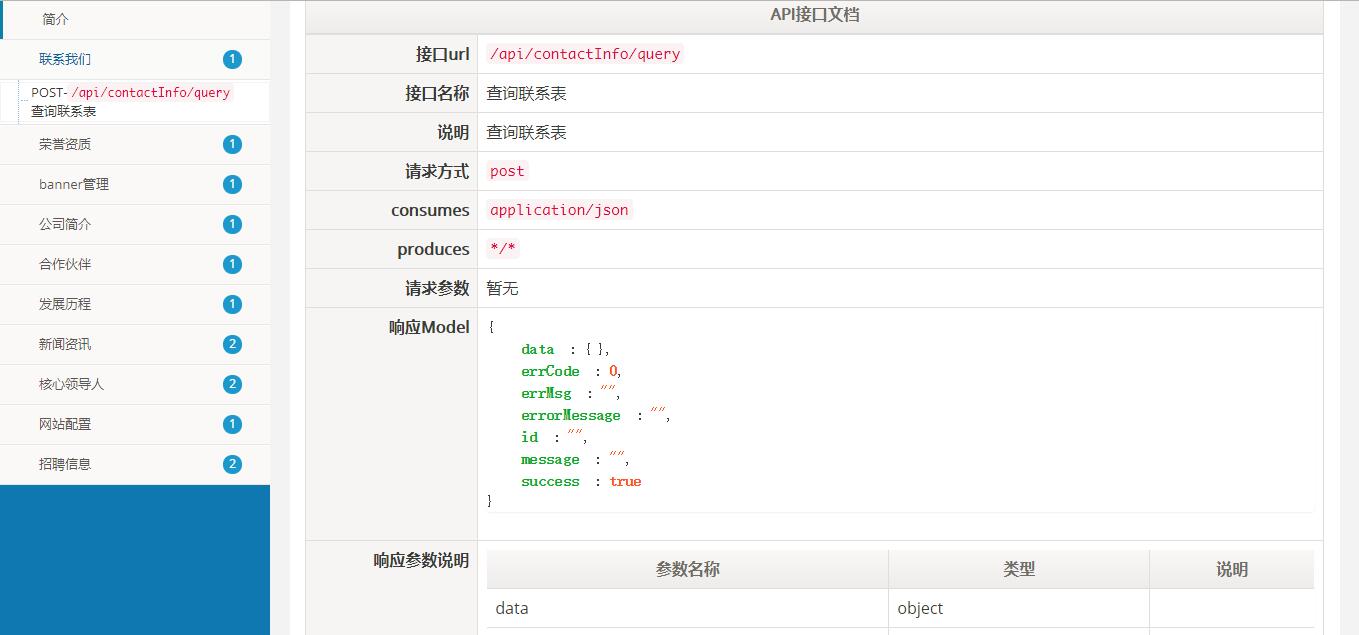

引入swagger
在pom.xml文件中引入swagger以及ui的jar包依赖
<dependency>

  <groupId>io.springfox</groupId>

  <artifactId>springfox-swagger2</artifactId>

  <version>2.7.0</version>

</dependency>

<!--引入ui包-->

<dependency>

  <groupId>com.github.xiaoymin</groupId>

  <artifactId>swagger-bootstrap-ui</artifactId>

  <version>1.7</version>

</dependency>
配置configuration
配置swagger的启用配置文件,关键注解@EnableSwagger2
一下配置是支持接口分组的配置,如果没有分组配置,只需要创建一个Docket即可
@Configuration
@EnableSwagger2
public class SwaggerConfiguration {
@Bean
public Docket createRestApi() {
return new Docket(DocumentationType.SWAGGER_2)
.apiInfo(apiInfo())
.groupName("资源管理")
.select()
.apis(RequestHandlerSelectors.basePackage("com.lishiots.dc.baseinfo.ctl"))
.paths(PathSelectors.any())
.build();
}
@Bean
public Docket createMonitorRestApi() {
return new Docket(DocumentationType.SWAGGER_2)
.apiInfo(apiInfo())
.groupName("实时监测")
.select()
.apis(RequestHandlerSelectors.basePackage("com.lishiots.dc.monitor.ctl"))
.paths(PathSelectors.any())
.build();
}
@Bean
public Docket createActivitiRestApi() {
return new Docket(DocumentationType.SWAGGER_2)
.apiInfo(apiInfo())
.groupName("工作流引擎")
.select()
.apis(RequestHandlerSelectors.basePackage("com.lishiots.dc.activiti.ctl"))
.paths(PathSelectors.any())
.build();
}
@Bean
public Docket createBaseRestApi() {
return new Docket(DocumentationType.SWAGGER_2)
.apiInfo(apiInfo())
.groupName("kernel模块")
.select()
.apis(RequestHandlerSelectors.basePackage("com.lishiots.dc.kernel.ctl"))
.paths(PathSelectors.any())
.build();
}
@Bean
public Docket createComplaintRestApi() {
return new Docket(DocumentationType.SWAGGER_2)
.apiInfo(apiInfo())
.groupName("投诉管理")
.select()
.apis(RequestHandlerSelectors.basePackage("com.lishiots.dc.complaint.ctl"))
.paths(PathSelectors.any())
.build();
}
private ApiInfo apiInfo() {
return new ApiInfoBuilder()
.title("swagger RESTful APIs")
.description("swagger RESTful APIs")
.termsOfServiceUrl("http://www.test.com/")
.contact("xiaoymin@foxmail.com")
.version("1.0")
.build();
}
}
Controller层使用swagger注解
ctl代码层:
@Api(tags = "banner管理")
@RestController
@RequestMapping("/api/bannerInfo")
public class BannerCtl {
@Autowired
private BannerInfoService service;
@PostMapping("/query")
@ApiOperation(value = "查询banner",notes = "查询banner")
public Pagination<BannerInfo> bannerInfoQuery(){
Pagination<BannerInfo> pagination = service.bannerInfoQuery();
return pagination;
}
}
接口访问
在浏览器输入:http://${host}:${port}/doc.html
在Spring Boot中使用swagger-bootstrap-ui的更多相关文章
- Spring Boot中使用Swagger CodeGen生成REST client
文章目录 什么是Open API规范定义文件呢? 生成Rest Client 在Spring Boot中使用 API Client 配置 使用Maven plugin 在线生成API Spring B ...
- Spring Boot 中使用 Swagger
前后端分离开发,后端需要编写接⼝说明⽂档,会耗费⽐较多的时间. swagger 是⼀个⽤于⽣成服务器接⼝的规范性⽂档,并且能够对接⼝进⾏测试的⼯具. 作用 ⽣成接⼝说明⽂档 对接⼝进⾏测试 使用步骤 ...
- spring boot 中使用swagger 来自动生成接口文档
1.依赖包 <dependency> <groupId>io.springfox</groupId> <artifactId>springfox-swa ...
- spring boot 中使用swagger
一.pom.xml <dependency> <groupId>io.springfox</groupId> <artifactId>springfox ...
- 【swagger】1.swagger提供开发者文档--简单集成到spring boot中【spring mvc】【spring boot】
swagger提供开发者文档 ======================================================== 作用:想使用swagger的同学,一定是想用它来做前后台 ...
- Spring Boot中使用Swagger2构建RESTful APIs介绍
1.添加相关依赖 <!-- https://mvnrepository.com/artifact/io.springfox/springfox-swagger2 --> <depen ...
- 在spring Boot中使用swagger-bootstrap-ui(原文)
1.swagger简介 Swagger是一个API接口管理工具,支持在线测试接口数据,根据配置自动生成API文档,结合spring mvc而提供界面化方法文档的一个开源框架. 1.1Swagger主要 ...
- Spring Boot 快速整合Swagger
一.前言 Spring Boot作为当前最为流行的Java web开发脚手架,越来越多的开发者选择用其来构建企业级的RESTFul API接口.这些接口不但会服务于传统的web端(b/s),也会服务于 ...
- Spring Boot中使用Swagger2构建强大的RESTful API文档
由于Spring Boot能够快速开发.便捷部署等特性,相信有很大一部分Spring Boot的用户会用来构建RESTful API.而我们构建RESTful API的目的通常都是由于多终端的原因,这 ...
随机推荐
- Wechat 微信端正确播放audio、video的姿势
在开发微信项目时,有在项目中播放音频(audio)和视频(video)的需求: 在开发中,我们会遇到的问题 audio.video在Android和IOS系统上的兼容性: video播放完成后,跳出浏 ...
- 实战开发-》融云tp3.2.3
1.先去下载sdk 2.我放在的位置如下: 3.之前试了试,怎么引入都不成功,所以我加入了命名空间 还有,我把methods下的所有类都加了命名空间,心里安慰吧. 4.在公共函数写函数,例如 填写自己 ...
- MySQL优化-》执行计划和常见索引
MySql的explain执行计划 explain是一个Mysql性能显示的工具,它显示了MySQL如何使用索引来处理select语句以及连接表.可以帮助选择更好的索引和写出更优化的查询语句.在开发当 ...
- mysql分组查询前n条数据
建表: CREATE TABLE hard(id INT,aa varchar(50) ,bb INT,PRIMARY key(id))insert into hard values(1,'a',9) ...
- Java框架之Spring(五)
本文主要介绍Spring中, 1 Spring JDBC 2 使用注解方式管理事务的传播行为 3 采用XML 方式配置事务 4 SH 整合 5 SSH 整合 一.Spring JDBC 1) 导包 , ...
- 如何将nupkg文件安装到VS2017
本文为原创文章.源代码为原创代码,如转载/复制,请在网页/代码处明显位置标明原文名称.作者及网址,谢谢! 开发工具:VS2017 系统:Win10 X64 一.首先在https://www.nuget ...
- Nginx是如何处理Request的?
nginx是如何匹配过来的请求,然后做处理的呢?这个匹配的过程可以分为两步: 1.选择server 2.选择location 选择server 仅仅匹配server name 加入Nginx的配 ...
- SQL数据开发(经典) 基本操作
数据开发(经典) 1.按姓氏笔画排序: Select * From TableName Order By CustomerName Collate Chinese_PRC_Str oke_ci_as ...
- 51 Nod 1027 大数乘法【Java大数乱搞】
1027 大数乘法 基准时间限制:1 秒 空间限制:131072 KB 分值: 0 难度:基础题 给出2个大整数A,B,计算A*B的结果. Input 第1行:大数A 第2行:大数B (A,B的长度 ...
- [bzoj3287] Mato的刷屏计划
第一眼以为是傻逼斜率优化>_< f[i]表示按i次最多可输出字符数..f[i]=max{ f[i-1]+1,(i-j-1)*f[j] },j<i-2 结果n在100+的时候就喜闻乐见 ...