
在Spring Boot中使用swagger-bootstrap-ui
在Spring Boot中使用swagger-bootstrap-ui
swagger-bootstrap-ui是基于swagger接口api实现的一套UI,因swagger原生ui是上下结构的,在浏览接口时不是很清晰,所以,swagger-bootstrap-ui是基于左右菜单风格的方式,适用与我们在开发后台系统左右结构这种风格类似,方便与接口浏览
GitHub:https://github.com/xiaoymin/Swagger-Bootstrap-UI
欢迎大家Watch,Fork,Star
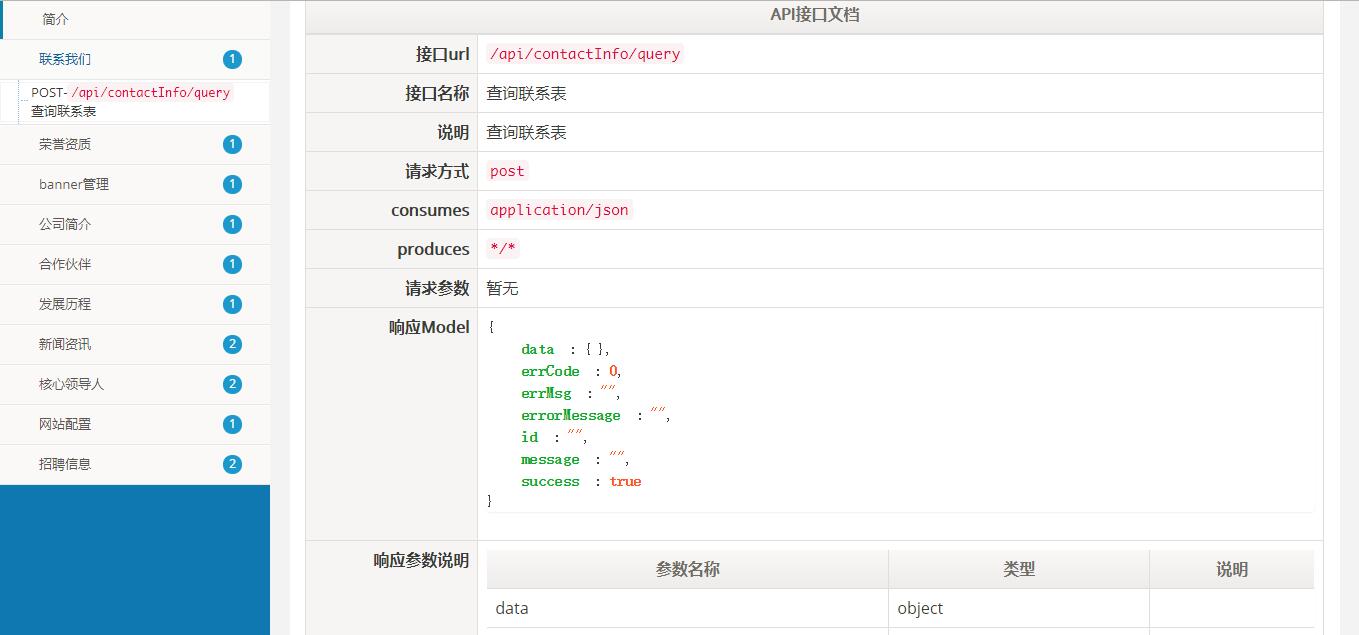
界面预览:

引入swagger
在pom.xml文件中引入swagger以及ui的jar包依赖
<dependency>

  <groupId>io.springfox</groupId>

  <artifactId>springfox-swagger2</artifactId>

  <version>2.7.0</version>

</dependency>

<!--引入ui包-->

<dependency>

  <groupId>com.github.xiaoymin</groupId>

  <artifactId>swagger-bootstrap-ui</artifactId>

  <version>1.7</version>

</dependency>
配置configuration
配置swagger的启用配置文件,关键注解@EnableSwagger2
一下配置是支持接口分组的配置,如果没有分组配置,只需要创建一个Docket即可
@Configuration
@EnableSwagger2
public class SwaggerConfiguration {
@Bean
public Docket createRestApi() {
return new Docket(DocumentationType.SWAGGER_2)
.apiInfo(apiInfo())
.groupName("资源管理")
.select()
.apis(RequestHandlerSelectors.basePackage("com.lishiots.dc.baseinfo.ctl"))
.paths(PathSelectors.any())
.build();
}
@Bean
public Docket createMonitorRestApi() {
return new Docket(DocumentationType.SWAGGER_2)
.apiInfo(apiInfo())
.groupName("实时监测")
.select()
.apis(RequestHandlerSelectors.basePackage("com.lishiots.dc.monitor.ctl"))
.paths(PathSelectors.any())
.build();
}
@Bean
public Docket createActivitiRestApi() {
return new Docket(DocumentationType.SWAGGER_2)
.apiInfo(apiInfo())
.groupName("工作流引擎")
.select()
.apis(RequestHandlerSelectors.basePackage("com.lishiots.dc.activiti.ctl"))
.paths(PathSelectors.any())
.build();
}
@Bean
public Docket createBaseRestApi() {
return new Docket(DocumentationType.SWAGGER_2)
.apiInfo(apiInfo())
.groupName("kernel模块")
.select()
.apis(RequestHandlerSelectors.basePackage("com.lishiots.dc.kernel.ctl"))
.paths(PathSelectors.any())
.build();
}
@Bean
public Docket createComplaintRestApi() {
return new Docket(DocumentationType.SWAGGER_2)
.apiInfo(apiInfo())
.groupName("投诉管理")
.select()
.apis(RequestHandlerSelectors.basePackage("com.lishiots.dc.complaint.ctl"))
.paths(PathSelectors.any())
.build();
}
private ApiInfo apiInfo() {
return new ApiInfoBuilder()
.title("swagger RESTful APIs")
.description("swagger RESTful APIs")
.termsOfServiceUrl("http://www.test.com/")
.contact("xiaoymin@foxmail.com")
.version("1.0")
.build();
}
}
Controller层使用swagger注解
ctl代码层:
@Api(tags = "banner管理")
@RestController
@RequestMapping("/api/bannerInfo")
public class BannerCtl {
@Autowired
private BannerInfoService service;
@PostMapping("/query")
@ApiOperation(value = "查询banner",notes = "查询banner")
public Pagination<BannerInfo> bannerInfoQuery(){
Pagination<BannerInfo> pagination = service.bannerInfoQuery();
return pagination;
}
}
接口访问
在浏览器输入:http://${host}:${port}/doc.html
在Spring Boot中使用swagger-bootstrap-ui的更多相关文章
- Spring Boot中使用Swagger CodeGen生成REST client
文章目录 什么是Open API规范定义文件呢? 生成Rest Client 在Spring Boot中使用 API Client 配置 使用Maven plugin 在线生成API Spring B ...
- Spring Boot 中使用 Swagger
前后端分离开发,后端需要编写接⼝说明⽂档,会耗费⽐较多的时间. swagger 是⼀个⽤于⽣成服务器接⼝的规范性⽂档,并且能够对接⼝进⾏测试的⼯具. 作用 ⽣成接⼝说明⽂档 对接⼝进⾏测试 使用步骤 ...
- spring boot 中使用swagger 来自动生成接口文档
1.依赖包 <dependency> <groupId>io.springfox</groupId> <artifactId>springfox-swa ...
- spring boot 中使用swagger
一.pom.xml <dependency> <groupId>io.springfox</groupId> <artifactId>springfox ...
- 【swagger】1.swagger提供开发者文档--简单集成到spring boot中【spring mvc】【spring boot】
swagger提供开发者文档 ======================================================== 作用:想使用swagger的同学,一定是想用它来做前后台 ...
- Spring Boot中使用Swagger2构建RESTful APIs介绍
1.添加相关依赖 <!-- https://mvnrepository.com/artifact/io.springfox/springfox-swagger2 --> <depen ...
- 在spring Boot中使用swagger-bootstrap-ui(原文)
1.swagger简介 Swagger是一个API接口管理工具,支持在线测试接口数据,根据配置自动生成API文档,结合spring mvc而提供界面化方法文档的一个开源框架. 1.1Swagger主要 ...
- Spring Boot 快速整合Swagger
一.前言 Spring Boot作为当前最为流行的Java web开发脚手架,越来越多的开发者选择用其来构建企业级的RESTFul API接口.这些接口不但会服务于传统的web端(b/s),也会服务于 ...
- Spring Boot中使用Swagger2构建强大的RESTful API文档
由于Spring Boot能够快速开发.便捷部署等特性,相信有很大一部分Spring Boot的用户会用来构建RESTful API.而我们构建RESTful API的目的通常都是由于多终端的原因,这 ...
随机推荐
- [js高手之路]从零开始打造一个javascript开源框架gdom与插件开发免费视频教程连载中
百度网盘下载地址:https://pan.baidu.com/s/1kULNXOF 优酷土豆观看地址:http://v.youku.com/v_show/id_XMzAwNTY2MTE0MA==.ht ...
- this与base关键字
this关键字 this关键字代表当前对象,通过this关键字可以访问当前对象的成员.(当前对象的成员:自己本身的成员+从父类继承过来的所有的成员.) this关键字可以访问:本类的所有成员和父类的非 ...
- php 常量const
常量使用关键词const修饰,一经定义,不能改变 常量的使用规则 定义后,应该马上赋初始值 不能用public.private.protected修饰 在本类,可用self::name 类名::na ...
- Maven 环境配置
1. 解压maven 2. 配置MAVEN_HOME环境变量 MAVEN_HOME D:\maven\apache-maven-3.0.5-bin\apache-maven-3.0.5 path ...
- .NET(c#) 移动开发平台 - Smobiler(1)
如果说基于.net的移动开发平台,目前比较流行的可能是xamarin了,不过除了这个,还有一个比xamarin更好用的国内的.net移动开发平台,smobiler,不用学习另外一套开发模式或者搭建复杂 ...
- better-scroll不能滚动之 滚动监听-左右联动
滚动监听 better-scroll 无法滚动的分析,直接翻到最后,看问题汇总,希望能帮助你解决. 借用一下人家这个好看的项目图片,做一个解释.左边的内容会跟右边的内容一起关联,点击左边的菜单,右边会 ...
- K:平衡二叉树(AVL)
相关介绍: 二叉查找树的查找效率与二叉树的形状有关,对于按给定序列建立的二叉排序树,若其左.右子树均匀分布,则查找过程类似于有序表的二分查找,时间复杂度变为O(log2n).当若给定序列原来有序,则 ...
- Java中的集合框架(中)
Map和HashMap Map接口 1.Map提供了一种映射关系,其中的元素是以键值对(key-value)的形式存储的,能够实现根据key快速查找value 2.Map中的键值对以Entry类型的对 ...
- linux下,文件的权限和数字对应关系详解
命令 chmod ABC file 其中A.B.C各为一个数字,分别表示User.Group.及Other的权限. A.B.C这三个数字如果各自转换成由"0"."1&qu ...
- 【Java学习笔记之二十七】Java8中传多个参数时的方法
java中传参数时,在类型后面跟"..."的使用: public static void main(String[] args){ testStringA ...