tpcc-mysql的安装:http://www.cnblogs.com/lizhi221/p/6814003.html
tpcc-mysql的使用:http://www.cnblogs.com/lizhi221/p/6814014.html
 
前提,已经按照好gnuplot并支持jpeg【直接yum安装即可:yum install gnuplot】
 
1、使用tpcc-mysql压测数据库,得到压测结果文件
[root@localhost tpcc-mysql]# ./tpcc_start -h127.0.0.1 -P3306 -d sampson -u root -p mysql -w 1 -c 10 -r 60 -l 60 > tpcc-output/tpcc-output-1038.log
[root@localhost tpcc-mysql]# ./tpcc_start -h127.0.0.1 -P3306 -d sampson -u root -p mysql -w 2 -c 10 -r 60 -l 60 > tpcc-output/tpcc-output-1047.log
 
2、使用tpcc-output-analyze.sh脚本获取压测结果文件中的每次的事务数,并将结果写到制定的TXT文本中
[root@localhost tpcc-mysql]# ./tpcc-output-analyze.sh tpcc-output/tpcc-output-1038.log > tpcc-output/tpcc-1038-data.txt
[root@localhost tpcc-mysql] # cat tpcc-output/tpcc-1038-data.txt
10 599
20 643
30 746
40 730
50 688
60 770
 
[root@localhost tpcc-mysql]# ./tpcc-output-analyze.sh tpcc-output/tpcc-output-1047.log > tpcc-output/tpcc-1047-data.txt
[root@localhost tpcc-mysql] # cat tpcc-output/tpcc-1047-data.txt
10 153
20 159
30 168
40 175
50 145
60  93
 
3、将两个文本合并
[root@localhost tpcc-mysql]# paste tpcc-output/tpcc-1038-data.txt tpcc-output/tpcc-1047-data.txt > tpcc-output/tpcc-graph-data-0504.txt
[root@localhost tpcc-mysql] # cat tpcc-output/tpcc-graph-data-0504.txt
10 599    10 153
20 643    20 159
30 746    30 168
40 730    40 175
50 688    50 145
60 770    60  93
 
4、使用tpcc-graph-build.sh脚本生成图表
[root@localhost tpcc-mysql]#./tpcc-graph-build.sh tpcc-output/tpcc-graph-data-0504.txt tpcc-output/tpcc-graph-0504.jpg
 
注:

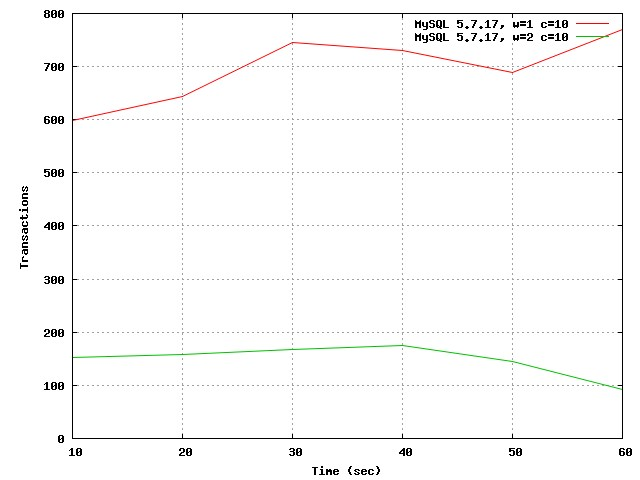
plot datafile using 1:2 title "MySQL 5.7.17, w=1 c=10" with lines,\
datafile using 3:4 title "MySQL 5.7.17, w=2 c=10" with lines axes x1y1
【这里的using对应tpcc-graph-data-0504.txt的列,using 1:2即使用1、2列 】
 
图表显示:

[root@localhost tpcc-mysql] # cat tpcc-output-analyze.sh
#!/bin/sh
TIMESLOT=1
if [ -n "$2" ]
then
TIMESLOT=$2
fi
cat $1 | grep -v HY000 | grep -v payment | grep -v neword | awk -v timeslot=$TIMESLOT 'BEGIN { FS="[,():]"; s=0; cntr=0; aggr=0 } /MEASURING START/ { s=1} /STOPPING THREADS/ {s=0} /0/ { if (s==1) { cntr++; aggr+=$2; } if ( cntr==timeslot ) { printf ("%d %3d\n",$1,(aggr/timeslot)) ; cntr=0; aggr=0 } }'
 
[root@localhost tpcc-mysql] # cat tpcc-graph-build.sh
#!/bin/bash
 
### goto user homedir and remove previous file
rm -f '$2'
 
gnuplot << EOP
 
### set data source file
datafile = '$1'
 
### set graph type and size
set terminal jpeg size 640,480
 
### set titles
set grid x y
set xlabel "Time (sec)"
set ylabel "Transactions"
 
### set output filename
set output '$2'
 
### build graph
# plot datafile with lines
plot datafile using 1:2 title "MySQL 5.7.17, w=1 c=10" with lines,\
datafile using 3:4 title "MySQL 5.7.17, w=2 c=10" with lines axes x1y1
 
EOP
 

使用gnuplot对tpcc-mysql压测结果生成图表的更多相关文章

  1. 03:TPCC 基准压测my.cnf

    line: V1.3 mail: gczheng@139.com date: 2017-11-09 一.TPCC测试前准备 1.压测环境 配置 信息 主机 Dell PowerEdge R730xd ...

  2. 【JMeter】(3)---MySQL压测

    JMeter---MySQL压测 一.添加MySQL驱动jar包 在测试计划(Test Plan)页面添加jar包 二.添加MySQL连接配置 添加线程组右击-->添加(add)-->配置 ...

  3. MySQL 压测

    https://mp.weixin.qq.com/s/vKJZp5cGUetHokGh2EZUXg mysqlslap --iterations=100 --create-schema='test' ...

  4. JMeter使用教程2——MySQL压测

    之前写过一篇JMeter使用教程,只是介绍了http请求的压力测试,想到MySQL的测试也挺必要的,于是写下这篇记录一下.如果不知道怎么下载和安装,可以看一下上一篇关于JMeter的文章,地址是:ht ...

  5. jmeter进行MySQL压测

    jmeter怎么对数据库进行压测 目录 jmeter怎么对数据库进行压测 点击测试计划,再点击"浏览",把JDBC驱动添加进来: 然后添加配置元件 再添加一个采样器:JDBC re ...

  6. Mysql压测工具mysqlslap 讲解

    在mysql5.1以后的版本:客户端带了个工具mysqlslap可以对mysql进行压力测试: 可以使用mysqlslap --help来显示使用方法: Default options are rea ...

  7. MySQL压测中遇到的一些问题

    批量insert http://blog.csdn.net/xiaoxian8023/article/details/20155429 Mysql jdbc 批处理数据,需要给jdbc连接加上rewr ...

  8. sysbench 1.0.9 mysql 压测工具安装使用

    备注:    安装比较简单,可以使用源码或者使用yum 进行安装,本次测试使用yum    注意1.0 之后版本与老版本改动比较大,好多地方都有修改,本次测试使用    的mysql 使用docker ...

  9. jmeter非GUI模式如何压测并生成测试报告

    在启动Jmeter时,我们会看到这样一句提示: 不要使用GUI模式(界面模式)进行负载测试,GUI模式只能用于创建测试和调试.进行负载测试时,需要时用非GUI模式. 那么为什么进行负载测试时一定要用非 ...

随机推荐

  1. 对于反射中的invoke()方法的理解

    先讲一下java中的反射: 反射就是将类别的各个组成部分进行剖析,可以得到每个组成部分,就可以对每一部分进行操作 在比较复杂的程序或框架中来使用反射技术,可以简化代码提高程序的复用性. 讲的是Meth ...

  2. jQuery Ajax 实例 全解析(转)

    1. load( url, [data], [callback] ) :载入远程 HTML 文件代码并插入至 DOM 中. url (String) : 请求的HTML页的URL地址. data (M ...

  3. iOS9,10没有问题,iOS8上面一登录就崩溃,原因Assets的问题

    在项目中开发中,打包成一个ipa的包,发现iOS9,10,运行非常流畅,iOS8上面一运行就崩溃,找了好久,才找到原因竟然是Assets的问题,一开始我把ipa包放在蒲公英上面托管扫码下载的,用iTu ...

  4. Python之路-基本数据类型

    一.数据类型 1.数字 包含整型和浮点型,还有复数2.字符 长度,索引,切片也适用于列表的操作 移除空白 strip() 默认字符串前后的空格,制表符,换行符 strip(";") ...

  5. OS X background process

    Types of Background Process 1. login item 2. xpc service 3. daemon/agent (也可以叫 mach service) 4. star ...

  6. 【R.转载】apply函数族的使用方法

    为什么用apply 因为我是一个程序员,所以在最初学习R的时候,当成"又一门编程语言"来学习,但是怎么学都觉得别扭.现在我的看法倾向于,R不是一种通用型的编程语言,而是一种统计领域 ...

  7. oralce set

    1         SET TIMING ON 说明:显示SQL语句的运行时间.默认值为OFF. 在SQLPLUS中使用,时间精确到0.01秒.也就是10毫秒. 在PL/SQL DEVELOPER 中 ...

  8. Parse error: syntax error, unexpected '[' in D:\phpStudy\WWW\tp5\thinkphp\library\think\Loader.php on line 18

    g刚学习tp5就遇到了这个问题  百思不得其解,看到官网说明 是基于PHP5.4 设计的  打开 phpstudy版本一看 就呵呵呵了 .还是5.3的版本.更换版本之后 就ok了.

  9. JavaScript--------------------jQuery中.bind() .live() .delegate() .on()的区别 和 三种方式写光棒事件 动画

    bind(type,[data],fn) 为每个匹配元素的特定事件绑定事件处理函数. $("a").bind("click",function(){alert( ...

  10. NOIP2014D2T2寻找道路

    洛谷传送门 这道题可以把边都反着存一遍,从终点开始深搜,然后把到不了的点 和它们所指向的点都去掉. 最后在剩余的点里跑一遍spfa就可以了. --代码 #include <cstdio> ...