
ELK日志分析系统之logstash7.x最新版安装与配置
2 、Logstash的简介
2.1 logstash 介绍
LogStash由JRuby语言编写,基于消息(message-based)的简单架构,并运行在Java虚拟机(JVM)上。不同于分离的代理端(agent)或主机端(server),LogStash可配置单一的代理端(agent)与其它开源软件结合,以实现不同的功能。
2.2 logStash的四大组件
Shipper:发送事件(events)至LogStash;通常,远程代理端(agent)只需要运行这个组件即可;
Broker and Indexer:接收并索引化事件;
Search and Storage:允许对事件进行搜索和存储;
Web Interface:基于Web的展示界面
正是由于以上组件在LogStash架构中可独立部署,才提供了更好的集群扩展性。
2.3、软件包下载网址:https://www.elastic.co/cn/downloads/logstash
2.4、将下载的tar压缩包拷贝到/application/目录下,并创建软链接/application/logstash。
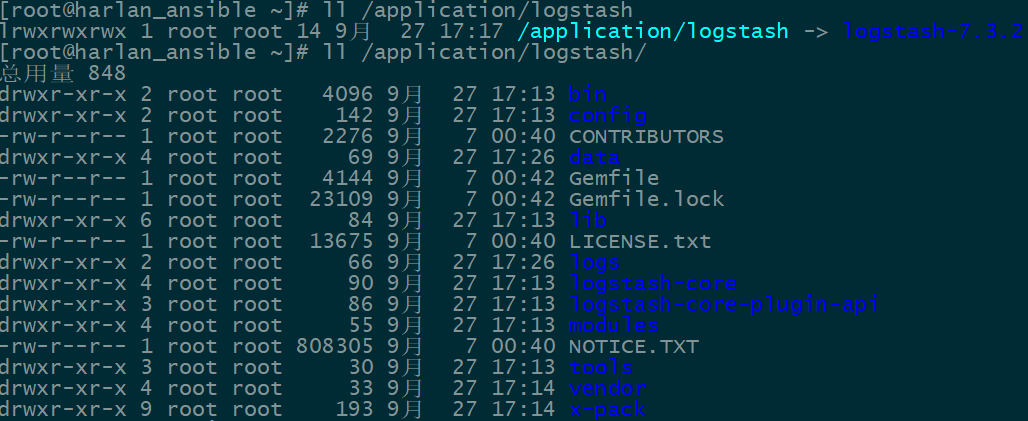
2.5、循环渐近的学习logstash
2.5.1 启动一个logstash,-e:在命令行执行;input输入,stdin标准输入,是一个插件;output输出,stdout:标准输出。默认输出格式是使用rubudebug显示详细输出,codec为一种编解码器
[root@harlan_ansible ~]# /application/logstash/bin/logstash -e 'input {stdin{}} output {stdout{}}'

OpenJDK -Bit Server VM warning: Option UseConcMarkSweepGC was deprecated in version 9.0 and will likely be removed in a future release.

WARNING: An illegal reflective access operation has occurred

WARNING: Illegal reflective access by com.headius.backport9.modules.Modules (file:/application/logstash-7.3./logstash-core/lib/jars/jruby-complete-9.2.7.0.jar) to field java.io.FileDescriptor.fd

WARNING: Please consider reporting this to the maintainers of com.headius.backport9.modules.Modules

WARNING: Use --illegal-access=warn to enable warnings of further illegal reflective access operations

WARNING: All illegal access operations will be denied in a future release

Thread.exclusive is deprecated, use Thread::Mutex

Sending Logstash logs to /application/logstash/logs which is now configured via log4j2.properties

[--27T21::,][WARN ][logstash.config.source.multilocal] Ignoring the 'pipelines.yml' file because modules or command line options are specified

[--27T21::,][INFO ][logstash.runner          ] Starting Logstash {"logstash.version"=>"7.3.2"}

[--27T21::,][INFO ][org.reflections.Reflections] Reflections took  ms to scan  urls, producing  keys and  values

[--27T21::,][WARN ][org.logstash.instrument.metrics.gauge.LazyDelegatingGauge] A gauge metric of an unknown type (org.jruby.RubyArray) has been create for key: cluster_uuids. This may result in invalid serialization.  It is recommended to log an issue to the responsible developer/development team.

[--27T21::,][INFO ][logstash.javapipeline    ] Starting pipeline {:pipeline_id=>"main", "pipeline.workers"=>, "pipeline.batch.size"=>, "pipeline.batch.delay"=>, "pipeline.max_inflight"=>, :thread=>"#<Thread:0x1b23cd0d run>"}

[--27T21::,][INFO ][logstash.javapipeline    ] Pipeline started {"pipeline.id"=>"main"}

The stdin plugin is now waiting for input:

[--27T21::,][INFO ][logstash.agent           ] Pipelines running {:count=>, :running_pipelines=>[:main], :non_running_pipelines=>[]}

[--27T21::,][INFO ][logstash.agent           ] Successfully started Logstash API endpoint {:port=>}

hello word            #手动输入一串字符,然后下面在屏幕上会标准输出。

/application/logstash-7.3./vendor/bundle/jruby/2.5./gems/awesome_print-1.7./lib/awesome_print/formatters/base_formatter.rb:: warning: constant ::Fixnum is deprecated

{

       "message" => "hello word",

      "@version" => "",

    "@timestamp" => --27T13::.241Z,

          "host" => "harlan_ansible"

}
2.5.2 将屏幕输入的字符串输出到elasticsearch服务中
[root@harlan_ansible ~]# /application/logstash/bin/logstash -e 'input { stdin{} } output { elasticsearch { hosts => ["127.0.0.1:9200"] } }'
OpenJDK -Bit Server VM warning: Option UseConcMarkSweepGC was deprecated in version 9.0 and will likely be removed in a future release.

WARNING: An illegal reflective access operation has occurred

WARNING: Illegal reflective access by com.headius.backport9.modules.Modules (file:/application/logstash-7.3./logstash-core/lib/jars/jruby-complete-9.2.7.0.jar) to field java.io.FileDescriptor.fd

WARNING: Please consider reporting this to the maintainers of com.headius.backport9.modules.Modules

WARNING: Use --illegal-access=warn to enable warnings of further illegal reflective access operations

WARNING: All illegal access operations will be denied in a future release

Thread.exclusive is deprecated, use Thread::Mutex

Sending Logstash logs to /application/logstash/logs which is now configured via log4j2.properties

[--27T21::,][WARN ][logstash.config.source.multilocal] Ignoring the 'pipelines.yml' file because modules or command line options are specified

[--27T21::,][INFO ][logstash.runner          ] Starting Logstash {"logstash.version"=>"7.3.2"}

[--27T21::,][INFO ][org.reflections.Reflections] Reflections took  ms to scan  urls, producing  keys and  values

[--27T21::,][INFO ][logstash.outputs.elasticsearch] Elasticsearch pool URLs updated {:changes=>{:removed=>[], :added=>[http://127.0.0.1:9200/]}}

[--27T21::,][WARN ][logstash.outputs.elasticsearch] Restored connection to ES instance {:url=>"http://127.0.0.1:9200/"}

[--27T21::,][INFO ][logstash.outputs.elasticsearch] ES Output version determined {:es_version=>}

[--27T21::,][WARN ][logstash.outputs.elasticsearch] Detected a .x and above cluster: the `type` event field won't be used to determine the document _type {:es_version=>7}

[--27T21::,][INFO ][logstash.outputs.elasticsearch] New Elasticsearch output {:class=>"LogStash::Outputs::ElasticSearch", :hosts=>["//127.0.0.1:9200"]}

[--27T21::,][INFO ][logstash.outputs.elasticsearch] Using default mapping template

[--27T21::,][WARN ][org.logstash.instrument.metrics.gauge.LazyDelegatingGauge] A gauge metric of an unknown type (org.jruby.specialized.RubyArrayOneObject) has been create for key: cluster_uuids. This may result in invalid serialization.  It is recommended to log an issue to the responsible developer/development team.

[--27T21::,][INFO ][logstash.javapipeline    ] Starting pipeline {:pipeline_id=>"main", "pipeline.workers"=>, "pipeline.batch.size"=>, "pipeline.batch.delay"=>, "pipeline.max_inflight"=>, :thread=>"#<Thread:0x228d3610 run>"}

[--27T21::,][INFO ][logstash.javapipeline    ] Pipeline started {"pipeline.id"=>"main"}

[--27T21::,][INFO ][logstash.outputs.elasticsearch] Attempting to install template {:manage_template=>{"index_patterns"=>"logstash-*", "version"=>, "settings"=>{"index.refresh_interval"=>"5s", "number_of_shards"=>, "index.lifecycle.name"=>"logstash-policy", "index.lifecycle.rollover_alias"=>"logstash"}, "mappings"=>{"dynamic_templates"=>[{"message_field"=>{"path_match"=>"message", "match_mapping_type"=>"string", "mapping"=>{"type"=>"text", "norms"=>false}}}, {"string_fields"=>{"match"=>"*", "match_mapping_type"=>"string", "mapping"=>{"type"=>"text", "norms"=>false, "fields"=>{"keyword"=>{"type"=>"keyword", "ignore_above"=>}}}}}], "properties"=>{"@timestamp"=>{"type"=>"date"}, "@version"=>{"type"=>"keyword"}, "geoip"=>{"dynamic"=>true, "properties"=>{"ip"=>{"type"=>"ip"}, "location"=>{"type"=>"geo_point"}, "latitude"=>{"type"=>"half_float"}, "longitude"=>{"type"=>"half_float"}}}}}}}

The stdin plugin is now waiting for input:

[--27T21::,][INFO ][logstash.outputs.elasticsearch] Installing elasticsearch template to _template/logstash

[--27T21::,][INFO ][logstash.agent           ] Pipelines running {:count=>, :running_pipelines=>[:main], :non_running_pipelines=>[]}

[--27T21::,][INFO ][logstash.agent           ] Successfully started Logstash API endpoint {:port=>}

[--27T21::,][INFO ][logstash.outputs.elasticsearch] Creating rollover alias <logstash-{now/d}->

[--27T21::,][INFO ][logstash.outputs.elasticsearch] Installing ILM policy {"policy"=>{"phases"=>{"hot"=>{"actions"=>{"rollover"=>{"max_size"=>"50gb", "max_age"=>"30d"}}}}}} to _ilm/policy/logstash-policy

hello    #手动输入一个字符串。
通过浏览器访问地址:http://10.0.0.169:9200/_search?pretty
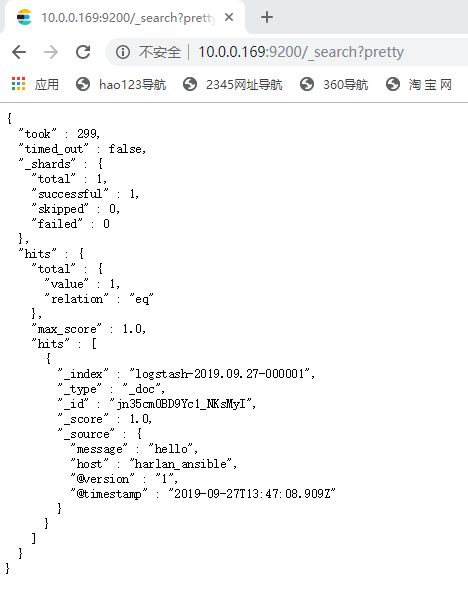
恭喜,至此你已经成功利用Elasticsearch和Logstash来收集日志数据了。
2.6、 收集系统日志的conf
conf文件放置在/application/logstash/bin/目录下,具体配置如下:
input {

    file {

        path => "/var/log/messages"

        type => "system"

        start_position => "beginning"

    }

    file {

        path => "/application/es/to/logs/elasticsearch.log"

        type => "es-error"

        start_position => "beginning"

    }

}

output {

    if [type] == "system" {

        elasticsearch {

            hosts => ["10.0.0.169:9200"]

            index => "system-%{+YYYY.MM.dd}"

        }

    }

    if [type] == "es-error" {

        elasticsearch {

            hosts => ["10.0.0.169:9200"]

            index => "es-error-%{+YYYY.MM.dd}"

        }

    }

}
执行命令启动logstash服务:
/application/logstash/bin/logstash -f logstash.conf
ELK日志分析系统之logstash7.x最新版安装与配置的更多相关文章
- ELK日志分析系统之Kibana7.x最新版安装与配置
3.Kibana的简介 Kibana 让您能够自由地选择如何呈现自己的数据.Kibana 核心产品搭载了一批经典功能:柱状图.线状图.饼图.旭日图等等. 3.1.软件包下载地址:https://www ...
- ELK日志分析系统之elasticsearch7.x最新版安装与配置
1.Elasticsearch 1.1.elasticsearch的简介 ElasticSearch是一个基于Lucene的搜索服务器.它提供了一个分布式多用户能力的全文搜索引擎,基于RESTful ...
- ELK日志分析系统简单部署
1.传统日志分析系统: 日志主要包括系统日志.应用程序日志和安全日志.系统运维和开发人员可以通过日志了解服务器软硬件信息.检查配置过程中的错误及错误发生的原因.经常分析日志可以了解服务器的负荷,性能安 ...
- Rsyslog+ELK日志分析系统
转自:https://www.cnblogs.com/itworks/p/7272740.html Rsyslog+ELK日志分析系统搭建总结1.0(测试环境) 因为工作需求,最近在搭建日志分析系统, ...
- 十分钟搭建和使用ELK日志分析系统
前言 为满足研发可视化查看测试环境日志的目的,准备采用EK+filebeat实现日志可视化(ElasticSearch+Kibana+Filebeat).题目为“十分钟搭建和使用ELK日志分析系统”听 ...
- ELK日志分析系统-Logstack
ELK日志分析系统 作者:Danbo 2016-*-* 本文是学习笔记,参考ELK Stack中文指南,链接:https://www.gitbook.com/book/chenryn/kibana-g ...
- elk 日志分析系统Logstash+ElasticSearch+Kibana4
elk 日志分析系统 Logstash+ElasticSearch+Kibana4 logstash 管理日志和事件的工具 ElasticSearch 搜索 Kibana4 功能强大的数据显示clie ...
- 《ElasticSearch6.x实战教程》之实战ELK日志分析系统、多数据源同步
第十章-实战:ELK日志分析系统 ElasticSearch.Logstash.Kibana简称ELK系统,主要用于日志的收集与分析. 一个完整的大型分布式系统,会有很多与业务不相关的系统,其中日志系 ...
- Docker笔记(十):使用Docker来搭建一套ELK日志分析系统
一段时间没关注ELK(elasticsearch —— 搜索引擎,可用于存储.索引日志, logstash —— 可用于日志传输.转换,kibana —— WebUI,将日志可视化),发现最新版已到7 ...
随机推荐
- addEventListener 的三个参数
addEventListener 有三个参数:第一个参数表示事件名称(不含 on,如 "click"):第二个参数表示要接收事件处理的函数:第三个参数为 useCapture,本文 ...
- 好玩的Linux命令-1
Ag:比grep.ack更快的归递搜索文件内容 1:首先在linux创建个sh文件->ag.sh 2:在ag.sh里面输入如下内容并保存 #!/bin/bash set -x TEMP_DIR= ...
- webpack webpack.config.js配置
安装指定版本的webpack npm install webpack@3.6 -g 安装live-server 运行项目插件 输入live-server 运行后自动打开网页 npm ins ...
- CentOS7 systemctl 命令
*启动.重启.停止.重载服务 # systemctl start httpd.service # systemctl restart httpd.service # systemctl stop ht ...
- IncDec Sequence (差分)
题目地址 这道题可以用来检测一下你是否学会了差分,或者你可以更加透彻的理解差分 我们把 \(cf[]\) (差分)数组拿出了,就可以发现这道题就是每次可以在 \(cf[]\)中 选两个数,一个+1,一 ...
- ubuntu idea 安装
一.下载 1.进入官网 下载对应安装包 https://www.jetbrains.com/idea/download/#section=linux sudo wget https://downloa ...
- JavaScript 工作原理之十-使用 MutationObserver 监测 DOM 变化
原文请查阅这里,略有删减,本文采用知识共享署名 4.0 国际许可协议共享,BY Troland. 本系列持续更新中,Github 地址请查阅这里. 这是 JavaScript 工作原理的第十章. 网络 ...
- springboot-启动一段时间图片不能上传
问题:[B2B]后台服务.PC服务.APP服务.仓储服务,启动一段时间图片不能上传. 原因:/tmp下以tomcat开头的目录被清理了. 处理方案:1.找到涉及服务器 注:后台服务.PC服务.APP服 ...
- SoupUI 结合loadrunner压力测试
SoupUI 结合loadrunner压力测试 上一篇介绍了SoupUI接口测试,因为工作需要,需要在loadrunner进行websocket的压力测试,当然,SoupUI本身也是可以做性能测试的 ...
- Redis基础系列-安装启动
安装 ①将Redis 的tar 包上传到opt 目录②解压缩③安装gcc 环境我们需要将源码编译后再安装,因此需要安装c 语言的编译环境!不能直接make! 可以上网,yum install –y g ...