
vue 实现分页
1 新建 pager.js 文件
/**

 * [pagination 分页组件]

 * @param  {Number} total         [数据总条数]

 * @param  {Number} display     [每页显示条数 default:10]

 * @param  {Number} current     [当前页码 default:1]

 * @param  {Number} pagegroup     [分页条数(奇数) default:5]

 * @param  {Event} pagechange     [页码改动时 dispatch ]

 * @return {[type]}   [description]

 */

Vue.component('pagination', {

    template: '#template_pagination',

    props: {

        total: {            // 数据总条数

            type: Number,

            default: 0

        },

        display: {            // 每页显示条数

            type: Number,

            default: 10

        },

        current: {            // 当前页码

            type: Number,

            default: 1

        },

        pagegroup: {        // 分页条数 -- 奇数

            type: Number,

            default: 5,

            coerce: function (v) {

                v = v > 0 ? v : 5;

                return v % 2 === 1 ? v : v + 1;

            }

        }

    },

    computed: {

        page: function () { // 总页数

            return Math.ceil(this.total / this.display);

        },

        grouplist: function () { // 获取分页页码

            var len = this.page, temp = [], list = [], count = Math.floor(this.pagegroup / 2), center = this.current;

            if (len <= this.pagegroup) {

                while (len--) { temp.push({ text: this.page - len, val: this.page - len }); };

                return temp;

            }

            while (len--) { temp.push(this.page - len); };

            var idx = temp.indexOf(center);

            (idx < count) && (center = center + count - idx);

            (this.current > this.page - count) && (center = this.page - count);

            temp = temp.splice(center - count - 1, this.pagegroup);

            do {

                var t = temp.shift();

                list.push({

                    text: t,

                    val: t

                });

            } while (temp.length);

            if (this.page > this.pagegroup) {

                (this.current > count + 1) && list.unshift({ text: '...', val: list[0].val - 1 });

                (this.current < this.page - count) && list.push({ text: '...', val: list[list.length - 1].val + 1 });

            }

            return list;

        }

    },

    methods: {

        setCurrent: function (idx) {

            if (this.current != idx && idx > 0 && idx < this.page + 1) {

                this.current = idx;

                this.$emit('pagechange', this.current);

            }

        }

    }

});
2 前端:
@{

    ViewBag.Title = "About";

}

<script src="~/Scripts/vue.min.js"></script>

<script src="~/Scripts/pager/Pager.js"></script>

<!-- 模板 -->

<script type="text/template" id="template_pagination">

    <nav>

        <ul class="pagination">

            <li :class="{'disabled': current == 1}"><a href="javascript:;" v-on:click="setCurrent(1)"> 首页 </a></li>

            <li :class="{'disabled': current == 1}"><a href="javascript:;" v-on:click="setCurrent(current - 1)"> 上一页 </a></li>

            <li v-for="p in grouplist" :class="{'active': current == p.val}"><a href="javascript:;" v-on:click="setCurrent(p.val)"> {{ p.text }} </a></li>

            <li :class="{'disabled': current == page}"><a href="javascript:;" v-on:click="setCurrent(current + 1)"> 下一页</a></li>

            <li :class="{'disabled': current == page}"><a href="javascript:;" v-on:click="setCurrent(page)"> 尾页 </a></li>

        </ul>

        <ul class="pagination pull-right">

            <li><span> 共 {{ total }}  条数据 </span></li>

            <li><span> 每页显示 {{ display }}  条数据 </span></li>

            <li><span> 共 {{ page }} 页 </span></li>

            <li><span> 当前第 {{ current }} 页 </span></li>

        </ul>

    </nav>

</script>

<div>

    <div id="app">

        <div class="container">

            <h1>  Vue 分页组件 </h1>

            <pagination :total="total" :current.sync="current" v-on:pagechange="pagechange"></pagination>

            <pre>{{ $data|json }}</pre>

            <pre>{{ current }}</pre>

        </div>

    </div>

    <div id="app01">

        <div class="container">

            <h1>  Vue 分页组件 </h1>

            <pagination :total="total" :current.sync="current" v-on:pagechange="pagechange"></pagination>

            <pre>{{ $data|json }}</pre>

            <pre>{{ current }}</pre>

            <code>sasasasas</code>

        </div>

    </div>

</div>

<script>

    new Vue({

        el: '#app',

        data: {

            total: 81,     // 记录总条数

            display: 10,   // 每页显示条数

            current: 1     // 当前第n页 , 也可以 watch current 的变化

        },

        methods: {

            pagechange: function (p) {

                this.current = p;// 页码改变event , p 为新的 current

                console.log('pagechange', p);

            }

        }

    });

    new Vue({

        el: '#app01',

        data: {

            total: 81,     // 记录总条数

            display: 10,   // 每页显示条数

            current: 1     // 当前第n页 , 也可以 watch current 的变化

        },

        methods: {

            pagechange: function (p) {

                this.current = p;// 页码改变event , p 为新的 current

                console.log('pagechange', p);

            }

        }

    });

</script>
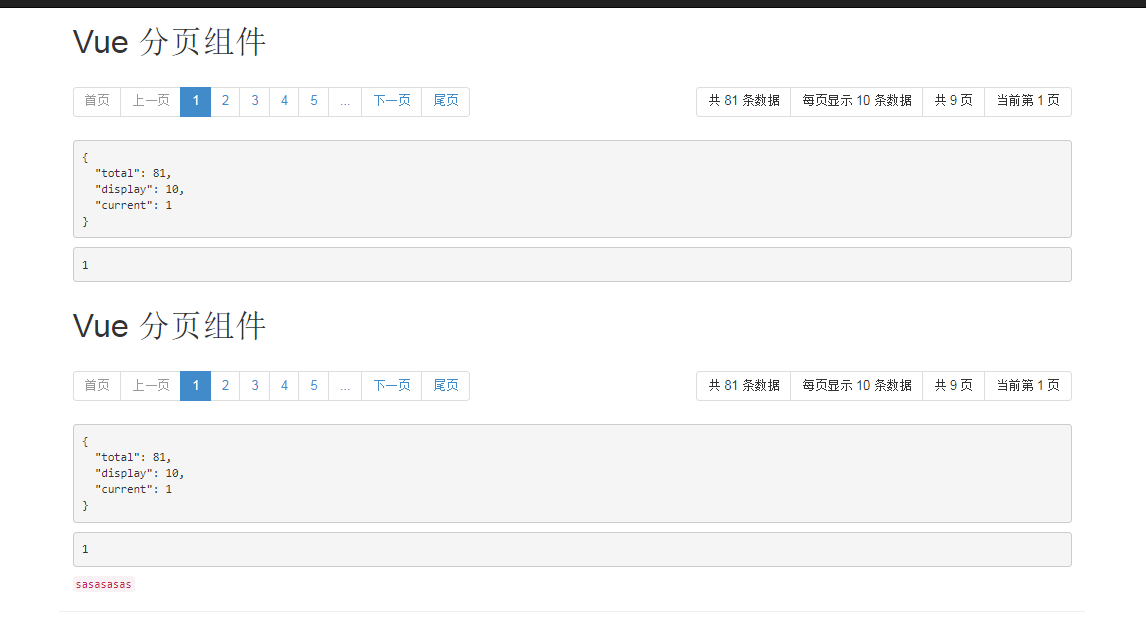
展示:
vue 实现分页的更多相关文章
- 基于Vue封装分页组件
使用Vue做双向绑定的时候,可能经常会用到分页功能 接下来我们来封装一个分页组件 先定义样式文件 pagination.css ul, li { margin: 0px; padding: 0px;} ...
- JS(vue iview)分页解决方案
JS(vue iview)分页解决方案 一.解决思路 使用分页组件 使用组件API使组件自动生成页面数量 调用组件on-change事件的返回值page 将交互获得的数组存在一个数组list中 通过p ...
- 基于vue的分页插件
相信大家用过很多jquery的分页插件,那这次就用一用基于vue的分页插件. 这里的环境用的是springboot 首先要引入pagehelper的jar文件,版本是1.2.3,配置文件也需要配置一下 ...
- 基于iview 封装一个vue 表格分页组件
iview 是一个支持中大型项目的后台管理系统ui组件库,相对于一个后台管理系统的表格来说分页十分常见的 iview是一个基于vue的ui组件库,其中的iview-admin是一个已经为我们搭好的后天 ...
- vue day5 分页控件 更新 PagedList.mvc 仿
<!DOCTYPE html> <html> <head> <meta http-equiv="Content-Type" content ...
- vue day6 分页显示
@{ ViewBag.Title = "Home Page"; Layout = null; } <!DOCTYPE html> <html> <he ...
- vue day5 分页控件
<!DOCTYPE html> <html> <head> <meta http-equiv="Content-Type" content ...
- Vue element 分页
Vue单页面,有一个带分页的表格,表格内数据关联页码,套路如下: 代码如下: <div class="c-table-list auth-list m-bottom-20"& ...
- 使用Layui和Vue实现分页
原理就是利用Layui的分页组件和Vue组件的模板渲染功能. 我下面直接贴代码,比较直观. index.html <!DOCTYPE html> <html> <head ...
- vue 封装分页组件
分页 一般都是调接口, 接口为这种格式 {code: 0, msg: "success",…} code:0 data:{ content:[{content: "11& ...
随机推荐
- 浅谈CICD持续集成、持续部署的流程(转)
Jenkins是一个比较流行的持续集成工具GitLab是存储镜像的镜像仓库由客户端将代码push推送到git仓库,gitlab上配置了一个webHook的东西可以触发Jenkins的构建.进入到Jen ...
- Spring中自动装配的模式
原创转载请注明出处:https://www.cnblogs.com/agilestyle/p/11484037.html 自动装配模式 Reference https://docs.spring.io ...
- 理解webpack中的process.env.NODE_ENV
参考资料 一. process 要理解 process.env.NODE_ENV 就必须要了解 process,process 是 node 的全局变量,并且 process 有 env 这个属性,但 ...
- delphi中SendMessage使用说明
SendMessage基础知识 函数功能:该函数将指定的消息发送到一个或多个窗口.此函数为指定的窗口调用窗口程序,直到窗口程序处理完消息再返回.而函数PostMessage不同,将一个消息寄送到一个线 ...
- 简单使用Laravel-admin构建一个功能强大的后台管理
Laravel-admin可以快速构建一个功能强大的后台,方便快速开发. 以下内容记录简单使用Laravel-admin,以及遇到小错误的解决方法. Laravel-admin 依赖以下环境 需要提前 ...
- python读取数据库mysql报错
昨天在学习PYTHON读取数据库的知识时,一直在报错,找不到原因. 最后同事说是语法错误. import sysreload(sys)sys.setdefaultencoding('gb18030') ...
- 几个常见的漏洞(xss攻击 cookie未清除 nginx信息泄露)与处理方法
项目在安全检查中发现很多问题,要求整改,其中就有最常见的xss攻击 漏洞描述 渗透测试人员检测到网站筛选框均存在反射型跨站脚本攻击,例如: "><script>alert( ...
- 更改package.js后重新加载
node --save可有省略掉手动修改package.json的步骤 当你为你的模块安装一个依赖模块时,正常情况下你得先安装他们(在模块根目录下npm install module-name), ...
- 分析/proc/[pid]/maps中的各个内存区域的大小
cat maps | sed -e "s/\([0-9a-f]\{8\}\)-\([0-9a-f]\{8\}\)/0x\1 0x\2/" | awk '{printf(" ...
- HDU6655 Just Repeat(2019杭电多校J题)
原题链接:http://acm.hdu.edu.cn/showproblem.php?pid=6655 简单博弈问题,A,B手里各有n,m张牌,牌有颜色,两人轮流出牌(A先出),一个人只能打出对放未打 ...