
spring boot 项目的创建
一. 进入https://start.spring.io 快速创建项目
二. 利用eclipse sts插件创建项目
1. 安装sts插件
- 进入https://spring.io/tools3/sts/all????????spring 选择对应的sts版本下载
- 要连外网才可以安装
三.创建spring boot 项目详细步骤
1.目录结构
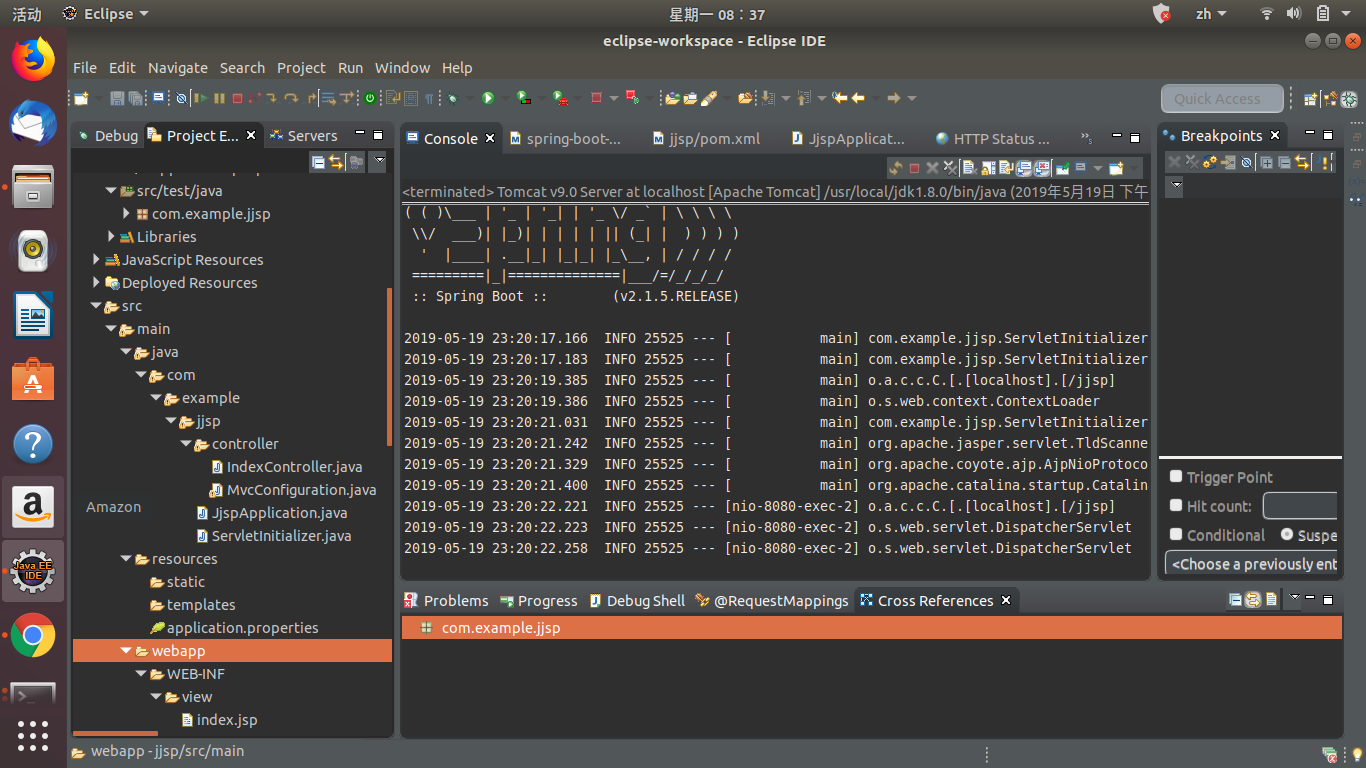
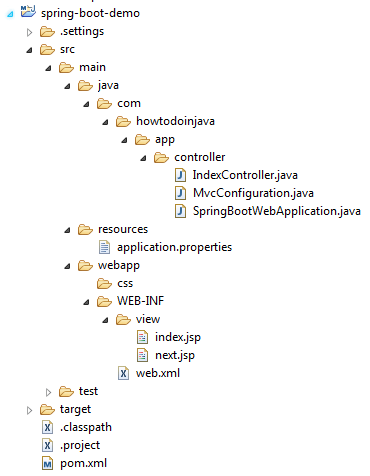
2.pom.xml 依赖
<?xml version="1.0" encoding="UTF-8"?>

<project xmlns="http://maven.apache.org/POM/4.0.0" xmlns:xsi="http://www.w3.org/2001/XMLSchema-instance"

    xsi:schemaLocation="http://maven.apache.org/POM/4.0.0 http://maven.apache.org/xsd/maven-4.0.0.xsd">

    <modelVersion>4.0.0</modelVersion>

    <parent>

        <groupId>org.springframework.boot</groupId>

        <artifactId>spring-boot-starter-parent</artifactId>

        <version>2.1.5.RELEASE</version>

        <relativePath/> <!-- lookup parent from repository -->

    </parent>

    <groupId>com.example</groupId>

    <artifactId>jjsp</artifactId>

    <version>0.0.1-SNAPSHOT</version>

    <packaging>war</packaging>

    <name>jjsp</name>

    <description>jsp project for Spring Boot</description>

    <properties>

        <java.version>1.8</java.version>

    </properties>

    <dependencies>

        <dependency>

            <groupId>org.springframework.boot</groupId>

            <artifactId>spring-boot-starter-web</artifactId>

        </dependency>

        <dependency>

            <groupId>org.springframework.boot</groupId>

            <artifactId>spring-boot-starter-tomcat</artifactId>

            <scope>provided</scope>

        </dependency>

        <dependency>

            <groupId>org.springframework.boot</groupId>

            <artifactId>spring-boot-starter-test</artifactId>

            <scope>test</scope>

        </dependency>

        <dependency>

            <groupId>javax.servlet</groupId>

            <artifactId>jstl</artifactId>

        </dependency>

        <!-- To compile JSP files -->

        <dependency>

            <groupId>org.apache.tomcat.embed</groupId>

            <artifactId>tomcat-embed-jasper</artifactId>

            <scope>provided</scope>

            </dependency>

    </dependencies>

    <build>

        <plugins>

            <plugin>

                <groupId>org.springframework.boot</groupId>

                <artifactId>spring-boot-maven-plugin</artifactId>

            </plugin>

        </plugins>

    </build>

</project>
3.Spring Boot应用程序初始化程序
生成可部署war文件的第一步是提供SpringBootServletInitializer子类并覆盖其configure()方法。这利用了Spring Framework的Servlet 3.0支持,并允许您在servlet容器启动时配置应用程序。
package com.example.jjsp.controller;

import org.springframework.boot.SpringApplication;

import org.springframework.boot.autoconfigure.SpringBootApplication;

@SpringBootApplication

public class JjspApplicatio1n {

        public static void main(String[] args) {

                SpringApplication.run(JjspApplicatio1n.class, args);

        }

}
package com.example.jjsp.controller;

import org.springframework.boot.builder.SpringApplicationBuilder;

import org.springframework.boot.web.servlet.support.SpringBootServletInitializer;

public class ServletInitializer extends SpringBootServletInitializer {

    @Override

    protected SpringApplicationBuilder configure(SpringApplicationBuilder application) {

        return application.sources(JjspApplicatio1n.class);

    }

}
4. spring controller
package com.example.jjsp.controller;

import java.util.Map;

import org.springframework.stereotype.Controller;

import org.springframework.web.bind.annotation.RequestMapping;

@Controller

public class IndexController {

    @RequestMapping("/")

    public String home(Map<String, Object> model) {

        model.put("message", "HowToDoInJava Reader !!");

        return "index";

    }

    @RequestMapping("/next")

    public String next(Map<String, Object> model) {

        model.put("message", "You are in new page !!");

        return "next";

    }

}
5.Spring Boot JSP ViewResolver配置
要解析JSP文件位置,可以使用两种方法。
1)在application.properties中添加条目
spring.mvc.view.prefix=/WEB-INF/view/

spring.mvc.view.suffix=.jsp

logging.level.org.springframework=TRACK

logging.level.com=TRACK
2)配置InternalResourceViewResolver以提供JSP页面
package com.example.jjsp.controller;

import org.springframework.context.annotation.ComponentScan;

import org.springframework.context.annotation.Configuration;

import org.springframework.web.servlet.config.annotation.EnableWebMvc;

import org.springframework.web.servlet.config.annotation.ViewResolverRegistry;

import org.springframework.web.servlet.config.annotation.WebMvcConfigurerAdapter;

import org.springframework.web.servlet.view.InternalResourceViewResolver;

import org.springframework.web.servlet.view.JstlView;

@Configuration

@EnableWebMvc

@ComponentScan

public class MvcConfiguration extends WebMvcConfigurerAdapter

{

    @Override

    public void configureViewResolvers(ViewResolverRegistry registry) {

        InternalResourceViewResolver resolver = new InternalResourceViewResolver();

        resolver.setPrefix("/WEB-INF/view/");

        resolver.setSuffix(".jsp");

        resolver.setViewClass(JstlView.class);

        registry.viewResolver(resolver);

    }

}
6.
spring boot 项目的创建的更多相关文章
- 1.关于SPring Boot项目的创建
一.引入依赖 <parent> <groupId>org.springframework.boot</groupId> <artifactId>spri ...
- spring boot学习01【搭建环境、创建第一个spring boot项目】
1.给eclipse安装spring boot插件 Eclipse中安装Spring工具套件(STS): Help -> Eclipse Marketplace... 在Search标签或者Po ...
- 从零开始的Spring Boot(1、搭建一个Spring Boot项目Hello World)
搭建一个Spring Boot项目Hello World 写在前面 从零开始的Spring Boot(2.在Spring Boot中整合Servlet.Filter.Listener的方式):http ...
- [转] 使用Spring Boot和Gradle创建项目
Spring Boot 是由 Pivotal 团队提供的全新框架,其设计目的是用来简化新 Spring 应用的初始搭建以及开发过程.该框架使用了特定的方式来进行配置,从而使开发人员不再需要定义样板化的 ...
- 使用Spring Boot和Gradle创建AngularJS项目
Spring Boot 是由 Pivotal 团队提供的全新框架,其设计目的是用来简化新 Spring 应用的初始搭建以及开发过程.该框架使用了特定的方式来进行配置,从而使开发人员不再需要定义样板化的 ...
- 创建一个 Spring Boot 项目,你会几种方法?
我最早是 2016 年底开始写 Spring Boot 相关的博客,当时使用的版本还是 1.4.x ,文章发表在 CSDN 上,阅读量最大的一篇有 42W+,如下图: 2017 年由于种种原因,就没有 ...
- Spring Boot入门(一):使用IDEA创建Spring Boot项目并使用yaml配置文件
由于公司最近在做技术转型(从.Net转Java),因此自己也开启了学习Java之路.学习Java怎么能不学习这几年这么火的Spring Boot框架,由于自己有总结的习惯,因此会把学习的过程以博客的形 ...
- [转]通过Spring Boot三分钟创建Spring Web项目
来源:https://www.tianmaying.com/tutorial/project-based-on-spring-boot Spring Boot简介 接下来我们所有的Spring代码实例 ...
- Eclipse创建第一个Spring Boot项目
一.安装SpringBoot插件 安装过程需要联网下载插件,属于在线安装,请耐心等待安装完成,下载安装完成以后,需要重启Eclipse 二.创建Spring Boot项目 如下图所示new-other ...
随机推荐
- 人脸识别课件需要安装的python模块
Python3.6安装face_recognition人脸识别库 https://www.jianshu.com/p/8296f2aac1aa
- Antd Vue 问题集合
1.table列宽问题 在滚动列时,如果要指定列宽,不要指定所有列宽,至少预留一列不执行列宽. 同时:scroll="{ x: width}", width的值要是所有列的宽度之和 ...
- Python--前端基础之JavaScript(JS的引入方式,JS的变量、常量和标识符,JS的数据类型,运算符,流程控制,JavaScript的对象)
JavaScript介绍 JavaScript是运行在浏览器端的脚步语言,JavaScript主要解决的是前端与用户交互的问题,包括使用交互与数据交互. JavaScript是浏览器解释执行的,前端脚 ...
- POJ 2240 Arbitrage (spfa判环)
Arbitrage Arbitrage is the use of discrepancies in currency exchange rates to transform one unit of ...
- cf round#598 CDEF
C:模拟:未跳到目的地之前先贪心放板子,能到达目的地后紧贴着放板子 先判能不能跳到目的地,能跳到再考虑是否需要将后面的板子往前移动 #include<bits/stdc++.h> usin ...
- BZOJ 1778: [Usaco2010 Hol]Dotp 驱逐猪猡(高斯消元+期望dp)
传送门 解题思路 设\(f(x)\)表示到\(x\)这个点的期望次数,那么转移方程为\(f(x)=\sum\frac{f(u)*(1 - \frac{p}{q})}{deg(u)}\),其中\(u\) ...
- lnmp 一键安装详解
1.使用putty或类似的SSH工具登陆VPS或服务器: 登陆后运行:screen -S lnmp 如果提示screen: command not found 命令不存在可以执行:yum instal ...
- SSH known_hosts / authorized_keys
参考: http://blog.sina.com.cn/s/blog_148a693f10102vj8m.html 什么是SSH? 简单说,SSH是一种网络协议,用于计算机之间的加密登录. 如果一个用 ...
- linux删除指定文件夹中某个文件除外的其他文件
# shopt -s extglob # rm -fr !(file1) 如果是多个要排除的,可以这样: # rm -rf !(file1|file2) 首先科普下shopt -s extglob B ...
- Angularjs可以查看scope的插件AngularJS Batarang
AngularJS Batarang是一个显示AngularJS的scope 层次的Chrome插件,有效的快速查看一个page 中有多少Scope能够帮助我们快速方便调试AngularJS程序. 插 ...