
web项目使用fastdsf上传|下载文件
在上传代码中添加一下代码
suffix=suffix.substring(1);
fast.FastDFSFile file = new fast.FastDFSFile(mFile.getBytes(), suffix);
NameValuePair[] meta_list = new NameValuePair[4];
meta_list[0] = new NameValuePair("fileName", mFile.getOriginalFilename());
meta_list[1] = new NameValuePair("fileLength", String.valueOf(mFile.getSize()));
meta_list[2] = new NameValuePair("fileExt", suffix);
meta_list[3] = new NameValuePair("fileAuthor", "WangLiang");
String filePath = fast.FileManager.upload(file, meta_list);
System.out.println(filePath);
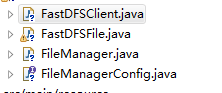
public class FastDFSClient {
private TrackerClient trackerClient = null;
private TrackerServer trackerServer = null;
private StorageClient1 storageClient = null;
private StorageServer storageServer = null;
public FastDFSClient(String conf) throws Exception {
if (conf.contains("classpath:")) {
conf = conf.replace("classpath:", this.getClass().getResource("/").getPath());
}
ClientGlobal.init(conf);
trackerClient = new TrackerClient();
trackerServer = trackerClient.getConnection();
storageServer = null;
storageClient = new StorageClient1(trackerServer, storageServer);
}
public String uploadFile(String fileName, String extName, NameValuePair[] metas) throws Exception {
String result = storageClient.upload_file1(fileName, extName, metas);
return result;
}
public String uploadFile(String fileName) throws Exception {
String result = storageClient.upload_file1(fileName, null, null);
return result;
}
public String uploadFile(String fileName, String extName) throws Exception {
String result = storageClient.upload_file1(fileName, extName, null);
return result;
}
}
public class FastDFSFile {
private static final long serialVersionUID = 1L;
private byte[] content;
private String name;
private String ext;
private String length;
public FastDFSFile(byte[] content, String ext) {
this.content = content;
this.ext = ext;
}
public FastDFSFile(byte[] content, String name, String ext) {
this.content = content;
this.name = name;
this.ext = ext;
}
public FastDFSFile(byte[] content, String name, String ext, String length
) {
this.content = content;
this.name = name;
this.ext = ext;
this.length = length;
}
public byte[] getContent() {
return content;
}
public void setContent(byte[] content) {
this.content = content;
}
public String getName() {
return name;
}
public void setName(String name) {
this.name = name;
}
public String getExt() {
return ext;
}
public void setExt(String ext) {
this.ext = ext;
}
public String getLength() {
return length;
}
public void setLength(String length) {
this.length = length;
}
}
public class FileManager implements FileManagerConfig {
private static final long serialVersionUID = 1L;
private static TrackerClient trackerClient;
private static TrackerServer trackerServer;
private static StorageServer storageServer;
private static StorageClient storageClient;
static {
try {
String classPath = new File(FileManager.class.getResource("/").getFile()).getCanonicalPath();
String fdfsClientConfigFilePath = classPath + File.separator + CLIENT_CONFIG_FILE;
ClientGlobal.init(fdfsClientConfigFilePath);
trackerClient = new TrackerClient();
trackerServer = trackerClient.getConnection();
storageClient = new StorageClient(trackerServer, storageServer);
} catch (Exception e) {
e.printStackTrace();
}
}
/**
* 文件上传
* @param file
* @param valuePairs
* @return
*/
public static String upload(FastDFSFile file, NameValuePair[] valuePairs) {
String[] uploadResults = null;
try {
uploadResults = storageClient.upload_file(file.getContent(), file.getExt(), valuePairs);
} catch (Exception e) {
e.printStackTrace();
}
String groupName = uploadResults[0];
String remoteFileName = uploadResults[1];
String fileAbsolutePath = PROTOCOL + TRACKER_NGNIX_ADDR + SEPARATOR + groupName + SEPARATOR + remoteFileName;
return fileAbsolutePath;
}
/**
* 文件下载
* @param groupName
* @param remoteFileName
* @param specFileName
* @return
*/
public static ResponseEntity<byte[]> download(String groupName, String remoteFileName, String specFileName) {
byte[] content = null;
HttpHeaders headers = new HttpHeaders();
try {
content = storageClient.download_file(groupName, remoteFileName);
headers.setContentDispositionFormData("attachment",
new String(specFileName.getBytes("UTF-8"), "iso-8859-1"));
headers.setContentType(MediaType.APPLICATION_OCTET_STREAM);
} catch (Exception e) {
// TODO Auto-generated catch block
e.printStackTrace();
}
return new ResponseEntity<byte[]>(content, headers, HttpStatus.CREATED);
}
}
public interface FileManagerConfig extends Serializable {
public static final String PROTOCOL = "http://";
public static final String SEPARATOR = "/";
public static final String TRACKER_NGNIX_ADDR = "192.168.111.136";
public static final String TRACKER_NGNIX_PORT = "";
public static final String CLIENT_CONFIG_FILE = "client.conf";
}


tracker_server=192.168.111.136:22122
下载
根据之前上传保存的物理路径 截取
/**
* 下载 截取物理路径下载
* @param awardModel
* @param request
* @param response
* @param createtime
* @param endtime
* @param act_id
* @throws Exception
*/
/*@RequestMapping(value = "/{username}/download", method = RequestMethod.GET)
public ResponseEntity<byte[]> download(@PathVariable String username, Model model,HttpServletResponse response) throws IOException, MyException {
User u = users.get(username);
String filePath = u.getFilePath();
String substr = filePath.substring(filePath.indexOf("group"));
String group = substr.split("/")[0];
String remoteFileName = substr.substring(substr.indexOf("/")+1);
String specFileName = username + substr.substring(substr.indexOf("."));
return FileManager.download(group, remoteFileName,specFileName);
}*/
web项目使用fastdsf上传|下载文件的更多相关文章
- java web service 上传下载文件
1.新建动态web工程youmeFileServer,新建包com,里面新建类FileProgress package com; import java.io.FileInputStream; imp ...
- 【WCF】利用WCF实现上传下载文件服务
引言 前段时间,用WCF做了一个小项目,其中涉及到文件的上传下载.出于复习巩固的目的,今天简单梳理了一下,整理出来,下面展示如何一步步实现一个上传下载的WCF服务. 服务端 1.首先新建一个名 ...
- WebSSH画龙点睛之lrzsz上传下载文件
本篇文章没有太多的源码,主要讲一下实现思路和技术原理 当使用Xshell或者SecureCRT终端工具时,我的所有文件传输工作都是通过lrzsz来完成的,主要是因为其简单方便,不需要额外打开sftp之 ...
- SFTP远程连接服务器上传下载文件-qt4.8.0-vs2010编译器-项目实例
本项目仅测试远程连接服务器,支持上传,下载文件,更多功能开发请看API自行开发. 环境:win7系统,Qt4.8.0版本,vs2010编译器 qt4.8.0-vs2010编译器项目实例下载地址:CSD ...
- C#实现http协议支持上传下载文件的GET、POST请求
C#实现http协议支持上传下载文件的GET.POST请求using System; using System.Collections.Generic; using System.Text; usin ...
- rz和sz上传下载文件工具lrzsz
######################### rz和sz上传下载文件工具lrzsz ####################################################### ...
- linux上很方便的上传下载文件工具rz和sz
linux上很方便的上传下载文件工具rz和sz(本文适合linux入门的朋友) ##########################################################&l ...
- shell通过ftp实现上传/下载文件
直接代码,shell文件名为testFtptool.sh: #!/bin/bash ########################################################## ...
- linux下常用FTP命令 上传下载文件【转】
1. 连接ftp服务器 格式:ftp [hostname| ip-address]a)在linux命令行下输入: ftp 192.168.1.1 b)服务器询问你用户名和密码,分别输入用户名和相应密码 ...
随机推荐
- JS获取各种宽度、高度的简单介绍:
JS获取各种宽度.高度的简单介绍: scrollHeight: 获取对象的滚动高度. scrollLeft:设置或获取位于对象左边界和窗口中目前可见内容的最左端之间的距离 scrollTop:设置或获 ...
- 手动ubuntu 18.04修改登录锁屏界面效果(含登录背景修改)flat-remix
前言 在ubuntu 18.04,可以通过修改/etc/alternatives/gdm3.css来进行修改 本来想直接使用flat-remix主题,但是只有这个登录界面没有达到作者演示的效果,所以手 ...
- C#用户自定义控件(含源代码)-透明文本框
using System; using System.Collections; using System.ComponentModel; using System.Drawing; using Sys ...
- 学习笔记11 EF查询相当于sql 中的 where in
两种写法 1. int[] Ids={1,2,3} DBContainer db=new DBContainer(); var list=db.表明.where(a=>Ids.Contains( ...
- 整合ssm三大框架使用注解开发查询用户信息
整合ssm三大框架使用注解开发查询用户信息 一.基础知识准备之spring mvc工作原理 二.分析 第一步:发起请求到前端控制器(DispatcherServlet) 第二步:前端控制器请求Hand ...
- [CSP-S模拟测试]:凤凰院凶真(LCIS)
题目描述 $\alpha$世界线.凤凰院凶真创立了反抗$SERN$统治的组织“瓦尔基里”.为了脱离$\alpha$线,他需要制作一个世界线变动率测量仪.测量一个世界线相对于另一个世界线的变动率,实质上 ...
- 北风设计模式课程---状态模式State(对象行为型)
北风设计模式课程---状态模式State(对象行为型) 一.总结 一句话总结: 状态模式 具体状态的行为在具体的状态类中就解决,不用交给外部做判断.实质是将多条件判断弄成了多个类,在不同的类中做判断 ...
- selenium 访问网页抛出ElementNotVisibleException异常
问题描述: 在使用selenium时遇到如下异常导致程序终止: selenium.common.exceptions.ElementNotVisibleException: Message: {&qu ...
- win10半夜自动开机的问题分析
win10半夜自动开机的系统日志: 解决方法一: 1.根据日志判断自动唤醒后,windows更新了时间和代理 服务管理器中,关闭windows update, 但是半夜还会自动开 再关闭服务管理器的w ...
- 匿名函数 sorted() filter() map() 递归函数
一. lambda() 匿名函数 说白了,从字面理解匿名函数就是看不见的函数,那么他的看不见表现在哪里呢? 其实就是在查询的时候他们的类型都是lambda的类型所以叫匿名,只要是用匿名函数写的大家 ...