
CSS3 flexbox弹性布局实例
常用例子
1.居中对齐
<!DOCTYPE html>

<head>

    <meta charset="utf-8">

    <style type="text/css">

        .flex-container{

            padding:;

            margin:;

            list-style:none;

            display:-webkit-box;

            display:-moz-box;

            display:-ms-flexbox;

            display:-webkit-flex;

            display:flex;

            -webkit-flex-flow:row nowrap;

            justify-content:space-around;

        }

        .flex-item{

            background:tomato;

            padding:5px;

            width:200px;

            height:150px;

            margin-top:10px;

            line-height:150px;

            color:white;

            font-weight:bold;

            font-size:3em;

            text-align:center

        }

    </style>

</head>

<body>

<ul class="flex-container">

   <li class="flex-item"></li>

    <li class="flex-item"></li>

    <li class="flex-item"></li>

    <li class="flex-item"></li>

    <li class="flex-item"></li>

    <li class="flex-item"></li>

</ul>

</body>

</html>
效果:

2.自适应导航
<!DOCTYPE html>

<head>

    <meta charset="utf-8">

    <style type="text/css">

        .navigation{

            list-style:none;

            margin:0;

            background:deepskyblue;

            display:-webkit-box;

            display:-moz-box;

            display:-ms-flexbox;

            display:-webkit-flex;

            display:flex;

            -webkit-flex-flow:row wrap;

            justify-content:flex-end

        }

        .navigation a{

            text-decoration:none;

            display:block;

            padding:1em;

            color:white

        }

        .navigation a:hover{

            background:#00AEE8

        }

        @media all and (max-width:800px){

            .navigation{justify-content:space-around}

        }

        @media all and (max-width:600px){

            .navigation{

                -webkit-flex-flow:column wrap;

                padding:0

            }

            .navigation a{

                text-align:center;

                padding:10px;

                border-top:1px solid rgba(255,255,255,0.3);

                border-bottom:1px solid rgba(0,0,0,0.1)}

            .navigation li:last-of-type a{border-bottom:none}

        }

    </style>

</head>

<body>

<ul class="navigation">

    <li><a href="#">Home</a></li>

    <li><a href="#">About</a></li>

    <li><a href="#">Products</a></li>

    <li><a href="#">Contact</a></li>

</ul>

</body>

</html>
效果:

/* Large */

.navigation {

  display: flex;

  flex-flow: row wrap;

  /* This aligns items to the end line on main-axis */

  justify-content: flex-end;

}

/* Medium screens */

@media all and (max-width: 800px) {

  .navigation {

    /* When on medium sized screens, we center it by evenly distributing empty space around items */

    justify-content: space-around;

  }

}

/* Small screens */

@media all and (max-width: 500px) {

  .navigation {

    /* On small screens, we are no longer using row direction but column */

    flex-direction: column;

  }

}
3.常见3栏移动优先布局
- 设置子元素从左到右,超出换行(flex-flow:row wrap;)。
- 默认情况下所有子元素拓展比例为1(flex-grow:1),伸缩比例为100%(flex-basis:100%)。
- 大于800px时,.main的拓展比例为2.伸缩值为0(flex-basis:0px),并且侧栏aside-1排列在第一位,main在第二位,aside-2在第三位。
- 大于600时。.aside元素的拓展比例为1(flex-grow:1),伸缩比例为auto(flex-basis:auto)。
<!DOCTYPE html>

<head>

    <meta charset="utf-8">

    <style type="text/css">

        .wrapper{

            display:-webkit-box;

            display:-moz-box;

            display:-ms-flexbox;

            display:-webkit-flex;

            display:flex;

            -webkit-flex-flow:row wrap;

            font-weight:bold;

            text-align:center

        }

        .wrapper > *{padding:10px;flex:1 100%}

        .header{background:tomato}

        .footer{background:lightgreen}

        .main{text-align:left;background:deepskyblue}

        .aside-1{background:gold}

        .aside-2{background:hotpink}

        @media all and (min-width:600px){.aside{flex:1 auto}

        }
         @media all and (min-width:800px){.main{flex:2 0px}

            .aside-1{order:1}

            .main{order:2}

            .aside-2{order:3}

            .footer{order:4}

        }

    </style>

</head>

<body>

<div class="wrapper">

    <header class="header">Header</header>

    <article class="main">

        <p>Pellentesque habitant morbi tristique senectus et netus et malesuada fames ac turpis egestas. Vestibulum tortor quam, feugiat vitae, ultricies eget, tempor sit amet, ante. Donec eu libero sit amet quam egestas semper. Aenean ultricies mi vitae est. Mauris placerat eleifend leo.</p>

    </article>

    <aside class="aside aside-1">Aside 1</aside>

    <aside class="aside aside-2">Aside 2</aside>

    <footer class="footer">Footer</footer>

</div>

</body>

</html>
效果:

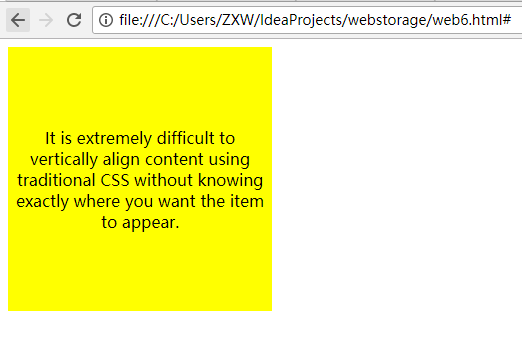
垂直居中对齐
<!DOCTYPE html>

<head>

    <meta charset="utf-8">

    <style type="text/css">

        著作权归作者所有。

        商业转载请联系作者获得授权,非商业转载请注明出处。

        链接:http://caibaojian.com/flexbox-example.html

                                 来源:http://caibaojian.com

                                           body {

                                               display: -webkit-flex;

                                               display: flex;

                                               flex-flow: column;

                                               -webkit-align-items: center;

                                               align-items: center;

                                               -webkit-justify-content: center;

                                               justify-content: center;

                                               width: %;

                                               height: %;

                                               background: lightgrey;

                                           }

        .content {

            /* also making content into a flex box so we can also vertically center its content */

            display: -webkit-flex;

            display: flex;

            -webkit-flex-flow: column;

            flex-flow: column;

            -webkit-justify-content: center;

            justify-content: center;

            text-align: center;

            width: 250px;

            height: 250px;

            padding: 7px;

            background: yellow;

        }

    </style>

</head>

<body>

<form>

    <body>

    <div class="content">

        <p>It is extremely difficult to vertically align content using traditional CSS without knowing exactly where you want the item to appear.

            </p>

    </div>

    </body>

</form>

</body>

</html>
博客帖子的典型页面布局
<!DOCTYPE html>

<head>

    <meta charset="utf-8">

    <style type="text/css">

        .post {

            display: flex;

            flex-flow: column wrap;

        }

        .post-meta {

            display: flex;

            flex-flow: row wrap;

            order: ;

        }

        .post-body {

            order: ;

        }

        .post-comments {

            order: ;

        }

        .comments-count {

            margin-left: auto;

        }

        .post-image {

            order: ;

            align-self: center;

        }

    </style>

</head>

<body>

<div class="post">

    <h1>This is my first blog post</h1>

    <div class="post-meta">

        <div class="author">Alex Cheng</div>

        <div class="datetime">-- : am</div>

        <div class="comments-count"> comments</div>

    </div>

    <div class="post-body">

        My first blog post.

    </div>

    <div class="post-image">

        <img src="http://placehold.it/500x200&text=1">

    </div>

    <div class="post-comments">

        <h3>Comments</h3>

        <ul>

            <li><div class="author">Bob</div><div>This is a good post.</div></li>

            <li><div class="autho">David</div><div>Good post.</div></li>

        </ul>

    </div>

</div>

</body>

</html>

2017-08-23 23:25:48
CSS3 flexbox弹性布局实例的更多相关文章
- css3 FlexBox 弹性布局
Flex 弹性布局 这个是css3中新添加的内容,现在已经支持所有的浏览器,利用Flex布局,可以简便.完整.响应式地实现各种页面布局. 注意:在设置 flex 后,子元素的flaot ,clear, ...
- CSS3中的Flexbox弹性布局(一)
CSS3引入了一种新的布局模式——Flexbox布局,即伸缩布局盒模型(Flexible Box),用来提供一个更加有效的方式制定.调整和分布一个容器里项目布局,即使它们的大小是未知或者动态的,这里简 ...
- CSS3中的Flexbox弹性布局(二)
flexbox详解 flexbox的出现是为了解决复杂的web布局,因为这种布局方式很灵活.容器的子元素可以任意方向进行排列.此属性目前处于非正式标准. flex布局模型不同于块和内联模型布局,块和内 ...
- CSS3之弹性布局
flexbox是CSS3提出的页面布局模块.flexbox可以把列表横向或者纵向排列,并且填满可以延伸到的空间.稍微复杂的布局可以通过嵌套flex container来实现. 利用flexbox可以方 ...
- 【RN - 基础】之FlexBox弹性布局
前言 弹性盒模型(The Flexible Box Module),又叫FlexBox,意为“弹性布局”,旨在通过弹性的方式来对齐和分布容器中内容的空间,使其能适应不同的屏幕,为盒装模型提供最大的灵活 ...
- CSS3 -- FlexBox(弹性盒子)
盒子模型 CSS中有一种基础设计模式叫盒模型,盒模型定义了Web页面中的元素如何来解析. 在盒模型中主要包括width.height.border.background.padding和margin这 ...
- Flexbox弹性布局
Flexbox,一种CSS3的布局模式,也叫做弹性盒子模型,用来为盒装模型提供最大的灵活性.最新版本兼容IE11+.firefox.safari.chrome.opera及移动端,但移动端ios7.1 ...
- Flexbox弹性布局,更优雅的布局
Flexbox,更优雅的布局 Flex 布局教程:语法篇 Flex 布局教程:实例篇 2009年,W3C提出了一种新的方案----Flex布局,可以简便.完整.响应式地实现各种页面布局.目前,它已经得 ...
- css flexbox 弹性布局
flexbox 即css flexible box layout. ie9及以下不支持flexbox. flex详细规范(https://www.w3.org/TR/css-flexbox/) 为什么 ...
随机推荐
- GPG(pgp)加解密中文完整教程
一.介绍 我们都知道,互联网是不安全的,但其上所使用的大部分应用,如Web.Email等一般都只提供明文传输方式(用https.smtps等例外).所以,当我们需要传输重要文件时,应该对当中的信息加密 ...
- 麦子lavarel---10、一些第三方应用注意
麦子lavarel---10.一些第三方应用注意 一.总结 一句话总结: 其实把重要的几个功能弄一个就好了,邮箱验证,手机号验证,支付验证,都是调用第三方接口,也很简单 1.关于页面和服务端校验的看法 ...
- HDU6715 算术(莫比乌斯反演)
HDU6715 算术 莫比乌斯反演的变形. 对 \(\mu(lcm(i,j))\) 变换,易得 \(\mu(lcm(i,j)) = \mu(i)\cdot\mu(j)\cdot \mu(gcd(i,j ...
- React-Native 之 GD (三)近半小时热门
1.设置页面跳转 半小时热门组件 GDHalfHourHot.js /** * 近半小时热门 */ import React, { Component } from 'react'; import ...
- Splinter 的认识和基础应用
Splinter 是一个使用Python开发的开源web应用测试程序,它可以帮助我们实现自动浏览站点和与其进行交互.它是依赖于其它python插件或拓展进行的,所以我们使用它之前需要安装一系列的依赖包 ...
- 项目开源-基于ASP.NET Core和EF Core的快速开发框架
前言:作为一名95后的程序猿,已经写了一年多的代码了,为了提升自己的技术水平,所以决定尝试编写一个快速开发框架开源出来,一来提升自己的技术水平,二来助力.NET Core生态发展 写这个框架主要是为了 ...
- JSPDF 原理
Jspdf是一个将html内容生成pdf文件的库,原理是对输入浏览器的文字或二进制图片进行base64编码转换,以pdf中应有的形式组织,最终以data uri scheme, data:applic ...
- #1146 - Table 'phpmyadmin.pma__table_uiprefs' doesn't exist
在使用phpmyadmin时,数据库总报错#1146 - Table ‘phpmyadmin.pma_table_uiprefs' doesn't exist 修改phpmyadmin的配置文件con ...
- KETTLE——(一)资源库
对KETTLE有了大概的了解,pdi-ce-6.0.1.0-386也下载完成了. 1.解压pdi-ce-6.0.1.0-386.zip文件,双击运行Spoon.bat(KETTLE是Java开发的,运 ...
- 修改属性item1(1变化)
给imgList1,7,12,16添加数据 数据层data:{imgList1:[],imgList7:[],imgList12:[],imgList16:[],} 处理层let _this=this ...