
Beats:如何创建一个定制的Elastic Beat
Beats作为Elastic Stack家族中重要的部分。它可以和方便地让我们把我们的数据发送到Elasticsearch或Logstash之中。如果我们想要生成自己的Beat,请使用GitHub的beats仓库中提供的Beat生成器。在今天的文章中,我们将详细介绍如何一步一步地来创建一个我们自己想要的beat。
设置自己的开发环境
安装go环境
Beats实际上是go程序。我们可以参照链接“Go get started”(https://golang.org/doc/install)来安装自己的golang语言开发环境。等我们安装好我们的go后,我们可以在terminal中打入如下的命令:
    $ which go

    /usr/local/go/bin/go
那么我们需要在我们的环境中设置如下的变量:
    export GOROOT=/usr/local/go

    export PATH=$GOPATH/bin:$GOROOT/bin:$PATH

    export GOPATH=$HOME/go/beats
在这里,我也设置了以GOPATH。你可以设置自己的路径。针对我的情况,我在我的home目录下创建了一个go目录,并在go目录下生产一个叫做beats的目录。在一下,我们会在这个目录里生成我们的定制的beat。
下载Elastic beats源码
在这一步我们下载Elastic beats的源码。在termnial中打入如下的命令:
    mkdir -p ${GOPATH}/src/github.com/elastic

    git clone https://github.com/elastic/beats ${GOPATH}/src/github.com/elastic/beats
安装Python
目前generator只对Python2适用,所以,我们需要安装Python2。我们可以参照页面https://www.python.org/downloads/进行安装我们的python2。
安装virtualenv
我们必须安装virtualenv才能使得generator正常工作。可以参照链接https://virtualenv.pypa.io/en/latest/installation/来进行安装。如果自己的电脑上同时已经安装了python3,那么我们需要同时设置如写变量:
    export PYTHON_EXE='python2.7'

    export VIRTUALENV_PARAMS='-p python2.7'

    export VIRTUALENV_PYTHON='/usr/bin/python2.7'

    export VIRTUALENV_PYTHON='/usr/local/bin/python' (for Mac)
请注意:这里的python是2.x版本的python,而不是python3。我们需要保证VIRTUALENV_PYTHON指向我们的Python2的执行文件。
安装mage
我们需要在地址https://github.com/magefile/mage下载这个源码,并编译:
    go get -u -d github.com/magefile/mage

    cd $GOPATH/src/github.com/magefile/mage

    go run bootstrap.go
等上面的命令执行完后,我们可以在如下的目录中找到编译好的执行文件mage:
    liuxg-2:bin liuxg$ ls $GOPATH/bin

    mage
创建定制beat
首先创建一个目录在$GOPATH下,并进入该目录。
    mkdir ${GOPATH}/src/github.com/{user}

    cd ${GOPATH}/src/github.com/{user}
注意这里的user指的是自己在github上的用户名。比如针对我的情况是liu-xiao-guo。我打入如下写的命令:
    mkdir ${GOPATH}/src/github.com/liu-xiao-guo

    cd  $GOPATH/src/github.com/elastic/beats/
接下来,我们运行如下的命令:
mage GenerateCustomBeat
执行结果:
    $ mage GenerateCustomBeat

    2019/11/13 15:24:01 Found Elastic Beats dir at /Users/liuxg/go/beats/src/github.com/elastic/beats

    Enter the beat name [examplebeat]: Countbeat

    Enter your github name [your-github-name]: liu-xiao-guo

    Enter the beat path [github.com/liu-xiao-guo/countbeat]:

    Enter your full name [Firstname Lastname]: Xiaoguo Liu

    Enter the beat type [beat]:

    DEPRECATION: Python 2.7 will reach the end of its life on January 1st, 2020. Please upgrade your Python as Python 2.7 won't be maintained after that date. A future version of pip will drop support for Python 2.7. More details about Python 2 support in pip, can be found at https://pip.pypa.io/en/latest/development/release-process/#python-2-support

    DEPRECATION: Python 2.7 will reach the end of its life on January 1st, 2020. Please upgrade your Python as Python 2.7 won't be maintained after that date. A future version of pip will drop support for Python 2.7. More details about Python 2 support in pip, can be found at https://pip.pypa.io/en/latest/development/release-process/#python-2-support

    WARNING: Retrying (Retry(total=4, connect=None, read=None, redirect=None, status=None)) after connection broken by 'ReadTimeoutError("HTTPSConnectionPool(host='pypi.tuna.tsinghua.edu.cn', port=443): Read timed out. (read timeout=15)",)': /simple/semver/

    2019/11/13 15:25:50 Found Elastic Beats dir at /Users/liuxg/go/beats/src/github.com/liu-xiao-guo/countbeat/vendor/github.com/elastic/beats

    Generated fields.yml for countbeat to /Users/liuxg/go/beats/src/github.com/liu-xiao-guo/countbeat/fields.yml

    2019/11/13 15:25:52 Found Elastic Beats dir at /Users/liuxg/go/beats/src/github.com/liu-xiao-guo/countbeat/vendor/github.com/elastic/beats

    Auto packing the repository in background for optimum performance.

    See "git help gc" for manual housekeeping.

    =======================

    Your custom beat is now available as /Users/liuxg/go/beats/src/github.com/liu-xiao-guo/countbeat

    =======================
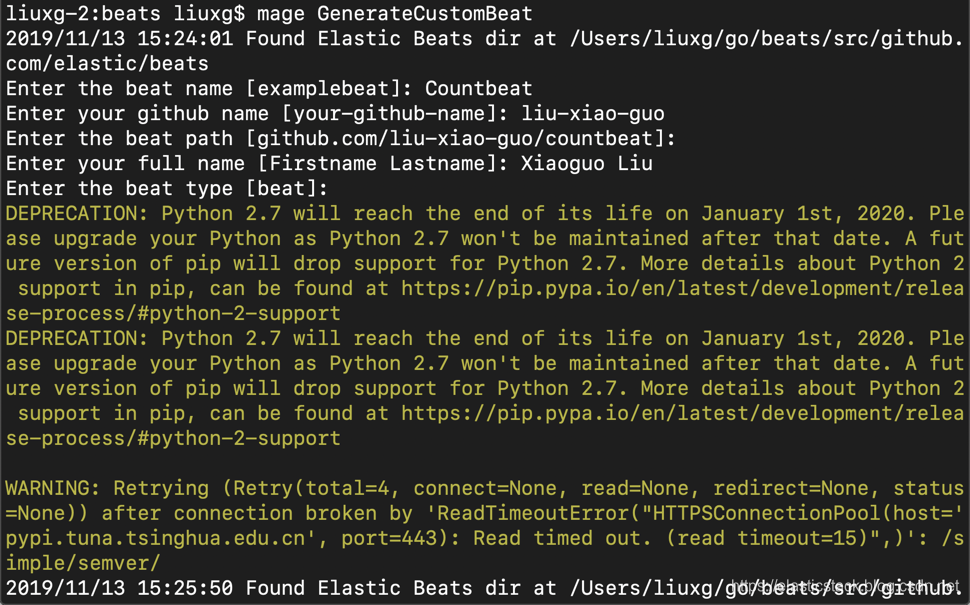
这样,我们基本上就生产了一个最基本的beat的框架。
接下来,我们进入到我们的beat目录里,并进行编译:
cd ${GOPATH}/src/github.com/{user}/countbeat
针对我的情况:
cd ${GOPATH}/src/github.com/liu-xiao-guo/countbeat
我们可以看一下里面最基本的文件:
    $ pwd

    /Users/liuxg/go/beats/src/github.com/liu-xiao-guo/countbeat

    liuxg-2:countbeat liuxg$ ls

    CONTRIBUTING.md		cmd			magefile.go

    LICENSE.txt		config			main.go

    Makefile		countbeat.docker.yml	main_test.go

    NOTICE.txt		countbeat.reference.yml	make.bat

    README.md		countbeat.yml		tests

    _meta			docs			vendor

    beater			fields.yml

    build			include
这里有最基本的框架文件。里面含有一个叫做countbeat.yml的配置文件及一些标准的模板文件。我们在命令行中直接打入如下的指令:
make

    $ make

    go build -i -ldflags "-X github.com/liu-xiao-guo/countbeat/vendor/github.com/elastic/beats/libbeat/version.buildTime=2019-11-13T07:33:25Z -X github.com/liu-xiao-guo/countbeat/vendor/github.com/elastic/beats/libbeat/version.commit=501bd87da668346f78398676c78b4a39394a3640"
经过上面的编译,我们可以发现在当前的目录下,有一个已经编译好的countbeat可执行文件:

我们在当前的目录下直接运行这个可执行的文件:
./countbeat -e -d "*"
我们可以在terminal中看到:

那么在我们的Kibana中也可以看到如下信息:


显然数据已经被成功上传到Elasticsearch中了。
每一个文档的内容如下:
    {

      "@timestamp": "2019-11-13T07:38:57.095Z",

      "agent": {

        "version": "8.0.0",

        "type": "countbeat",

        "ephemeral_id": "d3f0638e-ee58-45ff-92cc-74f188fd66a4",

        "hostname": "liuxg-2.local",

        "id": "1d35220e-7f75-442a-88eb-43ec1e97f0d0"

      },

      "counter": 5,

      "ecs": {

        "version": "1.2.0"

      },

      "host": {

        "hostname": "liuxg-2.local",

        "architecture": "x86_64",

        "os": {

          "build": "19B88",

          "platform": "darwin",

          "version": "10.15.1",

          "family": "darwin",

          "name": "Mac OS X",

          "kernel": "19.0.0"

        },

        "id": "E51545F1-4BDC-5890-B194-83D23620325A",

        "name": "liuxg-2.local"

      },

      "type": "liuxg-2.local"

    }
它里面含有一个counter的整数值。
所有关于beat的设计上的代码可以在目录${GOPATH}/src/github.com/liu-xiao-guo/countbeat下的/beater/CountBeat.go文件里实现的。设计比较直接。大家可以看一下代码应该可以明白。

读取JSON文件beat
在上面我们已经熟悉了如何去创建一个template的beat。它是一个最基本的beat,并没有什么特别的功能。在这节里,我们接着如法炮制来创建一个稍微有一点用途的beat。我们的这个beat叫做readjson beat。它的源码可以按照如下的方法得到:
git clone https://github.com/liu-xiao-guo/beats-readjson
首先,我们可以准备一个我们想要的json文件,比如:
users.json

    {

      "users": [

        {

          "name": "Elliot",

          "type": "Reader",

          "age": 23,

          "social": {

            "facebook": "https://facebook.com",

            "twitter": "https://twitter.com"

          }

        },

        {

          "name": "Fraser",

          "type": "Author",

          "age": 17,

          "social": {

            "facebook": "https://facebook.com",

            "twitter": "https://twitter.com"

          }

        }

      ]

    }
我们可以把这个文件放入到我们如何喜欢的位置。针对我的情况,我把它置于我的电脑的如下位置:
/Users/liuxg/data/beats/users.json
我们可以在readjson.yml文件中进行配置:
readjson.yml

我们的readjson.go设计也相当简单:
readjson.go

    package beater

    import (

    	"fmt"

    	"os"

    	"io/ioutil"

    	"encoding/json"

    	"strconv"

    	"time"

    	"os/signal"

        "syscall"

    	"github.com/elastic/beats/libbeat/beat"

    	"github.com/elastic/beats/libbeat/common"

    	"github.com/elastic/beats/libbeat/logp"

    	"github.com/liu-xiao-guo/readjson/config"

    )

    type Users struct {

        Users []User `json:"users"`

    }

    // User struct which contains a name

    // a type and a list of social links

    type User struct {

        Name   string `json:"name"`

        Type   string `json:"type"`

        Age    int    `json:"Age"`

        Social Social `json:"social"`

    }

    // Social struct which contains a

    // list of links

    type Social struct {

        Facebook string `json:"facebook"`

        Twitter  string `json:"twitter"`

    }

    // readjson configuration.

    type readjson struct {

    	done   chan struct{}

    	config config.Config

    	client beat.Client

    }

    // New creates an instance of readjson.

    func New(b *beat.Beat, cfg *common.Config) (beat.Beater, error) {

    	c := config.DefaultConfig

    	if err := cfg.Unpack(&c); err != nil {

    		return nil, fmt.Errorf("Error reading config file: %v", err)

    	}

    	bt := &readjson{

    		done:   make(chan struct{}),

    		config: c,

    	}

    	return bt, nil

    }

    // Run starts readjson.

    func (bt *readjson) Run(b *beat.Beat) error {

    	logp.Info("readjson is running! Hit CTRL-C to stop it.")

    	var err error

    	bt.client, err = b.Publisher.Connect()

    	if err != nil {

    		return err

    	}

    	fmt.Println("Path: ", bt.config.Path)

    	fmt.Println("Period: ", bt.config.Period)

    	// Open our jsonFile

    	jsonFile, err := os.Open(bt.config.Path)

    	// if we os.Open returns an error then handle it

    	if err != nil {

        	fmt.Println(err)

    	}

    	fmt.Println("Successfully Opened users.json")

    	// defer the closing of our jsonFile so that we can parse it later on

    	defer jsonFile.Close()

    	byteValue, _ := ioutil.ReadAll(jsonFile)

    	// we initialize our Users array

        var users Users

        json.Unmarshal(byteValue, &users)

        // we iterate through every user within our users array and

        // print out the user Type, their name, and their facebook url

        // as just an example

        for i := 0; i < len(users.Users); i++ {

            fmt.Println("User Type: " + users.Users[i].Type)

            fmt.Println("User Age: " + strconv.Itoa(users.Users[i].Age))

            fmt.Println("User Name: " + users.Users[i].Name)

            fmt.Println("Facebook Url: " + users.Users[i].Social.Facebook)

            event := beat.Event{

    			Timestamp: time.Now(),

    			Fields: common.MapStr {

    				"ostype":    	b.Info.Name,

    				"name":		users.Users[i].Name,

    				"type":		users.Users[i].Type,

    				"age":		users.Users[i].Age,

    				"social":	users.Users[i].Social,

    			},

    		}

    		bt.client.Publish(event)

        }

        c := make(chan os.Signal)

        signal.Notify(c, os.Interrupt, syscall.SIGTERM)

        go func() {

            <-c

            os.Exit(1)

        }()

        for {

            fmt.Println("sleeping...")

            time.Sleep(10 * time.Second)

        }

    }

    // Stop stops readjson.

    func (bt *readjson) Stop() {

    	bt.client.Close()

    	close(bt.done)

    }
它在run method里把json文件读入,并把它们分别发送出去到我们的Elasticsearch中。
我们按照上面的步骤进行编译,并最终运行我们的readjson beat。
./readjson -e

我们可以在Kibana中看到我们已经发送上来的beat信息:
参考:
【1】https://www.elastic.co/guide/en/beats/devguide/7.5/newbeat-generate.html
Beats:如何创建一个定制的Elastic Beat的更多相关文章
- wordpress插件开发从创建一个新的菜单开始
创建插件的目的 1.我们为什么要创建一个插件? IT界有一个知名的论调叫做不要造重复的轮子,如果有可能的话,你应该尽可能的从现有的网络资源上选择一个已有的插件来使用,而不是重新创造一个.它耗费的精力很 ...
- ASP.NET Core管道深度剖析(2):创建一个“迷你版”的管道来模拟真实管道请求处理流程
从<ASP.NET Core管道深度剖析(1):采用管道处理HTTP请求>我们知道ASP.NET Core请求处理管道由一个服务器和一组有序的中间件组成,所以从总体设计来讲是非常简单的,但 ...
- 利用django创建一个投票网站(一)
这是教程的原始链接:http://django-intro-zh.readthedocs.io/zh_CN/latest/part1/ 创建你的第一个 Django 项目, 第一部分 来跟着实际项目学 ...
- 创建一个Portlet工程
使用Liferay的SDK创建一个简单的Portlet,此Portlet不包括业务逻辑.不包括数据库,只有简单的页面展现,用以说明Portlet的开发过程. 一.创建Portlet工程 1.打开Lif ...
- soapui中文操作手册(二)----通过您的WSDL请求创建一个测试
1.通过您的WSDL请求创建一个测试 点击加号旁边的导航拓展项目树的Web服务,并选择请求: 在SoapUI Pro中,所述请求编辑出现在右边.SoapUI Pro有一个编辑器,它简化了XML的层 ...
- 创建一个Table View
在本课程中,您将创建应用程序FoodTracker的主屏幕.您将创建第二个,表视图为主场景,列出了用户的菜谱.你会设计定制表格单元格显示每一个菜谱,它是这样的: 学习目标 在课程结束时,你将能够: 创 ...
- [转]通过Mesos、Docker和Go,使用300行代码创建一个分布式系统
http://www.csdn.net/article/2015-07-31/2825348 [编者按]时下,对于大部分IT玩家来说,Docker和Mesos都是熟悉和陌生的:熟悉在于这两个词无疑已成 ...
- UE4编程之C++创建一个FPS工程(二)角色网格、动画、HUD、子弹类
转自:http://blog.csdn.net/u011707076/article/details/44243103 紧接上回,本篇文章将和大家一同整理总结UE4关于角色网格.动画.子弹类和HUD的 ...
- 通过 Mesos、Docker 和 Go,使用 300 行代码创建一个分布式系统
[摘要]虽然 Docker 和 Mesos 已成为不折不扣的 Buzzwords ,但是对于大部分人来说它们仍然是陌生的,下面我们就一起领略 Mesos .Docker 和 Go 配合带来的强大破坏力 ...
随机推荐
- linux中shell变量$#,$@,$0,$1,$2的含义解释<转>
linux中shell变量$#,$@,$,$,$2的含义解释: 变量说明: $$ Shell本身的PID(ProcessID) $! Shell最后运行的后台Process的PID $? 最后运行的命 ...
- 模拟赛DAY 2 T1江城唱晚
[题目背景] 墙角那株海棠,是你种下的思念. 生死不能忘,高烛照容颜. 一曲江城唱晚,重忆当年坐灯前, 青衫中绣着你留下的线. ——银临<江城唱晚> [问题描述] 扶苏是个喜欢一边听古风歌 ...
- 像计算机科学家一样思考python-第3章 函数
在程序设计中,函数是指用于进行某种计算的一系列语句的有名称的组合.定义一个函数时,需要指定函数的名称并写下一系列程序语句.之后,就可以使用名称来“调用”这个函数 3.1函数调用 一个函数调用的例子 & ...
- mysql 添加外键报错:
1.报错信息 Cannot add or update a child row: a foreign key constraint fails 2.原因分析 [1]字段的数据类型 父表: 子表: 以上 ...
- 设置IIS的gzip
如果服务器iis 中没有配置动态压缩的话,在性能中选项中配置. 设置成功之后:
- Tesseract5.0训练字库,提高OCR特殊场景识别率,合并字库(二)
一.准备工作 需要的文件 tif文件和box文件. 如果你打标打好了,但是是分批次打标的,那么可以合并字库,我们最初只需要 tif 和 box 文件,如下: 二.生成对应的 .tr 训练文件 根据不同 ...
- levelDB Log-writer
分析完KV在内存中的存储,接下来就是操作日志.所有的写操作都必须先成功的append到操作日志中,然后再更新内存memtable.这样做有两个有点:1可以将随机的写IO变成append,极大的提高写磁 ...
- [Python3 填坑] 005 如何“响铃”
目录 1. print( 坑的信息 ) 2. 开始填坑 2.1 问题的由来 2.2 问题的解决 1. print( 坑的信息 ) 挖坑时间:2019/01/08 明细 坑的编码 内容 Py004-2 ...
- Java-集合第三篇List集合
1.List集合 有序可重复集合,集合中的每个元素都有其对应的顺序索引. 2.List相对于Collection额外提供的方法: 1>void add(int index,Object elem ...
- e.target与e.currentTarget的区别,事件冒泡与事件捕获 ,事件委托
e.target与e.currentTarget的区别:https://www.jianshu.com/p/1dd668ccc97a 事件冒泡与事件捕获 :https://www.jianshu.co ...