
springboot 数据访问【转】【补】
六、SpringBoot与数据访问
1、JDBC
pom.xml配置
<dependencies>

    <dependency>

        <groupId>org.springframework.boot</groupId>

        <artifactId>spring-boot-starter-jdbc</artifactId>

    </dependency>

    <dependency>

        <groupId>mysql</groupId>

        <artifactId>mysql-connector-java</artifactId>

        <scope>runtime</scope>

    </dependency>

</dependencies>
application.yml
spring:

  datasource:

    username: root

    password:

    url: jdbc:mysql://192.168.1.2:/jdbc

    driver-class-name: com.mysql.jdbc.Driver
    #type: 也可以自定义数据源类型
效果:默认是用org.apache.tomcat.jdbc.pool.DataSource作为数据源,相关配置都在DataSourceProperties里面;
自动配置原理:org.springframework.boot.autoconfigure.jdbc:
1、默认使用Tomcat连接池;
参考DataSourceConfiguration.java
    @ConditionalOnClass(org.apache.tomcat.jdbc.pool.DataSource.class)

    @ConditionalOnProperty(name = "spring.datasource.type", havingValue = "org.apache.tomcat.jdbc.pool.DataSource", matchIfMissing = true)

    static class Tomcat extends DataSourceConfiguration {

        @Bean

        @ConfigurationProperties(prefix = "spring.datasource.tomcat")

        public org.apache.tomcat.jdbc.pool.DataSource dataSource(

                DataSourceProperties properties) {

     ......

        }

    }
2、SpringBoot默认可以支持;
参考DataSourceConfiguration.java
org.apache.tomcat.jdbc.pool.DataSource、HikariDataSource、BasicDataSource(dbcp,dbcp2)、
3、自定义数据源类型
参考DataSourceConfiguration.java
@ConditionalOnMissingBean(DataSource.class)

@ConditionalOnProperty(name = "spring.datasource.type")

static class Generic {

   @Bean

   public DataSource dataSource(DataSourceProperties properties) {

       //使用DataSourceBuilder创建数据源,利用反射创建响应type的数据源,并且绑定相关属性

      return properties.initializeDataSourceBuilder().build();

   }

}
4、DataSourceInitializer:其实是一个ApplicationListener监听器, 用于执行一些初始化sql脚本
参考DataSourceAutoConfiguration.java 的 dataSourceInitializer(...)方法
初始化配置如下:
1)、runSchemaScripts();运行建表语句,放在指定位置即可自动运行,只需在classpath下将文件命名为schema.sql或schema-all.sql;
2)、runDataScripts();运行插入数据的sql语句,只需在classpath下将文件命名为data.sql或data-all.sql;
3) 、如果不想以schema,data等开头, 那么也可以在application.yml中直接指定多个文件 ,如下:
application.yml配置:
    #指定启动时执行的数据定义语句DDL,且指定schema后默认classpath路径下的schema-all.sql将无效

    schema: classpath:initsql/schema-cat.sql,classpath:initsql/schema-dog.sql

    #指定启动时执行的数据操作语句DML,且指定data属性,后默认classpath路径下的data-all.sql将无效

    data: classpath:initsql/data-cat.sql,classpath:initsql/data-dog.sql
或者在application.properties中配置:
# 程序启动时初始化语句

#(数据定义语句DDL)

spring.datasource.schema=classpath:schema-cat.sql

#(数据操作语句DML)

spring.datasource.data=classpath:data-cat.sql
5、操作数据库:自动配置了JdbcTemplate操作数据库
test测试用途:
@RunWith(SpringRunner.class)

@SpringBootTest

public class JdbcTemplateTest {

    Logger logger = LoggerFactory.getLogger(getClass());

    @Autowired

    DataSource dataSource;

    @Test

    public void contextLoads() throws SQLException {

        System.out.println(dataSource.getClass());

        Connection connection = dataSource.getConnection();

        System.out.println(connection);

        connection.close();

    }

}
2、整合Druid数据源
pom.xml中引用druid依赖
<!--引入druid数据源-->

<!-- https://mvnrepository.com/artifact/com.alibaba/druid -->

<dependency>

    <groupId>com.alibaba</groupId>

    <artifactId>druid</artifactId>

    <version>1.1.8</version>

</dependency>
application.yml配置
# 数据源配置

spring:

  datasource:

    username: zd

    password: zd

    url: jdbc:mysql://centos/test

    driver-class-name: com.mysql.jdbc.Driver

    #也可以自定义数据源类型,目前指定了druid数据源

    #type: com.alibaba.druid.pool.DruidDataSource

    #配置druid数据源特有的属性,对应 com.alibaba.druid.pool.DruidDataSource 属性

    initialSize: 2

    minIdle: 5

    maxActive: 20

    maxWait: 60000

    timeBetweenEvictionRunsMillis: 60000

    minEvictableIdleTimeMillis: 300000

    validationQuery: SELECT 1 FROM DUAL

    testWhileIdle: true

    testOnBorrow: false

    testOnReturn: false

    poolPreparedStatements: true

    #   配置监控统计拦截的filters,去掉后监控界面sql无法统计,'wall'用于防火墙

    filters: stat,wall,log4j

    maxPoolPreparedStatementPerConnectionSize: 20

    useGlobalDataSourceStat: true

    connectionProperties: druid.stat.mergeSql=true;druid.stat.slowSqlMillis=500
新增MyDruidConfiguration.java配置
@Configuration//指明当前类是一个配置类

public class MyDruidConfiguration {

    @ConfigurationProperties(prefix = "spring.datasource")

    @Bean

    public DataSource druid() {

        return new DruidDataSource();

    }

    /**

     * 配置一个管理后台的Servlet

     *

     * @accessAddress http://localhost:8080/springbootdemo/druid

     */

    @Bean

    public ServletRegistrationBean statViewServlet() {

        ServletRegistrationBean bean = new ServletRegistrationBean(new StatViewServlet(), "/druid/*");

        Map<String, String> initParams = new HashMap<>();

        initParams.put("loginUsername", "admin");

        initParams.put("loginPassword", "123456");

        initParams.put("allow", "");//默认就是允许所有访问

        initParams.put("deny", "192.168.15.16");

        bean.setInitParameters(initParams);

        return bean;

    }

    /**

     * 配置一个web监控的filter

     */

    @Bean

    public FilterRegistrationBean webStatFilter() {

        FilterRegistrationBean bean = new FilterRegistrationBean();

        bean.setFilter(new WebStatFilter());

        Map<String, String> initParams = new HashMap<>();

        initParams.put("exclusions", "*.js,*.css,/druid/*");

        bean.setInitParameters(initParams);

        bean.setUrlPatterns(Arrays.asList("/*"));

        return bean;

    }

}
DruidController.java
@RequestMapping("/MyDruidController")

@Controller

public class MyDruidController {

    @Autowired

    JdbcTemplate jdbcTemplate;

    /**

     * http://localhost:8080/springbootdemo/MyDruidController/selectFromStudent

     */

    @ResponseBody

    @GetMapping("/selectFromStudent")

    public List selectFromStudent(){

        List<Map<String, Object>> list = jdbcTemplate.queryForList("select * FROM student limit 1");

        return list;

    }

}
3、整合MyBatis
步骤:
1)、配置数据源相关属性(见上一节Druid)
2)、给数据库建表
3)、创建JavaBean
pom.xml依赖配置
<dependency>

    <groupId>org.mybatis.spring.boot</groupId>

    <artifactId>mybatis-spring-boot-starter</artifactId>

    <version>1.3.1</version>

</dependency>
MyMybatisConfiguration.java添加
@org.springframework.context.annotation.Configuration//指明当前类是一个配置类

//配置mybatis扫描mapper的包路径,被MapperScan扫描到的类不用再加Mybatis的@Mapper注解也能生效

@MapperScan(value = "com.example.demo.dao.mapper")

public class MyMybatisConfiguration {

    @Bean

    public ConfigurationCustomizer configurationCustomizer(){

        return new ConfigurationCustomizer(){

            @Override

            public void customize(org.apache.ibatis.session.Configuration configuration) {

                //设置mybatis 下划线和驼峰映射, 比如数据库stu_name和类属性stuName能正常映射

                //但目前发现不管true,false都没有区别,一样正常

                configuration.setMapUnderscoreToCamelCase(true);

            }

        };

    }

}
Mapper注解接口
@Mapper

public interface StudentMapper {

    @Select("select * from student where id=#{id}")

    public Student getStudentById(Integer id);

    @Delete("delete from student where id=#{id}")

    public int deleteStudentById(Integer id);

    //useGeneratedKeys使用自动生成的主键"id" ,这样对象插入后可以正常获取id

    @Options(useGeneratedKeys = true , keyProperty = "id")

    @Insert("insert into student(name) values(#{name})")

    public int insertStudent(Student student);

    @Update("update student set studentName=#{name} where id=#{id}")

    public int updateStudent(Student student);

}
MyMybatisController.java
@RequestMapping("/MyMybatisController")

@Controller

public class MyMybatisController {

    @Autowired

    StudentMapper studentMapper;

    /**

     * address: http://localhost:8080/springbootdemo/MyMybatisController/selectById/1

     */

    @ResponseBody

    @GetMapping("/selectById/{id}")

    public Student selectById(@PathVariable int id) {

        Student stu = studentMapper.selectById(id);

        return stu;

    }

    /**

     * address: http://localhost:8080/springbootdemo/MyMybatisController/save?name=bobo&motherName=sisi&age=18&monitor=false&birthday=1964-07-12%2011:12:13

     */

    @ResponseBody

    @GetMapping("/save")

    public Student save(Student stu) {

        studentMapper.save(stu);

        return stu;

    }

    /**

     * web数据绑定器,在获取到数据前,做一些预处理,仅对当前Controller有效。

     *

     * @param binder

     * @throws Exception

     */

    @InitBinder

    public void initBinder(WebDataBinder binder) throws Exception {

        //允许Long类型为空

        binder.registerCustomEditor(Long.class, new CustomNumberEditor(Long.class, true));

        //设置接收的日期,把默认的yyyy/MM/dd HH:mm:ss格式改成yyyy-MM-dd HH:mm:ss

        binder.registerCustomEditor(java.util.Date.class, new CustomDateEditor(new SimpleDateFormat("yyyy-MM-dd HH:mm:ss"), true));

    }

}

5)、配置文件版(未验证)
mybatis:
  config-location: classpath:mybatis/mybatis-config.xml 指定全局配置文件的位置
  mapper-locations: classpath:mybatis/mapper/*.xml  指定sql映射文件的位置
更多使用参照
http://www.mybatis.org/spring-boot-starter/mybatis-spring-boot-autoconfigure/
4、整合SpringData JPA
1)、SpringData简介
spring Data 项目的目的是为了简化构建基于 Spring 框架应用的数据访问,包括非关系数据库、Map-Reduce 框架、云数据服务等等;另外也包含对关系数据库的访问支持。
Spring Data 作为SpringSource的其中一个父项目, 旨在统一和简化对各类型持久化存储, 而不拘泥于是关系型数据库还是NoSQL 数据存储。
SpringData是一个用于简化数据库访问,并支持云服务的开源框架。
这主要是Spring Data Commons项目来实现的,它提供统一的标准, 包含CRUD(创建、获取、更新、删除)、查询、排序和分页的相关操作。目标是使得数据库的访问变得方便快捷,并支持map-reduce框架和云计算机数据服务。
支持基于关系型数据库的数据服务,如OracleRAC等。
对于拥有海量数据的项目,可以用SpringData来简化项目的开发,就如Spring Framework对JDBC,ORM的支持一样,SpringData会让数据访问变得更加方便。
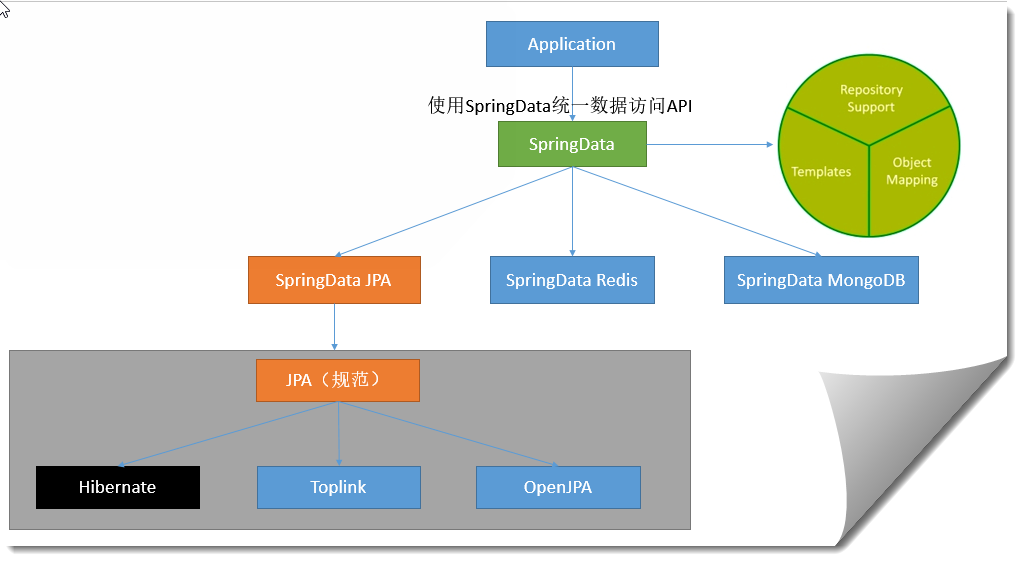
2)、SpringData基本接口
Repository<ID extends Serializable> : 统一接口
|RevisionRepository<ID extends Serializable , N extends Number & Comparable <N>> : 基于乐观锁机制
|CrudRepository<ID extends Serializable>: 基本CRUD操作
|PagingAndSortingRepository<ID extends Serializable>: 基本CRUD及分页
|JpaRepository<ID extends Serializable>: 最常用的Jpa
Repository(org.springframework.data.repository)
|RevisionRepository(org.springframework.repository.history)
|CrudRepository(org.springframework.data.repository)
|PagingAndSortingRepository(org.springframework.data.repository)
|JpaRepository(org.springframework.data.jpa.repository)

3)、整合SpringData JPA
JPA:ORM(Object Relational Mapping);
1)、基本的配置JpaProperties
spring

  #jdb配置部分

  .........

  #jpa配置

  jpa:

    #hibernate配置

    hibernate:

      #更新或者创建数据表结构

      ddl-auto: update

    #控制台显示SQL

    show-sql: true
2)、StudentEntity.java实体类
和数据表进行映射,并且配置好映射关系;
package com.example.demo.bean;

import javax.persistence.*;

import java.util.Date;

import java.util.List;

import java.util.Map;

/**

 * 供jpa(hibernate)使用,使用JPA注解配置映射关系

 */

@Table/*(name = "tbl_user")*/ //@Table来指定和哪个数据表对应;如果省略默认表名就是studententity;

@Entity //告诉JPA这是一个实体类(数据表映射类)

public class StudentEntity {

    @Id //这是一个主键

    @GeneratedValue(strategy = GenerationType.IDENTITY)//自增主键

    public Integer id;

    @Column //省略默认列名就是属性名

    public String name;

    private Integer age;

    private Boolean monitor;//是否是班长

    private Date birthday;

    @Column(name = "last_name",length = 50) //这是和数据表对应的一个列

    private String motherName;

    @Transient//不和数据库作映射

    private Teacher teacher;

    @Transient//不和数据库作映射

    private Map<String, Object> maps;

    @Transient//不和数据库作映射

    private List<Object> lists;

   ......

}
3)、StudentRepository.java
Dao数据表操作类(Repository)
/**

 * hibernate专用,需要继承JpaRepository来完成对数据库的操作,JpaRepository父类里面有save(),update()等方法可供使用

 */

public interface StudentRepository extends JpaRepository<StudentEntity,Integer> {

}
4)、MyHibernateController .java
@RequestMapping("/MyHibernateController")

@Controller

public class MyHibernateController {

    @Autowired

    StudentRepository studentRepository;

    /**

     * address: http://localhost:8080/springbootdemo/MyHibernateController/selectById/1

     */

    @ResponseBody

    @GetMapping("/selectById/{id}")

    public StudentEntity selectById(@PathVariable int id) {

        StudentEntity stu = studentRepository.findOne(id);

        return stu;

    }

    /**

     * address: http://localhost:8080/springbootdemo/MyHibernateController/save?name=bobo&motherName=sisi&age=18&monitor=false&birthday=1951/02/19%2011:12:13

     */

    @ResponseBody

    @GetMapping("/save")

    public StudentEntity save(StudentEntity stu) {

        studentRepository.save(stu);

        return stu;

    }

}
只看了视频3中的以下部分
参考
主要引用自尚学堂视频教程
其它参考
SpringData学习总结笔记==>https://blog.csdn.net/mmh19891113/article/details/80929109 (未看)
springboot 数据访问【转】【补】的更多相关文章
- SpringBoot数据访问之Druid启动器的使用
数据访问之Druid启动器的使用 承接上文:SpringBoot数据访问之Druid数据源的自定义使用 官方文档: Druid Spring Boot Starter 首先在在 Spring Boot ...
- SpringBoot数据访问之整合mybatis注解版
SpringBoot数据访问之整合mybatis注解版 mybatis注解版: 贴心链接:Github 在网页下方,找到快速开始文档 上述链接方便读者查找. 通过快速开始文档,搭建环境: 创建数据库: ...
- Springboot数据访问,棒棒哒!
Springboot对数据访问部分提供了非常强大的集成,支持mysql,oracle等传统数据库的同时,也支持Redis,MongoDB等非关系型数据库,极大的简化了DAO的代码,尤其是Spring ...
- SpringBoot数据访问(一) SpringBoot整合Mybatis
前言 SpringData是Spring提供的一个用于简化数据库访问.支持云服务的开源框架.它是一个伞形项目,包含了大量关系型数据库及非关系型数据库的数据访问解决方案,其设计目的是为了使我们可以快速且 ...
- SpringBoot数据访问(二) SpringBoot整合JPA
JPA简介 Spring Data JPA是Spring Data大家族的一部分,它可以轻松实现基于JPA的存储库.该模块用于增强支持基于JPA的数据访问层,它使我们可以更加容易地构建使用数据访问技术 ...
- SpringBoot数据访问之Druid数据源的使用
数据访问之Druid数据源的使用 说明:该数据源Druid,使用自定义方式实现,后面文章使用start启动器实现,学习思路为主. 为什么要使用数据源: 数据源是提高数据库连接性能的常规手段,数据源 ...
- SpringBoot数据访问之整合Mybatis配置文件
环境搭建以及前置知识回顾 SpringBoot中有两种start的形式: 官方:spring-boot-starter-* 第三方:*-spring-boot-starter Mybatis属于第三方 ...
- SpringBoot数据访问(三) SpringBoot整合Redis
前言 除了对关系型数据库的整合支持外,SpringBoot对非关系型数据库也提供了非常好的支持,比如,对Redis的支持. Redis(Remote Dictionary Server,即远程字典服务 ...
- 【串线篇】SpringBoot数据访问【数据源/mybatis/指定映射文件位置】
一.配置数据源 1.1.jdbc版本 JDBC(.tomcat.jdbc.pool.DataSource作为数据源) <?xml version="1.0" encoding ...
随机推荐
- struts2-环境搭建-访问流程-配置详解-常量配置-类详解
1 struts2概述 1.1 概念 1.2 struts2使用优势 自动封装参数 参数校验 结果的处理(转发|重定向) 国际化 显示等待页面 表单的防止重复提交 struts2具有更加先进的架构以 ...
- WebGis二次开发包实例
<%@ Page Language="C#" AutoEventWireup="true" CodeBehind="index.aspx.cs& ...
- 码云及git使用
首次使用码云,将本地文件与之关联(创建仓库之后的页面截图) git -- 版本控制(协同开发软件) git add . # 将当前文件下所有内容添加到临时缓存区 git commit -m " ...
- MacBook下为要运行的.net core 项目指定sdk版本
安装完.net core 3.0,运行早期版本构建的项目遇到运行错误,查阅官方文档解决问题,特此记录!官方原文如下: SDK 使用最新安装的版本 SDK 命令包括 dotnet new 和 dotne ...
- Codeforces 851D Arpa and a list of numbers
D. Arpa and a list of numbers time limit per test 2 seconds memory limit per test 256 megabytes inpu ...
- Java IO:字节流与字符流
https://blog.csdn.net/my_truelove/article/details/53758412 字符和字节之间可以互相转化,中间的参照就是编码方式. 相当于给你一个密码本,按照这 ...
- JavaScript基本的使用
<!DOCTYPE html> <html lang="en"> <head> <meta charset="UTF-8&quo ...
- AppScan操作手册
AppScan操作手册 转自:http://blog.51cto.com/zhouanya/1388681 1.SQL注入 1.1.什么是sql注入 所谓SQL注入(SQL Injection), ...
- 客户端用javascript填充Dropdownlist,服务器端获取不到Dropdownlist的值
今天遇到一个奇怪的问题,某一页面需要使用三级级联下拉列表框.为提高用户体验,采用jQuery的cascadingDropDown插件调用后台Web Services来实现ajax填充. 填充没有任何问 ...
- Codeforces Beta Round #77 (Div. 2 Only) A. Football【字符串/判断是否存在连续7个0或7个1】
A. Football time limit per test 2 seconds memory limit per test 256 megabytes input standard input o ...